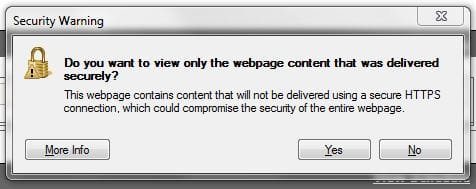
Annoying popup in IE8

tribone

New member
Member
Local time
11:28 AM
Messages
10
Location
Buena Park, CA
Hey guys. I'm getting very annoyed with this popup that keeps appearing in IE8 :banghead:. It doesn't appear on Firefox nor Chrome. I've looked very briefly through here and I couldn't see anyone else posted this.

This is happening on both Windows 7 and XP, with or without a 3rd party firewall. :picnic:

I've gone as far as installing one update at a time on a VM and I still can't pinpoint it. Has anyone else come accross this and been able to get rid of it?

Thanks for all your help! :geek:

Here is the image:

stupid shit!.JPG

-Guillermo
 

My Computer My Computer

At a glance

Windows 7 Ultimate 64-Bit6GB
Computer Manufacturer/Model Number
HP DV1125NR and SONY VPCL111FX
OS
Windows 7 Ultimate 64-Bit
Memory
6GB
If you would like to disable this security warning forever,go to Tools -> Internet Options and select the Security tab. Make sure the “Internet” zone is selected and then click the “Custom Level” button. Scroll-down the list of options and set the “Display mixed content” setting from “Prompt” to “Enable.”


My Computer My Computer

At a glance

Windows 7 Home Premium x64AMD Phenom II X4 9458 GB G-Skill 1.5v DDR 3 1333Mhz(2) MSI 512MB GTS 250 SLI
Computer Manufacturer/Model Number
Home built
OS
Windows 7 Home Premium x64
CPU
AMD Phenom II X4 945
Motherboard
ASUS M4N98TD EVO AM3 NVIDIA nForce 980a SLI
Memory
8 GB G-Skill 1.5v DDR 3 1333Mhz
Graphics Card(s)
(2) MSI 512MB GTS 250 SLI
Sound Card
Soundblaster Audigy 2 platinum
Monitor(s) Displays
Samsung 2255BW 22"
Screen Resolution
1650 x 1050
Hard Drives
2 WD 250GB 7500RPM
PSU
Antec TP-750. The ultimate bang for the buck PSU
Case
Raidmax
Cooling
Sycthe Slipstream cooling fans(4)
Keyboard
Zboard Merc
Mouse
Logitech MX-518
Internet Speed
3MB
Other Info
LG Blu-Ray/DVD combo drive/LG DVD-RW w/ lightscribe
If you would like to disable this security warning forever,go to Tools -> Internet Options and select the Security tab. Make sure the “Internet” zone is selected and then click the “Custom Level” button. Scroll-down the list of options and set the “Display mixed content” setting from “Prompt” to “Enable.”


That was it! Thanks! :thumbsup:
 

My Computer My Computer

At a glance

Windows 7 Ultimate 64-Bit6GB
Computer Manufacturer/Model Number
HP DV1125NR and SONY VPCL111FX
OS
Windows 7 Ultimate 64-Bit
Memory
6GB
Glad to be of help. Hook me up by adding to my reputation please by clicking the scale icon in the upper right corner of my post. Thanks a bunch:)
 

My Computer My Computer

At a glance

Windows 7 Home Premium x64AMD Phenom II X4 9458 GB G-Skill 1.5v DDR 3 1333Mhz(2) MSI 512MB GTS 250 SLI
Computer Manufacturer/Model Number
Home built
OS
Windows 7 Home Premium x64
CPU
AMD Phenom II X4 945
Motherboard
ASUS M4N98TD EVO AM3 NVIDIA nForce 980a SLI
Memory
8 GB G-Skill 1.5v DDR 3 1333Mhz
Graphics Card(s)
(2) MSI 512MB GTS 250 SLI
Sound Card
Soundblaster Audigy 2 platinum
Monitor(s) Displays
Samsung 2255BW 22"
Screen Resolution
1650 x 1050
Hard Drives
2 WD 250GB 7500RPM
PSU
Antec TP-750. The ultimate bang for the buck PSU
Case
Raidmax
Cooling
Sycthe Slipstream cooling fans(4)
Keyboard
Zboard Merc
Mouse
Logitech MX-518
Internet Speed
3MB
Other Info
LG Blu-Ray/DVD combo drive/LG DVD-RW w/ lightscribe
Note that the warning is genuine, if not a little annoying. For example, hit something as simple as https://www.microsoft.com and note that you will actually get that warning in IE8 (but not Chrome or Firefox). The reason is that the page contains references to images *and webtrends files* that are NOT stored on an HTTPS page, but are being served from an HTTP page instead - thus making the page *technically* insecure if you allow the content. The reason IE warns you is that it wants to know if you want the insecure (HTTP) content to be downloaded and run, along with all of the secure (HTTPS) content. Basically it's a security risk to allow both of these things to run at the same time, because it could (potentially) allow malicious content served from an HTTP site to access page content that would otherwise be secure over HTTPS. Disabling this will, of course, disable the warning - however, it *is* a security risk that you will no longer be consulted on - it will simply allow the HTTP content to load from an HTTPS page.

It would be better, if you're going to change the mixed content setting, to change it to "disabled" rather than "enabled". You still will avoid the prompt, but you'll be in the secure setting (only allowing HTTPS content on an HTTPS page), rather than insecure (allowing all HTTP content on an HTTPS page). Chrome, Firefox, etc already have the equivalent of "disabled" set, which is why you don't get prompted (of course, you don't get the HTTP content either, which could affect the rendering of the page), so this is technically the better choice.
 

My Computer My Computer

At a glance

Windows 10 Pro x64Intel Core i7 4790K @ 4.5GHz32GB DDR3Nvidia GeForce GTX970
Computer type
PC/Desktop
Computer Manufacturer/Model Number
Custom
OS
Windows 10 Pro x64
CPU
Intel Core i7 4790K @ 4.5GHz
Motherboard
Asus Maximus Hero VII
Memory
32GB DDR3
Graphics Card(s)
Nvidia GeForce GTX970
Sound Card
Realtek HD Audio
Screen Resolution
1920x1200
Hard Drives
1x Samsung 250GB SSD
4x WD RE 2TB (RAIDZ)
PSU
Corsair AX760i
Case
Fractal Design Define R4
Cooling
Noctua NH-D15
Glad to be of help. Hook me up by adding to my reputation please by clicking the scale icon in the upper right corner of my post. Thanks a bunch:)

I did immediately after it worked. Thanks again!
 

My Computer My Computer

At a glance

Windows 7 Ultimate 64-Bit6GB
Computer Manufacturer/Model Number
HP DV1125NR and SONY VPCL111FX
OS
Windows 7 Ultimate 64-Bit
Memory
6GB
Back
Top