Solved new popup in IE 11

robert808

New member
Member
Local time
12:09 PM
Messages
85
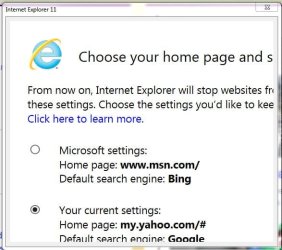
This popup just started appearing every time I open IE11. It will not expand to see if there is a way to get of it. The link to more info is no help. The default is always the first choice. I click the 2nd choice button but seems to have no effect. And my IE setting have not changed to that default as one might expect.

What is this?
 

Attachments

  • IE popup.JPG
    IE popup.JPG
    46.4 KB · Views: 32

My Computer My Computer

At a glance

windows 7 home premium 64 bit SP1Intel Core i7 3770S @ 3.10GHzDDR3 16384 MBytesIntel(R) HD Graphics 4000, NVIDIA GeForce GT ...
Computer type
PC/Desktop
Computer Manufacturer/Model Number
Dell XPS One 2710
OS
windows 7 home premium 64 bit SP1
CPU
Intel Core i7 3770S @ 3.10GHz
Motherboard
Dell 02XMCT (CPU 1)
Memory
DDR3 16384 MBytes
Graphics Card(s)
Intel(R) HD Graphics 4000, NVIDIA GeForce GT 640M
Sound Card
Realtek High Definition Audio
Monitor(s) Displays
XPS One 2710 on Intel HD Graphics 4000 27"
Screen Resolution
2560x1440@59Hz
Hard Drives
1863GB
Case
All-in-One
Keyboard
Changed to old multimedia wireless set I had on XP machine
Internet Speed
1 Gb
Antivirus
Norton 360
Browser
IE, Chrome & Firefox
Other Info
A little worried about CPU temp that gets up to 180 F when watching TV via Media Center. 140-150 F normally.
Change your zoom level to 100% and you should see the button named Done.
 

My Computer My Computer

At a glance

W7 Pro SP1 64biti78GBIntel HD Graphics
Computer type
Laptop
Computer Manufacturer/Model Number
Employer provided Dell Latitude
OS
W7 Pro SP1 64bit
CPU
i7
Memory
8GB
Graphics Card(s)
Intel HD Graphics
Hard Drives
crappy SSD
Antivirus
Employer mandated Symantec Endpoint Protection
Browser
Pale Moon 64bit, IE11 64bit & Chrome 64bit
Thanks for the advice. I may be wrong but I think the zoom would only apply to the IE windowitself; not the popup. I have a 27” andkeep the zoom at 150% – easy to read. After my post I checked and my popup blocker was off so turned it on. The other user was getting the popup also buther popup blocker was already on. After turningmy blocker on the popup stopped – coincidence? The other user continued to see the popup for a few more restarts of IEthen it stopped. There has been no popupsince yesterday.

I guess the problem is solved for now.
 

My Computer My Computer

At a glance

windows 7 home premium 64 bit SP1Intel Core i7 3770S @ 3.10GHzDDR3 16384 MBytesIntel(R) HD Graphics 4000, NVIDIA GeForce GT ...
Computer type
PC/Desktop
Computer Manufacturer/Model Number
Dell XPS One 2710
OS
windows 7 home premium 64 bit SP1
CPU
Intel Core i7 3770S @ 3.10GHz
Motherboard
Dell 02XMCT (CPU 1)
Memory
DDR3 16384 MBytes
Graphics Card(s)
Intel(R) HD Graphics 4000, NVIDIA GeForce GT 640M
Sound Card
Realtek High Definition Audio
Monitor(s) Displays
XPS One 2710 on Intel HD Graphics 4000 27"
Screen Resolution
2560x1440@59Hz
Hard Drives
1863GB
Case
All-in-One
Keyboard
Changed to old multimedia wireless set I had on XP machine
Internet Speed
1 Gb
Antivirus
Norton 360
Browser
IE, Chrome & Firefox
Other Info
A little worried about CPU temp that gets up to 180 F when watching TV via Media Center. 140-150 F normally.

My Computer My Computer

At a glance

Microsoft Windows 7 Home Premium 64-bit 7601 ...AMD C-60 APU with Radeon(tm) HD Graphics4.00 GBAMD Radeon HD 6290 Graphics
Computer type
Laptop
Computer Manufacturer/Model Number
ASUS
OS
Microsoft Windows 7 Home Premium 64-bit 7601 Multiprocessor Free Service Pack 1
CPU
AMD C-60 APU with Radeon(tm) HD Graphics
Motherboard
ASUSTeK COMPUTER INC. X501U
Memory
4.00 GB
Graphics Card(s)
AMD Radeon HD 6290 Graphics
Sound Card
(1) AMD High Definition Audio Device (2) Realtek High Defi
Screen Resolution
1366 x 768 x 32 bits (4294967296 colors) @ 60 Hz
Hard Drives
Hitachi HTS545050A7E380 SATA Disk Device
Antivirus
Comodo CIS & FW, SecureAplus App Whitelisting, Threatfire
Browser
Cyberfox 64bit, Opera 64bit, Airfox
Other Info
Spy-The-Spy, HitmanPro.Alert, Norton Connect Safe, MJRegWatcher, BitDefender TrafficLight, Voodoo Shield, Zemana AntiMalware
The laptop that I am using is owned/controlled by my employer. It does not have the April update that caused the popup (KB3148198) that you are seeing. Before posting to your thread, I installed IE11 (and KB3148198) into a virtual machine just to see what you are seeing. The zoom level does indeed impact the popup - just like I would expect.

A search on Google using the search terms...
ie "choose your home page"
...leads to lots of discussion on this.
Including this thread that mentions the offending KB.

And this one that shows the popup zoomed in and not zoomed in.

If you see the popup again, zoom out and see what you see :-)
 

My Computer My Computer

At a glance

W7 Pro SP1 64biti78GBIntel HD Graphics
Computer type
Laptop
Computer Manufacturer/Model Number
Employer provided Dell Latitude
OS
W7 Pro SP1 64bit
CPU
i7
Memory
8GB
Graphics Card(s)
Intel HD Graphics
Hard Drives
crappy SSD
Antivirus
Employer mandated Symantec Endpoint Protection
Browser
Pale Moon 64bit, IE11 64bit & Chrome 64bit
Back
Top