
how to turn on hardware virtualization in my bios

saravntbe

New member
Local time
12:58 PM
Messages
19
hi friends i need help from u...

how to turn on hardware virtualization in my bios
my model is:
Manufacturer: Intel Corporation
Model: DG41RQ
Chipset Vendor: Intel
Chipset Model: G41

help me friends....
K49bJ.png


i need to use vm ware workstation...waiting for reply...
the snap below is taken for microsoft web..
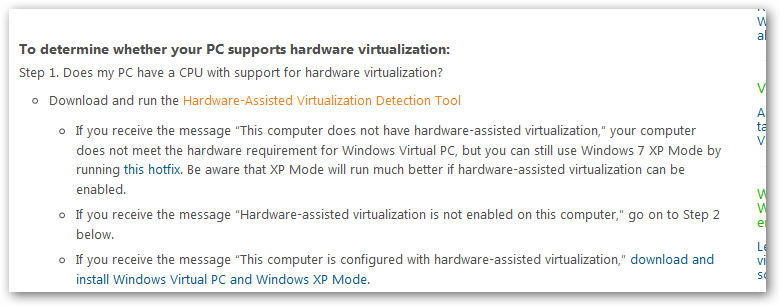
fY1Ix.png

 
Last edited:

My Computer My Computer

Computer Manufacturer/Model Number
skylink computer
OS
Windows 7 Ultimate 32bit
CPU
intel core2duo
Motherboard
Intel DG41RQ
Memory
2gb-ram
Graphics Card(s)
no
Sound Card
realtech
Monitor(s) Displays
samsung
Hard Drives
500 gb

My Computer My Computer

Computer Manufacturer/Model Number
HP
OS
Windows 7 Ultimate 64-bit
CPU
Intel(R) Core(TM) i5-540M @ 2.53GHz
Motherboard
Hewlett-Packard 1522
Memory
4GB DDR3 System Memory
Graphics Card(s)
1GB ATI Mobility Radeon HD 5830 Graphics
Monitor(s) Displays
15.6" diagonal Full High Definition LED
Screen Resolution
1920x1080
Hard Drives
500GB 7200RPM SATA Hard Drive
PSU
6 Cell Lithium Ion Polymer Battery
Cooling
NZXT Aluminum Notebook Cooler With 3 120mm Adjustable Fans
Other Info
Envy 15
Go to the bottom and select your system and follow those directions.
 

My Computer My Computer

Computer Manufacturer/Model Number
HP
OS
Windows 7 Ultimate 64-bit
CPU
Intel(R) Core(TM) i5-540M @ 2.53GHz
Motherboard
Hewlett-Packard 1522
Memory
4GB DDR3 System Memory
Graphics Card(s)
1GB ATI Mobility Radeon HD 5830 Graphics
Monitor(s) Displays
15.6" diagonal Full High Definition LED
Screen Resolution
1920x1080
Hard Drives
500GB 7200RPM SATA Hard Drive
PSU
6 Cell Lithium Ion Polymer Battery
Cooling
NZXT Aluminum Notebook Cooler With 3 120mm Adjustable Fans
Other Info
Envy 15
hi friends i need help from u...

how to turn on hardware virtualization in my bios
my model is:
Manufacturer: Intel Corporation
Model: DG41RQ
Chipset Vendor: Intel
Chipset Model: G41

help me friends....


K49bJ.png


i need to use vm ware workstation...waiting for reply...


the snap below is taken for microsoft web..


fY1Ix.png

Hi there

Unless you want to run a 64 bit GUEST (VM) OS you don't need to enable this to use vmware workstation.

Otherwise the pevious posters info is correct.

BTW you CAN actually run a 64 bit GUEST on a 32 bit HOST provided the hardware is enabled -- you can test for example a 64 BIT GUEST W7 VM running under a XP HOST -- although the host will only see a max of 4 GB RAM so your VM will be more limited.

Cheers
jimbo
 

My Computer My Computer

Computer type
PC/Desktop
Computer Manufacturer/Model Number
Custom built, several laptops HP/ASUS
OS
Linux CENTOS 7 / various Windows OS'es and servers
CPU
Intel i7 Intel i5
Memory
8GB, 16GB
Graphics Card(s)
On Motherboard
Sound Card
Realtek HD audio
Monitor(s) Displays
Apple Cinema display, Samsung LCD
Screen Resolution
1920 X 1080
Hard Drives
4 X 1TB SATA
Mouse
Toshiba wireless laser
Internet Speed
> 20MB up
Thanks friends...Finally i Found it...
 

My Computer My Computer

Computer Manufacturer/Model Number
skylink computer
OS
Windows 7 Ultimate 32bit
CPU
intel core2duo
Motherboard
Intel DG41RQ
Memory
2gb-ram
Graphics Card(s)
no
Sound Card
realtech
Monitor(s) Displays
samsung
Hard Drives
500 gb
ok i have a sony vaio vpccw laptop in which i want to Enable hardware virtualization but i run the intel processor inentification utility and in cpu technologies it say virtualization technology No:

is there anyway where i can hack my bios to enable this???
 

My Computer My Computer

OS
windows 7
Back
Top