Tale of two hard drives - one boots, the other has Win7 on it?

bryanska

New member
Local time
11:53 PM
Messages
5
I installed Win7 on an old XP machine, intending to put Win7 on one HDD, and use the other for media storage.

I've been using Win7 for about three weeks. Today I tried to determine which HDD had Win7 on it. In order to do this, I figured I'd unplug the SATA from one, then the other, and see which one booted Win7.

When I pulled one, I got the "BOOTMGR missing" error in the BIOS startup screen. When I pulled the other, I got a "system missing" error in what looked like Win7 font on a black screen.

Windows will only boot when both hard drives are connected. The generic drive has first boot priority.

I only have one drive letter -- C: The other drive is formatted but not mapped.

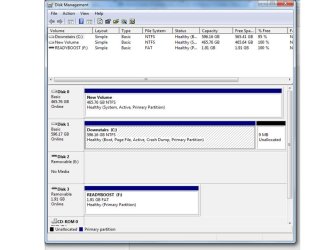
This is the limit of my expertise. Pasted below is a screenshot of Disk manager. Does anybody have any idea why I can't pull the non-Windows hard drive from the system?
 

Attachments
  • Presentation1.jpg
    Presentation1.jpg
    64.2 KB · Views: 98

My Computer My Computer

At a glance

Win 7 Ultimate 32bit and Win 7 Pro 64 bit (tw...Intel Quad Core Q82004GB DDR2 800mhzGeforce 9500GT
Computer Manufacturer/Model Number
Homebuilt
OS
Win 7 Ultimate 32bit and Win 7 Pro 64 bit (two machines)
CPU
Intel Quad Core Q8200
Motherboard
EVGA NForce 750 FTW
Memory
4GB DDR2 800mhz
Graphics Card(s)
Geforce 9500GT
Sound Card
Motherboard
Monitor(s) Displays
22" Acer
Hard Drives
2 500GB, one WD and one generic
PSU
450W
Case
Antec 300
Cooling
Lots of fans
Seems pretty obvious, the install deposited the bootmgr on physical disc 0 and the operating system on the drive you designated as C:

At least that's the way I'm reading into this problem. In response to what you are apparently trying to figure out. The disc that was removed when you got the system missing message, should be the disc windows 7 is actually located on.

As for a fix to this problem, I'll leave that up to someone else, I'm not properly read up on win 7 installation changes.
 

My Computer My Computer

At a glance

Windows 7 x64Intel i7 2600kG.skill Ripjaw 16gigs @ 1866Nvidia gtx580 (evga)
Computer Manufacturer/Model Number
Insane hobo technologies. ;-)
OS
Windows 7 x64
CPU
Intel i7 2600k
Motherboard
Asrock z68 extreme 4 gen 3
Memory
G.skill Ripjaw 16gigs @ 1866
Graphics Card(s)
Nvidia gtx580 (evga)
Sound Card
Integrated HD audio + hdmi
Monitor(s) Displays
24" ASUS widescreen + 42" insignia
Screen Resolution
1080p (1920x1080)
Hard Drives
128 Samsung 830
256 Samsung 840
3 x 1tb storage drive (various)
1 western digital 1tb (eSATA)
1 Seagate 1tb (eSATA)
PSU
1 kilowatt SLI/Crossfire rated Silverstone modular
Case
NZXT Phantom + additional 220 fan
Cooling
Zalmann
Keyboard
Microsoft wireless 3000 (v2)
Mouse
MS - wireless 5000 (bluetrack)
Internet Speed
depends on if you ask me or my provider.
Other Info
The above information is provided as is, and the author assumes no responsibility for issues it may cause with your sanity or fanboyism.
Hello bryanska. Welcome to the Forum.

Disk 0 has the Master Boot Record on it. This is the actual hard drive that you disconnected and then got the "BOOTMGR missing" message.

Disk 1 has the W7 files. This is the actual hard drive that you disconnected and then got the ""system missing"" message.

You want to have only Disk 1 connected. Disconnect Disk 0 and any External Drive.
Then run "Startup Repair" from your W7 installation disk by booting with the disk in the CD/DVD drive (Bios set to boot from CD first):
http://www.sevenforums.com/tutorials/681-startup-repair.html?ltr=S
Or make a "Repair Disk" from within Windows and boot from that:
http://www.sevenforums.com/tutorials/2083-system-repair-disc-create.html

You may need to run Startup Repair 3 Times to repair the Startup files and correct your installation.

For others: Always disconnect all drives except the drive you will be installing W7 onto to avoid this kind of problem. (Connect the CD/DVD. of course!)
 
Last edited:

My Computer My Computer

At a glance

Windows 7 64 Bit Home Premium SP1i7-3820GSkill F3-14900CL9Q - 16GBEVGA GeForce GTX660 - Driver 352.86
Computer type
PC/Desktop
Computer Manufacturer/Model Number
Home Built - Jan 2013
OS
Windows 7 64 Bit Home Premium SP1
CPU
i7-3820
Motherboard
Asus P9X79-PRO - Bios 4608
Memory
GSkill F3-14900CL9Q - 16GB
Graphics Card(s)
EVGA GeForce GTX660 - Driver 352.86
Sound Card
On board Realtek ALC898
Monitor(s) Displays
Acer S271HL
Screen Resolution
1920 x 1080
Hard Drives
#1- Samsung 840 Pro Series
#2- Western Digital WD1002FAEX Sata3 Black
#3- Western Digital WD1002FAEX Sata3 Black
PSU
Corsair CMPSU-850TX-V2 - 850 watt (by Seasonic)
Case
Corsair Obsidian 550D
Cooling
Standard 3 120mm case fans, Cooler Master Hyper 212 EVO
Keyboard
MS KC-0405
Mouse
Intellimouse 5-button
Internet Speed
56 Mbits/Sec (on a good day)
Antivirus
Avast & Malwarebytes
Browser
Firefox
Other Info
Asus DVD - DRW-24B1ST 24X
You will need to unmark Disk 0 as an Active partition and delete the Boot Manager before reconnecting the drive and booting with it connected.

You may be able to boot into Windows and do this using Disk Management, but I'm not sure about that. Maybe someone else here knows.

A sure way to do it is using DISKPART from the System Recovery Options:

Disconnect Disk 1 and Connect Disk 0 then Boot with the Installation DVD or Repair Disk again.

Select command prompt
Type DISKPART (press ENTER after each entry)
Type LIST DISK
Type SELECT DISK n (n should be the only disk)
Type LIST PARTITION
Type SELECT PARTITION n (n should be the only partition)
Type INACTIVE
Type FORMAT [QUICK]
Type EXIT to exit DISKPART
Type EXIT again to exit the command prompt

Now you can reconnect everything and Boot.

Hope that helps.
 

My Computer My Computer

At a glance

Windows 7 64 Bit Home Premium SP1i7-3820GSkill F3-14900CL9Q - 16GBEVGA GeForce GTX660 - Driver 352.86
Computer type
PC/Desktop
Computer Manufacturer/Model Number
Home Built - Jan 2013
OS
Windows 7 64 Bit Home Premium SP1
CPU
i7-3820
Motherboard
Asus P9X79-PRO - Bios 4608
Memory
GSkill F3-14900CL9Q - 16GB
Graphics Card(s)
EVGA GeForce GTX660 - Driver 352.86
Sound Card
On board Realtek ALC898
Monitor(s) Displays
Acer S271HL
Screen Resolution
1920 x 1080
Hard Drives
#1- Samsung 840 Pro Series
#2- Western Digital WD1002FAEX Sata3 Black
#3- Western Digital WD1002FAEX Sata3 Black
PSU
Corsair CMPSU-850TX-V2 - 850 watt (by Seasonic)
Case
Corsair Obsidian 550D
Cooling
Standard 3 120mm case fans, Cooler Master Hyper 212 EVO
Keyboard
MS KC-0405
Mouse
Intellimouse 5-button
Internet Speed
56 Mbits/Sec (on a good day)
Antivirus
Avast & Malwarebytes
Browser
Firefox
Other Info
Asus DVD - DRW-24B1ST 24X
Warning: Make sure you backup your Data first.

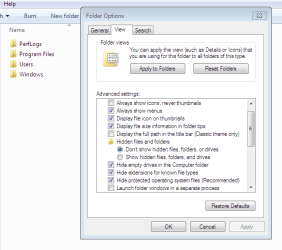
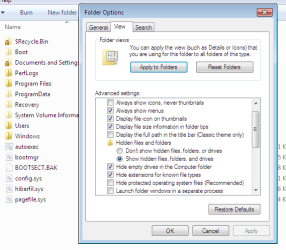
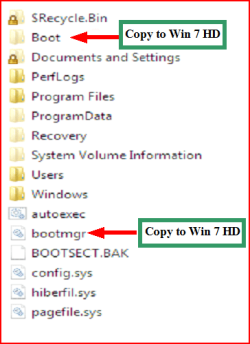
You may need to copy boot files from Disk 0 to your Disk 1,
1) Make sure you have these files on the Windows 7 partition.

Capture1.PNG Capture2.PNG

Capture3.PNG


2) Remove Disk 0 & replace with disk 1

3) Than do a startup repair.
http://www.sevenforums.com/tutorials/681-startup-repair.html?ltr=S
Note: You may need to do startup repair 3 to 4 times.

When booting OK.
4) Refit the old disk 0 as disk 1 & mark inactive
http://www.sevenforums.com/tutorials/71432-partition-mark-active.html?ltr=P
 

My Computer My Computer

At a glance

ME/XP/Vista/Win7
OS
ME/XP/Vista/Win7
Since you have nothing on the New Volumn drive just rt click and delete the volumn then unplug that drive, using the Win 7 dvd do a system repair and your back in business, plug in the second drive, use disk mgmt and set up the second drive and it will become D:
 

My Computer My Computer

At a glance

Windows 7 Home Premium 64 bitIntel Core 2 quad Extreme Q9770 @ 3.2 GHz4x2 GB Muskin 1600 MHz ramNVidia GTX 250
Computer Manufacturer/Model Number
Dell XPS 730
OS
Windows 7 Home Premium 64 bit
CPU
Intel Core 2 quad Extreme Q9770 @ 3.2 GHz
Memory
4x2 GB Muskin 1600 MHz ram
Graphics Card(s)
NVidia GTX 250
Sound Card
Soundblaster X-Fi Fatality Champion
Monitor(s) Displays
2 Dell 2007WFP Ultrascans
Screen Resolution
3360 x 1050
Hard Drives
WD Black 1TB sata, 2-WD Black 500 sata, 2-Seagate 500 Go external
PSU
1000 Watt
Cooling
air
Keyboard
MS Natrual Keyboard Pro
Mouse
Logitech Wireless Trackball
Internet Speed
DSL Elite
Hello bryanska. Welcome to the Forum.

Disk 0 has the Master Boot Record on it. This is the actual hard drive that you disconnected and then got the "BOOTMGR missing" message.

Disk 1 has the W7 files. This is the actual hard drive that you disconnected and then got the ""system missing"" message.

You want to have only Disk 1 connected. Disconnect Disk 0 and any External Drive.
Then run "Startup Repair" from your W7 installation disk by booting with the disk in the CD/DVD drive (Bios set to boot from CD first):
http://www.sevenforums.com/tutorials/681-startup-repair.html?ltr=S
Or make a "Repair Disk" from within Windows and boot from that:
http://www.sevenforums.com/tutorials/2083-system-repair-disc-create.html

You may need to run Startup Repair 3 Times to repair the Startup files and correct your installation.

For others: Always disconnect all drives except the drive you will be installing W7 onto to avoid this kind of problem. (Connect the CD/DVD. of course!)


I tried this approach and it worked!!! Thanks so much for the advice. First I deleted the partition on the drive with the boot installed. Then I followed your procedure. It worked very smoothly.

Then I was able to reformat the spare drive. I installed it into my HTPC.

By the way, HUGE side benefit: my fresh Win 7 install was super slow before. It would lag, the cursor would disappear, and hard drive write times were ridiculously slow. Installs would take twenty minutes. But with the second drive gone, everything is speedy now! Things work as they should.

Thanks for the help, everyone.
 

My Computer My Computer

At a glance

Win 7 Ultimate 32bit and Win 7 Pro 64 bit (tw...Intel Quad Core Q82004GB DDR2 800mhzGeforce 9500GT
Computer Manufacturer/Model Number
Homebuilt
OS
Win 7 Ultimate 32bit and Win 7 Pro 64 bit (two machines)
CPU
Intel Quad Core Q8200
Motherboard
EVGA NForce 750 FTW
Memory
4GB DDR2 800mhz
Graphics Card(s)
Geforce 9500GT
Sound Card
Motherboard
Monitor(s) Displays
22" Acer
Hard Drives
2 500GB, one WD and one generic
PSU
450W
Case
Antec 300
Cooling
Lots of fans
Congrats! Glad you got it sorted out.
 

My Computer My Computer

At a glance

Windows 7 64 Bit Home Premium SP1i7-3820GSkill F3-14900CL9Q - 16GBEVGA GeForce GTX660 - Driver 352.86
Computer type
PC/Desktop
Computer Manufacturer/Model Number
Home Built - Jan 2013
OS
Windows 7 64 Bit Home Premium SP1
CPU
i7-3820
Motherboard
Asus P9X79-PRO - Bios 4608
Memory
GSkill F3-14900CL9Q - 16GB
Graphics Card(s)
EVGA GeForce GTX660 - Driver 352.86
Sound Card
On board Realtek ALC898
Monitor(s) Displays
Acer S271HL
Screen Resolution
1920 x 1080
Hard Drives
#1- Samsung 840 Pro Series
#2- Western Digital WD1002FAEX Sata3 Black
#3- Western Digital WD1002FAEX Sata3 Black
PSU
Corsair CMPSU-850TX-V2 - 850 watt (by Seasonic)
Case
Corsair Obsidian 550D
Cooling
Standard 3 120mm case fans, Cooler Master Hyper 212 EVO
Keyboard
MS KC-0405
Mouse
Intellimouse 5-button
Internet Speed
56 Mbits/Sec (on a good day)
Antivirus
Avast & Malwarebytes
Browser
Firefox
Other Info
Asus DVD - DRW-24B1ST 24X
Ah shoot, the PC is still slow and laggy. Dang, I'll have to post that in another section.
 

My Computer My Computer

At a glance

Win 7 Ultimate 32bit and Win 7 Pro 64 bit (tw...Intel Quad Core Q82004GB DDR2 800mhzGeforce 9500GT
Computer Manufacturer/Model Number
Homebuilt
OS
Win 7 Ultimate 32bit and Win 7 Pro 64 bit (two machines)
CPU
Intel Quad Core Q8200
Motherboard
EVGA NForce 750 FTW
Memory
4GB DDR2 800mhz
Graphics Card(s)
Geforce 9500GT
Sound Card
Motherboard
Monitor(s) Displays
22" Acer
Hard Drives
2 500GB, one WD and one generic
PSU
450W
Case
Antec 300
Cooling
Lots of fans
Back
Top