
Can't delete album art files

puddleglum

New member
Local time
6:50 PM
Messages
17
I'm in windows explore trying to clean up my music folders. I don't use album art so I am trying to delete it but it just re-installs itself as soon as I delete it. :confused:
I found an old post about turning off some thing in the Library and about auto down loading stuff from the internet, I assume they were talking about WMP, but I'm in windows explore and I use Winamp Pro not WMP. [WMP is installed thought]

Any ideas out there?
Thanks!
 

My Computer My Computer

At a glance

windows 7 professional (student download)Core 2 Duo T5270 1.4 gig hz2 gig
Computer Manufacturer/Model Number
Dell Vostros 1500 Laptop
OS
windows 7 professional (student download)
CPU
Core 2 Duo T5270 1.4 gig hz
Memory
2 gig
Hard Drives
Internal 160 G
External 160 G
External 1.5 T
I'm in windows explore trying to clean up my music folders. I don't use album art so I am trying to delete it but it just re-installs itself as soon as I delete it. :confused:
I found an old post about turning off some thing in the Library and about auto down loading stuff from the internet, I assume they were talking about WMP, but I'm in windows explore and I use Winamp Pro not WMP. [WMP is installed thought]

Any ideas out there?
Thanks!

I'm assuming that you're using MP3 for your music, right? Part of the ID3v2 specification for tagging MP3 files includes embedded album art. This is why the album art keeps returning to your library, because Windows Explorer extracts (when available) the thumbnail to display directly from the MP3 file ID3v2 tag.

The only way I know how to stop this is to edit the tags of your MP3 files, and remove the embedded images.

Although I must point out that having the music show up in the library according to album, and recognizable cover art, does make the whole concept of a music library worth it...
 

My Computer My Computer

At a glance

Windows 7 Professional 32-bit SP1AMD A4/A63.00GB EDOVMware SVGA 3D
Computer type
PC/Desktop
Computer Manufacturer/Model Number
Virtual Machine
OS
Windows 7 Professional 32-bit SP1
CPU
AMD A4/A6
Motherboard
Intel Corporation 440BX Desktop Reference Platform
Memory
3.00GB EDO
Graphics Card(s)
VMware SVGA 3D
Sound Card
High Definition Audio Device
Monitor(s) Displays
Generic Non-PnP Monitor on VMware SVGA 3D
Screen Resolution
1440x900
Hard Drives
1 x 60GB VMware Virtual SATA Hard Drive ATA Device
Antivirus
Kaspersky Total Security
Agree with Dzomliza , in all of his views .

I use Mp3tag - the universal Tag Editor (ID3v2, MP4, OGG, FLAC, ...) for editing metadata . Open your music with it , select individual or the whole album, and you will see the album art in the left pane bottom . Right click on it > Delete . Now save the result . Do the same for all the albums .
 

My Computer My Computer

At a glance

Microsoft Windows 10 Pro Insider Preview 64-bitIntel(R) Core(TM) i3-4130 CPU @ 3.40GHzCorsair Vengence 4GB x2 (8.00GB Dual-Channel ...2047MB GeForce GTS 450 (ZOTAC International)
Computer type
PC/Desktop
Computer Manufacturer/Model Number
Self Assembled
OS
Microsoft Windows 10 Pro Insider Preview 64-bit
CPU
Intel(R) Core(TM) i3-4130 CPU @ 3.40GHz
Motherboard
Gigabyte Technology Co., Ltd. B85M-D3H
Memory
Corsair Vengence 4GB x2 (8.00GB Dual-Channel DDR3 @ 798MHz)
Graphics Card(s)
2047MB GeForce GTS 450 (ZOTAC International)
Sound Card
Onboard (Realtek High Definition Audio)
Monitor(s) Displays
LG Flatron E2040T
Screen Resolution
1600x900
Hard Drives
Western Digital 1 TB
Seagate 500 GB
PSU
Corsair VS550
Case
Cooler Master K380
Cooling
Cooler Master Seidon 120V Plus
Keyboard
Logitech MK260r
Mouse
Logitech MK260r
Internet Speed
PMPL Broadband
Antivirus
Windows Defender + MBAM
Browser
Firefox
Other Info
Dell Studio 15" Laptop
Dzomlija,

Thanks! It sounds like I need to adjust my rip settings then. I think I remember having a choice of being able to select how I wanted to save my files as far as tags go, I'll look into it.
As to "having the music show up in the library according to album". I have never had any problems, I guess I don't understand what you are referring to. Winamp displays every thing by artist if I select that, or by album if I select that, etc.. I really don't like the picture stuff, it takes up to much desktop real estate. I like the most info in the smallest footprint. [assembly language anyone?]
again, thanks for your help
 

My Computer My Computer

At a glance

windows 7 professional (student download)Core 2 Duo T5270 1.4 gig hz2 gig
Computer Manufacturer/Model Number
Dell Vostros 1500 Laptop
OS
windows 7 professional (student download)
CPU
Core 2 Duo T5270 1.4 gig hz
Memory
2 gig
Hard Drives
Internal 160 G
External 160 G
External 1.5 T
Archie,
The tag editor sounds good, appreciate the feed back. I got it installed but there is no delete selection, the current version is remove or cut. After doing that the album art was still in the original folders but, they stay deleted after deleting them.

Thank you, very much


Agree with Dzomliza , in all of his views .

I use Mp3tag - the universal Tag Editor (ID3v2, MP4, OGG, FLAC, ...) for editing metadata . Open your music with it , select individual or the whole album, and you will see the album art in the left pane bottom . Right click on it > Delete . Now save the result . Do the same for all the albums .
 
Last edited:

My Computer My Computer

At a glance

windows 7 professional (student download)Core 2 Duo T5270 1.4 gig hz2 gig
Computer Manufacturer/Model Number
Dell Vostros 1500 Laptop
OS
windows 7 professional (student download)
CPU
Core 2 Duo T5270 1.4 gig hz
Memory
2 gig
Hard Drives
Internal 160 G
External 160 G
External 1.5 T
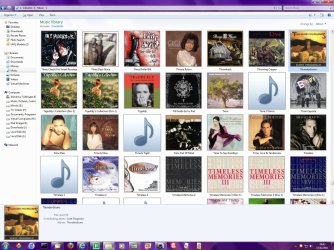
As to "having the music show up in the library according to album". I have never had any problems, I guess I don't understand what you are referring to.

A picture is worth 1000 words

This is how I have my Music Library configured in Windows Explorer:
Image1.jpg

If you don't like Thumbnails view, you can alway switch to details:
Image2.jpg
 

My Computer My Computer

At a glance

Windows 7 Professional 32-bit SP1AMD A4/A63.00GB EDOVMware SVGA 3D
Computer type
PC/Desktop
Computer Manufacturer/Model Number
Virtual Machine
OS
Windows 7 Professional 32-bit SP1
CPU
AMD A4/A6
Motherboard
Intel Corporation 440BX Desktop Reference Platform
Memory
3.00GB EDO
Graphics Card(s)
VMware SVGA 3D
Sound Card
High Definition Audio Device
Monitor(s) Displays
Generic Non-PnP Monitor on VMware SVGA 3D
Screen Resolution
1440x900
Hard Drives
1 x 60GB VMware Virtual SATA Hard Drive ATA Device
Antivirus
Kaspersky Total Security
I had to laugh when I read that. What can I say, can't argue to much anyway ;) I would use the detail view for sure. Actuall I don't use the library folders I just open my music player, in fact do you know how to get rid of the library folder? I should look for a utility program that would let me totally format the way windows explore window would look when it opens.

I guess you noticed my reply to Archie, so I'm up and running. This is an awesome forum. It is guys like you and Archie and the others, that make it that way.

Unlike CyberLink's PowerDirector 9 crew. I have been bantering back and forth waiting for there tech support for a month now. Just to get a [most likely] simple problem fixed. The last time they replied to me was to ask me for the same information that I all ready sent them. I'm about ready to reverse charges on my credit card and see if I can get it fixed that way. Anyway, thanks again


As to "having the music show up in the library according to album". I have never had any problems, I guess I don't understand what you are referring to.

A picture is worth 1000 words

This is how I have my Music Library configured in Windows Explorer:

If you don't like Thumbnails view, you can alway switch to details:
 

My Computer My Computer

At a glance

windows 7 professional (student download)Core 2 Duo T5270 1.4 gig hz2 gig
Computer Manufacturer/Model Number
Dell Vostros 1500 Laptop
OS
windows 7 professional (student download)
CPU
Core 2 Duo T5270 1.4 gig hz
Memory
2 gig
Hard Drives
Internal 160 G
External 160 G
External 1.5 T
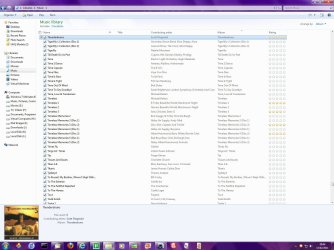
I had to laugh when I read that. What can I say, can't argue to much anyway ;) I would use the detail one for sure. But I don't use WMP. I guess you noticed my reply to Archie, so I'm up and running. This is an awesome forum. It is guys like you and Archie and the others, that make it that way.

We try our best here at Sevenforums. If there is anything else we can help with, you know where to go! :D

Unlike CyberLink's PowerDirector 9 crew. I have been waiting for there tech support for a month to get a [most likely] simple problem fixed and nothing. They keep asking me for the same information that I all ready sent them, but don't address the questions I'm asking. I'm about ready to reverse charges on my credit card and see if I can get it fixed that way. Anyway, thanks again

That happens alot, doesn't it? Where a company expects someone to use their software, but then falls short of providing decent support. Your own experience echos why I stopped using Cyberlink software entirely.
 

My Computer My Computer

At a glance

Windows 7 Professional 32-bit SP1AMD A4/A63.00GB EDOVMware SVGA 3D
Computer type
PC/Desktop
Computer Manufacturer/Model Number
Virtual Machine
OS
Windows 7 Professional 32-bit SP1
CPU
AMD A4/A6
Motherboard
Intel Corporation 440BX Desktop Reference Platform
Memory
3.00GB EDO
Graphics Card(s)
VMware SVGA 3D
Sound Card
High Definition Audio Device
Monitor(s) Displays
Generic Non-PnP Monitor on VMware SVGA 3D
Screen Resolution
1440x900
Hard Drives
1 x 60GB VMware Virtual SATA Hard Drive ATA Device
Antivirus
Kaspersky Total Security
Archie,
The tag editor sounds good, appreciate the feed back. I got it installed but there is no delete selection, the current version is remove or cut. After doing that the album art was still in the original folders but, they stay deleted after deleting them.

Thank you, very much


Agree with Dzomliza , in all of his views .

I use Mp3tag - the universal Tag Editor (ID3v2, MP4, OGG, FLAC, ...) for editing metadata . Open your music with it , select individual or the whole album, and you will see the album art in the left pane bottom . Right click on it > Delete . Now save the result . Do the same for all the albums .

Hi there...

I can whole heartedly recommend Tagscanner - this can add / remove / extract album art along with all other id3 tagging. It's free and very good.
 

My Computer My Computer

At a glance

Windows 7 Home Premium x64 OEM --> RTM clean ...Intel T44004Gb? - Mobile Intel(R) 4 Series Express Chipset ...
Computer Manufacturer/Model Number
Toshiba Satellite L500
OS
Windows 7 Home Premium x64 OEM --> RTM clean install
CPU
Intel T4400
Motherboard
? - laptop inbuilt ?
Memory
4Gb
Graphics Card(s)
? - Mobile Intel(R) 4 Series Express Chipset Family ?
Sound Card
Realtek
Monitor(s) Displays
? + extended to a 42" LG55PC plasma tele!
Screen Resolution
1366 * 768
Hard Drives
320Gb 5500rpm
PSU
?
Case
?
Cooling
?
Internet Speed
3Meg, when it works.
Other Info
A LOWLY LAPTOP!
I have a problem myself with this kind of stuff: my music folder contains various and different mp3, each one of them has its own cover picture embedded in the tag.
Unfortunately the system has decided to pick one of those tags (random) and make a "folder.jpg" and an "albumartsmall.jpg" out of it.
This happened the moment I inserted album art in the files tags.
No matter how many times I remove those 2 files (which makes no sense having in this folder): they always reappear.
Is there a way I can avoid it, without having to remove all album art from each file?

Thanks :)
 

My Computer My Computer

At a glance

Windows 7 Ultimate 32
OS
Windows 7 Ultimate 32
I have a problem myself with this kind of stuff: my music folder contains various and different mp3, each one of them has its own cover picture embedded in the tag.
Unfortunately the system has decided to pick one of those tags (random) and make a "folder.jpg" and an "albumartsmall.jpg" out of it.
This happened the moment I inserted album art in the files tags.
No matter how many times I remove those 2 files (which makes no sense having in this folder): they always reappear.
Is there a way I can avoid it, without having to remove all album art from each file?

Thanks :)
Where are you seeing these images exactly?
 

My Computer My Computer

At a glance

Win 7 Ultimate 64-bit SP1 (desktop)Intel Core 2 Duo E84002x 2GB OCZ DDR II SDRAM PC2-6400NVIDIA GeForce 9400GT
Computer type
PC/Desktop
Computer Manufacturer/Model Number
Gigabyte Technology Co., Ltd.
OS
Win 7 Ultimate 64-bit SP1 (desktop)
CPU
Intel Core 2 Duo E8400
Motherboard
Gigabyte GA-EP35-DS3R
Memory
2x 2GB OCZ DDR II SDRAM PC2-6400
Graphics Card(s)
NVIDIA GeForce 9400GT
Monitor(s) Displays
HP 2009m(primary), Acer P191W
Screen Resolution
1600x900, 1440x900
Hard Drives
Internal:WD Caviar Black 640GB 32MB cache 7200RPM
External:Samsung Story Station 1TB HDD desktop drive
500GB Toshiba portable drive
PSU
Antec Earthwatts EA500D
Case
Antec Sonata III
Cooling
4 fans
Keyboard
Logitech Wave
Mouse
Logitech M-SBF90
Internet Speed
Slow due to home Wireless-G router
Antivirus
MSE, Hitman Pro, Malwarebytes
Browser
Chrome and Palemoon
Other Info
Laptop....Acer 5750Z-4835
15.6" HD Widescreen CineCrystal™ LED-backlit LCD Display: (1366x768 resolution, 16:9 aspect ratio)
Intel® Pentium® Processor B940 (2.0GHz, 2MB L3 cache)
Windows® 7 Home Premium,500GB Hard Drive,4GB DDR3 RAM, Intel® HD Graphics,8X DVD-Super Multi Double-Layer Drive
Multi-in-1 Digital Media Card Reader,802.11b/g/n Wi-Fi
Chrome and Palemoon, MSE, Hitman Pro
Inside the generic "Music" folder.
My OS is set to show hiddens and systems files, otherwise it would be hidden.
 

My Computer My Computer

At a glance

Windows 7 Ultimate 32
OS
Windows 7 Ultimate 32
Inside the generic "Music" folder.
My OS is set to show hiddens and systems files, otherwise it would be hidden.
Interesting. Which music program(s) are you using? And are these files you've ripped yourself, or bought online?
 

My Computer My Computer

At a glance

Win 7 Ultimate 64-bit SP1 (desktop)Intel Core 2 Duo E84002x 2GB OCZ DDR II SDRAM PC2-6400NVIDIA GeForce 9400GT
Computer type
PC/Desktop
Computer Manufacturer/Model Number
Gigabyte Technology Co., Ltd.
OS
Win 7 Ultimate 64-bit SP1 (desktop)
CPU
Intel Core 2 Duo E8400
Motherboard
Gigabyte GA-EP35-DS3R
Memory
2x 2GB OCZ DDR II SDRAM PC2-6400
Graphics Card(s)
NVIDIA GeForce 9400GT
Monitor(s) Displays
HP 2009m(primary), Acer P191W
Screen Resolution
1600x900, 1440x900
Hard Drives
Internal:WD Caviar Black 640GB 32MB cache 7200RPM
External:Samsung Story Station 1TB HDD desktop drive
500GB Toshiba portable drive
PSU
Antec Earthwatts EA500D
Case
Antec Sonata III
Cooling
4 fans
Keyboard
Logitech Wave
Mouse
Logitech M-SBF90
Internet Speed
Slow due to home Wireless-G router
Antivirus
MSE, Hitman Pro, Malwarebytes
Browser
Chrome and Palemoon
Other Info
Laptop....Acer 5750Z-4835
15.6" HD Widescreen CineCrystal™ LED-backlit LCD Display: (1366x768 resolution, 16:9 aspect ratio)
Intel® Pentium® Processor B940 (2.0GHz, 2MB L3 cache)
Windows® 7 Home Premium,500GB Hard Drive,4GB DDR3 RAM, Intel® HD Graphics,8X DVD-Super Multi Double-Layer Drive
Multi-in-1 Digital Media Card Reader,802.11b/g/n Wi-Fi
Chrome and Palemoon, MSE, Hitman Pro
Inside the generic "Music" folder.
My OS is set to show hiddens and systems files, otherwise it would be hidden.
Interesting. Which music program(s) are you using? And are these files you've ripped yourself, or bought online?
Program for playing? None, I usually transfer them to my Creative player, practically never listen to music from my pc.
Some I ripped, some I bought, some I ... borrowed :D

Yesterday I decided to give them all an album art tag, I used Tag&Rename to do it.
Funny thing is:
most of the files are stored in separate folders like
Music\artist\album
so to have a folder for each artist, inside of which there's a folder for each album.
Outside this "system", directly in the music folder, are all of those single songs, like miscellaneus.

The reappearing of this 2 jpg files only happens in the "music" folder. Inside any album folder it doesn't!
I can erase the folderart file and so it will be.

Ain't it strange? :huh:
 

My Computer My Computer

At a glance

Windows 7 Ultimate 32
OS
Windows 7 Ultimate 32
Inside the generic "Music" folder.
My OS is set to show hiddens and systems files, otherwise it would be hidden.
Interesting. Which music program(s) are you using? And are these files you've ripped yourself, or bought online?
Program for playing? None, I usually transfer them to my Creative player, practically never listen to music from my pc.
Some I ripped, some I bought, some I ... borrowed :D

Yesterday I decided to give them all an album art tag, I used Tag&Rename to do it.
Funny thing is:
most of the files are stored in separate folders like
Music\artist\album
so to have a folder for each artist, inside of which there's a folder for each album.
Outside this "system", directly in the music folder, are all of those single songs, like miscellaneus.

The reappearing of this 2 jpg files only happens in the "music" folder. Inside any album folder it doesn't!
I can erase the folderart file and so it will be.

Ain't it strange? :huh:
First things first.....do you have a backup of them?
If you have them safely backed up, then I would think that if they are also in the artist and album folders, then you should be able to just delete the single songs that are in the main music folder. That would solve the problem, I would think.:geek:
 

My Computer My Computer

At a glance

Win 7 Ultimate 64-bit SP1 (desktop)Intel Core 2 Duo E84002x 2GB OCZ DDR II SDRAM PC2-6400NVIDIA GeForce 9400GT
Computer type
PC/Desktop
Computer Manufacturer/Model Number
Gigabyte Technology Co., Ltd.
OS
Win 7 Ultimate 64-bit SP1 (desktop)
CPU
Intel Core 2 Duo E8400
Motherboard
Gigabyte GA-EP35-DS3R
Memory
2x 2GB OCZ DDR II SDRAM PC2-6400
Graphics Card(s)
NVIDIA GeForce 9400GT
Monitor(s) Displays
HP 2009m(primary), Acer P191W
Screen Resolution
1600x900, 1440x900
Hard Drives
Internal:WD Caviar Black 640GB 32MB cache 7200RPM
External:Samsung Story Station 1TB HDD desktop drive
500GB Toshiba portable drive
PSU
Antec Earthwatts EA500D
Case
Antec Sonata III
Cooling
4 fans
Keyboard
Logitech Wave
Mouse
Logitech M-SBF90
Internet Speed
Slow due to home Wireless-G router
Antivirus
MSE, Hitman Pro, Malwarebytes
Browser
Chrome and Palemoon
Other Info
Laptop....Acer 5750Z-4835
15.6" HD Widescreen CineCrystal™ LED-backlit LCD Display: (1366x768 resolution, 16:9 aspect ratio)
Intel® Pentium® Processor B940 (2.0GHz, 2MB L3 cache)
Windows® 7 Home Premium,500GB Hard Drive,4GB DDR3 RAM, Intel® HD Graphics,8X DVD-Super Multi Double-Layer Drive
Multi-in-1 Digital Media Card Reader,802.11b/g/n Wi-Fi
Chrome and Palemoon, MSE, Hitman Pro
Interesting. Which music program(s) are you using? And are these files you've ripped yourself, or bought online?
Program for playing? None, I usually transfer them to my Creative player, practically never listen to music from my pc.
Some I ripped, some I bought, some I ... borrowed :D

Yesterday I decided to give them all an album art tag, I used Tag&Rename to do it.
Funny thing is:
most of the files are stored in separate folders like
Music\artist\album
so to have a folder for each artist, inside of which there's a folder for each album.
Outside this "system", directly in the music folder, are all of those single songs, like miscellaneus.

The reappearing of this 2 jpg files only happens in the "music" folder. Inside any album folder it doesn't!
I can erase the folderart file and so it will be.

Ain't it strange? :huh:
First things first.....do you have a backup of them?
If you have them safely backed up, then I would think that if they are also in the artist and album folders, then you should be able to just delete the single songs that are in the main music folder. That would solve the problem, I would think.:geek:
I don't get it: why a backup?
No, maybe I explained it badly: in the artist\album folders are only the worthy ones; the others, spread in the music folder, are like the "loose" ones.
 

My Computer My Computer

At a glance

Windows 7 Ultimate 32
OS
Windows 7 Ultimate 32
Program for playing? None, I usually transfer them to my Creative player, practically never listen to music from my pc.
Some I ripped, some I bought, some I ... borrowed :D

Yesterday I decided to give them all an album art tag, I used Tag&Rename to do it.
Funny thing is:
most of the files are stored in separate folders like
Music\artist\album
so to have a folder for each artist, inside of which there's a folder for each album.
Outside this "system", directly in the music folder, are all of those single songs, like miscellaneus.

The reappearing of this 2 jpg files only happens in the "music" folder. Inside any album folder it doesn't!
I can erase the folderart file and so it will be.

Ain't it strange? :huh:
First things first.....do you have a backup of them?
If you have them safely backed up, then I would think that if they are also in the artist and album folders, then you should be able to just delete the single songs that are in the main music folder. That would solve the problem, I would think.:geek:
I don't get it: why a backup?
No, maybe I explained it badly: in the artist\album folders are only the worthy ones; the others, spread in the music folder, are like the "loose" ones.
I only suggested a backup just in case in deleting something you lost them all, both good and bad. Better safe than sorry, right?:geek:

But yes, if the good ones are safely in the album folder, then I think you'd be safe just deleting those loose ones in the main music folder. I'm not familiar with Tag & Rename( I use MP3Tag) but it's possible those are simply extra copies created by T&R that you don't need at all.
 

My Computer My Computer

At a glance

Win 7 Ultimate 64-bit SP1 (desktop)Intel Core 2 Duo E84002x 2GB OCZ DDR II SDRAM PC2-6400NVIDIA GeForce 9400GT
Computer type
PC/Desktop
Computer Manufacturer/Model Number
Gigabyte Technology Co., Ltd.
OS
Win 7 Ultimate 64-bit SP1 (desktop)
CPU
Intel Core 2 Duo E8400
Motherboard
Gigabyte GA-EP35-DS3R
Memory
2x 2GB OCZ DDR II SDRAM PC2-6400
Graphics Card(s)
NVIDIA GeForce 9400GT
Monitor(s) Displays
HP 2009m(primary), Acer P191W
Screen Resolution
1600x900, 1440x900
Hard Drives
Internal:WD Caviar Black 640GB 32MB cache 7200RPM
External:Samsung Story Station 1TB HDD desktop drive
500GB Toshiba portable drive
PSU
Antec Earthwatts EA500D
Case
Antec Sonata III
Cooling
4 fans
Keyboard
Logitech Wave
Mouse
Logitech M-SBF90
Internet Speed
Slow due to home Wireless-G router
Antivirus
MSE, Hitman Pro, Malwarebytes
Browser
Chrome and Palemoon
Other Info
Laptop....Acer 5750Z-4835
15.6" HD Widescreen CineCrystal™ LED-backlit LCD Display: (1366x768 resolution, 16:9 aspect ratio)
Intel® Pentium® Processor B940 (2.0GHz, 2MB L3 cache)
Windows® 7 Home Premium,500GB Hard Drive,4GB DDR3 RAM, Intel® HD Graphics,8X DVD-Super Multi Double-Layer Drive
Multi-in-1 Digital Media Card Reader,802.11b/g/n Wi-Fi
Chrome and Palemoon, MSE, Hitman Pro
First things first.....do you have a backup of them?
If you have them safely backed up, then I would think that if they are also in the artist and album folders, then you should be able to just delete the single songs that are in the main music folder. That would solve the problem, I would think.:geek:
I don't get it: why a backup?
No, maybe I explained it badly: in the artist\album folders are only the worthy ones; the others, spread in the music folder, are like the "loose" ones.
I only suggested a backup just in case in deleting something you lost them all, both good and bad. Better safe than sorry, right?:geek:

But yes, if the good ones are safely in the album folder, then I think you'd be safe just deleting those loose ones in the main music folder. I'm not familiar with Tag & Rename( I use MP3Tag) but it's possible those are simply extra copies created by T&R that you don't need at all.

ehm... sorry, but for the third time I have to repeat it:
they are not the same files!

Major artists have their own folders, with complete albums, but others, of which I barely have 1 song, are loose in the generic music folder.
I hope this makes it clearer now, there's no double, no extra copies.
Tag&Rename works just fine in editing files tags, that's all it does.
 

My Computer My Computer

At a glance

Windows 7 Ultimate 32
OS
Windows 7 Ultimate 32
I don't get it: why a backup?
No, maybe I explained it badly: in the artist\album folders are only the worthy ones; the others, spread in the music folder, are like the "loose" ones.
I only suggested a backup just in case in deleting something you lost them all, both good and bad. Better safe than sorry, right?:geek:

But yes, if the good ones are safely in the album folder, then I think you'd be safe just deleting those loose ones in the main music folder. I'm not familiar with Tag & Rename( I use MP3Tag) but it's possible those are simply extra copies created by T&R that you don't need at all.

ehm... sorry, but for the third time I have to repeat it:
they are not the same files!

Major artists have their own folders, with complete albums, but others, of which I barely have 1 song, are loose in the generic music folder.
I hope this makes it clearer now, there's no double, no extra copies.
Tag&Rename works just fine in editing files tags, that's all it does.
Ah, I see now....forgive me, I've not been awake for very long.:o
What if you made a sub-folder for single songs like that...would the extra art images still appear?
 

My Computer My Computer

At a glance

Win 7 Ultimate 64-bit SP1 (desktop)Intel Core 2 Duo E84002x 2GB OCZ DDR II SDRAM PC2-6400NVIDIA GeForce 9400GT
Computer type
PC/Desktop
Computer Manufacturer/Model Number
Gigabyte Technology Co., Ltd.
OS
Win 7 Ultimate 64-bit SP1 (desktop)
CPU
Intel Core 2 Duo E8400
Motherboard
Gigabyte GA-EP35-DS3R
Memory
2x 2GB OCZ DDR II SDRAM PC2-6400
Graphics Card(s)
NVIDIA GeForce 9400GT
Monitor(s) Displays
HP 2009m(primary), Acer P191W
Screen Resolution
1600x900, 1440x900
Hard Drives
Internal:WD Caviar Black 640GB 32MB cache 7200RPM
External:Samsung Story Station 1TB HDD desktop drive
500GB Toshiba portable drive
PSU
Antec Earthwatts EA500D
Case
Antec Sonata III
Cooling
4 fans
Keyboard
Logitech Wave
Mouse
Logitech M-SBF90
Internet Speed
Slow due to home Wireless-G router
Antivirus
MSE, Hitman Pro, Malwarebytes
Browser
Chrome and Palemoon
Other Info
Laptop....Acer 5750Z-4835
15.6" HD Widescreen CineCrystal™ LED-backlit LCD Display: (1366x768 resolution, 16:9 aspect ratio)
Intel® Pentium® Processor B940 (2.0GHz, 2MB L3 cache)
Windows® 7 Home Premium,500GB Hard Drive,4GB DDR3 RAM, Intel® HD Graphics,8X DVD-Super Multi Double-Layer Drive
Multi-in-1 Digital Media Card Reader,802.11b/g/n Wi-Fi
Chrome and Palemoon, MSE, Hitman Pro
Being curious, I searched in my music folders ; with unhiding protected OS files , folder.jpg and albumartsmall.jpg are present in all the subfolders ..... even in a folder I have got this : AlbumArt_{008DDEDC-574F-47B8-A3AF-5EBF5C9942DC}_Large .

I guess they are needed for tagging an album art (as putting a jpeg file in a folder and renaming it as Folder.jpg, we often do, to make it the only displaying item in the folder, and then manually hiding it). If I shift to the recommending option to hied the protected OS files , they are not visible at all ..... so better keep those as they are .
 

My Computer My Computer

At a glance

Microsoft Windows 10 Pro Insider Preview 64-bitIntel(R) Core(TM) i3-4130 CPU @ 3.40GHzCorsair Vengence 4GB x2 (8.00GB Dual-Channel ...2047MB GeForce GTS 450 (ZOTAC International)
Computer type
PC/Desktop
Computer Manufacturer/Model Number
Self Assembled
OS
Microsoft Windows 10 Pro Insider Preview 64-bit
CPU
Intel(R) Core(TM) i3-4130 CPU @ 3.40GHz
Motherboard
Gigabyte Technology Co., Ltd. B85M-D3H
Memory
Corsair Vengence 4GB x2 (8.00GB Dual-Channel DDR3 @ 798MHz)
Graphics Card(s)
2047MB GeForce GTS 450 (ZOTAC International)
Sound Card
Onboard (Realtek High Definition Audio)
Monitor(s) Displays
LG Flatron E2040T
Screen Resolution
1600x900
Hard Drives
Western Digital 1 TB
Seagate 500 GB
PSU
Corsair VS550
Case
Cooler Master K380
Cooling
Cooler Master Seidon 120V Plus
Keyboard
Logitech MK260r
Mouse
Logitech MK260r
Internet Speed
PMPL Broadband
Antivirus
Windows Defender + MBAM
Browser
Firefox
Other Info
Dell Studio 15" Laptop
Back
Top