computer can't connect with canon pixma ip8500 printer

thane

New member
Local time
6:33 PM
Messages
32
Hi

I hope that someone can help. I have a computer operating windows 7 bit 64. I am trying to install my canon pixma ip8500 printer. I managed to find the official driver on the canon website (windows couldn't detect it automatically) and downloaded it. My computer then recognised my printer as ip8500 ... however I can't print or check the printer status.

When I attempt to print a screen pops up which says "collecting printer status" and then the computer print process gets stuck. I click on the "display print queue" button and the status is "error - printing".

Even aside from trying to print a document I am unable to check the printer status, (eg the ink levels). Whenever I try, the screen saying "collecting printer status" pops up. The status is "error - printing" size "9 bytes". The status will then alternate every couple of seconds ... "printing", then "error - printing", then "deleting - error - printing" and then back to "printing" again.

When I try to clear the queue ... the status query keeps alternating. I am not able to clear the status until I go into 'view' and click on "refresh".

In addition, I've noticed that the printer icon in "devices and printers" will have a green tick on the printer for a second and then a yellow exclamation mark.

I've tried uninstalling the printer and reinstalling it ... but without any success. And also reinstalling the device software.

The printer was working on my old windows XP computer without any problems.

If anyone can give me any advice I'd be very grateful.

Thankyou.

Thane
 

My Computer My Computer

At a glance

windows 7, 64 bit
OS
windows 7, 64 bit
Did you download the the 64bit drivers?
 

My Computer My Computer

At a glance

ME/XP/Vista/Win7
OS
ME/XP/Vista/Win7
Hi Yes I did. I downloaded PrinterDriver Add on Module Ver 1.10 (Windows 7/7x64). Posted on the official cannon website 03/12/2010. the download was named aomwin110ea23us.exe.

Since my post I have managed to print a document but it took an hour for the print command to be relayed from the computer to the printer. Once the message was received by the printer the document was printed in a few seconds.

Any thoughts as to why there would be such a delay ... and what I could do to fix the problem?

Thane
 

My Computer My Computer

At a glance

windows 7, 64 bit
OS
windows 7, 64 bit
Hi Yes I did. I downloaded PrinterDriver Add on Module Ver 1.10 (Windows 7/7x64). Posted on the official cannon website 03/12/2010. the download was named aomwin110ea23us.exe.

Since my post I have managed to print a document but it took an hour for the print command to be relayed from the computer to the printer. Once the message was received by the printer the document was printed in a few seconds.

Any thoughts as to why there would be such a delay ... and what I could do to fix the problem?

Thane

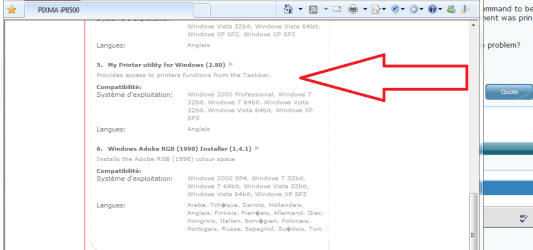
Go back to Canon site and grab the interface "My Printer Utility for Windows v2.80" in order to have the printer to work and being recognized...the add-on module v1.10 is not enough...but windows 7 should have recognized the printer with its Windows Update drivers install, normally!
 

Attachments

  • Capture.PNG
    Capture.PNG
    16.6 KB · Views: 205

My Computer My Computer

At a glance

Windows 7 Professional SP1 - x64 [Non-UEFI Boot]Ivy Bridge Core i5 3570K (Delidded)G.Skill "Ares" DDR3 PC3-12800 - 1600MHz (16Gb)Asus Dual-RX480-O4G
Computer type
PC/Desktop
Computer Manufacturer/Model Number
Custom Build
OS
Windows 7 Professional SP1 - x64 [Non-UEFI Boot]
CPU
Ivy Bridge Core i5 3570K (Delidded)
Motherboard
Asus P8Z77-V LE PLUS
Memory
G.Skill "Ares" DDR3 PC3-12800 - 1600MHz (16Gb)
Graphics Card(s)
Asus Dual-RX480-O4G
Sound Card
Creative Sound Blaster Z w/5.1 sound system
Monitor(s) Displays
Asus IPS 23"
Screen Resolution
16/9
Hard Drives
Internal:
500Go Sata 6Gb/s (x2)
500Go Sata 3Gb/s (x2)
SSD 60Go Sata 6Gb/s
PSU
In Win C 900W Series 80+ Platinum
Case
Thermaltake Chaser A71
Cooling
Custom Water Cooling Loop
Keyboard
Cooler Master QuickFire XTi
Mouse
Razer Imperator 2012 (4G)
Antivirus
MSE
Browser
IE 11.0.xxx Rtm
Other Info
"Raid0" with Intel Smart Response Technology (HDD/SSD)
Hi

Thank you for the advice. I downloaded the interface "My Printer Utility" but it hasn't solved the problem. When I try to print I still get error reports ... and I still can't check the status of the printer (ink jet levels).

For some reason the computer gets to "collecting printer status" but then can't resolve the printer status.

Any other suggestions?

Thane
 
Last edited:

My Computer My Computer

At a glance

windows 7, 64 bit
OS
windows 7, 64 bit
Hello Thane and welcome to the Forum. I had a similar problem with my Lexmark printer. I reinstalled the driver without removing the original install. During the second install attempt I got a warning dialog box telling me the driver was "...already installed, did I wish to continue (recommended)". I continued the installation and once it was finished everything was fine. Perhaps this would help you.
 

My Computer My Computer

At a glance

Win 7 Pro 64-bitIntel i5 2.4 Ghz8GB DDR3Intel HD 3000
Computer type
Laptop
Computer Manufacturer/Model Number
Sony Vaio VPCEB47GM Laptop
OS
Win 7 Pro 64-bit
CPU
Intel i5 2.4 Ghz
Memory
8GB DDR3
Graphics Card(s)
Intel HD 3000
Sound Card
IDT High Definition
Monitor(s) Displays
15.6 WGXA Anti-Glare LED
Screen Resolution
1280x800
Hard Drives
640Gb 7200rpm
Antivirus
MSE
Browser
Opera (primary) with IE9 backup
Thanks. Tried the reinstall as you suggested ... but still no good. When I try to check printer status I get the ubiquitous "collecting printer status". When I check the print queue it says ...

status inquiry - "printing" - then flashes "error - printing" - then flashes "deleting - error - printing" - size 9bytes.

In order to clear the print queue I have to turn the printer off. The printer status then shows as being off line. Then I can clear the print queue.

When I turn the printer back on I get the same "collecting printer status" ... and the same old flashing status inquiry starts up again.

Hmmmmm.

Interestingly when I did the reinstall it didn't say that the driver was already installed ...

Thane
 
Last edited:

My Computer My Computer

At a glance

windows 7, 64 bit
OS
windows 7, 64 bit
And just to add salt into the wound ... the printer works fine on my partner's computer ... windows 7 bit 32.
 

My Computer My Computer

At a glance

windows 7, 64 bit
OS
windows 7, 64 bit
And just to add salt into the wound ... the printer works fine on my partner's computer ... windows 7 bit 32.

Unplug the printer. Uninstall all Canon softwares from "Program & Features", then go in your "Device Manage"r and uninstall the Printer drivers (delete it aswell).

Restart from scratch the install as it says in instruction quick datasheet & make sure you have the x64 Canon drivers.
 

My Computer My Computer

At a glance

Windows 7 Professional SP1 - x64 [Non-UEFI Boot]Ivy Bridge Core i5 3570K (Delidded)G.Skill "Ares" DDR3 PC3-12800 - 1600MHz (16Gb)Asus Dual-RX480-O4G
Computer type
PC/Desktop
Computer Manufacturer/Model Number
Custom Build
OS
Windows 7 Professional SP1 - x64 [Non-UEFI Boot]
CPU
Ivy Bridge Core i5 3570K (Delidded)
Motherboard
Asus P8Z77-V LE PLUS
Memory
G.Skill "Ares" DDR3 PC3-12800 - 1600MHz (16Gb)
Graphics Card(s)
Asus Dual-RX480-O4G
Sound Card
Creative Sound Blaster Z w/5.1 sound system
Monitor(s) Displays
Asus IPS 23"
Screen Resolution
16/9
Hard Drives
Internal:
500Go Sata 6Gb/s (x2)
500Go Sata 3Gb/s (x2)
SSD 60Go Sata 6Gb/s
PSU
In Win C 900W Series 80+ Platinum
Case
Thermaltake Chaser A71
Cooling
Custom Water Cooling Loop
Keyboard
Cooler Master QuickFire XTi
Mouse
Razer Imperator 2012 (4G)
Antivirus
MSE
Browser
IE 11.0.xxx Rtm
Other Info
"Raid0" with Intel Smart Response Technology (HDD/SSD)
I'll try that. I note one thing that is a little odd ... there is no printer driver in my Device Manager. I can only see a device in devices and printers. Is that usual for windows 7?
 

My Computer My Computer

At a glance

windows 7, 64 bit
OS
windows 7, 64 bit

My Computer My Computer

At a glance

Windows 7 Professional SP1 - x64 [Non-UEFI Boot]Ivy Bridge Core i5 3570K (Delidded)G.Skill "Ares" DDR3 PC3-12800 - 1600MHz (16Gb)Asus Dual-RX480-O4G
Computer type
PC/Desktop
Computer Manufacturer/Model Number
Custom Build
OS
Windows 7 Professional SP1 - x64 [Non-UEFI Boot]
CPU
Ivy Bridge Core i5 3570K (Delidded)
Motherboard
Asus P8Z77-V LE PLUS
Memory
G.Skill "Ares" DDR3 PC3-12800 - 1600MHz (16Gb)
Graphics Card(s)
Asus Dual-RX480-O4G
Sound Card
Creative Sound Blaster Z w/5.1 sound system
Monitor(s) Displays
Asus IPS 23"
Screen Resolution
16/9
Hard Drives
Internal:
500Go Sata 6Gb/s (x2)
500Go Sata 3Gb/s (x2)
SSD 60Go Sata 6Gb/s
PSU
In Win C 900W Series 80+ Platinum
Case
Thermaltake Chaser A71
Cooling
Custom Water Cooling Loop
Keyboard
Cooler Master QuickFire XTi
Mouse
Razer Imperator 2012 (4G)
Antivirus
MSE
Browser
IE 11.0.xxx Rtm
Other Info
"Raid0" with Intel Smart Response Technology (HDD/SSD)
thanks for the tip!! ... I'll try that as well.
 
Last edited:

My Computer My Computer

At a glance

windows 7, 64 bit
OS
windows 7, 64 bit
thanks I'll try that as well.

For reinstall, you can use the drivers you grabbed earlier on canon site.

Plug the printer only after having boot and enter your session, let windows 7 install its own drivers (they will be replaced after by your install).

Install My Printer Utility v2.80, this will install the proprer driver for ip8500.

Then install the add-on module v1.10.

Reboot your computer after making sure all is set well.

Then you can start to manage settings in My Printer Utility interface.
 

My Computer My Computer

At a glance

Windows 7 Professional SP1 - x64 [Non-UEFI Boot]Ivy Bridge Core i5 3570K (Delidded)G.Skill "Ares" DDR3 PC3-12800 - 1600MHz (16Gb)Asus Dual-RX480-O4G
Computer type
PC/Desktop
Computer Manufacturer/Model Number
Custom Build
OS
Windows 7 Professional SP1 - x64 [Non-UEFI Boot]
CPU
Ivy Bridge Core i5 3570K (Delidded)
Motherboard
Asus P8Z77-V LE PLUS
Memory
G.Skill "Ares" DDR3 PC3-12800 - 1600MHz (16Gb)
Graphics Card(s)
Asus Dual-RX480-O4G
Sound Card
Creative Sound Blaster Z w/5.1 sound system
Monitor(s) Displays
Asus IPS 23"
Screen Resolution
16/9
Hard Drives
Internal:
500Go Sata 6Gb/s (x2)
500Go Sata 3Gb/s (x2)
SSD 60Go Sata 6Gb/s
PSU
In Win C 900W Series 80+ Platinum
Case
Thermaltake Chaser A71
Cooling
Custom Water Cooling Loop
Keyboard
Cooler Master QuickFire XTi
Mouse
Razer Imperator 2012 (4G)
Antivirus
MSE
Browser
IE 11.0.xxx Rtm
Other Info
"Raid0" with Intel Smart Response Technology (HDD/SSD)
Hi I have tried to do this multiple times but all without success.

One thing that is interesting is that I don't seem to be able to uninstall the ip8500 from printers and devices. I click on the icon and remove device. But when I go back into printer and devices the icon has reappeared.

I found the driver in device manager and uninstalled it - it's not listed there now. I've uninstalled the canon programs from programs and features. And I've disconnected the printer.

Any suggestions on how I can completely remove all related devices. I must be missing something.

Thanks for your help and patience.

Cheers

Thane
 

My Computer My Computer

At a glance

windows 7, 64 bit
OS
windows 7, 64 bit
It seems that the reason I can't remove the device because it is in use. I get this message ...

Failed to remove driver Canon Inkjet PIXMA iP8500. The specified printer driver is currently in use.
Failed to remove package prnca00m.inf. Driver package is in use.

and another message ...

The following package(s) can not be deleted:
prnca00m.inf (x64)
This package contains the following driver(s) that are in use:
Canon Inkjet PIXMA iP8500; This driver is used on:
Canon Inkjet PIXMA iP8500

The following driver(s) can not be deleted:
Driver Canon Inkjet PIXMA iP8500 (x64) is in use. It is used on:
Canon Inkjet PIXMA iP8500

Suggestions?

I can see that there are several canon inkjet printer files in windows/system32/spool/drivers/x64/3 ... I'm tempted to delete them but will hold off ...
 
Last edited:

My Computer My Computer

At a glance

windows 7, 64 bit
OS
windows 7, 64 bit
Humm, the printer have to be unplug in order to remove it from Device Manager. If the printer is WiFi connected you might want to go in Control Panel=>Peripherals & Printers and remove it from there aswell and physical turn it off.
 

My Computer My Computer

At a glance

Windows 7 Professional SP1 - x64 [Non-UEFI Boot]Ivy Bridge Core i5 3570K (Delidded)G.Skill "Ares" DDR3 PC3-12800 - 1600MHz (16Gb)Asus Dual-RX480-O4G
Computer type
PC/Desktop
Computer Manufacturer/Model Number
Custom Build
OS
Windows 7 Professional SP1 - x64 [Non-UEFI Boot]
CPU
Ivy Bridge Core i5 3570K (Delidded)
Motherboard
Asus P8Z77-V LE PLUS
Memory
G.Skill "Ares" DDR3 PC3-12800 - 1600MHz (16Gb)
Graphics Card(s)
Asus Dual-RX480-O4G
Sound Card
Creative Sound Blaster Z w/5.1 sound system
Monitor(s) Displays
Asus IPS 23"
Screen Resolution
16/9
Hard Drives
Internal:
500Go Sata 6Gb/s (x2)
500Go Sata 3Gb/s (x2)
SSD 60Go Sata 6Gb/s
PSU
In Win C 900W Series 80+ Platinum
Case
Thermaltake Chaser A71
Cooling
Custom Water Cooling Loop
Keyboard
Cooler Master QuickFire XTi
Mouse
Razer Imperator 2012 (4G)
Antivirus
MSE
Browser
IE 11.0.xxx Rtm
Other Info
"Raid0" with Intel Smart Response Technology (HDD/SSD)
Hi

the printer uses a usb connection.

It is unplugged from the laptop ... but when I try to remove it from devices and printers I'm told that it is in use and can't be deleted.

?????
 

My Computer My Computer

At a glance

windows 7, 64 bit
OS
windows 7, 64 bit
Might reboot your machine printer unplug and retry.

If not working, try reinstall the proper drivers. It should work anyway.
 

My Computer My Computer

At a glance

Windows 7 Professional SP1 - x64 [Non-UEFI Boot]Ivy Bridge Core i5 3570K (Delidded)G.Skill "Ares" DDR3 PC3-12800 - 1600MHz (16Gb)Asus Dual-RX480-O4G
Computer type
PC/Desktop
Computer Manufacturer/Model Number
Custom Build
OS
Windows 7 Professional SP1 - x64 [Non-UEFI Boot]
CPU
Ivy Bridge Core i5 3570K (Delidded)
Motherboard
Asus P8Z77-V LE PLUS
Memory
G.Skill "Ares" DDR3 PC3-12800 - 1600MHz (16Gb)
Graphics Card(s)
Asus Dual-RX480-O4G
Sound Card
Creative Sound Blaster Z w/5.1 sound system
Monitor(s) Displays
Asus IPS 23"
Screen Resolution
16/9
Hard Drives
Internal:
500Go Sata 6Gb/s (x2)
500Go Sata 3Gb/s (x2)
SSD 60Go Sata 6Gb/s
PSU
In Win C 900W Series 80+ Platinum
Case
Thermaltake Chaser A71
Cooling
Custom Water Cooling Loop
Keyboard
Cooler Master QuickFire XTi
Mouse
Razer Imperator 2012 (4G)
Antivirus
MSE
Browser
IE 11.0.xxx Rtm
Other Info
"Raid0" with Intel Smart Response Technology (HDD/SSD)
Hi

tried plugging in printer and unplugging it ... but still can't remove from devices and printers... it says that it is in use.

I reinstalled the drivers you mentioned (v2.80 and the add on module) but I still can't print. The computer is just "collecting printer status" and nothing happens.

hmmmmm.
 

My Computer My Computer

At a glance

windows 7, 64 bit
OS
windows 7, 64 bit
Got Pixma aswell plug onto Laptop, never went through such hassle!!:huh:

I've reinstall along two years at least three times during those clean Windows 7 Install. I was proceeded like that:

First entered the session, plugged the printer, did let windows 7 find itself the drivers, then installed My Printer & the add-on module, rebooted, then i could access to the interface to calibrate the heads and manage settings.

Are you sure all documents waiting to be printed are removed? In that case there's some, open the active documents in printers icon in taskbar and delete all...that's probably why it won't uninstall.
 

My Computer My Computer

At a glance

Windows 7 Professional SP1 - x64 [Non-UEFI Boot]Ivy Bridge Core i5 3570K (Delidded)G.Skill "Ares" DDR3 PC3-12800 - 1600MHz (16Gb)Asus Dual-RX480-O4G
Computer type
PC/Desktop
Computer Manufacturer/Model Number
Custom Build
OS
Windows 7 Professional SP1 - x64 [Non-UEFI Boot]
CPU
Ivy Bridge Core i5 3570K (Delidded)
Motherboard
Asus P8Z77-V LE PLUS
Memory
G.Skill "Ares" DDR3 PC3-12800 - 1600MHz (16Gb)
Graphics Card(s)
Asus Dual-RX480-O4G
Sound Card
Creative Sound Blaster Z w/5.1 sound system
Monitor(s) Displays
Asus IPS 23"
Screen Resolution
16/9
Hard Drives
Internal:
500Go Sata 6Gb/s (x2)
500Go Sata 3Gb/s (x2)
SSD 60Go Sata 6Gb/s
PSU
In Win C 900W Series 80+ Platinum
Case
Thermaltake Chaser A71
Cooling
Custom Water Cooling Loop
Keyboard
Cooler Master QuickFire XTi
Mouse
Razer Imperator 2012 (4G)
Antivirus
MSE
Browser
IE 11.0.xxx Rtm
Other Info
"Raid0" with Intel Smart Response Technology (HDD/SSD)
Back
Top