War of Attrition with my Partition, it’s doin' my head

Tram 1

New member
Member
Local time
7:24 PM
Messages
83
War of Attrition with my Partition, it’s doin' my head

Hi all,

RC 7100, HD 350 GB HD

I need advise please. I wish to create a small partition of 50GB.

I followed Brink’s tutorial in creating a partition but it ain’t happening for me.

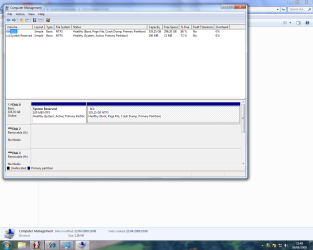
In disk management, I don’t get right click then "click New Simple Volume" I get, see screen shot 1.

Is it my understanding however that first I have to shrink "C" ( my HD ) by 50gb.

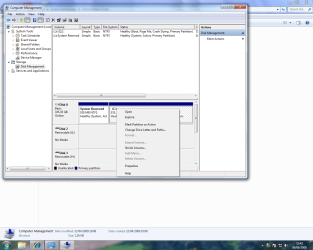
If that is the case, see screen shot 2, what is 50GB in MBs, what figure do I put in?

Having shrunk "C" is it then simply a case of just starting over, right clicking unallocated region on your hard disk, then click New Simple Volume and follow the wizard?

( by shrinking will I affect my existing Win 7 OS and any software installed, cos' I got the OS and Apps' working pretty much as I want it.)

I’ve had to bite the bullet, my only reason for creating a partition is because I wish to install my retail version of XP home, which is a 32 bit OS.

I have decided to do without the XP mode in Win 7 and do everything I could to get old software to operate under Win 7 and I’ve managed pretty well so far, updating, playing or delving around as required.

However there are two programs I can’t manage without, that will not install using WIN 7 or 64 bit XP mode, hence the partition.

But am I understanding correctly, my existing OS is Win 7 64 bit, the partition I will create I wish to install 32 bit XP home, will it install?

Is 50GB enough for XP Home and two tiny programs?
 

Attachments
  • Screen Shot 1.png
    Screen Shot 1.png
    70.7 KB · Views: 25
  • Screen Shot 2.png
    Screen Shot 2.png
    60 KB · Views: 42

My Computer My Computer

At a glance

Win7
OS
Win7

My Computer My Computer

At a glance

64-bit Windows 11 Pro for WorkstationsIntel i7-8700K OC'd to 5 GHz64 GB (4x16GB) G.SKILL TridentZ RGB DDR4 3600...ASUS ROG-STRIX-GTX1080TI-O11G-GAMING
Computer type
PC/Desktop
Computer Manufacturer/Model Number
Self built custom
OS
64-bit Windows 11 Pro for Workstations
CPU
Intel i7-8700K OC'd to 5 GHz
Motherboard
ASUS ROG Maximus XI Formula Z390
Memory
64 GB (4x16GB) G.SKILL TridentZ RGB DDR4 3600 MHz
Graphics Card(s)
ASUS ROG-STRIX-GTX1080TI-O11G-GAMING
Sound Card
Integrated
Monitor(s) Displays
2 x Samsung Odyssey G7 27"
Screen Resolution
2560x1440
Hard Drives
1TB Samsung 990 PRO M.2,
4TB Samsung 990 PRO PRO M.2,
TerraMaster F8 SSD Plus NAS
PSU
Seasonic Prime Titanium 850W
Case
Thermaltake Core P3
Cooling
Corsair Hydro H115i
Keyboard
Logitech wireless K800
Mouse
Logitech MX Master 4
Internet Speed
2 Gb/s Download and 100 Mb/s Upload
Antivirus
Malwarebyte Anti-Malware Premium
Browser
Google Chrome
Other Info
Logitech Z625 speaker system,
Logitech BRIO 4K Pro webcam,
HP Color LaserJet Pro MFP M477fdn,
APC SMART-UPS RT 1000 XL - SURT1000XLI,
Galaxy S23 Plus phone
Hello Tram,

You will need to shrink C: by 51200 MB first, then finish creating the partition from the unallocated space that you shrunk from C.

Afterwards, you can install XP to dual boot with Windows 7 if you like. 50GB should be plenty. :)

http://www.sevenforums.com/tutorials/8057-dual-boot-installation-windows-7-xp.html

Hope this helps,
Shawn

Thanks Brink, that went perfectly, :)

My next question is installing the Win XP home on the new partion.

My new partition I have assigned the drive letter K:

(I have just realized something, my copy of XP Home is an upgrade version from 98 SE, does that present a problem??)

This may sound daft but how do I install, :o I mean do I insert XP OS disk into DVD drive and will it ask me which partition I wish to install to or what?
I don't want it to overwrite my Win 7 OS obviously or run any chance of it.
 

My Computer My Computer

At a glance

Win7
OS
Win7
Tram,

When you get to step 4B in this link, you can then insert your Windows 98 SE disc or other qualifying upgrade OS. If you do not have these, then you will not be able to install the upgrade XP version.

After this, if you can install XP, just pick back up in the dual boot tutorial here to be able to boot to either XP or Windows 7 at boot. :)

http://www.sevenforums.com/tutorials/8057-dual-boot-installation-windows-7-xp.html
 

My Computer My Computer

At a glance

64-bit Windows 11 Pro for WorkstationsIntel i7-8700K OC'd to 5 GHz64 GB (4x16GB) G.SKILL TridentZ RGB DDR4 3600...ASUS ROG-STRIX-GTX1080TI-O11G-GAMING
Computer type
PC/Desktop
Computer Manufacturer/Model Number
Self built custom
OS
64-bit Windows 11 Pro for Workstations
CPU
Intel i7-8700K OC'd to 5 GHz
Motherboard
ASUS ROG Maximus XI Formula Z390
Memory
64 GB (4x16GB) G.SKILL TridentZ RGB DDR4 3600 MHz
Graphics Card(s)
ASUS ROG-STRIX-GTX1080TI-O11G-GAMING
Sound Card
Integrated
Monitor(s) Displays
2 x Samsung Odyssey G7 27"
Screen Resolution
2560x1440
Hard Drives
1TB Samsung 990 PRO M.2,
4TB Samsung 990 PRO PRO M.2,
TerraMaster F8 SSD Plus NAS
PSU
Seasonic Prime Titanium 850W
Case
Thermaltake Core P3
Cooling
Corsair Hydro H115i
Keyboard
Logitech wireless K800
Mouse
Logitech MX Master 4
Internet Speed
2 Gb/s Download and 100 Mb/s Upload
Antivirus
Malwarebyte Anti-Malware Premium
Browser
Google Chrome
Other Info
Logitech Z625 speaker system,
Logitech BRIO 4K Pro webcam,
HP Color LaserJet Pro MFP M477fdn,
APC SMART-UPS RT 1000 XL - SURT1000XLI,
Galaxy S23 Plus phone
Tram,

When you get to step 4B in this link, you can then insert your Windows 98 SE disc or other qualifying upgrade OS. If you do not have these, then you will not be able to install the upgrade XP version.

After this, if you can install XP, just pick back up in the dual boot tutorial here to be able to boot to either XP or Windows 7 at boot. :)

http://www.sevenforums.com/tutorials/8057-dual-boot-installation-windows-7-xp.html

Thanks Brink, understood all of that,

But once I get to 4b it's going to ask,

If you are attempting to clean install with a Windows XP Home or Pro Upgrade CD, you will see this screen, which requires you to insert your previous Windows CD in order to verify that you qualify for the Upgrade version.

My partition doesn't have a previous version of Windows on it, I still have a legit 98 SE disk, do I need to install that before installing XP home upgrade.

Having said that the PC HD on which I'm writing this and in which I created the partition a moment ago did have 98 SE and the XP upgrade installed before Win 7 was installed on it.

Installation might ask for 98 disk for but will I have to install it taking into account the above.

And if I do have to install whole of 98SE, I assume during the process like XP I get to choose which partition,......is that right?
 

My Computer My Computer

At a glance

Win7
OS
Win7
Tram,

Na, just as the message stated, you will just need to insert yout 98 disk so that it can verify that you have one. That's all, you will not need to install 98. ;)
 

My Computer My Computer

At a glance

64-bit Windows 11 Pro for WorkstationsIntel i7-8700K OC'd to 5 GHz64 GB (4x16GB) G.SKILL TridentZ RGB DDR4 3600...ASUS ROG-STRIX-GTX1080TI-O11G-GAMING
Computer type
PC/Desktop
Computer Manufacturer/Model Number
Self built custom
OS
64-bit Windows 11 Pro for Workstations
CPU
Intel i7-8700K OC'd to 5 GHz
Motherboard
ASUS ROG Maximus XI Formula Z390
Memory
64 GB (4x16GB) G.SKILL TridentZ RGB DDR4 3600 MHz
Graphics Card(s)
ASUS ROG-STRIX-GTX1080TI-O11G-GAMING
Sound Card
Integrated
Monitor(s) Displays
2 x Samsung Odyssey G7 27"
Screen Resolution
2560x1440
Hard Drives
1TB Samsung 990 PRO M.2,
4TB Samsung 990 PRO PRO M.2,
TerraMaster F8 SSD Plus NAS
PSU
Seasonic Prime Titanium 850W
Case
Thermaltake Core P3
Cooling
Corsair Hydro H115i
Keyboard
Logitech wireless K800
Mouse
Logitech MX Master 4
Internet Speed
2 Gb/s Download and 100 Mb/s Upload
Antivirus
Malwarebyte Anti-Malware Premium
Browser
Google Chrome
Other Info
Logitech Z625 speaker system,
Logitech BRIO 4K Pro webcam,
HP Color LaserJet Pro MFP M477fdn,
APC SMART-UPS RT 1000 XL - SURT1000XLI,
Galaxy S23 Plus phone
Tram,

Na, just as the message stated, you will just need to insert yout 98 disk so that it can verify that you have one. That's all, you will not need to install 98. ;)

Thanks Brink, :)

I panicked a bit, I found a Win 98 SE disk so I thought let's install, I down loaded Easy BCD and Net 2 into a folder on my Win 7 desktop.

I started the Win XP Installation, I got to step 4b, inserted my 98SE disk, then with disk still in drive, it asked what I wanted to do by using up and down keys, ( which were disabled ) Set up Windows, create partition, delete secleted partition.

Then underneath the above, a box in which was written "unknown disk" twice and below that, selected...... " C: partition1 unknown, 131072 mb free".

I was expecting to see the partition set up earlier, partition K.

Should I have just carried on and press enter on the selected " C: partition1 unknown, 131072 mb free"?

I quit installation because I wasn't sure.
 

My Computer My Computer

At a glance

Win7
OS
Win7
in windows 7 if you go into disk management how many partitions do you see?
For the new one that you just created, just write down the amount of free space in MB, and use that to pick the correct partition. Assuming that you only have the two partitions on the computer partition 1 will be the second one( the one you just created.)
 

My Computer My Computer

At a glance

windows 7 RTM x64Phenom II 965 Quad Core 3.4GhzMushkin Blackline 8GB (4x2gb)XFX Radeon 5970 Black Edition
Computer Manufacturer/Model Number
Black_Box (homebuilt)
OS
windows 7 RTM x64
CPU
Phenom II 965 Quad Core 3.4Ghz
Motherboard
Asus M4A79T Deluxe
Memory
Mushkin Blackline 8GB (4x2gb)
Graphics Card(s)
XFX Radeon 5970 Black Edition
Sound Card
onboard
Monitor(s) Displays
Dell 2408WPF-main Dell E248WFP-secondary
Screen Resolution
1920x1200-main 1920x1200-secondary
Hard Drives
OCZ Vertex Limited Edition 100GB (OS)
x1 WD Black Edition 500GB drive (Storage)
PSU
XFX 850w Black Edition (Modular)
Case
Mountian Mods H2go
Cooling
CoolITSystems ECO A.L.C.
Keyboard
Logitech MX 5500 wireless keyboard
Mouse
Razor Copperhead
Internet Speed
16Mb down/2Mb up Wowway Cable Internet
in windows 7 if you go into disk management how many partitions do you see?
For the new one that you just created, just write down the amount of free space in MB, and use that to pick the correct partition. Assuming that you only have the two partitions on the computer partition 1 will be the second one( the one you just created.)

Hi ccatlett,

I successfully get to Set Up Windows, it reads,
Set up Windows
Create Partition
Delete Selected Partition

Directly under the above it says,

Unknown disk There is no disk in this drive.


There is no disk in this drive
131072MB disk 0 at Id 0 on bus 0 on atapi [MBR]


C: Partition1 [unknown] 131072MB 131071 MB free ( and this line is selected).

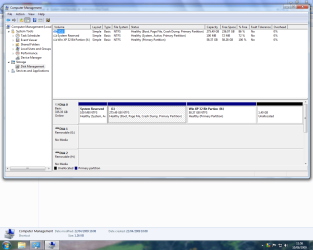
As I said to Brink I was expecting to see the partition I had set up earlier, I gave it the drive letter K:. I can see this drive in My Computer and also, please see Screen Shot.

Instead of going for a 50GB partition as I intended I went for 60GB instead.

I think my questions are, should I be seeing my created partition in the Windows set up or should I simply press enter on the selected line, I'm wary because I certainly don't want to overwrite my Windows 7 install?

My last questions are did I screw up when setting up the partition and what should I do if I didn't ?
 

Attachments

  • Screen Shot.png
    Screen Shot.png
    64.5 KB · Views: 17

My Computer My Computer

At a glance

Win7
OS
Win7
Tram,

Looking at your image, you will need to extend K into that 1.40 GB unallocated partition. Yes, you should have K or a drive that size as an option to select to install XP on during it's installation.
 

My Computer My Computer

At a glance

64-bit Windows 11 Pro for WorkstationsIntel i7-8700K OC'd to 5 GHz64 GB (4x16GB) G.SKILL TridentZ RGB DDR4 3600...ASUS ROG-STRIX-GTX1080TI-O11G-GAMING
Computer type
PC/Desktop
Computer Manufacturer/Model Number
Self built custom
OS
64-bit Windows 11 Pro for Workstations
CPU
Intel i7-8700K OC'd to 5 GHz
Motherboard
ASUS ROG Maximus XI Formula Z390
Memory
64 GB (4x16GB) G.SKILL TridentZ RGB DDR4 3600 MHz
Graphics Card(s)
ASUS ROG-STRIX-GTX1080TI-O11G-GAMING
Sound Card
Integrated
Monitor(s) Displays
2 x Samsung Odyssey G7 27"
Screen Resolution
2560x1440
Hard Drives
1TB Samsung 990 PRO M.2,
4TB Samsung 990 PRO PRO M.2,
TerraMaster F8 SSD Plus NAS
PSU
Seasonic Prime Titanium 850W
Case
Thermaltake Core P3
Cooling
Corsair Hydro H115i
Keyboard
Logitech wireless K800
Mouse
Logitech MX Master 4
Internet Speed
2 Gb/s Download and 100 Mb/s Upload
Antivirus
Malwarebyte Anti-Malware Premium
Browser
Google Chrome
Other Info
Logitech Z625 speaker system,
Logitech BRIO 4K Pro webcam,
HP Color LaserJet Pro MFP M477fdn,
APC SMART-UPS RT 1000 XL - SURT1000XLI,
Galaxy S23 Plus phone
Tram,

Looking at your image, you will need to extend K into that 1.40 GB unallocated partition. Yes, you should have K or a drive that size as an option to select to install XP on during it's installation.
,

Hello Brink,

Any idea what I did wrong, your tutroials are quite straight forward.

How do I extend K: into the 1.40 GB unallocated partition.

And will I then see K: in the windows setup.
 

My Computer My Computer

At a glance

Win7
OS
Win7

My Computer My Computer

At a glance

64-bit Windows 11 Pro for WorkstationsIntel i7-8700K OC'd to 5 GHz64 GB (4x16GB) G.SKILL TridentZ RGB DDR4 3600...ASUS ROG-STRIX-GTX1080TI-O11G-GAMING
Computer type
PC/Desktop
Computer Manufacturer/Model Number
Self built custom
OS
64-bit Windows 11 Pro for Workstations
CPU
Intel i7-8700K OC'd to 5 GHz
Motherboard
ASUS ROG Maximus XI Formula Z390
Memory
64 GB (4x16GB) G.SKILL TridentZ RGB DDR4 3600 MHz
Graphics Card(s)
ASUS ROG-STRIX-GTX1080TI-O11G-GAMING
Sound Card
Integrated
Monitor(s) Displays
2 x Samsung Odyssey G7 27"
Screen Resolution
2560x1440
Hard Drives
1TB Samsung 990 PRO M.2,
4TB Samsung 990 PRO PRO M.2,
TerraMaster F8 SSD Plus NAS
PSU
Seasonic Prime Titanium 850W
Case
Thermaltake Core P3
Cooling
Corsair Hydro H115i
Keyboard
Logitech wireless K800
Mouse
Logitech MX Master 4
Internet Speed
2 Gb/s Download and 100 Mb/s Upload
Antivirus
Malwarebyte Anti-Malware Premium
Browser
Google Chrome
Other Info
Logitech Z625 speaker system,
Logitech BRIO 4K Pro webcam,
HP Color LaserJet Pro MFP M477fdn,
APC SMART-UPS RT 1000 XL - SURT1000XLI,
Galaxy S23 Plus phone
Hi Brink,
do I have to delete Partition K first or do I just follow from step 2.?
http://www.sevenforums.com/tutorials/2670-partition-volume-extend.html
I'm afraid that I do not know what you may be doing wrong in the XP installation though. :(
Not sure I'm doing anything wrong as such, it's exactly as the links you provided said it would be, accept I didn't see K: partition as expected which is why I quit.

This may hopefully fix it.
 

My Computer My Computer

At a glance

Win7
OS
Win7
From step 2 since that partition is already unallocted that you want to extend into. ;)
 

My Computer My Computer

At a glance

64-bit Windows 11 Pro for WorkstationsIntel i7-8700K OC'd to 5 GHz64 GB (4x16GB) G.SKILL TridentZ RGB DDR4 3600...ASUS ROG-STRIX-GTX1080TI-O11G-GAMING
Computer type
PC/Desktop
Computer Manufacturer/Model Number
Self built custom
OS
64-bit Windows 11 Pro for Workstations
CPU
Intel i7-8700K OC'd to 5 GHz
Motherboard
ASUS ROG Maximus XI Formula Z390
Memory
64 GB (4x16GB) G.SKILL TridentZ RGB DDR4 3600 MHz
Graphics Card(s)
ASUS ROG-STRIX-GTX1080TI-O11G-GAMING
Sound Card
Integrated
Monitor(s) Displays
2 x Samsung Odyssey G7 27"
Screen Resolution
2560x1440
Hard Drives
1TB Samsung 990 PRO M.2,
4TB Samsung 990 PRO PRO M.2,
TerraMaster F8 SSD Plus NAS
PSU
Seasonic Prime Titanium 850W
Case
Thermaltake Core P3
Cooling
Corsair Hydro H115i
Keyboard
Logitech wireless K800
Mouse
Logitech MX Master 4
Internet Speed
2 Gb/s Download and 100 Mb/s Upload
Antivirus
Malwarebyte Anti-Malware Premium
Browser
Google Chrome
Other Info
Logitech Z625 speaker system,
Logitech BRIO 4K Pro webcam,
HP Color LaserJet Pro MFP M477fdn,
APC SMART-UPS RT 1000 XL - SURT1000XLI,
Galaxy S23 Plus phone
From step 2 since that partition is already unallocted that you want to extend into. ;)


Thank you Brink

that went great but still K: partition not recognized in Win XP set up, any clues?

I'm not doing anything wrong, partition simply isn't recognized.

I got one idea let me try this by you, when I set up the K; partition up I gave it a name " Win XP 32 bit K:, should I have in the instance simply assigned it the drive letter K:. Could that be the problem, If so how do I rename it or should I delete the K: partition and start all over?
 

My Computer My Computer

At a glance

Win7
OS
Win7
OK, renamed the partition to L: and this is seen in Disk Management and My Computer but the partition is still not been reconised by set up in WIN XP, any ideas?
 

My Computer My Computer

At a glance

Win7
OS
Win7
Strange. When you get to step 5 in METHOD TWO of the tutorial, what do you see listed in that same image?
 

My Computer My Computer

At a glance

64-bit Windows 11 Pro for WorkstationsIntel i7-8700K OC'd to 5 GHz64 GB (4x16GB) G.SKILL TridentZ RGB DDR4 3600...ASUS ROG-STRIX-GTX1080TI-O11G-GAMING
Computer type
PC/Desktop
Computer Manufacturer/Model Number
Self built custom
OS
64-bit Windows 11 Pro for Workstations
CPU
Intel i7-8700K OC'd to 5 GHz
Motherboard
ASUS ROG Maximus XI Formula Z390
Memory
64 GB (4x16GB) G.SKILL TridentZ RGB DDR4 3600 MHz
Graphics Card(s)
ASUS ROG-STRIX-GTX1080TI-O11G-GAMING
Sound Card
Integrated
Monitor(s) Displays
2 x Samsung Odyssey G7 27"
Screen Resolution
2560x1440
Hard Drives
1TB Samsung 990 PRO M.2,
4TB Samsung 990 PRO PRO M.2,
TerraMaster F8 SSD Plus NAS
PSU
Seasonic Prime Titanium 850W
Case
Thermaltake Core P3
Cooling
Corsair Hydro H115i
Keyboard
Logitech wireless K800
Mouse
Logitech MX Master 4
Internet Speed
2 Gb/s Download and 100 Mb/s Upload
Antivirus
Malwarebyte Anti-Malware Premium
Browser
Google Chrome
Other Info
Logitech Z625 speaker system,
Logitech BRIO 4K Pro webcam,
HP Color LaserJet Pro MFP M477fdn,
APC SMART-UPS RT 1000 XL - SURT1000XLI,
Galaxy S23 Plus phone
Strange. When you get to step 5 in METHOD TWO of the tutorial, what do you see listed in that same image?

Exactly as it appears in step 5 accept in the box mine reads, ( on three lines ),

Exactly as it appears in step 5 accept in the box mine reads,

Unknown disk there is no disk in this drive.

There is no disk in this drive
131072MB disk 0 at Id 0 on bus 0 on atapi [MBR]

C: Partition1 [unknown] 131072MB 131071 MB free ( this line is high lighted/selected) and to press enter.

I quit as I don't want to overwrite Win 7.

Please note C; partition1,...... is that how it should read?

I ask the question again is there a problem installing a 32 bit OS on a partition created within a 64 bit environment?
 

My Computer My Computer

At a glance

Win7
OS
Win7
I'm not sure why it doesn't see if for you. It should read C: Partition3 I would think for it. :huh:
 

My Computer My Computer

At a glance

64-bit Windows 11 Pro for WorkstationsIntel i7-8700K OC'd to 5 GHz64 GB (4x16GB) G.SKILL TridentZ RGB DDR4 3600...ASUS ROG-STRIX-GTX1080TI-O11G-GAMING
Computer type
PC/Desktop
Computer Manufacturer/Model Number
Self built custom
OS
64-bit Windows 11 Pro for Workstations
CPU
Intel i7-8700K OC'd to 5 GHz
Motherboard
ASUS ROG Maximus XI Formula Z390
Memory
64 GB (4x16GB) G.SKILL TridentZ RGB DDR4 3600 MHz
Graphics Card(s)
ASUS ROG-STRIX-GTX1080TI-O11G-GAMING
Sound Card
Integrated
Monitor(s) Displays
2 x Samsung Odyssey G7 27"
Screen Resolution
2560x1440
Hard Drives
1TB Samsung 990 PRO M.2,
4TB Samsung 990 PRO PRO M.2,
TerraMaster F8 SSD Plus NAS
PSU
Seasonic Prime Titanium 850W
Case
Thermaltake Core P3
Cooling
Corsair Hydro H115i
Keyboard
Logitech wireless K800
Mouse
Logitech MX Master 4
Internet Speed
2 Gb/s Download and 100 Mb/s Upload
Antivirus
Malwarebyte Anti-Malware Premium
Browser
Google Chrome
Other Info
Logitech Z625 speaker system,
Logitech BRIO 4K Pro webcam,
HP Color LaserJet Pro MFP M477fdn,
APC SMART-UPS RT 1000 XL - SURT1000XLI,
Galaxy S23 Plus phone
Still unable to get a partition up and running.

This is what I did last night after receiving further advise.

I deleted the partition and then reallocated the space to C:, then started over.

I created a 60GB partition K: but this time instead of formating it in NTFS I had an option to do so in ex fat, so choose this, proceeded to install XP but partition is still not recognized in the set up, ( same issue as before ).

The thinking behind this was during the XP home upgrade partition set up I have to insert a Window 98SE disk for previous OS installation, (98SE wouldn't recognize NTFS hence the fat format on the partition--------well it made sense to me and it might have worked, :(

Still not to be defeated, I deleted the partition again, reallocated, created FAT partition but didn't format, and tried to re-install XP, ( but no joy, getting the same issue).

I'm flummoxed, either I can create a Fat 32 bit partition within/under Win 7 or I can't.

Some further advise was to reinstall Win XP over Win 7 RC and create a partition within XP for Win 7,.........but I'm so not sure on this approach as I have got Win 7 working just great and it's a lot of fussing around.

Is the problem the two different file systems on the same HD, as I wrote I can see the K: partition in Disk management and My Computer, I might be missing a step but I don't think I'm doing anything wrong.
 

My Computer My Computer

At a glance

Win7
OS
Win7
Back
Top