
Hi everyone,
I'm new to this forum.
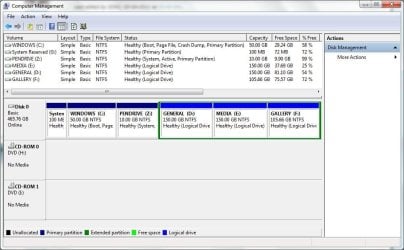
Here's my current hard drive partition after a new fresh windows installation.(installed on 7th June)
The partition i decided earlier to install Ubuntu OS is now under control of my current windows 7 64-bit OS : [PEN DRIVE (Z 10 GB:]. bcoz this partition is now shown as System, Active, Primary Partition.
Now i need to make this 10GB Z drive as a normal Logical Drive, (without active, primary partition or system options) so that i can install Ubuntu OS easily.
Please Help.
I'm new to this forum.
Here's my current hard drive partition after a new fresh windows installation.(installed on 7th June)
The partition i decided earlier to install Ubuntu OS is now under control of my current windows 7 64-bit OS : [PEN DRIVE (Z
10 GB:]. bcoz this partition is now shown as System, Active, Primary Partition. Now i need to make this 10GB Z drive as a normal Logical Drive, (without active, primary partition or system options) so that i can install Ubuntu OS easily.
Please Help.
Attachments
My Computer
At a glance
Windows 7 Ultimate x64 SP1Intel(R) Core(TM) i3-2100 CPU @ 3.10GHz, 3100...2.00 GBATI Radeon HD 5400 Series 1.00 GB
- Computer Manufacturer/Model Number
- INTEL / DH61WW
- OS
- Windows 7 Ultimate x64 SP1
- CPU
- Intel(R) Core(TM) i3-2100 CPU @ 3.10GHz, 3100 Mhz, 2 Core(s)
- Motherboard
- Intel Corporation DH61WW AAG23116-203
- Memory
- 2.00 GB
- Graphics Card(s)
- ATI Radeon HD 5400 Series 1.00 GB
- Sound Card
- Realtek High Definition Audio
- Monitor(s) Displays
- Samsung Syncmaster 920NW
- Screen Resolution
- 1440 x 900
- Hard Drives
- Western Digital 500 GB


