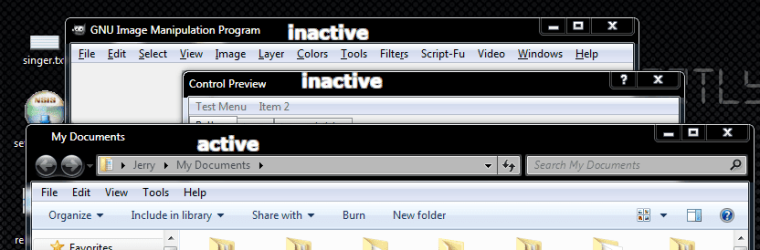
How do i remove the windows title text "bloom" effect in Windows 7?

d4rk0n3

New member
Local time
1:33 PM
Messages
14
How do i remove the windows title text "bloom" effect in Windows 7?

Hi, I'm completely new to windows 7 and themes, but i've been spending some time now trying to figure out how to modify this:
issuenq.jpg
What i want to do is just simply display the text in clear white, without any of the bloomed faded white color below it, i think it looks really bad. Disabling desktop composition does remove that color, but it does remove a lot more of the nice colors going on so i don't want to do that, i only wanna remove the color below the text fields on the titles. Thanks, love this forum, a lot of cool themes!! :)
 

My Computer My Computer

OS
Proferssional 7 32bit

My Computer My Computer

Computer type
Laptop
Computer Manufacturer/Model Number
Sager NP9170
OS
Win 7 Pro x64 / Win 10 Pro
CPU
Intel(R) Core(TM) i7-3630QM CPU @ 2.40GHz
Motherboard
CLEVO P170EM
Memory
12 GB
Graphics Card(s)
(1) Intel(R) HD Graphics 4000 (2) NVIDIA GeForce GTX 675M
Sound Card
(1) Realtek High Definition Audio (2) Intel(R) Display Aud
Monitor(s) Displays
17.3
Screen Resolution
1920x1080
Hard Drives
(1) Samsung 860 EVO 500GB(OS) (1) Samsung 860 EVO 500GB(Data)
Keyboard
Backlite
Antivirus
MSE, Malwarebytes Pro
Browser
Firefox
Other Info
DESKTOP: Custom-built.
OS: Win 10 Pro x64.
CASE: Rosewill R5.
CPU: Intel I5 4670K CPU @ 3.40GHz.
CPU COOLER: Cool Master Hyper 212 EVO.
MOTHERBOARD: Asus Z87-A.
MEMORY: Kingston HyperX 2x4 GB.
GPU: Nvidia Geforce 650 TI.
PSU: Corsair TX750.
DRIVES: (1) Samsung 840 120 GB SSD (2) Western Digital blue 500 GB 7200 RPM.
Very nice Jerry, is there any chance you could modify that file to be more "Greyish/White" instead of dark blue? I couldn't seem to modify the color that much, or am i doing it wrong?

Thanks for the quick reply & help!! :)
 

My Computer My Computer

OS
Proferssional 7 32bit
Very nice Jerry, is there any chance you could modify that file to be more "Greyish/White" instead of dark blue? I couldn't seem to modify the color that much, or am i doing it wrong?

Thanks for the quick reply & help!! :)

Did you try right click on desktop go to personalization then window color & pick a color & slide the slider to the left?
Post a screenshot please.
http://www.sevenforums.com/tutorials/9733-screenshots-files-upload-post-seven-forums.html
Jerry
 

Attachments

  • Region.png
    Region.png
    29.7 KB · Views: 22

My Computer My Computer

Computer type
Laptop
Computer Manufacturer/Model Number
Sager NP9170
OS
Win 7 Pro x64 / Win 10 Pro
CPU
Intel(R) Core(TM) i7-3630QM CPU @ 2.40GHz
Motherboard
CLEVO P170EM
Memory
12 GB
Graphics Card(s)
(1) Intel(R) HD Graphics 4000 (2) NVIDIA GeForce GTX 675M
Sound Card
(1) Realtek High Definition Audio (2) Intel(R) Display Aud
Monitor(s) Displays
17.3
Screen Resolution
1920x1080
Hard Drives
(1) Samsung 860 EVO 500GB(OS) (1) Samsung 860 EVO 500GB(Data)
Keyboard
Backlite
Antivirus
MSE, Malwarebytes Pro
Browser
Firefox
Other Info
DESKTOP: Custom-built.
OS: Win 10 Pro x64.
CASE: Rosewill R5.
CPU: Intel I5 4670K CPU @ 3.40GHz.
CPU COOLER: Cool Master Hyper 212 EVO.
MOTHERBOARD: Asus Z87-A.
MEMORY: Kingston HyperX 2x4 GB.
GPU: Nvidia Geforce 650 TI.
PSU: Corsair TX750.
DRIVES: (1) Samsung 840 120 GB SSD (2) Western Digital blue 500 GB 7200 RPM.
Thank you Jerry!

However i have another question for you, one thing that is really annoying now is the fact that all the "Un selected" windows that are open turn really bright, while the selected window remains the color i wanted.

Is there anyway to disable the change of un selected windows in windows 7 aero?

See my screenshot for an better view of the problem.

selectednotselected.jpg


Thank you again for your continued support!
 

My Computer My Computer

OS
Proferssional 7 32bit
I just realized from google that there's more advanced settings to the aero interface when you click "Advanced appearance settings" but when i click that i get this classic skins only window with a message saying:

To turn on Windows Aero select a windows theme, Colors and sizes selected here apply only if you have selected windows 7 basic theme or an easy of access theme.

What does this mean? My computer clearly runs aero, i can turn glass and everything on and get see through windows, my gfx is a NVIDIA 8800GTS 640 ram. What can be the issue here? Do only Windows 7 Ultimate Edition users get to change these colors?

Thank you!

EDIT: Here you can see me running Aero standard setup, with glass on, but i still can't access any advanced aero color settings, and windows tells me to start aero, but it's already running (????)

47941327.jpg
 

My Computer My Computer

OS
Proferssional 7 32bit
Thank you Jerry!

However i have another question for you, one thing that is really annoying now is the fact that all the "Un selected" windows that are open turn really bright, while the selected window remains the color i wanted.

Is there anyway to disable the change of un selected windows in windows 7 aero?

See my screenshot for an better view of the problem.

selectednotselected.jpg


Thank you again for your continued support!
It can not be done from Personalization that I know of, but I can change it with WSB
You will have to do 1 of these 2 ways of Enabling custom themes.

http://www.sevenforums.com/tutorials/34579-enabling-custom-themes-windows-7-a.html
Or
http://www.sevenforums.com/tutorials/28377-theme-how-apply-custom-themes.html?filter


I just realized from google that there's more advanced settings to the aero interface when you click "Advanced appearance settings" but when i click that i get this classic skins only window with a message saying:

To turn on Windows Aero select a windows theme, Colors and sizes selected here apply only if you have selected windows 7 basic theme or an easy of access theme.

What does this mean? My computer clearly runs aero, i can turn glass and everything on and get see through windows, my gfx is a NVIDIA 8800GTS 640 ram. What can be the issue here? Do only Windows 7 Ultimate Edition users get to change these colors?

Thank you!

EDIT: Here you can see me running Aero standard setup, with glass on, but i still can't access any advanced aero color settings, and windows tells me to start aero, but it's already running (????)

47941327.jpg
Don't worry about that there is some things that can be changed from the dropdown menu.
Jerry
 

My Computer My Computer

Computer type
Laptop
Computer Manufacturer/Model Number
Sager NP9170
OS
Win 7 Pro x64 / Win 10 Pro
CPU
Intel(R) Core(TM) i7-3630QM CPU @ 2.40GHz
Motherboard
CLEVO P170EM
Memory
12 GB
Graphics Card(s)
(1) Intel(R) HD Graphics 4000 (2) NVIDIA GeForce GTX 675M
Sound Card
(1) Realtek High Definition Audio (2) Intel(R) Display Aud
Monitor(s) Displays
17.3
Screen Resolution
1920x1080
Hard Drives
(1) Samsung 860 EVO 500GB(OS) (1) Samsung 860 EVO 500GB(Data)
Keyboard
Backlite
Antivirus
MSE, Malwarebytes Pro
Browser
Firefox
Other Info
DESKTOP: Custom-built.
OS: Win 10 Pro x64.
CASE: Rosewill R5.
CPU: Intel I5 4670K CPU @ 3.40GHz.
CPU COOLER: Cool Master Hyper 212 EVO.
MOTHERBOARD: Asus Z87-A.
MEMORY: Kingston HyperX 2x4 GB.
GPU: Nvidia Geforce 650 TI.
PSU: Corsair TX750.
DRIVES: (1) Samsung 840 120 GB SSD (2) Western Digital blue 500 GB 7200 RPM.
Hi Jerry,

Thanks again for your quick replies, i've patched my windows using http://www.sevenforums.com/tutorials/28377-theme-how-apply-custom-themes.html?filter and i've tried several custom themes already so i think my os is ready for whatever mods you can throw at me :)

I'm sorry but here's another interesting question i have to throw at you.

I've tried using the Windows 7 Basic theme (None aero) and it looks quiet nice actually, however... I wish to change the color.

As stated in the color and appearance setting it says specifically that i have to use this theme (Windows 7 Basic) or any other of the "Ease of Access Theme" but yet again, when i change colors, nothing happens.

I'm very confused here, thanks again for helping a Windows 7 newbie!
 

My Computer My Computer

OS
Proferssional 7 32bit
Sorry this is my absolute last question for you Jerry!

Is there anyway to remove the "White faded color" on the taskbar windows, but keep the one (fully lighted up) for the selected window?

See this screenshot:
94351634.jpg


Once again, i'm ever so thankful! :)
 

My Computer My Computer

OS
Proferssional 7 32bit
Hi Jerry,

Thanks again for your quick replies, i've patched my windows using http://www.sevenforums.com/tutorials/28377-theme-how-apply-custom-themes.html?filter and i've tried several custom themes already so i think my os is ready for whatever mods you can throw at me :)

I'm sorry but here's another interesting question i have to throw at you.

I've tried using the Windows 7 Basic theme (None aero) and it looks quiet nice actually, however... I wish to change the color.

As stated in the color and appearance setting it says specifically that i have to use this theme (Windows 7 Basic) or any other of the "Ease of Access Theme" but yet again, when i change colors, nothing happens.

I'm very confused here, thanks again for helping a Windows 7 newbie!
Very little can be changed color and appearance setting for Basic. Basic is controlled by the aero.msstyle I can change that to, I will make some changes but Please don't ask for a whole theme
Jerry

Edit: aero would be easier
 

My Computer My Computer

Computer type
Laptop
Computer Manufacturer/Model Number
Sager NP9170
OS
Win 7 Pro x64 / Win 10 Pro
CPU
Intel(R) Core(TM) i7-3630QM CPU @ 2.40GHz
Motherboard
CLEVO P170EM
Memory
12 GB
Graphics Card(s)
(1) Intel(R) HD Graphics 4000 (2) NVIDIA GeForce GTX 675M
Sound Card
(1) Realtek High Definition Audio (2) Intel(R) Display Aud
Monitor(s) Displays
17.3
Screen Resolution
1920x1080
Hard Drives
(1) Samsung 860 EVO 500GB(OS) (1) Samsung 860 EVO 500GB(Data)
Keyboard
Backlite
Antivirus
MSE, Malwarebytes Pro
Browser
Firefox
Other Info
DESKTOP: Custom-built.
OS: Win 10 Pro x64.
CASE: Rosewill R5.
CPU: Intel I5 4670K CPU @ 3.40GHz.
CPU COOLER: Cool Master Hyper 212 EVO.
MOTHERBOARD: Asus Z87-A.
MEMORY: Kingston HyperX 2x4 GB.
GPU: Nvidia Geforce 650 TI.
PSU: Corsair TX750.
DRIVES: (1) Samsung 840 120 GB SSD (2) Western Digital blue 500 GB 7200 RPM.
Hi Jerry,

Thanks again for your quick replies, i've patched my windows using http://www.sevenforums.com/tutorials/28377-theme-how-apply-custom-themes.html?filter and i've tried several custom themes already so i think my os is ready for whatever mods you can throw at me :)

I'm sorry but here's another interesting question i have to throw at you.

I've tried using the Windows 7 Basic theme (None aero) and it looks quiet nice actually, however... I wish to change the color.

As stated in the color and appearance setting it says specifically that i have to use this theme (Windows 7 Basic) or any other of the "Ease of Access Theme" but yet again, when i change colors, nothing happens.

I'm very confused here, thanks again for helping a Windows 7 newbie!
Very little can be changed color and appearance setting for Basic. Basic is controlled by the aero.msstyle I can change that to, I will make some changes but Please don't ask for a whole theme
Jerry

If you could modify the version you made and linked here: http://www.sevenforums.com/themes-styles/32594-aero-theme-question-3.html#post1131316

1. To not change unselected window color (as asked in this thread post #5)

2. Remove that white shaded color on the buttons in the taskbar but keep the high light for the selected window (as asked in this thread post #9)

If you could help me with this i would be forever thankful Jerry!
 

My Computer My Computer

OS
Proferssional 7 32bit

My Computer My Computer

Computer type
Laptop
Computer Manufacturer/Model Number
Sager NP9170
OS
Win 7 Pro x64 / Win 10 Pro
CPU
Intel(R) Core(TM) i7-3630QM CPU @ 2.40GHz
Motherboard
CLEVO P170EM
Memory
12 GB
Graphics Card(s)
(1) Intel(R) HD Graphics 4000 (2) NVIDIA GeForce GTX 675M
Sound Card
(1) Realtek High Definition Audio (2) Intel(R) Display Aud
Monitor(s) Displays
17.3
Screen Resolution
1920x1080
Hard Drives
(1) Samsung 860 EVO 500GB(OS) (1) Samsung 860 EVO 500GB(Data)
Keyboard
Backlite
Antivirus
MSE, Malwarebytes Pro
Browser
Firefox
Other Info
DESKTOP: Custom-built.
OS: Win 10 Pro x64.
CASE: Rosewill R5.
CPU: Intel I5 4670K CPU @ 3.40GHz.
CPU COOLER: Cool Master Hyper 212 EVO.
MOTHERBOARD: Asus Z87-A.
MEMORY: Kingston HyperX 2x4 GB.
GPU: Nvidia Geforce 650 TI.
PSU: Corsair TX750.
DRIVES: (1) Samsung 840 120 GB SSD (2) Western Digital blue 500 GB 7200 RPM.
If you could modify the version you made and linked here: http://www.sevenforums.com/themes-styles/32594-aero-theme-question-3.html#post1131316

1. To not change unselected window color (as asked in this thread post #5)

2. Remove that white shaded color on the buttons in the taskbar but keep the high light for the selected window (as asked in this thread post #9)
#1 you do not want any change?
#2 yes
Jerry

#1 I don't want the windows to change color if i select another open window. See this picture:

selectednotselected.jpg


You can see that the window i have selected (on top of the other) has the original color, while the unselected window becomes brighter, i wish to keep all windows static and original color.

Thank you again Jerry, I've just installed WBS and my god, it's not an easy tool to use, i think it's better for me to let you help me here :)

Thanks once again.
 

My Computer My Computer

OS
Proferssional 7 32bit
Would you like solid black?
Jerry
 

Attachments

  • active2.png
    active2.png
    25 KB · Views: 15

My Computer My Computer

Computer type
Laptop
Computer Manufacturer/Model Number
Sager NP9170
OS
Win 7 Pro x64 / Win 10 Pro
CPU
Intel(R) Core(TM) i7-3630QM CPU @ 2.40GHz
Motherboard
CLEVO P170EM
Memory
12 GB
Graphics Card(s)
(1) Intel(R) HD Graphics 4000 (2) NVIDIA GeForce GTX 675M
Sound Card
(1) Realtek High Definition Audio (2) Intel(R) Display Aud
Monitor(s) Displays
17.3
Screen Resolution
1920x1080
Hard Drives
(1) Samsung 860 EVO 500GB(OS) (1) Samsung 860 EVO 500GB(Data)
Keyboard
Backlite
Antivirus
MSE, Malwarebytes Pro
Browser
Firefox
Other Info
DESKTOP: Custom-built.
OS: Win 10 Pro x64.
CASE: Rosewill R5.
CPU: Intel I5 4670K CPU @ 3.40GHz.
CPU COOLER: Cool Master Hyper 212 EVO.
MOTHERBOARD: Asus Z87-A.
MEMORY: Kingston HyperX 2x4 GB.
GPU: Nvidia Geforce 650 TI.
PSU: Corsair TX750.
DRIVES: (1) Samsung 840 120 GB SSD (2) Western Digital blue 500 GB 7200 RPM.
Would you like solid black?
Jerry

If you could please make it just a slight bit more bright, like this in the setting:

55397981.jpg


Thank you Jerry!!
 
Last edited:

My Computer My Computer

OS
Proferssional 7 32bit

My Computer My Computer

Computer type
Laptop
Computer Manufacturer/Model Number
Sager NP9170
OS
Win 7 Pro x64 / Win 10 Pro
CPU
Intel(R) Core(TM) i7-3630QM CPU @ 2.40GHz
Motherboard
CLEVO P170EM
Memory
12 GB
Graphics Card(s)
(1) Intel(R) HD Graphics 4000 (2) NVIDIA GeForce GTX 675M
Sound Card
(1) Realtek High Definition Audio (2) Intel(R) Display Aud
Monitor(s) Displays
17.3
Screen Resolution
1920x1080
Hard Drives
(1) Samsung 860 EVO 500GB(OS) (1) Samsung 860 EVO 500GB(Data)
Keyboard
Backlite
Antivirus
MSE, Malwarebytes Pro
Browser
Firefox
Other Info
DESKTOP: Custom-built.
OS: Win 10 Pro x64.
CASE: Rosewill R5.
CPU: Intel I5 4670K CPU @ 3.40GHz.
CPU COOLER: Cool Master Hyper 212 EVO.
MOTHERBOARD: Asus Z87-A.
MEMORY: Kingston HyperX 2x4 GB.
GPU: Nvidia Geforce 650 TI.
PSU: Corsair TX750.
DRIVES: (1) Samsung 840 120 GB SSD (2) Western Digital blue 500 GB 7200 RPM.
Sorry!!! I edited the post i was hoping you wouldn't be fast enough to see it before i edited, could you make it just a slight bit brighter then complete black?

Sorry for all these requests, but thanks for bearing with me!! Much appreciated.
 

My Computer My Computer

OS
Proferssional 7 32bit
Sorry!!! I edited the post i was hoping you wouldn't be fast enough to see it before i edited, could you make it just a slight bit brighter then complete black?

Sorry for all these requests, but thanks for bearing with me!! Much appreciated.

Yes I can use a color picker & get that
I will check this thread before I start
Jerry
 

My Computer My Computer

Computer type
Laptop
Computer Manufacturer/Model Number
Sager NP9170
OS
Win 7 Pro x64 / Win 10 Pro
CPU
Intel(R) Core(TM) i7-3630QM CPU @ 2.40GHz
Motherboard
CLEVO P170EM
Memory
12 GB
Graphics Card(s)
(1) Intel(R) HD Graphics 4000 (2) NVIDIA GeForce GTX 675M
Sound Card
(1) Realtek High Definition Audio (2) Intel(R) Display Aud
Monitor(s) Displays
17.3
Screen Resolution
1920x1080
Hard Drives
(1) Samsung 860 EVO 500GB(OS) (1) Samsung 860 EVO 500GB(Data)
Keyboard
Backlite
Antivirus
MSE, Malwarebytes Pro
Browser
Firefox
Other Info
DESKTOP: Custom-built.
OS: Win 10 Pro x64.
CASE: Rosewill R5.
CPU: Intel I5 4670K CPU @ 3.40GHz.
CPU COOLER: Cool Master Hyper 212 EVO.
MOTHERBOARD: Asus Z87-A.
MEMORY: Kingston HyperX 2x4 GB.
GPU: Nvidia Geforce 650 TI.
PSU: Corsair TX750.
DRIVES: (1) Samsung 840 120 GB SSD (2) Western Digital blue 500 GB 7200 RPM.
Thank you so much Jerry :) Will be waiting for your modifications!
 

My Computer My Computer

OS
Proferssional 7 32bit
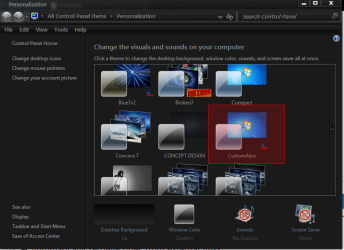
Here you go try it & see if it's OK
Put the 2 (screenshot) in C/Windows/Resources/Themes
Then it will be in Personalization as CustomAero (screenshot)
Jerry
 

Attachments

  • theme.png
    theme.png
    24.8 KB · Views: 16
  • theme2.png
    theme2.png
    52.3 KB · Views: 21
  • CustomAero.zip
    CustomAero.zip
    870.1 KB · Views: 21

My Computer My Computer

Computer type
Laptop
Computer Manufacturer/Model Number
Sager NP9170
OS
Win 7 Pro x64 / Win 10 Pro
CPU
Intel(R) Core(TM) i7-3630QM CPU @ 2.40GHz
Motherboard
CLEVO P170EM
Memory
12 GB
Graphics Card(s)
(1) Intel(R) HD Graphics 4000 (2) NVIDIA GeForce GTX 675M
Sound Card
(1) Realtek High Definition Audio (2) Intel(R) Display Aud
Monitor(s) Displays
17.3
Screen Resolution
1920x1080
Hard Drives
(1) Samsung 860 EVO 500GB(OS) (1) Samsung 860 EVO 500GB(Data)
Keyboard
Backlite
Antivirus
MSE, Malwarebytes Pro
Browser
Firefox
Other Info
DESKTOP: Custom-built.
OS: Win 10 Pro x64.
CASE: Rosewill R5.
CPU: Intel I5 4670K CPU @ 3.40GHz.
CPU COOLER: Cool Master Hyper 212 EVO.
MOTHERBOARD: Asus Z87-A.
MEMORY: Kingston HyperX 2x4 GB.
GPU: Nvidia Geforce 650 TI.
PSU: Corsair TX750.
DRIVES: (1) Samsung 840 120 GB SSD (2) Western Digital blue 500 GB 7200 RPM.
Back
Top