
You are using an out of date browser. It may not display this or other websites correctly.
You should upgrade or use an alternative browser.
You should upgrade or use an alternative browser.
Has anyone here got the Samknows router setup?
- Thread starter Tarka Dal
- Start date


Hello Runkle,
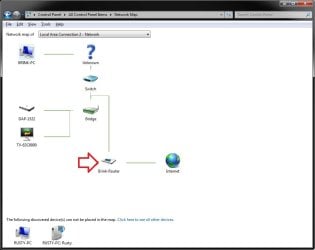
You should be able to open the Network and Sharing Center and click on the See full map link. This will open the Network Map where you can hover the mouse pointer over your listed router to see it's IP address and/or click on it to actually open the router's log in page in your default web browser.
Hope this helps,
Shawn
You should be able to open the Network and Sharing Center and click on the See full map link. This will open the Network Map where you can hover the mouse pointer over your listed router to see it's IP address and/or click on it to actually open the router's log in page in your default web browser.
Hope this helps,
Shawn
Last edited:
My Computer
- Computer type
- PC/Desktop
- Computer Manufacturer/Model Number
- Self built custom
- OS
- 64-bit Windows 11 Pro for Workstations
- CPU
- Intel i7-8700K OC'd to 5 GHz
- Motherboard
- ASUS ROG Maximus XI Formula Z390
- Memory
- 64 GB (4x16GB) G.SKILL TridentZ RGB DDR4 3600 MHz
- Graphics Card(s)
- ASUS ROG-STRIX-GTX1080TI-O11G-GAMING
- Sound Card
- Integrated
- Monitor(s) Displays
- 2 x Samsung Odyssey G7 27"
- Screen Resolution
- 2560x1440
- Hard Drives
- 1TB Samsung 990 PRO M.2,
4TB Samsung 990 PRO PRO M.2,
TerraMaster F8 SSD Plus NAS
- PSU
- Seasonic Prime Titanium 850W
- Case
- Thermaltake Core P3
- Cooling
- Corsair Hydro H115i
- Keyboard
- Logitech wireless K800
- Mouse
- Logitech MX Master 4
- Internet Speed
- 2 Gb/s Download and 100 Mb/s Upload
- Antivirus
- Malwarebyte Anti-Malware Premium
- Browser
- Google Chrome
- Other Info
- Logitech Z625 speaker system,
Logitech BRIO 4K Pro webcam,
HP Color LaserJet Pro MFP M477fdn,
APC SMART-UPS RT 1000 XL - SURT1000XLI,
Galaxy S23 Plus phone
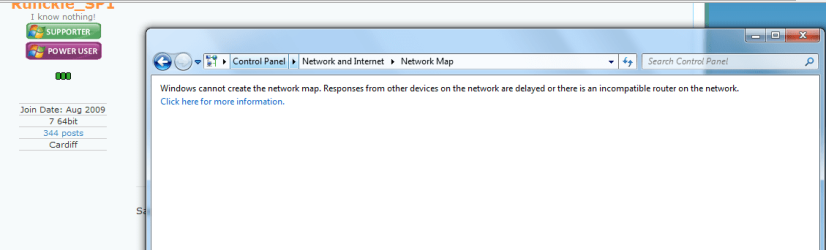
See if refreshing (F5 or Alt+V+Refresh) that window a few times, or restarting the computer and trying again may help get the map.
My Computer
- Computer type
- PC/Desktop
- Computer Manufacturer/Model Number
- Self built custom
- OS
- 64-bit Windows 11 Pro for Workstations
- CPU
- Intel i7-8700K OC'd to 5 GHz
- Motherboard
- ASUS ROG Maximus XI Formula Z390
- Memory
- 64 GB (4x16GB) G.SKILL TridentZ RGB DDR4 3600 MHz
- Graphics Card(s)
- ASUS ROG-STRIX-GTX1080TI-O11G-GAMING
- Sound Card
- Integrated
- Monitor(s) Displays
- 2 x Samsung Odyssey G7 27"
- Screen Resolution
- 2560x1440
- Hard Drives
- 1TB Samsung 990 PRO M.2,
4TB Samsung 990 PRO PRO M.2,
TerraMaster F8 SSD Plus NAS
- PSU
- Seasonic Prime Titanium 850W
- Case
- Thermaltake Core P3
- Cooling
- Corsair Hydro H115i
- Keyboard
- Logitech wireless K800
- Mouse
- Logitech MX Master 4
- Internet Speed
- 2 Gb/s Download and 100 Mb/s Upload
- Antivirus
- Malwarebyte Anti-Malware Premium
- Browser
- Google Chrome
- Other Info
- Logitech Z625 speaker system,
Logitech BRIO 4K Pro webcam,
HP Color LaserJet Pro MFP M477fdn,
APC SMART-UPS RT 1000 XL - SURT1000XLI,
Galaxy S23 Plus phone
See if refreshing (F5 or Alt+V+Refresh) that window a few times, or restarting the computer and trying again may help get the map.
Thanks for your help Shawn but no go on F5...Or reboot...apparently it is something to do with LLTD

My Computer
- OS
- Stools
I found this that may help. 
http://fcc.samknows.com/faq.html
Review and Installation of NETGEAR WNR3500L Wireless-N Gigabit Open Source Router (Page 1 of 2): MyOpenRouter
Router is suppose to be the Netgear WNR3500L.
Log in info:
Router and Networking FAQ
http://fcc.samknows.com/faq.html
Review and Installation of NETGEAR WNR3500L Wireless-N Gigabit Open Source Router (Page 1 of 2): MyOpenRouter
Router is suppose to be the Netgear WNR3500L.
Log in info:
Router and Networking FAQ
My Computer
- Computer type
- PC/Desktop
- Computer Manufacturer/Model Number
- Self built custom
- OS
- 64-bit Windows 11 Pro for Workstations
- CPU
- Intel i7-8700K OC'd to 5 GHz
- Motherboard
- ASUS ROG Maximus XI Formula Z390
- Memory
- 64 GB (4x16GB) G.SKILL TridentZ RGB DDR4 3600 MHz
- Graphics Card(s)
- ASUS ROG-STRIX-GTX1080TI-O11G-GAMING
- Sound Card
- Integrated
- Monitor(s) Displays
- 2 x Samsung Odyssey G7 27"
- Screen Resolution
- 2560x1440
- Hard Drives
- 1TB Samsung 990 PRO M.2,
4TB Samsung 990 PRO PRO M.2,
TerraMaster F8 SSD Plus NAS
- PSU
- Seasonic Prime Titanium 850W
- Case
- Thermaltake Core P3
- Cooling
- Corsair Hydro H115i
- Keyboard
- Logitech wireless K800
- Mouse
- Logitech MX Master 4
- Internet Speed
- 2 Gb/s Download and 100 Mb/s Upload
- Antivirus
- Malwarebyte Anti-Malware Premium
- Browser
- Google Chrome
- Other Info
- Logitech Z625 speaker system,
Logitech BRIO 4K Pro webcam,
HP Color LaserJet Pro MFP M477fdn,
APC SMART-UPS RT 1000 XL - SURT1000XLI,
Galaxy S23 Plus phone
I found this that may help.
http://fcc.samknows.com/faq.html
Review and Installation of NETGEAR WNR3500L Wireless-N Gigabit Open Source Router (Page 1 of 2): MyOpenRouter
Router is suppose to be the Netgear WNR3500L.
Log in info:
Router and Networking FAQ
Ohhh Shawn thanks mate... But, I have a Linksys WRT160NL That's why I am finding It so hard to find the ip address....Cheers
My Computer
- OS
- Stools

Did you get it through the SamKnows/FCC Speed Test project?
My Computer
- Computer type
- PC/Desktop
- Computer Manufacturer/Model Number
- Lenovo IdeaCenter 450
- OS
- Windows 10 Pro X64
- CPU
- Intel Quad Core i7-4770 @ 3.4Ghz
- Memory
- 16.0GB PC3-12800 DDR3 SDRAM 1600 MHz
- Graphics Card(s)
- Intel Integrated HD Graphics
- Sound Card
- Realtek HD Audio
- Monitor(s) Displays
- HP 22" LCD
- Screen Resolution
- 1680 x 1050
- Hard Drives
- 250GB Samsung EVO SATA-3 SSD
2TB Seagate ST2000DM001 SATA-2
1.5TB Seagate ST3150041AS SATA
- Keyboard
- Dell USB
- Mouse
- Lenovo USB
- Internet Speed
- Cable via Road Runner 3MB Upload, 30MB Download
- Antivirus
- Windows Defender, MBAM Pro, MBAE
- Browser
- Seamonkey
- Other Info
- UEFI/GPT
PLDS DVD-RW DH16AERSH
Runkle,
Strange, it should be 192.168.1.1 according to the product page and manual for it below. Did it not come with any paperwork, or a number or site to look it up at? Since it's a FCC Samknows version, it may have been changed when they modified it.
Product page:
Linksys by Cisco Wireless-N Broadband Router with Storage Link WRT160NL
PDF manual:
http://downloads.linksysbycisco.com/downloads/userguide/1224641340473/WRT160NL_V10_UG_NC-WEB.pdf
See if this may help.
How do I get access to my unit's configuration page?
Your unit can be accessed by browsing to http://www.routerlogin.net on a PC currently connected to the unit, be it by wireless or by direct ethernet connection. You will be prompted for a username and password - please use "admin" and "password" to log in. We strongly recommend you change the password to something secure once you've logged on to the device, via "Set Password" under "Maintenance" on the left-hand side. If your Samknows unit is currently in bridge mode, please use http://netgearsetup.samknows.com instead.
Strange, it should be 192.168.1.1 according to the product page and manual for it below. Did it not come with any paperwork, or a number or site to look it up at? Since it's a FCC Samknows version, it may have been changed when they modified it.
Product page:
Linksys by Cisco Wireless-N Broadband Router with Storage Link WRT160NL
PDF manual:
http://downloads.linksysbycisco.com/downloads/userguide/1224641340473/WRT160NL_V10_UG_NC-WEB.pdf
See if this may help.
How do I get access to my unit's configuration page?
Your unit can be accessed by browsing to http://www.routerlogin.net on a PC currently connected to the unit, be it by wireless or by direct ethernet connection. You will be prompted for a username and password - please use "admin" and "password" to log in. We strongly recommend you change the password to something secure once you've logged on to the device, via "Set Password" under "Maintenance" on the left-hand side. If your Samknows unit is currently in bridge mode, please use http://netgearsetup.samknows.com instead.
My Computer
- Computer type
- PC/Desktop
- Computer Manufacturer/Model Number
- Self built custom
- OS
- 64-bit Windows 11 Pro for Workstations
- CPU
- Intel i7-8700K OC'd to 5 GHz
- Motherboard
- ASUS ROG Maximus XI Formula Z390
- Memory
- 64 GB (4x16GB) G.SKILL TridentZ RGB DDR4 3600 MHz
- Graphics Card(s)
- ASUS ROG-STRIX-GTX1080TI-O11G-GAMING
- Sound Card
- Integrated
- Monitor(s) Displays
- 2 x Samsung Odyssey G7 27"
- Screen Resolution
- 2560x1440
- Hard Drives
- 1TB Samsung 990 PRO M.2,
4TB Samsung 990 PRO PRO M.2,
TerraMaster F8 SSD Plus NAS
- PSU
- Seasonic Prime Titanium 850W
- Case
- Thermaltake Core P3
- Cooling
- Corsair Hydro H115i
- Keyboard
- Logitech wireless K800
- Mouse
- Logitech MX Master 4
- Internet Speed
- 2 Gb/s Download and 100 Mb/s Upload
- Antivirus
- Malwarebyte Anti-Malware Premium
- Browser
- Google Chrome
- Other Info
- Logitech Z625 speaker system,
Logitech BRIO 4K Pro webcam,
HP Color LaserJet Pro MFP M477fdn,
APC SMART-UPS RT 1000 XL - SURT1000XLI,
Galaxy S23 Plus phone
Did you get it through the SamKnows/FCC Speed Test project?
Yes but they have not responded...???
Runkle,
Strange, it should be 192.168.1.1 according to the product page and manual for it below. Did it not come with any paperwork, or a number or site to look it up at? Since it's a FCC Samknows version, it may have been changed when they modified it.
Product page:
Linksys by Cisco Wireless-N Broadband Router with Storage Link WRT160NL
PDF manual:
http://downloads.linksysbycisco.com/downloads/userguide/1224641340473/WRT160NL_V10_UG_NC-WEB.pdf
See if this may help.
How do I get access to my unit's configuration page?
Your unit can be accessed by browsing to http://www.routerlogin.net on a PC currently connected to the unit, be it by wireless or by direct ethernet connection. You will be prompted for a username and password - please use "admin" and "password" to log in. We strongly recommend you change the password to something secure once you've logged on to the device, via "Set Password" under "Maintenance" on the left-hand side. If your Samknows unit is currently in bridge mode, please use http://netgearsetup.samknows.com instead.
Thanks but these are no help!
My Computer
- OS
- Stools

I just got my SamKnows router but it is a Netgear. When you open Network and Sharing Center can you see the Router. If not check your cable from the PC to the Router. There should be a pin hole in the back to reset the router to default. Give it a try and let us know.
Jim
Jim
My Computer
- Computer type
- PC/Desktop
- Computer Manufacturer/Model Number
- Home Built
- OS
- Windows 8.1 Pro w/Media Center 64bit, Windows 7 HP 64bit
- CPU
- Phenom II X6 1100T
- Motherboard
- ASUS M5A99X EVO
- Memory
- Crucial Balistic 8gb DDR3-1866 CL9
- Graphics Card(s)
- MSI R6850 Cyclone IGD5 PE
- Sound Card
- On Board
- Monitor(s) Displays
- ASUS VE258Q 25" LED with DVI-HDMI-DisplayPort
- Screen Resolution
- 1920 x 1080
- Hard Drives
- Two WD Cavier Black 2TB Sata III, WD My Book Essential 2TB USB 3.0
- PSU
- Seasonic X650 80 Plus GOLD Modular
- Case
- Corsair 400R
- Cooling
- Antec Kuhler H2O 620, Two 120mm and four 140mm
- Keyboard
- Logitech K120
- Mouse
- Logitech Marble Mouse USB, Logitech Precision Game Pad
- Internet Speed
- 15MB
- Antivirus
- Norton IS 2013, Malwarebytes Pro Beta 2
- Browser
- IE-11, FF-27
- Other Info
- APC UPS ES 750, Netgear WNR3500L Gigabit & Wireless N Router with SamKnows Test Program, Motorola SB6120 Gigabit Cable Modem. Brother HL-2170W Laser Printer, Epson V300 Scanner
The OP is in England and not part of the FCC/SamKnows project.
However it seam that SamKnows is working with OFcom in England on a similar project.
Ofcom | Help us test broadband speed claims
The routers should be standard with just the test programs loaded into the program. All the normal functions are not affected with normal login procedure.
Jim
However it seam that SamKnows is working with OFcom in England on a similar project.
Ofcom | Help us test broadband speed claims
The routers should be standard with just the test programs loaded into the program. All the normal functions are not affected with normal login procedure.
Jim
My Computer
- Computer type
- PC/Desktop
- Computer Manufacturer/Model Number
- Home Built
- OS
- Windows 8.1 Pro w/Media Center 64bit, Windows 7 HP 64bit
- CPU
- Phenom II X6 1100T
- Motherboard
- ASUS M5A99X EVO
- Memory
- Crucial Balistic 8gb DDR3-1866 CL9
- Graphics Card(s)
- MSI R6850 Cyclone IGD5 PE
- Sound Card
- On Board
- Monitor(s) Displays
- ASUS VE258Q 25" LED with DVI-HDMI-DisplayPort
- Screen Resolution
- 1920 x 1080
- Hard Drives
- Two WD Cavier Black 2TB Sata III, WD My Book Essential 2TB USB 3.0
- PSU
- Seasonic X650 80 Plus GOLD Modular
- Case
- Corsair 400R
- Cooling
- Antec Kuhler H2O 620, Two 120mm and four 140mm
- Keyboard
- Logitech K120
- Mouse
- Logitech Marble Mouse USB, Logitech Precision Game Pad
- Internet Speed
- 15MB
- Antivirus
- Norton IS 2013, Malwarebytes Pro Beta 2
- Browser
- IE-11, FF-27
- Other Info
- APC UPS ES 750, Netgear WNR3500L Gigabit & Wireless N Router with SamKnows Test Program, Motorola SB6120 Gigabit Cable Modem. Brother HL-2170W Laser Printer, Epson V300 Scanner
Similar threads

- Replies
- 19
- Views
- 7K
- Replies
- 4
- Views
- 16K

