Solved Anyone here familiar with DVDStyler? Menu setup question...

Gums

New member
Power User
Local time
12:38 PM
Messages
106
There is a forum for DVDStyler itself but that place is a veritable ghost town. My menu setup is basically very simple. I have a main menu (vmMenu) which shows the title and beneath that two buttons, "Play All" and "Chapters". Page two (Menu 1) has three titles on it. When I select "Chapters" on the vmMENU, I'm taken to page two (Menu 1) and I'm highlighted on the second title, not the first title as one would think. Shouldn't one be taken by default to select the first title, first? I have to move or select backward one title every time I select Chapters. Can't seem to get it to start with title 1. It does work if it plays automatically but you'd never get to see the rest of the chapters menu. Everything else works as it should, even added a video loop and music to the main menu. It's just that I'm taken to Title 2 every time I select Chapters. If anyone has any DVDStyler insight, I'd be most appreciative in hearing from you. Thank you.
 

My Computer My Computer

At a glance

Windows 7 64 bit
OS
Windows 7 64 bit
Hi Gums, DVDStyler always starts with title one. To set chapters, look inside the red box in my pdf.
 

My Computer My Computer

At a glance

Win7 H.Prem. 32bit+SP1
Computer Manufacturer/Model Number
Look in my Signature.
OS
Win7 H.Prem. 32bit+SP1
Mine always starts with Title Two. Here's my Main Menu. I use vmMenu instead of Menu 1 for the Main Menu. Does that matter? Pretty basic setup Title, Play All and Chapters.
Auschwitz 3.jpg

Here's the Chapter Menu (Menu 1) or page Two:

Auschwitz 4.jpg

Notice how the second title is highlighted. The happens by default when I select "Chapters" from the Previous Menu. Why on God's green earth is the initial selected thumbnail the second one instead of the first? Arrrrgh!!!

You'd think it would automatically allow one to scroll or select titles in order. One, two, three, etc. My starts with Title #2.

*** FYI, I DO NOT have any sympathies to any neo-Nazi or fascist organizations. I'm merely a history buff archiving shows from my DVR. ***
 
Last edited:

My Computer My Computer

At a glance

Windows 7 64 bit
OS
Windows 7 64 bit
I found a solution and here it is (just in case someone with a similar problem should read this thread). I always post what works in my threads and never leave them unresolved if I've found the solution. Anyway, found this web page:
DVD Authoring with DVDStyler

It's a great resource for using DVDStyler even if the version presented is not current. My version, as of December 27, 2011 is version 2.0.1

Found this about halfway down the page:
DVDStyler  hint.PNG
This command forces the focus (another term for the command given by the remote control) to the first button on the menu. My "focus" always began with the second button on the Chapters Menu. This command will highlight the first button on the menu for the option of selecting or moving on to the next button.


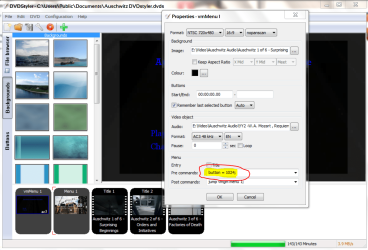
Here's what it looks like when I add that to my version of DVDStyler on the vmMenu page (Main menu).

vmMenu2.PNG
Right click on your menu and select "Properties" to get the window pop up seen here. Go to the Pre Commands field and enter: button = 1024;
Enter it exactly as presented including semicolon. I have it highlighted in yellow and circled in red.

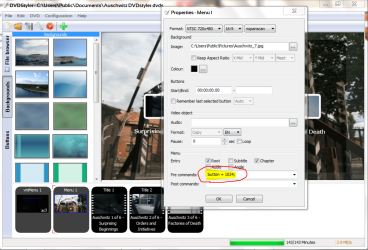
Go to any other applicable menu and do the same. In my case I was having an issue with the highlighted title being the second title on my chapter page and not the first as one would think was the default setting. The command "button = 1024;" forces the focus (remote control command) directly to the first button on a menu. Here's my second menu or Chapters menu:

chapter menu 2.PNG

Again, I have the field highlighted in yellow and circled in red even though it looks identical to the window from the previous menu.

And here is the end result as it appears on the Chapters Menu:

end result.jpg


Hope this helps anyone with any DVDStyler menu set ups. Thanks!
 

My Computer My Computer

At a glance

Windows 7 64 bit
OS
Windows 7 64 bit
  • Like
Reactions: JMH
Gums
I had to join this forum just to say a huge thank you for taking the trouble to set out your solution, and making it crystal clear.
Two years after your message I've just found and started using DVDStyler and the same problem is still there! I was despairing of continuing to use it because nothing in the GUI menus seemed to fix it. Now all is OK.
I'm now resolved to follow your example and always make sure I go back to my own forum queries and post any solution I end up with.
Mike
 

My Computer My Computer

At a glance

Windows 7
Computer type
PC/Desktop
OS
Windows 7
Back
Top