Solved Intellipoint 8.0 - Lost Settings

SCTechGuy

New member
Local time
8:21 AM
Messages
12
Location
South Carolina
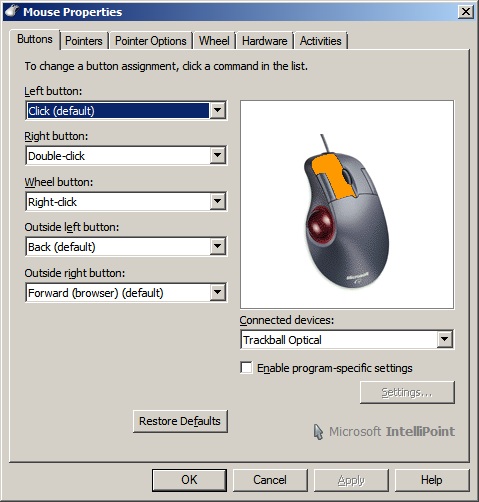
Ever since I've updated the Intellipoint software to 8.01, I've fallen prone to this random reset to factory defaults from my current custom button settings on my Trackball Optical. The funny part is that the functions will return to default but when you open the settings control panel, they still show the custom settings as shown in the picture below.

My exact custom settings:
7BEpR.jpg


What I'm wondering at this point, has anyone else run into this problem and if so, found a solution to it, besides having to restart the computer?
 
Last edited:

My Computer My Computer

Computer type
PC/Desktop
Computer Manufacturer/Model Number
Custom built
OS
Windows 7 Ultimate x64 SP1
CPU
AMD Phenom II x4 965
Motherboard
Asus M4A785TD-V EVO
Memory
16 GB
Graphics Card(s)
AMD HD 6950 (PCI-e)
Sound Card
Sound Blaster X-Fi Titanium (PCI-e)
Monitor(s) Displays
Samsung LCD-TV, Samsung SyncMaster 213T
Screen Resolution
1920x1080, 1600x1200
Hard Drives
WD 1 GB (SATA)
WD 3 GB (SATA)

My Computer My Computer

Computer type
PC/Desktop
Computer Manufacturer/Model Number
Black Shadow IV
OS
Win7 x64
CPU
i5-3570K
Motherboard
Asrock Z77 Extreme4
Memory
2x4GB Rip Jaws 8-9-9-24
Graphics Card(s)
Asus R9 280X
Sound Card
X-Fi Extreme Music
Monitor(s) Displays
Dell U2412M
Screen Resolution
1920x1200
Hard Drives
Samsung Evo 250GB /
OCZ Vertex 4 128GB
PSU
Seasonic 660XP2
Case
Fractal Design R4
Cooling
Noctua NH-U12S
I had my mouse and or keyboard re-installing 8.0 after I updated to sp1. Seems there might be a WU or something. I re-installed both drivers and problem went away.

fyi:
Mouclass.sys and mouhid.sys files did not update with SP1

At present, I haven't been able to update to SP1 but that's another problem I'm having altogether. So it's not SP1 problem...yet, but I will keep this in mind after I get SP1 working.

 

My Computer My Computer

Computer type
PC/Desktop
Computer Manufacturer/Model Number
Custom built
OS
Windows 7 Ultimate x64 SP1
CPU
AMD Phenom II x4 965
Motherboard
Asus M4A785TD-V EVO
Memory
16 GB
Graphics Card(s)
AMD HD 6950 (PCI-e)
Sound Card
Sound Blaster X-Fi Titanium (PCI-e)
Monitor(s) Displays
Samsung LCD-TV, Samsung SyncMaster 213T
Screen Resolution
1920x1080, 1600x1200
Hard Drives
WD 1 GB (SATA)
WD 3 GB (SATA)

My Computer My Computer

Computer type
PC/Desktop
Computer Manufacturer/Model Number
Custom Built
OS
Windows 10 Pro x64, Windows 8.1 Pro x64, Windows 7 Ultimate x64 SP1,
CPU
INTEL i9-7920X LGA 2066
Motherboard
Gigabyte X299-WU8 F3
Memory
64 GB (4 X 16 GB) G-Skill V Series DDR4 3200 Quad Channel
Graphics Card(s)
EVGA GTX 1060 SC 3 GB
Sound Card
Realtek Onboard ALC1220
Monitor(s) Displays
2 x Samsung S27E310
Screen Resolution
1920x1080
Hard Drives
Samsung 2 x 970 EVO Plus 500 GB NVMe
1 x 6TB WD 6003FZBX SATA
1 x 6TB WD 60EFRX SATA
12 x 3TB WD 30EFRX SATA
PSU
Seasonic X-1050
Case
Thermaltake Armor+
Cooling
Corsair H80i V2 Liquid AOI Cooler
Keyboard
Logitech G510s
Mouse
Logitech MX Master 2S
Internet Speed
200 Mb/s
Antivirus
ESET NOD32 13.1
Browser
EDGE (Dev, Canary, Beta), Chrome
Other Info
ASUS RT-AC68U router
Malwarebytes 4.0.4

My Computer My Computer

Computer type
PC/Desktop
Computer Manufacturer/Model Number
Custom built
OS
Windows 7 Ultimate x64 SP1
CPU
AMD Phenom II x4 965
Motherboard
Asus M4A785TD-V EVO
Memory
16 GB
Graphics Card(s)
AMD HD 6950 (PCI-e)
Sound Card
Sound Blaster X-Fi Titanium (PCI-e)
Monitor(s) Displays
Samsung LCD-TV, Samsung SyncMaster 213T
Screen Resolution
1920x1080, 1600x1200
Hard Drives
WD 1 GB (SATA)
WD 3 GB (SATA)
Back
Top