RealGem
New member
Hi,
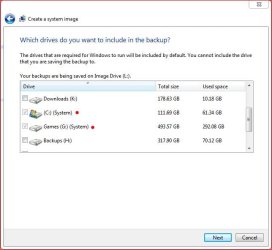
I have now tried two ways to do a Windows Backup. My desktop hard drive is only 250GB and I know I have 755GB fee on my 1TB external hard drive, because it told me (both in the System Image setup and on the drive properties; y'know with the pie diagram).
So I know I have over three times as much space as I need. But it won't let me do a Backup nor a System Image onto the external hard drive, and the reason given is "not enough free space"! :shock:
Anyone know why this might be?
Thanks a lot
I have now tried two ways to do a Windows Backup. My desktop hard drive is only 250GB and I know I have 755GB fee on my 1TB external hard drive, because it told me (both in the System Image setup and on the drive properties; y'know with the pie diagram).
So I know I have over three times as much space as I need. But it won't let me do a Backup nor a System Image onto the external hard drive, and the reason given is "not enough free space"! :shock:
Anyone know why this might be?
Thanks a lot
My Computer
- Computer type
- PC/Desktop
- Computer Manufacturer/Model Number
- iBuild™ custom PC
- OS
- Windows 7 Home Premium 64 bit
- CPU
- Intel® Core™ i5 650 Dual Core 2x 3.2Ghz 4MB Cache
- Motherboard
- ASUS P7H55-M 6x Rear USB 2.0 2x Front
- Memory
- Samsung 4GB (2x2GB) DDR3 1333MHz
- Graphics Card(s)
- nvidia GT430 1GB Graphics Card
- Sound Card
- Built-in audio
- Monitor(s) Displays
- Videoseven CMC 17" AD
- Screen Resolution
- 1280 x 1024
- Hard Drives
- 250GB 7200RPM SATA II
Hitachi 1TB Serial ATA II 32MB cache
- PSU
- Corsair 500Watt PSU
- Case
- Gigabyte GZ-X2 Black ATX MIDI Tower Case
- Cooling
- Standard CPU Cooling Fan
- Keyboard
- Packard Bell 9205
- Mouse
- Microsoft IntelliMouse Optical
- Internet Speed
- Supposed to be 100mbps (Average: 54mbps!)
- Other Info
- Also Windows 7 64 Bit on my Acer i3 Laptop


 confused