Hi All.
I'm have an issue using Remotes Assitance.
I'm tryinging to connect using Remote Assistance to my Win7 desktop to another Win7 desktop. Everyone has full updates to SP1
I am positive the problem is on my end. I have tested hooking up to the remote computer using another computer and it works perfectly. I was also able to hookup from the remote computer to my desktop that has the issue. This is weird.
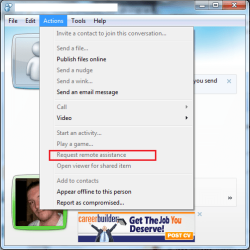
When I receive the Remote Assitance request I accept.
I then enter the password generated by the other computer and hit connect.
After 5-10 seconds it says it failed with the generic statement. I have tried troubleshooting but it comes up with no answers.
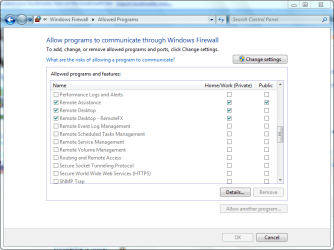
I have Remote Assistance actived on my computer but I think I may have turned something off in my network sharing that may have caused this problem.
I am unable to find anything that may cause no connection and looking for your suggestions. I have run sfc /scannow with no problems.
I would like to try and find the needle in the haystack before I do a full clean reinstall.
Thanks in advance.
I'm have an issue using Remotes Assitance.
I'm tryinging to connect using Remote Assistance to my Win7 desktop to another Win7 desktop. Everyone has full updates to SP1
I am positive the problem is on my end. I have tested hooking up to the remote computer using another computer and it works perfectly. I was also able to hookup from the remote computer to my desktop that has the issue. This is weird.
When I receive the Remote Assitance request I accept.
I then enter the password generated by the other computer and hit connect.
After 5-10 seconds it says it failed with the generic statement. I have tried troubleshooting but it comes up with no answers.
I have Remote Assistance actived on my computer but I think I may have turned something off in my network sharing that may have caused this problem.
I am unable to find anything that may cause no connection and looking for your suggestions. I have run sfc /scannow with no problems.
I would like to try and find the needle in the haystack before I do a full clean reinstall.
Thanks in advance.
My Computer
At a glance
Windows 10 ProIntel i5I'm old and lost a few chipsYup
- Computer type
- PC/Desktop
- Computer Manufacturer/Model Number
- Self Built
- OS
- Windows 10 Pro
- CPU
- Intel i5
- Motherboard
- I have a fatherboard
- Memory
- I'm old and lost a few chips
- Graphics Card(s)
- Yup
- Sound Card
- Yup
- Monitor(s) Displays
- Samsung 32" UHD
- Screen Resolution
- 3840 x 2160
- Hard Drives
- Samsung 860 EVO drives
- PSU
- 450 Watt and some fans that blow
- Case
- Small tower
- Cooling
- Yes I am cool. lol
- Keyboard
- Who needs a keyboard?
- Mouse
- Logitech Laser G7 wireless
- Internet Speed
- Zippy fast UP and DOWN
- Antivirus
- I got a shot
- Browser
- The new Improved EDGE 2020