Solved Remote Assistance Win7 to Win7

IggyAZ

A Sr. Senior Member
Guru
VIP
Local time
8:32 AM
Messages
846
Location
Desert SW
Hi All.
I'm have an issue using Remotes Assitance.

I'm tryinging to connect using Remote Assistance to my Win7 desktop to another Win7 desktop. Everyone has full updates to SP1
I am positive the problem is on my end. I have tested hooking up to the remote computer using another computer and it works perfectly. I was also able to hookup from the remote computer to my desktop that has the issue. This is weird.

When I receive the Remote Assitance request I accept.

I then enter the password generated by the other computer and hit connect.

After 5-10 seconds it says it failed with the generic statement. I have tried troubleshooting but it comes up with no answers.

I have Remote Assistance actived on my computer but I think I may have turned something off in my network sharing that may have caused this problem.
I am unable to find anything that may cause no connection and looking for your suggestions. I have run sfc /scannow with no problems.

I would like to try and find the needle in the haystack before I do a full clean reinstall. :eek:

Thanks in advance.
 

My Computer My Computer

At a glance

Windows 10 ProIntel i5I'm old and lost a few chipsYup
Computer type
PC/Desktop
Computer Manufacturer/Model Number
Self Built
OS
Windows 10 Pro
CPU
Intel i5
Motherboard
I have a fatherboard
Memory
I'm old and lost a few chips
Graphics Card(s)
Yup
Sound Card
Yup
Monitor(s) Displays
Samsung 32" UHD
Screen Resolution
3840 x 2160
Hard Drives
Samsung 860 EVO drives
PSU
450 Watt and some fans that blow
Case
Small tower
Cooling
Yes I am cool. lol
Keyboard
Who needs a keyboard?
Mouse
Logitech Laser G7 wireless
Internet Speed
Zippy fast UP and DOWN
Antivirus
I got a shot
Browser
The new Improved EDGE 2020
Hi,

It could be that your firewall settings have somehow changed.

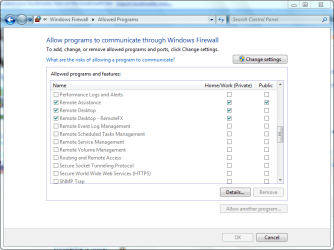
Type firewall into the Start search box and click Allow a program through Windows Firewall. Next, scroll down to the Remote entries like shown below.

Firewall.PNG

Make sure that you are allowing the following...

Remote Assistance
Remote Desktop
Remote Desktop - RemoteFX

Hope it helps :)


OS
 

My Computer My Computer

At a glance

Windows 7 Ultimate x64AMD Sempron Dual Core3GBNVIDIA GeForce 6150SE nForce 430
Computer Manufacturer/Model Number
Compaq Desktop
OS
Windows 7 Ultimate x64
CPU
AMD Sempron Dual Core
Memory
3GB
Graphics Card(s)
NVIDIA GeForce 6150SE nForce 430
Screen Resolution
1024x768
Hard Drives
150GB Sata
Orbital Shark
All are checked just like yours but still no go.
Remote Assistance
Remote Desktop
Remote Desktop - RemoteFX

Next suggestion
 

My Computer My Computer

At a glance

Windows 10 ProIntel i5I'm old and lost a few chipsYup
Computer type
PC/Desktop
Computer Manufacturer/Model Number
Self Built
OS
Windows 10 Pro
CPU
Intel i5
Motherboard
I have a fatherboard
Memory
I'm old and lost a few chips
Graphics Card(s)
Yup
Sound Card
Yup
Monitor(s) Displays
Samsung 32" UHD
Screen Resolution
3840 x 2160
Hard Drives
Samsung 860 EVO drives
PSU
450 Watt and some fans that blow
Case
Small tower
Cooling
Yes I am cool. lol
Keyboard
Who needs a keyboard?
Mouse
Logitech Laser G7 wireless
Internet Speed
Zippy fast UP and DOWN
Antivirus
I got a shot
Browser
The new Improved EDGE 2020
There's always the RD Gateway settings...

Type remote into the Start box and click Remote Desktop Connection. Click the Options dropdown and under the Advanced tab click Settings. Make sure that Automatically detect RD Gateway server settings is checked by default.

Gateway.PNG
 

My Computer My Computer

At a glance

Windows 7 Ultimate x64AMD Sempron Dual Core3GBNVIDIA GeForce 6150SE nForce 430
Computer Manufacturer/Model Number
Compaq Desktop
OS
Windows 7 Ultimate x64
CPU
AMD Sempron Dual Core
Memory
3GB
Graphics Card(s)
NVIDIA GeForce 6150SE nForce 430
Screen Resolution
1024x768
Hard Drives
150GB Sata
There's always the RD Gateway settings...

Type remote into the Start box and click Remote Desktop Connection. Click the Options dropdown and under the Advanced tab click Settings. Make sure that Automatically detect RD Gateway server settings is checked by default.

View attachment 141908

Thank you again Orbital Shark.
It is exactly what you said it should be. No change.
Now you can see why this has stumped me to no end.
I usually have the answers for others but this one, NOT.
 

My Computer My Computer

At a glance

Windows 10 ProIntel i5I'm old and lost a few chipsYup
Computer type
PC/Desktop
Computer Manufacturer/Model Number
Self Built
OS
Windows 10 Pro
CPU
Intel i5
Motherboard
I have a fatherboard
Memory
I'm old and lost a few chips
Graphics Card(s)
Yup
Sound Card
Yup
Monitor(s) Displays
Samsung 32" UHD
Screen Resolution
3840 x 2160
Hard Drives
Samsung 860 EVO drives
PSU
450 Watt and some fans that blow
Case
Small tower
Cooling
Yes I am cool. lol
Keyboard
Who needs a keyboard?
Mouse
Logitech Laser G7 wireless
Internet Speed
Zippy fast UP and DOWN
Antivirus
I got a shot
Browser
The new Improved EDGE 2020
Another option you could use is Windows Live Messenger...

1, Open up Messenger on both machines and log in (prefferably different accounts)
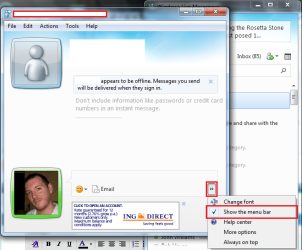
2, Start a conversation on the machine you wish to connect/give assistance to and click the highlighted parts in the pic below

MSN.PNG

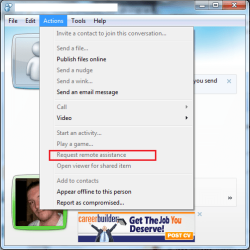
3, Click Actions then Request Remote Assistance

MSN 1.PNG

4, You will be prompted for a password, very much in the same manor as normal Remote Connection
5, Accept the Remote Connection on the machine you wish to use as the Remote Device and enter the password

This process could allow the standard Windows Remote Desktop Connection to work as intended


OS
 

My Computer My Computer

At a glance

Windows 7 Ultimate x64AMD Sempron Dual Core3GBNVIDIA GeForce 6150SE nForce 430
Computer Manufacturer/Model Number
Compaq Desktop
OS
Windows 7 Ultimate x64
CPU
AMD Sempron Dual Core
Memory
3GB
Graphics Card(s)
NVIDIA GeForce 6150SE nForce 430
Screen Resolution
1024x768
Hard Drives
150GB Sata
Another option you could use is Windows Live Messenger...

1, Open up Messenger on both machines and log in (prefferably different accounts)
2, Start a conversation on the machine you wish to connect/give assistance to and click the highlighted parts in the pic below

View attachment 141934

3, Click Actions then Request Remote Assistance

View attachment 141935

4, You will be prompted for a password, very much in the same manor as normal Remote Connection
5, Accept the Remote Connection on the machine you wish to use as the Remote Device and enter the password

This process could allow the standard Windows Remote Desktop Connection to work as intended


OS

That is exactly how we use it.
 

My Computer My Computer

At a glance

Windows 10 ProIntel i5I'm old and lost a few chipsYup
Computer type
PC/Desktop
Computer Manufacturer/Model Number
Self Built
OS
Windows 10 Pro
CPU
Intel i5
Motherboard
I have a fatherboard
Memory
I'm old and lost a few chips
Graphics Card(s)
Yup
Sound Card
Yup
Monitor(s) Displays
Samsung 32" UHD
Screen Resolution
3840 x 2160
Hard Drives
Samsung 860 EVO drives
PSU
450 Watt and some fans that blow
Case
Small tower
Cooling
Yes I am cool. lol
Keyboard
Who needs a keyboard?
Mouse
Logitech Laser G7 wireless
Internet Speed
Zippy fast UP and DOWN
Antivirus
I got a shot
Browser
The new Improved EDGE 2020

My Computer My Computer

At a glance

Windows 7 Ultimate 64 - OEM Service Pack 1Intel Core i7 930 2.80Ghz Bloomfield Socket L...Patriot Viper 6GB 3x2GB DDR3 PC3-1200C9 1600M...Asus ATI Radeon HD 5770 CuCore 1024MB GDDR5 P...
Computer Manufacturer/Model Number
Over Clockers Ultima Viper 2.80Ghz
OS
Windows 7 Ultimate 64 - OEM Service Pack 1
CPU
Intel Core i7 930 2.80Ghz Bloomfield Socket LGA 1366
Motherboard
Gigabyte GA-X58A-UD3R Intel X58 Socket 1366 DDR3
Memory
Patriot Viper 6GB 3x2GB DDR3 PC3-1200C9 1600Mhz Tri Channel
Graphics Card(s)
Asus ATI Radeon HD 5770 CuCore 1024MB GDDR5 PCI Express
Sound Card
Realtek ALC889 @ Intel 82801JB ICH10 - High Definition Audio
Monitor(s) Displays
Samsung SyncMaster 920N 19"
Screen Resolution
1280*1024
Hard Drives
1 x OCZ Vertex2 Series 120GB 2.5" SATA-II SSD
1 x Seagate Barracuda 7200.12 1TB SATA-II 32MB Cache
1 x Western Digital Caviar Green 2TB SATA-II 64 MB Cache
PSU
Corsair TX 650W ATX SLi
Case
Antec 902 Ultimate Gaming Case Black
Cooling
Prolimatech Megahalems Rev B CPU Cooler Socket 775/1156/1366
Keyboard
Microsoft Comfort Curve Keyboard
Mouse
Microsoft Optical USB
Internet Speed
ADSL24 FTTC 34.2 Mbps Down 7.1Mbps Up
Other Info
OcUK 22x DVDSATA ReWriter Black
Akasa AK-FN058 Apache Black Super Silent 120mm Fan
Printer Epson Stylus Photo R300
Scanner Canon Canoscan 8000F

My Computer My Computer

At a glance

Windows 10 ProIntel i5I'm old and lost a few chipsYup
Computer type
PC/Desktop
Computer Manufacturer/Model Number
Self Built
OS
Windows 10 Pro
CPU
Intel i5
Motherboard
I have a fatherboard
Memory
I'm old and lost a few chips
Graphics Card(s)
Yup
Sound Card
Yup
Monitor(s) Displays
Samsung 32" UHD
Screen Resolution
3840 x 2160
Hard Drives
Samsung 860 EVO drives
PSU
450 Watt and some fans that blow
Case
Small tower
Cooling
Yes I am cool. lol
Keyboard
Who needs a keyboard?
Mouse
Logitech Laser G7 wireless
Internet Speed
Zippy fast UP and DOWN
Antivirus
I got a shot
Browser
The new Improved EDGE 2020
Corrected by fresh new Win7 install

Well I decided to do a fresh Win7 install as I feel it was quickest.
Install went well as I had SP1 on my backup drive and within 2 1/2 hrs I was back to square one.
Oh... And MS Remote Assistance works great!

Thanks all for your help
 

My Computer My Computer

At a glance

Windows 10 ProIntel i5I'm old and lost a few chipsYup
Computer type
PC/Desktop
Computer Manufacturer/Model Number
Self Built
OS
Windows 10 Pro
CPU
Intel i5
Motherboard
I have a fatherboard
Memory
I'm old and lost a few chips
Graphics Card(s)
Yup
Sound Card
Yup
Monitor(s) Displays
Samsung 32" UHD
Screen Resolution
3840 x 2160
Hard Drives
Samsung 860 EVO drives
PSU
450 Watt and some fans that blow
Case
Small tower
Cooling
Yes I am cool. lol
Keyboard
Who needs a keyboard?
Mouse
Logitech Laser G7 wireless
Internet Speed
Zippy fast UP and DOWN
Antivirus
I got a shot
Browser
The new Improved EDGE 2020
Back
Top