7, I Hate!

Why don't you contact Microsoft and TELL THEM what upsets you???? Who knows, you might even help to get some changes made!!!
I will guarantee you that not one of these weekly ranters we have participated in the Windows 7 beta program and gave their feedback and comments. Not one.

You're right. To be a beta tester you must have a mind that is open to change. Enough said!
 

My Computer My Computer

Computer type
Laptop
Computer Manufacturer/Model Number
Hewlett-Packard/G62-107SA Notebook
OS
Microsoft Windows 7 Home Premium 64-bit Service Pack 1
CPU
Intel(R) Core(TM) i3 CPU M 330 @ 2.13GHz
Motherboard
Hewlett-Packard 1425
Memory
8 GB DDR3
Graphics Card(s)
Intel(R) HD Graphics
Sound Card
Realtek High Definition Audio
Monitor(s) Displays
Builtin
Screen Resolution
1366 x 768 x 32 bits (4294967296 colors) @ 60 Hz
Hard Drives
250 GB SATA Hard Disk Drive 7200 rpm
2TB Seagate GoFlex USB 2 Drive
1TB Iomega Prestige USB 2 Drive
1.5TB Iomega Prestige USB 2 Drive (Samsung)
2TB WD MyBook Live NAS.
Mouse
Logitech Anywhere MX
Internet Speed
152 Mbs download 10 Mbs upload
Antivirus
Norton 360
Browser
Chrome
That's really sad and unfortunate too, because the problems many of these people were ranting about were, for the most part, legitimate complaints that could've been/and should've been addressed by Microsoft.
 

My Computer My Computer

Computer Manufacturer/Model Number
HP Pavillion dv5t (generation 1)
OS
Vista 64 bit and 32 bit (SP2)
CPU
Intel(R) Core(TM)2 Duo Processor T9400 (2.53 GHz
Memory
4GB DDR2 System Memory (2 Dimm)
Graphics Card(s)
512 MB NVIDIA GeForce 9600M GT
Monitor(s) Displays
15.4" diagonal WSXGA+ High-Definition HP BrightView Widescre
Screen Resolution
1680 x 1050
Hard Drives
320GB 5400RPM SATA Hard Drive with HP ProtectSmart Hard Drive Protection
Keyboard
Built-in HP
Mouse
Built in - Synaptics TouchPad V6.5 on PS/2 Port
Internet Speed
Max
Other Info
~ Intel Next-Gen Wireless-N Mini-card w/Bluetooth ~ Blu-Ray ROM DVD+/-R/RW ~ Integ. HDTV Hybrid Tuner ~ 12 Cell Battery ~ MS Office (Home Premium) 2007 ~
It seems hard to believe that a select few individuals would have seen all of these issues, while the rest of the millions that were part of the beta simply missed them or forgot to mention them. I'm pretty sure the changes that were made were for a reason, whether we truly understand it or not. In fact, some of the changes might be a baby step for what is to come with future versions of Windows.
 

My Computer My Computer

Computer Manufacturer/Model Number
Self-Built in July 2009
OS
Windows 7 Ultimate x64
CPU
Intel Q9550 2.83Ghz OC'd to 3.40Ghz
Motherboard
Gigabyte GA-EP45-UD3R rev. 1.1, F12 BIOS
Memory
8GB G.Skill PI DDR2-800, 4-4-4-12 timings
Graphics Card(s)
EVGA 1280MB Nvidia GeForce GTX570
Sound Card
Realtek ALC899A 8 channel onboard audio
Monitor(s) Displays
23" Acer x233H
Screen Resolution
1920x1080
Hard Drives
Intel X25-M 80GB Gen 2 SSD
Western Digital 1TB Caviar Black, 32MB cache. WD1001FALS
PSU
Corsair 620HX modular
Case
Antec P182
Cooling
stock
Keyboard
ABS M1 Mechanical
Mouse
Logitech G9 Laser Mouse
Internet Speed
15/2 cable modem
Other Info
Windows and Linux enthusiast. Logitech G35 Headset.
That's really sad and unfortunate too, because the problems many of these people were ranting about were, for the most part, legitimate complaints that could've been/and should've been addressed by Microsoft.

Yes, It's interesting that most of the complaints are about libraries, probably the biggest and best change to windows file handling ever. Microsoft should have publicized the change much better and the help system is very basic. They took a fair bit of researching before I found them usable but now I am a big fan. The implementation however is, in places, flawed and inconsistent. There are too many restrictions and cases where if you use one feature you cant use another, but at least it's a start.
 

My Computer My Computer

Computer type
Laptop
Computer Manufacturer/Model Number
Hewlett-Packard/G62-107SA Notebook
OS
Microsoft Windows 7 Home Premium 64-bit Service Pack 1
CPU
Intel(R) Core(TM) i3 CPU M 330 @ 2.13GHz
Motherboard
Hewlett-Packard 1425
Memory
8 GB DDR3
Graphics Card(s)
Intel(R) HD Graphics
Sound Card
Realtek High Definition Audio
Monitor(s) Displays
Builtin
Screen Resolution
1366 x 768 x 32 bits (4294967296 colors) @ 60 Hz
Hard Drives
250 GB SATA Hard Disk Drive 7200 rpm
2TB Seagate GoFlex USB 2 Drive
1TB Iomega Prestige USB 2 Drive
1.5TB Iomega Prestige USB 2 Drive (Samsung)
2TB WD MyBook Live NAS.
Mouse
Logitech Anywhere MX
Internet Speed
152 Mbs download 10 Mbs upload
Antivirus
Norton 360
Browser
Chrome
I guess what surprises me about Libraries, is how simply they are to ignore. There is no reason to have to use them if you don't want to. For some things, I use them quite a bit. For others, I haven't bothered to build a library and instead just do it the normal way and it's no problem whatsoever switching back and forth between the two.
 

My Computer My Computer

Computer Manufacturer/Model Number
Self-Built in July 2009
OS
Windows 7 Ultimate x64
CPU
Intel Q9550 2.83Ghz OC'd to 3.40Ghz
Motherboard
Gigabyte GA-EP45-UD3R rev. 1.1, F12 BIOS
Memory
8GB G.Skill PI DDR2-800, 4-4-4-12 timings
Graphics Card(s)
EVGA 1280MB Nvidia GeForce GTX570
Sound Card
Realtek ALC899A 8 channel onboard audio
Monitor(s) Displays
23" Acer x233H
Screen Resolution
1920x1080
Hard Drives
Intel X25-M 80GB Gen 2 SSD
Western Digital 1TB Caviar Black, 32MB cache. WD1001FALS
PSU
Corsair 620HX modular
Case
Antec P182
Cooling
stock
Keyboard
ABS M1 Mechanical
Mouse
Logitech G9 Laser Mouse
Internet Speed
15/2 cable modem
Other Info
Windows and Linux enthusiast. Logitech G35 Headset.
I guess what surprises me about Libraries, is how simply they are to ignore. There is no reason to have to use them if you don't want to. For some things, I use them quite a bit. For others, I haven't bothered to build a library and instead just do it the normal way and it's no problem whatsoever switching back and forth between the two.

+1 I agree, i don't use them all the time either but they are there if i need them:)
 

My Computer My Computer

Computer Manufacturer/Model Number
Dell XPS 730
OS
Windows 7 Home Premium 64 bit
CPU
Intel Core 2 quad Extreme Q9770 @ 3.2 GHz
Memory
4x2 GB Muskin 1600 MHz ram
Graphics Card(s)
NVidia GTX 250
Sound Card
Soundblaster X-Fi Fatality Champion
Monitor(s) Displays
2 Dell 2007WFP Ultrascans
Screen Resolution
3360 x 1050
Hard Drives
WD Black 1TB sata, 2-WD Black 500 sata, 2-Seagate 500 Go external
PSU
1000 Watt
Cooling
air
Keyboard
MS Natrual Keyboard Pro
Mouse
Logitech Wireless Trackball
Internet Speed
DSL Elite
There is a basic problem for every (operating system) developer. If he propagates too many legacy functions, the system gets bloated and people will complain about that. It is also a cost problem for later maintenance. If he skips legacy functions, other people will complain that they cannot do things they used to do.

The developer is really caught between a rock and a hard place. Since I have done this for 35 years, I can assure you that a tremendous amount of thought goes into this one area.

The other problem is that some new function may make it impossible to continue an old function. E.g. some of the new Win7 screen functions seem to have prevented to carry forward the dock function from pushing a folder to the top of the screen.
 

My Computer My Computer

Computer Manufacturer/Model Number
HP, Dell, Gateway, Toshiba - 4 laptops and 2 desktops
OS
Vista, Windows7, Mint Mate, Zorin, Windows 8
CPU
from 1.6GHz Duo to i7
Monitor(s) Displays
2x HP w2207
Hard Drives
5x HDD, 7x SSD, 12x Externals
Keyboard
with trackball - no mices
Mouse
Trackball mice
Internet Speed
DSL 6000
There is also the size of the community to take into account. I too was a developer for many years fortunately for a relatively small group. Even here, where we had close integration with the users, there were always some were not happy to change the way things were done.
 

My Computer My Computer

Computer type
Laptop
Computer Manufacturer/Model Number
Hewlett-Packard/G62-107SA Notebook
OS
Microsoft Windows 7 Home Premium 64-bit Service Pack 1
CPU
Intel(R) Core(TM) i3 CPU M 330 @ 2.13GHz
Motherboard
Hewlett-Packard 1425
Memory
8 GB DDR3
Graphics Card(s)
Intel(R) HD Graphics
Sound Card
Realtek High Definition Audio
Monitor(s) Displays
Builtin
Screen Resolution
1366 x 768 x 32 bits (4294967296 colors) @ 60 Hz
Hard Drives
250 GB SATA Hard Disk Drive 7200 rpm
2TB Seagate GoFlex USB 2 Drive
1TB Iomega Prestige USB 2 Drive
1.5TB Iomega Prestige USB 2 Drive (Samsung)
2TB WD MyBook Live NAS.
Mouse
Logitech Anywhere MX
Internet Speed
152 Mbs download 10 Mbs upload
Antivirus
Norton 360
Browser
Chrome
I think the Libraries function is a very good feature if you learn how to use it. It puzzled me a bit at first but one good summary of that it is one place you can go to check a collection of similar files or data which are stored in different locations of the computer at the same time be it pictures, videos, documents, etc.. But of course you have to modify this yourself but believe me, its very easy and I thank God, they put this function.

In my case, I have a folder in my drive D: called "Videos" where I keep my video files of course but its a separate location from the "My Videos" area on the user folder. The solution: add both the "My Videos" folder and the "Videos" folder from my drive D: to the Videos Library so I can view them all as an organized list at the same time. And I still have the option to add even more locations to this library. You can do the same thing for your other libraries such as music, pictures and documents. You even have the option to make new libraries. If you wanna make it neat, you should store similar files on the folders you add into your library. Here is a screenshot demo I have for you. In my case, all the files you can see on the list are all videos, I keep my other files on their designated libraries.

Not only that. You are not stuck with the ones W7 provides you can create your own libraries with whatever you want in them.

View attachment 142041

Off topic, but how can you stand all the Norton Backup overlays?
 

My Computer My Computer

Computer type
PC/Desktop
Computer Manufacturer/Model Number
Custom Build
OS
Windows 7 Pro 64bit build 7601 SP1
CPU
Intel Core I5 3570K 3.4Ghz w/ Zalman CNPS9900NT RT
Motherboard
MSI Z77A-G45 Gaming
Memory
G.Skill F3-12800CL9D-8GbXL ; 4Gx2
Graphics Card(s)
EVGA Geforce GTX 770 Superclocked
Sound Card
Creative Sound Blaster Z
Monitor(s) Displays
Dual ViewSonic VX2770Smh-LED Black 27"IPS-Panel
Screen Resolution
1920x1080
Hard Drives
Kingston Hyper X 240GB SSD Win8 Pro 64bit 6GB/s Sata III
Intel 335 Series SSD 240GB Win8 Storage 6GB/s Sata III
Intel 320 Series SSD 600GB Storage 3GB/s Sata II
Western Digital Scorpio Black 1TB - Docked via Esata
PSU
Coolermaster GX 750W
Case
Corsair Vengence C70
Cooling
Coolermaster 120mm and Enermax 140mm
Keyboard
Corsair Vengence K70
Mouse
Logitech G500
Internet Speed
22mbps+
Browser
Firefox, Chrome, IE
Other Info
Swan M50W 2.1 speakers
APC UPS
Thermaltake BlacX HDD Dock
Samsung BD Optical Drive
Netgear WNDR4500
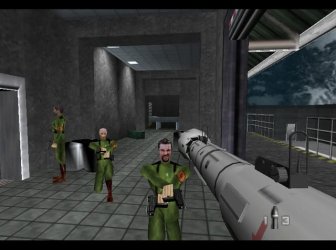
OK this is beyond me. I'm not sure if some settings were touched, but as far as I am concerned, I have not touched any regarding this.

A simple .jpg image fails to display properly.

XP viewer on the left, 7 Viewer on the right.

Ill include the original jpg. Compare with me please just to make sure it's not my computer the problem.
 

Attachments

  • goldeneye.png
    goldeneye.png
    246.3 KB · Views: 15
  • goldeneye007-1.jpg
    goldeneye007-1.jpg
    38.1 KB · Views: 13

My Computer My Computer

OS
7 Ultimate 64Bit
I gotta ask if that's the only JPG that shows up that way. Yes, it does the same thing on my box, and yes, it shows up fine in Picasa. The thing is, it's the only one in my collection of several hundred JPGs that shows like this in Windows Photo Viewer.
 

My Computer My Computer

Computer type
PC/Desktop
Computer Manufacturer/Model Number
iBuyPower NZXT
OS
Microsoft Windows 10 Home Build 15036
CPU
Intel(R) Core(TM) i7-860 @ 2.80GHz
Motherboard
Gigabyte Technology Co., Ltd. P55-UD3L
Memory
4.00 GB
Graphics Card(s)
NVIDIA GeForce GTX 750
Sound Card
(1) Line 6 UX2 (2) Realtek High Definition Audio
Monitor(s) Displays
23" acer
Screen Resolution
1920 x 1080 x 32 bits (4294967296 colors) @ 60 Hz
Hard Drives
(1) WDC WD5000AAKS-00D2B0 ATA Device (2) Seagate FreeAgent Go 250G USB Device
Cooling
Corsair H75 liquid cooler (Very easy to install, actually)
Internet Speed
60M cable modem-->Linksys E1200-->1Gbps net card
Browser
Chrome
Other Info
This is probably the longest I've ever had a Windows machine run without having to restore it to scratch. I'm used to restoring to "factory" about every 2 yrs. I've run with Win7 since new in 2009 and only recently (Nov, '14) restored to clean up the machine from all my 'xperimenting. LOL!! I may never need another machine.

Upgraded to 10 when it was still free, then installed 2017 update.
I gotta ask if that's the only JPG that shows up that way. Yes, it does the same thing on my box, and yes, it shows up fine in Picasa. The thing is, it's the only one in my collection of several hundred JPGs that shows like this in Windows Photo Viewer.

Actual while browsing my pictures, a couple showed up like this.
 

My Computer My Computer

OS
7 Ultimate 64Bit

My Computer My Computer

Computer type
Laptop
Computer Manufacturer/Model Number
Hewlett-Packard/G62-107SA Notebook
OS
Microsoft Windows 7 Home Premium 64-bit Service Pack 1
CPU
Intel(R) Core(TM) i3 CPU M 330 @ 2.13GHz
Motherboard
Hewlett-Packard 1425
Memory
8 GB DDR3
Graphics Card(s)
Intel(R) HD Graphics
Sound Card
Realtek High Definition Audio
Monitor(s) Displays
Builtin
Screen Resolution
1366 x 768 x 32 bits (4294967296 colors) @ 60 Hz
Hard Drives
250 GB SATA Hard Disk Drive 7200 rpm
2TB Seagate GoFlex USB 2 Drive
1TB Iomega Prestige USB 2 Drive
1.5TB Iomega Prestige USB 2 Drive (Samsung)
2TB WD MyBook Live NAS.
Mouse
Logitech Anywhere MX
Internet Speed
152 Mbs download 10 Mbs upload
Antivirus
Norton 360
Browser
Chrome
OK this is beyond me. I'm not sure if some settings were touched, but as far as I am concerned, I have not touched any regarding this.

A simple .jpg image fails to display properly.

XP viewer on the left, 7 Viewer on the right.

Ill include the original jpg. Compare with me please just to make sure it's not my computer the problem.

windows live gallery has the same problem. I had this problem with some of other jpgs using windows 7 image viewer and windows live gallery.. seems like it's microsoft imaging component problem... and yes i agree it is really sad that it does not display gif images (animation)..
 
Last edited:

My Computer My Computer

Computer type
PC/Desktop
Computer Manufacturer/Model Number
Self Built PC
OS
Windows 7 pro 64bit. (SP1)
CPU
Intel core I5 2400
Motherboard
Gigabyte H61
Memory
8GB DDR3 Kingston
Graphics Card(s)
Gigabyte GF GTX650OC
Sound Card
Realtek HD audio
Monitor(s) Displays
LCD 20"
Screen Resolution
1600x900
Hard Drives
INTEL SSD 320 80GB +Seagate 7200.12 1TBx3
PSU
Coolermaster RX450W
Case
Coolermaster atx case
Cooling
stock cooler
Keyboard
logitech
Mouse
logitech
Internet Speed
FTTD 100mbps
OK this is beyond me. I'm not sure if some settings were touched, but as far as I am concerned, I have not touched any regarding this.

A simple .jpg image fails to display properly.

XP viewer on the left, 7 Viewer on the right.

Ill include the original jpg. Compare with me please just to make sure it's not my computer the problem.


I have downloaded your image and I have no problem viewing it in the Photo Viewer on my Windows 7 Ultimate x64. I have never tweaked the Photo Viewer in any way.

I should also mention, that I have no problem viewing almost any other image files in Photo Viewer, including gif, png, jpg, bmp, etc. Animated gif files I have do not animate in Photo Viewer, in fact, I am not sure if it's supposed to animate them at all. In comparison with older versions of Windows, I see no difference in how the Photo Viewer behaves, although the app might have changed names (not so sure about that).
 

My Computer My Computer

Computer Manufacturer/Model Number
Dell Inspiron 530
OS
Windows 7 Ultimate (x64)
CPU
Q6600
Memory
8 GB
Graphics Card(s)
ATI Radeon HD 2600 XT
Monitor(s) Displays
Samsung Syncmaster P2450
Screen Resolution
1920x1080
Hard Drives
Samsung HD103UJ
Samsung HD501LJ
Internet Speed
25 Mb/s
I have downloaded your image and I have no problem viewing it in the Photo Viewer on my Windows 7 Ultimate x64. I have never tweaked the Photo Viewer in any way.

I should also mention, that I have no problem viewing almost any other image files in Photo Viewer, including gif, png, jpg, bmp, etc. Animated gif files I have do not animate in Photo Viewer, in fact, I am not sure if it's supposed to animate them at all. In comparison with older versions of Windows, I see no difference in how the Photo Viewer behaves, although the app might have changed names (not so sure about that).

how? I did not tweak or modify my windows live photo gallery in any way, and i got this problem its same in windows 7 photo viewer
please tell do you have windows essentials (photo gallery, movie maker etc.) installed?

and gif images are usually animated so viewing them without animation is no use..
 

My Computer My Computer

Computer type
PC/Desktop
Computer Manufacturer/Model Number
Self Built PC
OS
Windows 7 pro 64bit. (SP1)
CPU
Intel core I5 2400
Motherboard
Gigabyte H61
Memory
8GB DDR3 Kingston
Graphics Card(s)
Gigabyte GF GTX650OC
Sound Card
Realtek HD audio
Monitor(s) Displays
LCD 20"
Screen Resolution
1600x900
Hard Drives
INTEL SSD 320 80GB +Seagate 7200.12 1TBx3
PSU
Coolermaster RX450W
Case
Coolermaster atx case
Cooling
stock cooler
Keyboard
logitech
Mouse
logitech
Internet Speed
FTTD 100mbps
The only way to view an animated gif in windows 7 without a 3rd party app is in a web browser or, very badly, in Windows media Player.
 

My Computer My Computer

Computer type
Laptop
Computer Manufacturer/Model Number
Hewlett-Packard/G62-107SA Notebook
OS
Microsoft Windows 7 Home Premium 64-bit Service Pack 1
CPU
Intel(R) Core(TM) i3 CPU M 330 @ 2.13GHz
Motherboard
Hewlett-Packard 1425
Memory
8 GB DDR3
Graphics Card(s)
Intel(R) HD Graphics
Sound Card
Realtek High Definition Audio
Monitor(s) Displays
Builtin
Screen Resolution
1366 x 768 x 32 bits (4294967296 colors) @ 60 Hz
Hard Drives
250 GB SATA Hard Disk Drive 7200 rpm
2TB Seagate GoFlex USB 2 Drive
1TB Iomega Prestige USB 2 Drive
1.5TB Iomega Prestige USB 2 Drive (Samsung)
2TB WD MyBook Live NAS.
Mouse
Logitech Anywhere MX
Internet Speed
152 Mbs download 10 Mbs upload
Antivirus
Norton 360
Browser
Chrome
how? I did not tweak or modify my windows live photo gallery in any way, and i got this problem its same in windows 7 photo viewer
please tell do you have windows essentials (photo gallery, movie maker etc.) installed?

and gif images are usually animated so viewing them without animation is no use..

I do not have Windows Live Essentials installed. I am just using the original Photo Viewer. All I did was I simply downloaded the file the OP provided, saved it on my Desktop, and double-clicked on it.

Personally, I have many gif files without animation. I admit that lately most image files are jpg though.
 

My Computer My Computer

Computer Manufacturer/Model Number
Dell Inspiron 530
OS
Windows 7 Ultimate (x64)
CPU
Q6600
Memory
8 GB
Graphics Card(s)
ATI Radeon HD 2600 XT
Monitor(s) Displays
Samsung Syncmaster P2450
Screen Resolution
1920x1080
Hard Drives
Samsung HD103UJ
Samsung HD501LJ
Internet Speed
25 Mb/s
The only way to view an animated gif in windows 7 without a 3rd party app is in a web browser or, very badly, in Windows media Player.

By "web browser" I'm assuming you were referring to Internet Explorer, which displays them perfectly. Don't know about the others. . .
 

My Computer My Computer

Computer Manufacturer/Model Number
HP Pavillion dv5t (generation 1)
OS
Vista 64 bit and 32 bit (SP2)
CPU
Intel(R) Core(TM)2 Duo Processor T9400 (2.53 GHz
Memory
4GB DDR2 System Memory (2 Dimm)
Graphics Card(s)
512 MB NVIDIA GeForce 9600M GT
Monitor(s) Displays
15.4" diagonal WSXGA+ High-Definition HP BrightView Widescre
Screen Resolution
1680 x 1050
Hard Drives
320GB 5400RPM SATA Hard Drive with HP ProtectSmart Hard Drive Protection
Keyboard
Built-in HP
Mouse
Built in - Synaptics TouchPad V6.5 on PS/2 Port
Internet Speed
Max
Other Info
~ Intel Next-Gen Wireless-N Mini-card w/Bluetooth ~ Blu-Ray ROM DVD+/-R/RW ~ Integ. HDTV Hybrid Tuner ~ 12 Cell Battery ~ MS Office (Home Premium) 2007 ~
The only way to view an animated gif in windows 7 without a 3rd party app is in a web browser or, very badly, in Windows media Player.

By "web browser" I'm assuming you were referring to Internet Explorer, which displays them perfectly. Don't know about the others. . .

Yes IE although they should display properly in any web browser. It is WMP which displays them badly.
 

My Computer My Computer

Computer type
Laptop
Computer Manufacturer/Model Number
Hewlett-Packard/G62-107SA Notebook
OS
Microsoft Windows 7 Home Premium 64-bit Service Pack 1
CPU
Intel(R) Core(TM) i3 CPU M 330 @ 2.13GHz
Motherboard
Hewlett-Packard 1425
Memory
8 GB DDR3
Graphics Card(s)
Intel(R) HD Graphics
Sound Card
Realtek High Definition Audio
Monitor(s) Displays
Builtin
Screen Resolution
1366 x 768 x 32 bits (4294967296 colors) @ 60 Hz
Hard Drives
250 GB SATA Hard Disk Drive 7200 rpm
2TB Seagate GoFlex USB 2 Drive
1TB Iomega Prestige USB 2 Drive
1.5TB Iomega Prestige USB 2 Drive (Samsung)
2TB WD MyBook Live NAS.
Mouse
Logitech Anywhere MX
Internet Speed
152 Mbs download 10 Mbs upload
Antivirus
Norton 360
Browser
Chrome
Back
Top