booted into old install of windows 7, help please

thefabman

New member
Local time
1:11 AM
Messages
9
I was running 32bit windows 7 and ran into a bunch of problems so I installed the 64bit version and everything was running great then all of a sudden the computer turns off, it was similar to a blue screen except there was no blue screen. My computer restarted and when I logged back in it was the old 32bit version from before, I thought a fresh install formats the drive? How can I get rid of this 32bit version and log back into the 64bit version, there's no dual boot option if that's the case. Any help would be appreciated, thank you.
 

My Computer My Computer

At a glance

windows 7 home premium 64bit
OS
windows 7 home premium 64bit
Hello thefabman, welcome to Seven Forums!


Before we make any specific recommendations will you please post a snip/screen-shot of the entire disk management drive map with a full description as to which drive/partition is which, so we can see what you have going on as there may be a fairly simple way to resolve the situation.

In the Windows start menu right click computer and click manage, in the left pane of the "Computer Management" window that opens click disk management and post a snip of that.


How to Upload and Post a Screenshot and File in Seven Forums
 

My Computer My Computer

At a glance

W 7 64-bit UltimateIntel Q9550 Yorkfield8GB Dominator 8500C5DATI : XFX 5870
Computer Manufacturer/Model Number
* BFK Customs *
OS
W 7 64-bit Ultimate
CPU
Intel Q9550 Yorkfield
Motherboard
ASUS P5Q Pro
Memory
8GB Dominator 8500C5D
Graphics Card(s)
ATI : XFX 5870
Sound Card
Realtek HD Audio 7-1
Monitor(s) Displays
1x 47" LCD HDMI & 3x 26" LCD HDMI
Screen Resolution
1920x1080P & 1920x1200
Hard Drives
1x 80GB Intel X25-M G2 SSD : 1x 500GB & 1x 640GB WD Caviar Black(s)
PSU
Corsair 620HX
Case
Cooler Master RC-690
Cooling
Tuniq Tower 120, 2x 140mm and 3x 120mm case fans
Keyboard
Microsoft 500
Mouse
Razer Diamondback 3G
Internet Speed
14 Mb/s
Other Info
1x Koutech 3Gb/s SATA HDD Hot Swap Rack
Use the Snipping Tool in Start Menu.

Maximize the Disk Management window, include listings and full drive map of HD's.
 
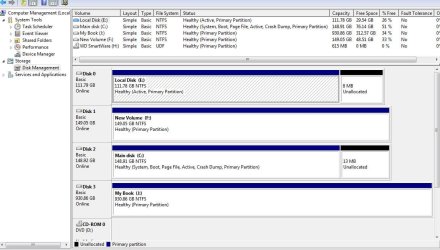
The main drive is C: here but in the 64bit version i installed the main drive became R: and i believe the E: drive from this snapshot became C: i tried to change the drive letters but it wouldnt let me change the E: drive from this snapshot, the main drive in the 64bit version i could change the drive letter, i dont know if that has anything to do with anything. It's almost as if the drive unformatted itself because nothing from this 32bit version was in the windows.old folder, it erased everything so unless my computer had a quantum moment and time traveled im completely clueless as i dont have a quantum core processor.

Capture.JPG
 

My Computer My Computer

At a glance

windows 7 home premium 64bit
OS
windows 7 home premium 64bit
What procedure did you follow when you did the 64 bit install?
Did you boot from the windows 7 DVD?
Did you select the correct drive to install too, the one that had the 32 bit version on it?
Was that drive 0?
Did you format the drive and or delete any partitions during the install?
 

My Computer My Computer

At a glance

Windows 10 Education 64 bitAMD Phenom II X4 980 Black Edition Deneb 3.7GHz8GB 4GBx2 Kingston PC10600 DDR3 1333 MemoryZotac NVIDIA Geforce GT640 2 Gig DDR3 PCIe
Computer type
PC/Desktop
Computer Manufacturer/Model Number
Home Built
OS
Windows 10 Education 64 bit
CPU
AMD Phenom II X4 980 Black Edition Deneb 3.7GHz
Motherboard
Asus M4N68T-M V2 µATX Motherboard
Memory
8GB 4GBx2 Kingston PC10600 DDR3 1333 Memory
Graphics Card(s)
Zotac NVIDIA Geforce GT640 2 Gig DDR3 PCIe
Sound Card
VIA VT1708s High Definition Audio 8-channel Onboard
Monitor(s) Displays
22" LG E2242 1080p and 2 19" I-INC AG191D
Screen Resolution
1280x1024 - 1920x1080 - 1280x1024
Hard Drives
Crucial M100 256 GB SSD and 500 GB WD Blue SATA
PSU
Thermaltake TR 620
Case
Power Up Black ATX Mid-Tower Case
Cooling
Stock heatsink and fan
Keyboard
Logitech Wireless K350 Wave
Mouse
Logitech Wireless M570 Trackman Wheel
Internet Speed
80 Mbps Down 30 Mbps Up
Antivirus
Windows Defender
Browser
Internet Explorer 11
Other Info
HP DVD1040e Lightscribe - External USB2
If you installed 64 bit to another HD, it placed the System boot files on C and configured a Dual Boot.

If you're booted into C and that's your original 32 bit then I'm guessing 64 bit is now DISK0 F - the description given is incomprehensible.

You can never change a drive letter for an OS partition as it will destroy your installation.
If you want to try to boot F then change it back to whatever drive letter you changed it from.

Then unplug C, set F as first HD to boot in BIOS setup (after DVD drive), boot the 64 bit DVD, select Repair my Computer on second screen, accept any offered Repair. If Win7 doesn't start, boot back in to http://www.sevenforums.com/tutorials/105541-startup-repair-run-3-separate-times.html until it writes the System boot files to DISK0 and starts up.

If 64 bit starts up, you can plug back in C and boot it using the one-time BIOS Boot menu key - delete any useless Windows Dual Boot menu in msconfig>Boot tab. You can wipe C using http://www.sevenforums.com/tutorials/52129-disk-clean-clean-all-diskpart-command.html
 
Booted from dvd, whenever I do an install I disconnect my other two drives, they're ide drives, my main drive is sata, it was drive 0. Its not possible that it installed on the other drives because they weren't connected, I really don't know why the drive changed from c: to r:
 

My Computer My Computer

At a glance

windows 7 home premium 64bit
OS
windows 7 home premium 64bit
OK so why do you think you are now back in the 32 bit version? Hit the Windows key and the Pause/Break key. (For system type what does it say?) Then go to Advanced system settings. Click the settings button under Startup and recovery under the advanced tab. Remove the check mark for Automatically restart in the System failure section. Now instead of rebooting you should see the actual BSOD, if it happens again.
 

My Computer My Computer

At a glance

Windows 10 Education 64 bitAMD Phenom II X4 980 Black Edition Deneb 3.7GHz8GB 4GBx2 Kingston PC10600 DDR3 1333 MemoryZotac NVIDIA Geforce GT640 2 Gig DDR3 PCIe
Computer type
PC/Desktop
Computer Manufacturer/Model Number
Home Built
OS
Windows 10 Education 64 bit
CPU
AMD Phenom II X4 980 Black Edition Deneb 3.7GHz
Motherboard
Asus M4N68T-M V2 µATX Motherboard
Memory
8GB 4GBx2 Kingston PC10600 DDR3 1333 Memory
Graphics Card(s)
Zotac NVIDIA Geforce GT640 2 Gig DDR3 PCIe
Sound Card
VIA VT1708s High Definition Audio 8-channel Onboard
Monitor(s) Displays
22" LG E2242 1080p and 2 19" I-INC AG191D
Screen Resolution
1280x1024 - 1920x1080 - 1280x1024
Hard Drives
Crucial M100 256 GB SSD and 500 GB WD Blue SATA
PSU
Thermaltake TR 620
Case
Power Up Black ATX Mid-Tower Case
Cooling
Stock heatsink and fan
Keyboard
Logitech Wireless K350 Wave
Mouse
Logitech Wireless M570 Trackman Wheel
Internet Speed
80 Mbps Down 30 Mbps Up
Antivirus
Windows Defender
Browser
Internet Explorer 11
Other Info
HP DVD1040e Lightscribe - External USB2
Capture2.JPG
 

My Computer My Computer

At a glance

windows 7 home premium 64bit
OS
windows 7 home premium 64bit
did your computer do anything out of the ordinary in the installation? are you sure that you booted into 64?
 

My Computer My Computer

At a glance

Windows 7 Ultimate x868 Gig(4 x 2 Gig)2 x GeForce 9500 GT (SLI)
OS
Windows 7 Ultimate x86
Motherboard
Asus P5N-D
Memory
8 Gig(4 x 2 Gig)
Graphics Card(s)
2 x GeForce 9500 GT (SLI)
Monitor(s) Displays
2 x 25" VGA, 1 37" DVI-D
Hard Drives
1x 5400 RPM 100 gig
4 x 5400 RPM 250 gig RAID 0+1
1 TB USB 3.0 external hard drive
500 gig external
did your computer do anything out of the ordinary in the installation? are you sure that you booted into 64?

windows came with a 32bit disc and a 64bit disc, im sure i installed 64bit because of the disc and the system information. it installed perfectly then i ran updates, this was yesterday morning, and its been fine...very little on it because i just installed it yesterday. Been fine till today it just blacked out and restarted into the old version.
 

My Computer My Computer

At a glance

windows 7 home premium 64bit
OS
windows 7 home premium 64bit
You are booted into C now as evidenced by the Boot flag. So what is on E, and which is the drive you changed letters on? Did you change it back? Do you want to try to start it now, to see?

Perhaps you unplugged all but the wrong drive to install, then when you plugged them back in the BIOS somehow changed boot order back to C.

Browse into DISK0 now via explorer and see what's on it. Post back a screenshot if you want using Snipping Tool in Start Menu.

In fact browse all drives to find which other one has a Windows file on it.
 
You are booted into C now as evidenced by the Boot flag. So what is on E, and which is the drive you changed letters on? Did you change it back? Do you want to try to start it now, to see?

Perhaps you unplugged all but the wrong drive to install, then when you plugged them back in the BIOS somehow changed boot order back to C.

Browse into DISK0 now via explorer and see what's on it. Post back a screenshot if you want using Snipping Tool in Start Menu.

In fact browse all drives to find which other one has a Windows file on it.

I have 3 internal drives 0 which would be the c: then I have e and f, at least they're e and f in this 32bit version, the e and f drives have nothing but music sessions on them, I disconnect those if I do an install they're connected via ide, when I installed the 64bit version only the 0 or c: was connected, its connected via sata, now when I booted into the 64bit version that 0 partition wasn't c: it was r: and the e: drive you see on the 32bit snapshot was c: but there were no windows files on there, no windows folder, there couldn't have been anyway because it wasn't connected to be installed to.

I also have a 4th drive, an external to back up the 2 drives with sessions on them.

That's the best way I can explain it I hope it wasn't too complicated, its a lot to explain with so many drives.

I've had bsod's before and I usually have the restart turned off to get the stop code but I hadn't turned it off yet in this case because it was a new install with nothing on it except cubase, I hadn't really installed anything yet and even still this wasn't a bsod because the screen just turned black and restarted and then I was back to the login screen in a span of 15 seconds
 

My Computer My Computer

At a glance

windows 7 home premium 64bit
OS
windows 7 home premium 64bit
If you installed 64 bit to DISK0 it would still be DISK0 which is now E, which you say you have music on and cannot see a Windows folder, correct?

Did you change the cables or move the drives at all? Because if you installed 64 bit to DISK0 then it would still be in that slot.
 
Looking at your Disk Management screen Disk 0 (E) is shown as the active partition but Disk 2 (C) is shown as System,Boot, which makes me think its the one your PC is booting from. You might want to check your BIOS to see what your boot order is. What is on disk 2 (C) as far as files and folders go. You might even want to show hidden and system files and see where your boot files are? What happened after the reboot to make you think you went from 64 bit to 32 bit?
 

My Computer My Computer

At a glance

Windows 10 Education 64 bitAMD Phenom II X4 980 Black Edition Deneb 3.7GHz8GB 4GBx2 Kingston PC10600 DDR3 1333 MemoryZotac NVIDIA Geforce GT640 2 Gig DDR3 PCIe
Computer type
PC/Desktop
Computer Manufacturer/Model Number
Home Built
OS
Windows 10 Education 64 bit
CPU
AMD Phenom II X4 980 Black Edition Deneb 3.7GHz
Motherboard
Asus M4N68T-M V2 µATX Motherboard
Memory
8GB 4GBx2 Kingston PC10600 DDR3 1333 Memory
Graphics Card(s)
Zotac NVIDIA Geforce GT640 2 Gig DDR3 PCIe
Sound Card
VIA VT1708s High Definition Audio 8-channel Onboard
Monitor(s) Displays
22" LG E2242 1080p and 2 19" I-INC AG191D
Screen Resolution
1280x1024 - 1920x1080 - 1280x1024
Hard Drives
Crucial M100 256 GB SSD and 500 GB WD Blue SATA
PSU
Thermaltake TR 620
Case
Power Up Black ATX Mid-Tower Case
Cooling
Stock heatsink and fan
Keyboard
Logitech Wireless K350 Wave
Mouse
Logitech Wireless M570 Trackman Wheel
Internet Speed
80 Mbps Down 30 Mbps Up
Antivirus
Windows Defender
Browser
Internet Explorer 11
Other Info
HP DVD1040e Lightscribe - External USB2
He is booted into C in the screenshot as shown by the Boot flag. He says that is his original 32 bit.

I think he installed 64 bit to E and it lost it's boot order to C as you suspect.
 
Something is messed up? I think I would unplug both the IDE drives, check the boot order in the BIOS and see what happens when you boot it up.
 

My Computer My Computer

At a glance

Windows 10 Education 64 bitAMD Phenom II X4 980 Black Edition Deneb 3.7GHz8GB 4GBx2 Kingston PC10600 DDR3 1333 MemoryZotac NVIDIA Geforce GT640 2 Gig DDR3 PCIe
Computer type
PC/Desktop
Computer Manufacturer/Model Number
Home Built
OS
Windows 10 Education 64 bit
CPU
AMD Phenom II X4 980 Black Edition Deneb 3.7GHz
Motherboard
Asus M4N68T-M V2 µATX Motherboard
Memory
8GB 4GBx2 Kingston PC10600 DDR3 1333 Memory
Graphics Card(s)
Zotac NVIDIA Geforce GT640 2 Gig DDR3 PCIe
Sound Card
VIA VT1708s High Definition Audio 8-channel Onboard
Monitor(s) Displays
22" LG E2242 1080p and 2 19" I-INC AG191D
Screen Resolution
1280x1024 - 1920x1080 - 1280x1024
Hard Drives
Crucial M100 256 GB SSD and 500 GB WD Blue SATA
PSU
Thermaltake TR 620
Case
Power Up Black ATX Mid-Tower Case
Cooling
Stock heatsink and fan
Keyboard
Logitech Wireless K350 Wave
Mouse
Logitech Wireless M570 Trackman Wheel
Internet Speed
80 Mbps Down 30 Mbps Up
Antivirus
Windows Defender
Browser
Internet Explorer 11
Other Info
HP DVD1040e Lightscribe - External USB2
Windows juat came back with this after a scan Trojan:DOS/Alureon.A it says it has something to do with the MBR anybody run into this before?
 

My Computer My Computer

At a glance

windows 7 home premium 64bit
OS
windows 7 home premium 64bit
Wow haha not trojan:D but trojan : DOS/alureon.a
 

My Computer My Computer

At a glance

windows 7 home premium 64bit
OS
windows 7 home premium 64bit
I haven't run into it myself. You might want to download and run the malicious software removal tool > Malicious Software Removal Tool | Protect Your Computer
Oh, when you are composing a message, if you look down at the bottom under "Additional Options", you will see a check box for "Disable smilies in text". ;)
 

My Computer My Computer

At a glance

Windows 10 Education 64 bitAMD Phenom II X4 980 Black Edition Deneb 3.7GHz8GB 4GBx2 Kingston PC10600 DDR3 1333 MemoryZotac NVIDIA Geforce GT640 2 Gig DDR3 PCIe
Computer type
PC/Desktop
Computer Manufacturer/Model Number
Home Built
OS
Windows 10 Education 64 bit
CPU
AMD Phenom II X4 980 Black Edition Deneb 3.7GHz
Motherboard
Asus M4N68T-M V2 µATX Motherboard
Memory
8GB 4GBx2 Kingston PC10600 DDR3 1333 Memory
Graphics Card(s)
Zotac NVIDIA Geforce GT640 2 Gig DDR3 PCIe
Sound Card
VIA VT1708s High Definition Audio 8-channel Onboard
Monitor(s) Displays
22" LG E2242 1080p and 2 19" I-INC AG191D
Screen Resolution
1280x1024 - 1920x1080 - 1280x1024
Hard Drives
Crucial M100 256 GB SSD and 500 GB WD Blue SATA
PSU
Thermaltake TR 620
Case
Power Up Black ATX Mid-Tower Case
Cooling
Stock heatsink and fan
Keyboard
Logitech Wireless K350 Wave
Mouse
Logitech Wireless M570 Trackman Wheel
Internet Speed
80 Mbps Down 30 Mbps Up
Antivirus
Windows Defender
Browser
Internet Explorer 11
Other Info
HP DVD1040e Lightscribe - External USB2
Back
Top