change AHCI before doing clean install of Windows 7 SP1

djrobison22

New member
Local time
10:05 AM
Messages
19
Location
West Hollywood, CA
I have a Sony VAIO All-In-One VPCL137FX running Windows 7 SP1 64bit os with 8gb RAM, NVIDIA GeForce 330M GPU and Intel Core 2 Quad Q8400 processers @ 2.66GHz.

I recently removed all of the Sony bloatware and kept only the drivers needed to keep the hardware working. I am planning on upgrading the 1TB HDD to a 256GB Samsung 850 EVO SSD but prior to doing so I want first do a Clean Install of Windows 7 SP1 that I was able to download from the Microsoft website using my other computer that is running Windows 10 via the "downloading for another computer" method. My goal is to have a complete and clean bloat free installation of Windows 7 complete with all drivers needed before I install the SSD.

I have upgraded my other computer to an SSD by simply doing a Clean Install of the OS (Windows 10 in that case) which was much easier than doing a clone and then imaging it to the SSD and will probably do the same here (if that is something I can do in Windows 7) and I know that seems redundant but it also seems like a way to deal with any problems I may have with the clean install without them being on the SSD so that any unnecessary writing and rewriting be done on the HDD.

I also feel like this first clean install is a good time to change the IDE to AHCI setting which leads me to another question...

Do I have to go into the registry and enable the msahhci file if I am doing a clean install if I am going to download the latest drivers from the Intel website?

Please advise...

Thank you,

Danny R
 

My Computer My Computer

At a glance

Microsoft Windows 7 Home Premium 64-bit 7601 ...Intel(R) Core(TM)2 Quad CPU Q8400 @ 2.66GHz8.00 GBNVIDIA GeForce GT 330M
Computer type
PC/Desktop
Computer Manufacturer/Model Number
Sony
OS
Microsoft Windows 7 Home Premium 64-bit 7601 Multiprocessor Free Service Pack 1
CPU
Intel(R) Core(TM)2 Quad CPU Q8400 @ 2.66GHz
Motherboard
Sony Corporation VAIO
Memory
8.00 GB
Graphics Card(s)
NVIDIA GeForce GT 330M
Sound Card
(1) Bluetooth Hands-free Audio (2) Realtek High Definition
Monitor(s) Displays
Digital Flat Panel (1920X1080 60Hz)
Screen Resolution
1920 x 1080 x 32 bits (4294967296 colors) @ 59 Hz
Hard Drives
ST31000528AS ATA Device
Keyboard
MS USB Dual Receiver Wireless Keyboard and Mouse
Mouse
MS USB Dual Receiver Wireless Keyboard and Mouse
Antivirus
ms security essentials, mbam 3.0 premium
Browser
Chrome
You need to do a clean install to the SSD if you do it to normal drive then copy some settings for SSD will be wrong. Change from IDE then clean install to SSD
 

My Computer My Computer

At a glance

win 8 32 bit
Computer type
PC/Desktop
OS
win 8 32 bit
- As Sony sometimes has special drivers, I suggest you to put the HDD into a USB case or boot from the win 7 installation disk and copy to a USB flash drive all c:\windows folder.
- Replace the HDD with the SSD and, on BIOS, change SATA mode from IDE to AHCI.
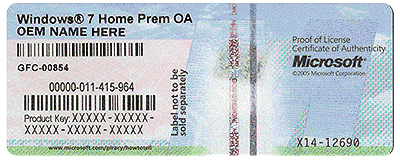
- Install win 7 using the key on the COA stick.
- When it ask for a driver, point to the old windows from the USB flash drive or USB case with the HDD.
 

My Computers My Computers

  • At a glance

    Windows 7 HP 64i5 6600K - 800MHz to 4200MHz4+4G GSkill DDR4 3000IG - Intel 530
    Computer type
    PC/Desktop
    Computer Manufacturer/Model Number
    custom build
    OS
    Windows 7 HP 64
    CPU
    i5 6600K - 800MHz to 4200MHz
    Motherboard
    GA-Z170-HD3P
    Memory
    4+4G GSkill DDR4 3000
    Graphics Card(s)
    IG - Intel 530
    Monitor(s) Displays
    Samsung 226BW
    Screen Resolution
    1680x1050
    Hard Drives
    (1) -1 SM951 – 128GB M.2 AHCI PCIe SSD drive for Windows 7 and Lubuntu
    (2) -1 WD SATA 3 - 1T for Data
    (3) -1 WD SATA 3 - 1T for backup
    PSU
    Thermaltake 450W TR2 gold
    Keyboard
    Old and good Chicony mechanical keyboard
    Mouse
    Logitech mX performance - 9 buttons (had to disable some)
    Internet Speed
    500Mb/s
    Browser
    Firefox 64
    Other Info
    TinyWall firewall
  • At a glance

    Windows 7 Proi7-4500U 800MHz to 3.0GHz(4+4)G DDR3 1600IG intel 4400 + NVIDIA GeForce GT 745M
    Computer type
    Laptop
    System Manufacturer/Model Number
    Asus Q550LF
    OS
    Windows 7 Pro
    CPU
    i7-4500U 800MHz to 3.0GHz
    Motherboard
    Asus Q550LF
    Memory
    (4+4)G DDR3 1600
    Graphics Card(s)
    IG intel 4400 + NVIDIA GeForce GT 745M
    Sound Card
    Realtek
    Monitor(s) Displays
    LG Display LP156WF4-SPH1
    Screen Resolution
    1920 x 1080
    Hard Drives
    BX500 120G SSD for Windows and programs +
    1T HDD for data
    Internet Speed
    500 Mb/s
    Browser
    Firefox
    Other Info
    TinyWall firewall
- As Sony sometimes has special drivers, I suggest you to put the HDD into a USB case or boot from the win 7 installation disk and copy to a USB flash drive all c:\windows folder.
- Replace the HDD with the SSD and, on BIOS, change SATA mode from IDE to AHCI.
- Install win 7 using the key on the COA stick.
- When it ask for a driver, point to the old windows from the USB flash drive or USB case with the HDD.

I am trying to do the clean install using a usb thumb drive which I created from a windows 7 sp1 iso I was able to download using my other computer and am having these issues:

- there is no option to change IDE to AHCI in my BIOS settings

- the installation will not complete. it just loops back to the Windows Setup window every time

Would it be easier to just purchase a new copy of Windows 7 as I do not have the original disks and I am unable to download them from Microsoft as my version is an OEM version and Sony does not offer any support for my computer any longer?

If I do this do I want an OEM version or a retail version if I want to upgrade to Windows 10 at some point?

I am very frustrated that I cannot do a clean install easily and if I can just purchase a new copy for a reasonable price it would be worth it.

Thanks,

Danny R
 

My Computer My Computer

At a glance

Microsoft Windows 7 Home Premium 64-bit 7601 ...Intel(R) Core(TM)2 Quad CPU Q8400 @ 2.66GHz8.00 GBNVIDIA GeForce GT 330M
Computer type
PC/Desktop
Computer Manufacturer/Model Number
Sony
OS
Microsoft Windows 7 Home Premium 64-bit 7601 Multiprocessor Free Service Pack 1
CPU
Intel(R) Core(TM)2 Quad CPU Q8400 @ 2.66GHz
Motherboard
Sony Corporation VAIO
Memory
8.00 GB
Graphics Card(s)
NVIDIA GeForce GT 330M
Sound Card
(1) Bluetooth Hands-free Audio (2) Realtek High Definition
Monitor(s) Displays
Digital Flat Panel (1920X1080 60Hz)
Screen Resolution
1920 x 1080 x 32 bits (4294967296 colors) @ 59 Hz
Hard Drives
ST31000528AS ATA Device
Keyboard
MS USB Dual Receiver Wireless Keyboard and Mouse
Mouse
MS USB Dual Receiver Wireless Keyboard and Mouse
Antivirus
ms security essentials, mbam 3.0 premium
Browser
Chrome
If you changed the boot order in the bios to have the usb drive boot first, then change it back, that is most likely why it keeps starting the install over and over, a lot of people make that mistake, just use the one time boot menu to choose the usb stick 1 time, that`s it.

Your dvd drive and your ssd should be the only 2 items listed in the Bios.

If there`s no AHCI option in the Bios, that`s just something you`ll have to live with :(

As far as an oem or retail version goes, you will never find a retail version anywhere and you don`t need to, oem is the same exact thing when it comes to the operating system.

If the Sony has a Windows 7 COA with a readable key, you do not have to buy anything.
 

Attachments

  • COA-Certificate-of-Authenticity.gif
    COA-Certificate-of-Authenticity.gif
    707.8 KB · Views: 22

My Computer My Computer

At a glance

Windows 10 Pro x64Intel Core i7 6700KGSkill TridentZ RGB 16GB 3600 16-16-16-36EVGA GTX 980 Ti SC x2
Computer type
PC/Desktop
Computer Manufacturer/Model Number
Skylake Special #666
OS
Windows 10 Pro x64
CPU
Intel Core i7 6700K
Motherboard
Asus Sabertooth Z170 Mark 1
Memory
GSkill TridentZ RGB 16GB 3600 16-16-16-36
Graphics Card(s)
EVGA GTX 980 Ti SC x2
Sound Card
Realtek High Definition
Monitor(s) Displays
AOC G2460PG
Screen Resolution
1920 x 1080 144Hz
Hard Drives
Samsung 860 Pro 256GB, Seagate Barracuda 4TB x2
PSU
EVGA 1000 P2, EVGA White Custom Braided Cables
Case
Corsair Vengeance C70 Gunmetal Black
Cooling
Corsair H100i v2, Corsair ML120 x2, Thermal Grizzly Kryonaut
Keyboard
Logitech G910 Orion Spectrum
Mouse
Logitech G700s
Internet Speed
Verizon Fios Quantum Gateway 75/75
Antivirus
Windows Defender, Malwarebytes Free 3.8.3
Browser
Chrome
Other Info
Corsair SP120 x4, LG Blu-ray Drive, Durabrand HT-395 100 Watt Dolby Digital Amp, Corsair H2100 Wireless 7.1 Headset
If you changed the boot order in the bios to have the usb drive boot first, then change it back, that is most likely why it keeps starting the install over and over, a lot of people make that mistake, just use the one time boot menu to choose the usb stick 1 time, that`s it.

Your dvd drive and your ssd should be the only 2 items listed in the Bios.

If there`s no AHCI option in the Bios, that`s just something you`ll have to live with :(

As far as an oem or retail version goes, you will never find a retail version anywhere and you don`t need to, oem is the same exact thing when it comes to the operating system.

If the Sony has a Windows 7 COA with a readable key, you do not have to buy anything.

Actually, I didn't change the boot order then change it back prior to your comment although when I decided to just abandon this endless loop until I could get some more advice I did change the boot order back to HDD first thinking my computer would just boot my current configuration but to my surprise it booted into Windows 10 upgrade! I let this installation run and now I have "digitally licensed via my Microsoft account" version of Windows 10 v1703 Build 15063.332 installed.

Not completely sure how this happened but is it possible that it is because I used my laptop (running Windows 10) to create the Windows 7 SP1 Installation disk? I would have been signed on with the same MSA as I use on my VAIO pc...if there were somehow anything I did that was dodgy wouldn't the installation have failed? I DO NOT WANT TO HAVE DONE ANYTHING ILLEGAL AND WAS IN NO WAY ATTEPTING TO DO ANYTHING BUT CLEAN INSTALL WINDOWS 7 WHICH I HAVE A LEGAL LICENSE FOR!

I would appreciate your feedback on this if possible...

Thanks,

Danny R
 

My Computer My Computer

At a glance

Microsoft Windows 7 Home Premium 64-bit 7601 ...Intel(R) Core(TM)2 Quad CPU Q8400 @ 2.66GHz8.00 GBNVIDIA GeForce GT 330M
Computer type
PC/Desktop
Computer Manufacturer/Model Number
Sony
OS
Microsoft Windows 7 Home Premium 64-bit 7601 Multiprocessor Free Service Pack 1
CPU
Intel(R) Core(TM)2 Quad CPU Q8400 @ 2.66GHz
Motherboard
Sony Corporation VAIO
Memory
8.00 GB
Graphics Card(s)
NVIDIA GeForce GT 330M
Sound Card
(1) Bluetooth Hands-free Audio (2) Realtek High Definition
Monitor(s) Displays
Digital Flat Panel (1920X1080 60Hz)
Screen Resolution
1920 x 1080 x 32 bits (4294967296 colors) @ 59 Hz
Hard Drives
ST31000528AS ATA Device
Keyboard
MS USB Dual Receiver Wireless Keyboard and Mouse
Mouse
MS USB Dual Receiver Wireless Keyboard and Mouse
Antivirus
ms security essentials, mbam 3.0 premium
Browser
Chrome

My Computers My Computers

  • At a glance

    7 X64i5 84002x8gb 3200mhz
    Computer type
    PC/Desktop
    OS
    7 X64
    CPU
    i5 8400
    Motherboard
    gigabyte b365m ds3h
    Memory
    2x8gb 3200mhz
    Hard Drives
    various
    PSU
    pure power 11 400w cm
    Case
    Coolermaster
    Cooling
    cryorig m9i
  • At a glance

    7x64g54008gb ddr4 2400
    Computer type
    PC/Desktop
    OS
    7x64
    CPU
    g5400
    Motherboard
    ga b365m ds3h
    Memory
    8gb ddr4 2400
    PSU
    xfx pro 450w

My Computer My Computer

At a glance

Windows 10 Pro x64Intel Core i7 6700KGSkill TridentZ RGB 16GB 3600 16-16-16-36EVGA GTX 980 Ti SC x2
Computer type
PC/Desktop
Computer Manufacturer/Model Number
Skylake Special #666
OS
Windows 10 Pro x64
CPU
Intel Core i7 6700K
Motherboard
Asus Sabertooth Z170 Mark 1
Memory
GSkill TridentZ RGB 16GB 3600 16-16-16-36
Graphics Card(s)
EVGA GTX 980 Ti SC x2
Sound Card
Realtek High Definition
Monitor(s) Displays
AOC G2460PG
Screen Resolution
1920 x 1080 144Hz
Hard Drives
Samsung 860 Pro 256GB, Seagate Barracuda 4TB x2
PSU
EVGA 1000 P2, EVGA White Custom Braided Cables
Case
Corsair Vengeance C70 Gunmetal Black
Cooling
Corsair H100i v2, Corsair ML120 x2, Thermal Grizzly Kryonaut
Keyboard
Logitech G910 Orion Spectrum
Mouse
Logitech G700s
Internet Speed
Verizon Fios Quantum Gateway 75/75
Antivirus
Windows Defender, Malwarebytes Free 3.8.3
Browser
Chrome
Other Info
Corsair SP120 x4, LG Blu-ray Drive, Durabrand HT-395 100 Watt Dolby Digital Amp, Corsair H2100 Wireless 7.1 Headset
Hi,
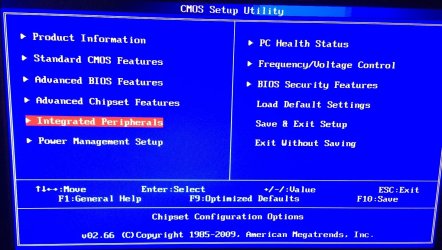
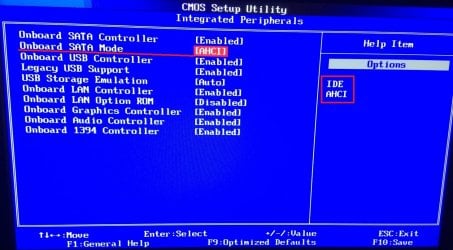
How old is this machine my 7-8 year old acer with legacy bios has the option in this section
Acer Bios Integrated P-1.JPG
Acer Bios Integrated P-2 ahci.JPG
 

My Computer My Computer

At a glance

Win-7-Pro64bit 7-H-Prem-64biti7-5930K 2nd i9-9940x both water blocked VRM'...Trident-z 3200C14 2nd Trident-z 3600C16EVGA 1080ti ftw3 2nd Titan Xp both water blocked
Computer type
PC/Desktop
Computer Manufacturer/Model Number
Custom assembled by me :}
OS
Win-7-Pro64bit 7-H-Prem-64bit
CPU
i7-5930K 2nd i9-9940x both water blocked VRM's too
Motherboard
ASUS SABERTOOTH X99 2nd ASUS x299 Apex
Memory
Trident-z 3200C14 2nd Trident-z 3600C16
Graphics Card(s)
EVGA 1080ti ftw3 2nd Titan Xp both water blocked
Sound Card
Built-in Realtek
Monitor(s) Displays
1-AOC G2460PG 24"G-Sync 144Hz/ 2nd 1-ASUS VG248QE 24" 144Hz
Screen Resolution
1920 x 1080 144Hz
Hard Drives
2-Samsung M.2 Evo & Evo Plus
2-Samsung 850 EVO 500GB SSD's/ 3-2.5 W.D. Black 1tb-&3-1tb/3-3.5 WD Black 1tb hdd's
PSU
EVGA SuperNOVA 1000-P2 2nd 1200-P2
Case
2-Corsair Obsidian Series 450D Black ATX Mid Tower
Cooling
Custom water loops
Keyboard
Logitech G710+/ 2nd Logitech G910
Mouse
2-RedDragon M901 Perdition 16400 dpi Gaming mouse = wired
Internet Speed
Comcast Ping 19ms 89.31mbps download speed 6.12mbps upload
Antivirus
Malwarebytes Pro/ Superantispyware Pro
Browser
FireFox & Pale moon
Other Info
2nd ASUS X299 Apex/Intel i9-9940x with Custom water loop/7H-Prem-x64/Corsair 450D case/Ram Trident-z 3600C16 4x8gb / Samsung970Evo plus 500gb SSD/Dual ssd EZ swap evo/PSU EVGA SuperNova 1200w-P2 80+Platinum/GPU Titan Xp /8-ML-140 on push-pull on 2-280GTX rads
Back
Top