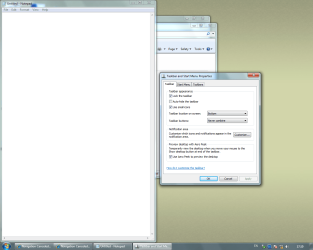
REALLY Never Combine icons on taskbar

WIN7Schnacke

New member
Local time
12:58 PM
Messages
15
(answered - not solved) REALLY Never Combine icons on taskbar

Hello World,

what a nice forum here! A lot of questions have been answered so far, but unfortunately not all! :(


I want that the icons on the taskbar of the related programs I have started will NOT be combined anyway.
Therefore if I want to open Internet Explorer at first, then Notepad at second and another Internet Explorer at last. The Icons should be orderd in the way I have opened them WITHOUT any combining!


The three given possibilites won't fit for my situation:

  • Always combine, hide labels (I want NO combining)
  • Combine when taskbar is full (will display label text) (I want NO combining)
  • Never combine (will display label text) (unfortunately same programms (like Internet Explorer) will be combined also)
Within this forum I found some interesting ideas and suggestions, but nothing led me to the solution I am looking for.

For example changing the registry entry (HKCU\Software\Microsoft\Windows\CurrentVerion\Explorer\Advanced\TaskbarGlomLevel) gave me the possibility to select on of the three given possibilites, but nothing more.


It seems that it is impossible with Windows7 to deactivate the combining completely.


I would be very nice if anyone can give me some comments if it is possible or not!


*EDIT*
Meanwhile I found a post here to use 7 Taskbar Tweaker. If possible I would like to use no additional software or is NON combining only possible with this software? Is there any other software available, perhaps from Microsoft?
Sorry for increasing the number of questions. ;)

Kind regards,
Schnacke
 
Last edited:

My Computer My Computer

At a glance

XP, VISTA, WIN7
OS
XP, VISTA, WIN7

My Computer My Computer

At a glance

XP / Win7 x64 ProIntel Quad-Core Q9450 @ 3.2GHz2x2GB GSkill DDR2NVIDIA GeForce 8600 GTS (EVGA)
OS
XP / Win7 x64 Pro
CPU
Intel Quad-Core Q9450 @ 3.2GHz
Motherboard
Asus P5-E
Memory
2x2GB GSkill DDR2
Graphics Card(s)
NVIDIA GeForce 8600 GTS (EVGA)
Monitor(s) Displays
Dell 2408WFP
Screen Resolution
1920x1200
Try enabling quick launch then unpinning all of the programs from the taskbar.

http://www.sevenforums.com/tutorials/888-quick-launch-enable-disable.html
Hi FliGi7,

thanks for your help.
If I understand the tutorial right, this generates a Quick Launch where I can start easily some applications (like the Quick Launch of XP).
But after they have been started, they will still be combined in the way I want to disable.

I think that this is not solving my problem, so any other reactions are still welcome!


Kind regards,
Schnacke
 

My Computer My Computer

At a glance

XP, VISTA, WIN7
OS
XP, VISTA, WIN7
It seems that it is impossible with Windows7 to deactivate the combining completely.
It seems as though we say this on a daily basis, but don't blame the OS, if the OS is not the culprit. If it was Windows 7..everyone would experience this problem. I've configured nearly 100 Windows 7 machines in the 18 months it is has been available, and each one gets set to Never Combine....and it works for any and all programs, including IE.

Now, that being said, if it doesn't work for you, that likely means something you "tweaked" or an app you installed is affecting the setting.

I would still go through the steps above, just to get it reset to the way you want. If that doesn't work, I'd consider running the sfc /SCANNOW command, or installing SP1 if you haven't already.
 

My Computer My Computer

At a glance

Windows 7 Ultimate x64 SP1Intel Core i7-260012 GB Patriot Extreme DDR3-1333Nvidia GTX 470
OS
Windows 7 Ultimate x64 SP1
CPU
Intel Core i7-2600
Motherboard
Gigabyte GA-P67A-UD3P-B3
Memory
12 GB Patriot Extreme DDR3-1333
Graphics Card(s)
Nvidia GTX 470
Monitor(s) Displays
Dell UltraSharp 2209WA
Hard Drives
OCZ Agility3 240 GB, WD5001AALS, WD7501AALS
PSU
OCZ ModStream 700W
Case
CoolerMaster HAF 912 Advanced
Cooling
CoolerMaster Hyper 212 Plus
It seems as though we say this on a daily basis, but don't blame the OS, if the OS is not the culprit. If it was Windows 7..everyone would experience this problem. I've configured nearly 100 Windows 7 machines in the 18 months it is has been available, and each one gets set to Never Combine....and it works for any and all programs, including IE.

That makes me wandering ! :eek:

I am unsure if I did explain it in the wrong way or if I am still doing the wrong things to disable the combining completely.

Interestingly I found several places (including a tutorial) in this forum that are telling me that it is still impossible with WIN7 to REALLY disable combining.


All of this is leading directly to the fact that the combining is forced and impossible to disable with the given WIN7 possibilites (without the '7 Taskbar Tweaker').


DeaconFrost, I think that we are not talking about the same things!?


Kind regards,
Schnacke
 

My Computer My Computer

At a glance

XP, VISTA, WIN7
OS
XP, VISTA, WIN7
You could try posting a screenshot of your taskbar with an example, but combining is definitely not forced. I'm not sure if we are talking about the same things, but once I set any computer to Never Combine....it stays that way, for all apps and programs. I'll post an example of mine.
 

Attachments

  • taskbar.jpg
    taskbar.jpg
    17.3 KB · Views: 65

My Computer My Computer

At a glance

Windows 7 Ultimate x64 SP1Intel Core i7-260012 GB Patriot Extreme DDR3-1333Nvidia GTX 470
OS
Windows 7 Ultimate x64 SP1
CPU
Intel Core i7-2600
Motherboard
Gigabyte GA-P67A-UD3P-B3
Memory
12 GB Patriot Extreme DDR3-1333
Graphics Card(s)
Nvidia GTX 470
Monitor(s) Displays
Dell UltraSharp 2209WA
Hard Drives
OCZ Agility3 240 GB, WD5001AALS, WD7501AALS
PSU
OCZ ModStream 700W
Case
CoolerMaster HAF 912 Advanced
Cooling
CoolerMaster Hyper 212 Plus
You could try posting a screenshot of your taskbar with an example, but combining is definitely not forced. I'm not sure if we are talking about the same things, but once I set any computer to Never Combine....it stays that way, for all apps and programs. I'll post an example of mine.

Hi DeaconFrost,

your screenshot is already discribing what I meant:
the two Internet Explorer applications are combined. I can show you the same with some screenshots I have prepared ...

I will do this in a seperate post for a better overview ...
 

My Computer My Computer

At a glance

XP, VISTA, WIN7
OS
XP, VISTA, WIN7
Try enabling quick launch then unpinning all of the programs from the taskbar.

http://www.sevenforums.com/tutorials/888-quick-launch-enable-disable.html
Hi FliGi7,

thanks for your help.
If I understand the tutorial right, this generates a Quick Launch where I can start easily some applications (like the Quick Launch of XP).
But after they have been started, they will still be combined in the way I want to disable.

I think that this is not solving my problem, so any other reactions are still welcome!


Kind regards,
Schnacke

Quick launch is only a part of the solution. The second part of my response above is unpinning all the programs so they don't combine. This should give you what you want.
 

My Computer My Computer

At a glance

XP / Win7 x64 ProIntel Quad-Core Q9450 @ 3.2GHz2x2GB GSkill DDR2NVIDIA GeForce 8600 GTS (EVGA)
OS
XP / Win7 x64 Pro
CPU
Intel Quad-Core Q9450 @ 3.2GHz
Motherboard
Asus P5-E
Memory
2x2GB GSkill DDR2
Graphics Card(s)
NVIDIA GeForce 8600 GTS (EVGA)
Monitor(s) Displays
Dell 2408WFP
Screen Resolution
1920x1200
Going by my screenshot...are you saying you don't want the IE windows to be next to each other, assuming they were opened separately? If so, I think you just need to remove the icon for IE from your taskbar.
 

My Computer My Computer

At a glance

Windows 7 Ultimate x64 SP1Intel Core i7-260012 GB Patriot Extreme DDR3-1333Nvidia GTX 470
OS
Windows 7 Ultimate x64 SP1
CPU
Intel Core i7-2600
Motherboard
Gigabyte GA-P67A-UD3P-B3
Memory
12 GB Patriot Extreme DDR3-1333
Graphics Card(s)
Nvidia GTX 470
Monitor(s) Displays
Dell UltraSharp 2209WA
Hard Drives
OCZ Agility3 240 GB, WD5001AALS, WD7501AALS
PSU
OCZ ModStream 700W
Case
CoolerMaster HAF 912 Advanced
Cooling
CoolerMaster Hyper 212 Plus
You could try posting a screenshot of your taskbar with an example, but combining is definitely not forced. I'm not sure if we are talking about the same things, but once I set any computer to Never Combine....it stays that way, for all apps and programs. I'll post an example of mine.

Hi DeaconFrost,

the two Internet Explorer applications are combined.

Huh?:confused: The two ie windows are clearly not combined in his screenshot.

 

My Computer My Computer

At a glance

XP / Win7 x64 ProIntel Quad-Core Q9450 @ 3.2GHz2x2GB GSkill DDR2NVIDIA GeForce 8600 GTS (EVGA)
OS
XP / Win7 x64 Pro
CPU
Intel Quad-Core Q9450 @ 3.2GHz
Motherboard
Asus P5-E
Memory
2x2GB GSkill DDR2
Graphics Card(s)
NVIDIA GeForce 8600 GTS (EVGA)
Monitor(s) Displays
Dell 2408WFP
Screen Resolution
1920x1200
The thing I want to show is that I can't get my wishes come true:
I want that the icons on the taskbar of the related programs I have started will NOT be combined anyway.
Therefore if I want to open Internet Explorer at first, then Notepad at second and another Internet Explorer at last. The Icons should be orderd in the way I have opened them WITHOUT any combining!


  1. I start with NO programms running (see pic 1)
  2. I open Internet Explorer at first (see pic 2) - no internet connection as you can see ;)
  3. Then Notepad at second (see pic 3)
  4. Another Internet Explorer at last (see pic 4) - and second internet explorer application will be shown next to first one
  5. My setting is: never combine (see pic 5)

I hope that this is explaining my problem detailled enough!


If there are still any problems or if you have any comments, please let me know!


Kind regards,
Schnacke
 

Attachments

  • 1.PNG
    1.PNG
    13.2 KB · Views: 21
  • 2.PNG
    2.PNG
    12.5 KB · Views: 24
  • 3.PNG
    3.PNG
    16 KB · Views: 21
  • 4.PNG
    4.PNG
    15 KB · Views: 37
  • 5.png
    5.png
    96.7 KB · Views: 38

My Computer My Computer

At a glance

XP, VISTA, WIN7
OS
XP, VISTA, WIN7
Why, why, why??????????????????????????????????
 

My Computer My Computer

At a glance

Windows 7 Ultimate 64 bit Steve Ballmer Signa...Intel Core 2 Quad - Q9550 - 2.83GHz stock - O...4GB DDR2 800MHz (PC6400) OCZ ReaperNvidia GE Force 8800 GTS
Computer Manufacturer/Model Number
Homebrew PC - "Alpha_Dawg"
OS
Windows 7 Ultimate 64 bit Steve Ballmer Signature Edition
CPU
Intel Core 2 Quad - Q9550 - 2.83GHz stock - OC'd to 3.6GHz
Motherboard
Gigabyte EP45-UD3P
Memory
4GB DDR2 800MHz (PC6400) OCZ Reaper
Graphics Card(s)
Nvidia GE Force 8800 GTS
Sound Card
Asus Xonar DX
Monitor(s) Displays
Samsung SyncMaster 2333HD
Screen Resolution
1920 x 1080
Hard Drives
WD Caviar Black 750GB - 7200RPM - 32MB cache
WD Caviar Green 1.5TB - 5400RPM - 64MB cache
WD Caviar Green 2.0TB - 5400RPM - 64MB cache
PSU
PC Power & Cooling Silencer 750
Case
Gigabyte 3D Aurora
Cooling
Case is Air - 5ea. 120mm fans (mix of Arctic and Xigmatec)
Keyboard
MS Natural Wireless KB
Mouse
MS Wireless Mouse
Internet Speed
50 mbps down/5 mbps up
Other Info
AVerMedia - AVerTVHD G2 Dual Tuner Card
You could try posting a screenshot of your taskbar with an example, but combining is definitely not forced. I'm not sure if we are talking about the same things, but once I set any computer to Never Combine....it stays that way, for all apps and programs. I'll post an example of mine.

Hi DeaconFrost,

the two Internet Explorer applications are combined.

Huh?:confused: The two ie windows are clearly not combined in his screenshot.

Ok this is explaining a lot!
So I am right, we are talking about something different! ;)

If you understand my wishes now (hopefully), do you have some helpful comments?


Kind regards,
Schnacke
 

My Computer My Computer

At a glance

XP, VISTA, WIN7
OS
XP, VISTA, WIN7
I just tried with several Office apps that aren't on my taskbar, and it still moved all Excel windows next to each other. I guess that leaves me to ask...why would this be a problem that needs to be ranted about? Call me crazy, but I like having that type of organization. They aren't combined into an icon where each tab is hidden behind the first...they are all visable as individual tabs.
 

My Computer My Computer

At a glance

Windows 7 Ultimate x64 SP1Intel Core i7-260012 GB Patriot Extreme DDR3-1333Nvidia GTX 470
OS
Windows 7 Ultimate x64 SP1
CPU
Intel Core i7-2600
Motherboard
Gigabyte GA-P67A-UD3P-B3
Memory
12 GB Patriot Extreme DDR3-1333
Graphics Card(s)
Nvidia GTX 470
Monitor(s) Displays
Dell UltraSharp 2209WA
Hard Drives
OCZ Agility3 240 GB, WD5001AALS, WD7501AALS
PSU
OCZ ModStream 700W
Case
CoolerMaster HAF 912 Advanced
Cooling
CoolerMaster Hyper 212 Plus
Hi DeaconFrost,

the two Internet Explorer applications are combined.

Huh?:confused: The two ie windows are clearly not combined in his screenshot.

Ok this is explaining a lot!
So I am right, we are talking about something different! ;)

If you understand my wishes now (hopefully), do you have some helpful comments?


Kind regards,
Schnacke

Correct, we're all off here because "combining" is not the proper term for this. I would call it ordering or grouping. Regardless, you're right and what you want to do is not possible. It's just something you'll have to get used to and certainly isn't the worst of the nuances people have to deal with in switching to Windows 7.
 

My Computer My Computer

At a glance

XP / Win7 x64 ProIntel Quad-Core Q9450 @ 3.2GHz2x2GB GSkill DDR2NVIDIA GeForce 8600 GTS (EVGA)
OS
XP / Win7 x64 Pro
CPU
Intel Quad-Core Q9450 @ 3.2GHz
Motherboard
Asus P5-E
Memory
2x2GB GSkill DDR2
Graphics Card(s)
NVIDIA GeForce 8600 GTS (EVGA)
Monitor(s) Displays
Dell 2408WFP
Screen Resolution
1920x1200
I just tried with several Office apps that aren't on my taskbar, and it still moved all Excel windows next to each other. I guess that leaves me to ask...why would this be a problem that needs to be ranted about? Call me crazy, but I like having that type of organization. They aren't combined into an icon where each tab is hidden behind the first...they are all visable as individual tabs.

The fact that you like that type of organization does not lead me to the point to call you crazy, it leads me to the point to call you a happy guy (because you can get your organization wishes)!

I understand all your comments of wandering why I would like to disable any kind of combining, sorting, grouping (or however you want to call it).
But is the reason important for you ?

If it is not possible with 'normal WIN7 possibilites' I have to accept that.
Then I need to test the 7 Taskbar software, what I normally would like to avoid.


So: if someone knows how to help me without the installation of additional software, I would become a very happy guy!


Kind regards,
Schnacke
 

My Computer My Computer

At a glance

XP, VISTA, WIN7
OS
XP, VISTA, WIN7
Correct, we're all off here because "combining" is not the proper term for this. I would call it ordering or grouping. Regardless, you're right and what you want to do is not possible. It's just something you'll have to get used to and certainly isn't the worst of the nuances people have to deal with in switching to Windows 7.


Thanks a lot FliGi7 for your reply, even this is not the answer I was looking for.

It is as always:
My wishes are to detailled so that I can't get exactly what I want!


Sorry for using the wrong words that were confusing some of you ...


Have a nice day ...
Schnacke
 

My Computer My Computer

At a glance

XP, VISTA, WIN7
OS
XP, VISTA, WIN7
No biggie. Most of us miss something from the previous OS that we'd like incorporated into this one and it just isn't happening. So, we try to concern ourselves more with the things that actually do work a lot better now and are great improvements - which are a lot of things.
 

My Computer My Computer

At a glance

XP / Win7 x64 ProIntel Quad-Core Q9450 @ 3.2GHz2x2GB GSkill DDR2NVIDIA GeForce 8600 GTS (EVGA)
OS
XP / Win7 x64 Pro
CPU
Intel Quad-Core Q9450 @ 3.2GHz
Motherboard
Asus P5-E
Memory
2x2GB GSkill DDR2
Graphics Card(s)
NVIDIA GeForce 8600 GTS (EVGA)
Monitor(s) Displays
Dell 2408WFP
Screen Resolution
1920x1200
yes, you are probably right ...

I am using WIN7 since some days ... and I try to find out how I can use WIN7 in the way I liked to use former versions of WIN.

At the moment it is so interesting to find some 'new behavior' in WIN7 und to try to understand what could be the value for me to use it???
 

My Computer My Computer

At a glance

XP, VISTA, WIN7
OS
XP, VISTA, WIN7
Back
Top