- Local time
- 7:39 AM
- Messages
- 1,251
Most A/V's are there to tell you when you get infected.:shock:
You are absolutely right! Antivirus programs can do no more than to alert you that your computer is infected and then try to remove the Malware if they can.
The next step is the evolution towards prevention rather than simple detection and removal only as AV software performs. Very simply what Sandboxie does is to isolate programs like browsers in a separate space on the HDD and does not allow them to make changes to the computer Registry or file system and any malicious code that the sandboxed browser might be infected with will have no access to the computer either and will be destroyed when the sandbox is deleted or overwritten...
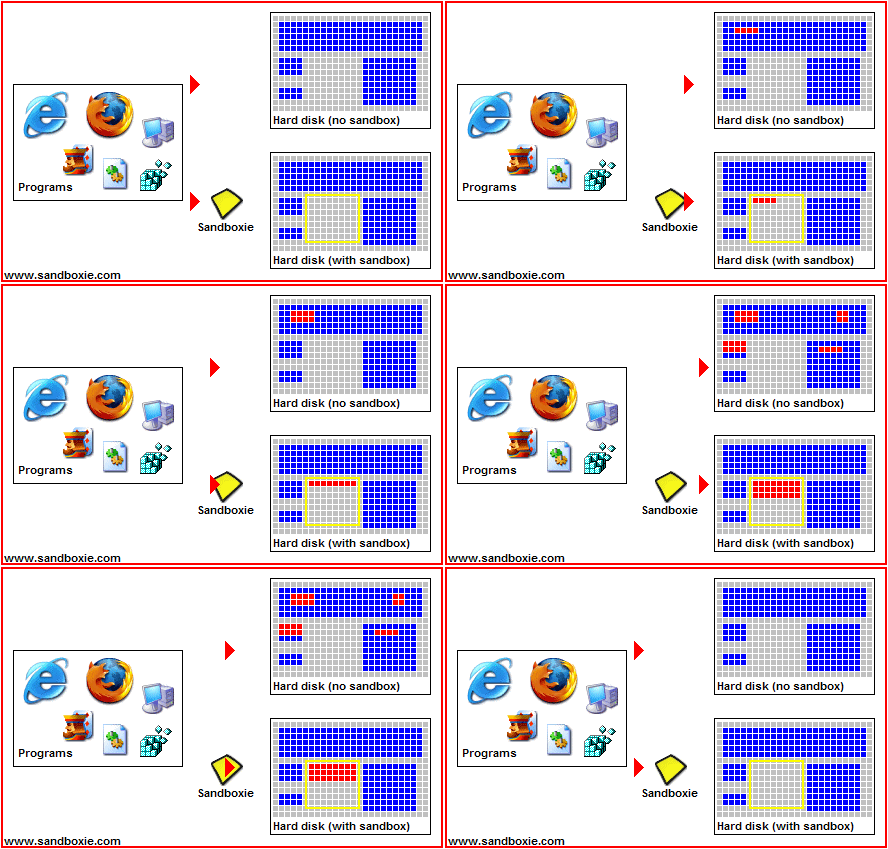
As long as everything that is transferred from the Sandbox to the computer is first scanned with Virus Total or any of many available on-demand virus scanners such as Malwarebytes before it is transferred to the computer then the computer will remain clean without the use of a resident Antivirus program.
~Maxx~
.

My Computer
At a glance
Windows 7 x64 Home PremiumIntel Core i7 930 @ 2.8 Ghz Socket 1366 LGA8 GB 1366 Mhz DDR3 (PC3-10700) RAMATI Radeon 5770 1 GB DDR5 RAM
- Computer Manufacturer/Model Number
- HP HPE 270f
- OS
- Windows 7 x64 Home Premium
- CPU
- Intel Core i7 930 @ 2.8 Ghz Socket 1366 LGA
- Motherboard
- Pegatron Truckee v1.04E41
- Memory
- 8 GB 1366 Mhz DDR3 (PC3-10700) RAM
- Graphics Card(s)
- ATI Radeon 5770 1 GB DDR5 RAM
- Sound Card
- Realtech High Definition
- Monitor(s) Displays
- 32" Sony Bravia
- Screen Resolution
- 1366 X 768
- Hard Drives
- Intel 25nm 120 GB Series 320 SSD HD Tune- 265 MBps Read/ 130 MBps Write
LaCie 1TB + 1TB RAID 0 eSATA Drive HD Tune- 160 MBps Read/ 90 MBps Write
- Keyboard
- Logitech Illuminated
- Mouse
- Logitech MX Revolution
- Internet Speed
- 36.4 Mbps Maximum on a 37 Mbps Motorola SB501 Modem

 just seems to be more and more the truth.