I need a decent firewall suggestion

Most A/V's are there to tell you when you get infected.:shock:

You are absolutely right! Antivirus programs can do no more than to alert you that your computer is infected and then try to remove the Malware if they can.

The next step is the evolution towards prevention rather than simple detection and removal only as AV software performs. Very simply what Sandboxie does is to isolate programs like browsers in a separate space on the HDD and does not allow them to make changes to the computer Registry or file system and any malicious code that the sandboxed browser might be infected with will have no access to the computer either and will be destroyed when the sandbox is deleted or overwritten...
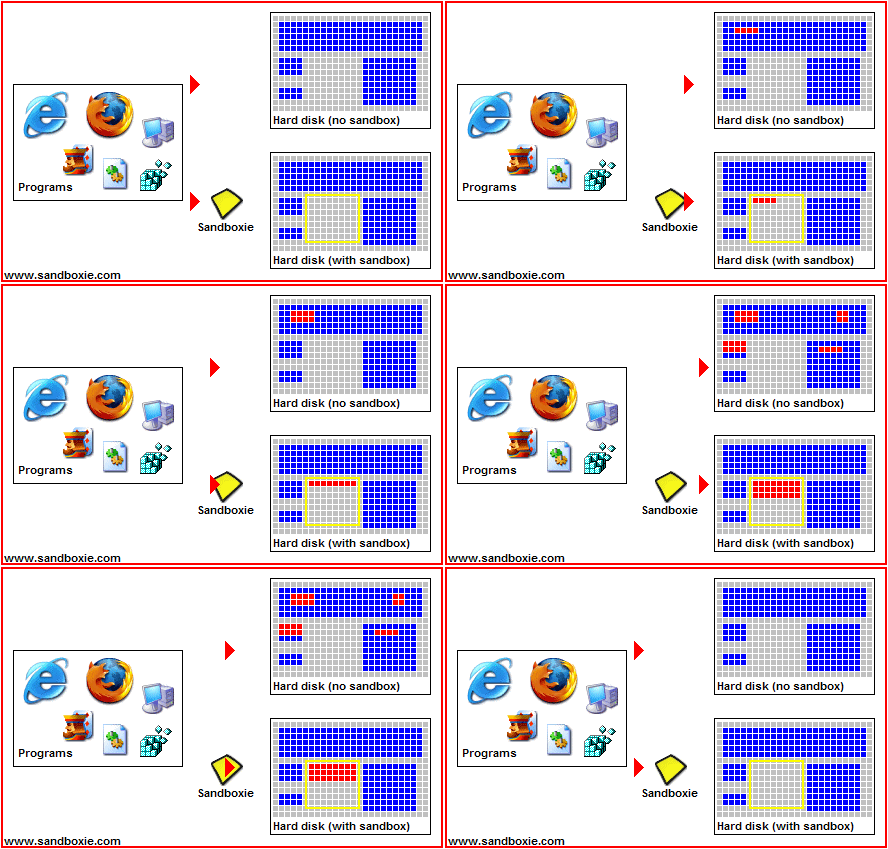
SandboxieAnimation-1.gif


As long as everything that is transferred from the Sandbox to the computer is first scanned with Virus Total or any of many available on-demand virus scanners such as Malwarebytes before it is transferred to the computer then the computer will remain clean without the use of a resident Antivirus program.

~Maxx~

.
Win7_50.png
 

My Computer My Computer

At a glance

Windows 7 x64 Home PremiumIntel Core i7 930 @ 2.8 Ghz Socket 1366 LGA8 GB 1366 Mhz DDR3 (PC3-10700) RAMATI Radeon 5770 1 GB DDR5 RAM
Computer Manufacturer/Model Number
HP HPE 270f
OS
Windows 7 x64 Home Premium
CPU
Intel Core i7 930 @ 2.8 Ghz Socket 1366 LGA
Motherboard
Pegatron Truckee v1.04E41
Memory
8 GB 1366 Mhz DDR3 (PC3-10700) RAM
Graphics Card(s)
ATI Radeon 5770 1 GB DDR5 RAM
Sound Card
Realtech High Definition
Monitor(s) Displays
32" Sony Bravia
Screen Resolution
1366 X 768
Hard Drives
Intel 25nm 120 GB Series 320 SSD HD Tune- 265 MBps Read/ 130 MBps Write

LaCie 1TB + 1TB RAID 0 eSATA Drive HD Tune- 160 MBps Read/ 90 MBps Write
Keyboard
Logitech Illuminated
Mouse
Logitech MX Revolution
Internet Speed
36.4 Mbps Maximum on a 37 Mbps Motorola SB501 Modem
Most A/V's are there to tell you when you get infected
I don't know where you got this from. My AV programs block the malware - and I have seen that many times. Sandboxie is a nice concept, but for daily fluent operation it is a pain in the neck. I for my part am not prepared to jump thru all these hops for the minuscule chance to prevent an infection.
 

My Computer My Computer

At a glance

Vista, Windows7, Mint Mate, Zorin, Windows 8from 1.6GHz Duo to i7
Computer Manufacturer/Model Number
HP, Dell, Gateway, Toshiba - 4 laptops and 2 desktops
OS
Vista, Windows7, Mint Mate, Zorin, Windows 8
CPU
from 1.6GHz Duo to i7
Monitor(s) Displays
2x HP w2207
Hard Drives
5x HDD, 7x SSD, 12x Externals
Keyboard
with trackball - no mices
Mouse
Trackball mice
Internet Speed
DSL 6000
Most A/V's are there to tell you when you get infected
I don't know where you got this from. My AV programs block the malware - and I have seen that many times. Sandboxie is a nice concept, but for daily fluent operation it is a pain in the neck. I for my part am not prepared to jump thru all these hops for the minuscule chance to prevent an infection.
Except for your currant A/V this seems to be the general opinion ive been reading about for the past few years. I wasnt trying to start a kurfuffle:D just seems to be more and more the truth.
Lets put it this way, Everytime ive relied on a A/V without Sandboxie, or Returnil, or Comodo D+, or a Geswall type of app, ive been infected. With any of these apps 0. And all have been the free versions.
So basically we have " everytime vs never " I will be going with never untill that changes
 

My Computer My Computer

At a glance

Win 7 64 premium
OS
Win 7 64 premium
Other Info
7 fw, LUA, UAC on high, IE-9 w/ smartscreen on, SANDBOXIE
Most A/V's are there to tell you when you get infected
Sandboxie is a nice concept, but for daily fluent operation it is a pain in the neck. I for my part am not prepared to jump thru all these hops for the minuscule chance to prevent an infection.
If you read carefully you will know that I said...

You are absolutely right! Antivirus programs can do no more than to alert you that your computer is infected and then try to remove the Malware if they can.

Taking the time to learn how to use Sandboxie and set it up to use my browsers in its virtual space was well worth the result of having 2 completely clean computers for the last 2 years and was well worth the effort I put into it for me. I simply can not bring myself to use Antivirus software that cleans up after an infection that it could not prevent. I'm sorry if you do not agree, but I was infected 3 times in less than a year while using Norton 2009 and I have since sworn off using any black list Antivirus program which bases its effectiveness on frequent definitions updates since then.

Sandboxie has kept both of my computers completely clean ever since then and I am willing to take your criticism for wanting to prevent yet another Malware infection and keep my computers totally clean from Malware even though it took a few hours of my time 2 years ago on the friendly Sandboxie forums where the creator of the software Tzuk took some of his own time to help me to learn how to use Sandboxie in order to make this level of total prevention possible on my computers.

~Maxx~

SBLogo.png
 

My Computer My Computer

At a glance

Windows 7 x64 Home PremiumIntel Core i7 930 @ 2.8 Ghz Socket 1366 LGA8 GB 1366 Mhz DDR3 (PC3-10700) RAMATI Radeon 5770 1 GB DDR5 RAM
Computer Manufacturer/Model Number
HP HPE 270f
OS
Windows 7 x64 Home Premium
CPU
Intel Core i7 930 @ 2.8 Ghz Socket 1366 LGA
Motherboard
Pegatron Truckee v1.04E41
Memory
8 GB 1366 Mhz DDR3 (PC3-10700) RAM
Graphics Card(s)
ATI Radeon 5770 1 GB DDR5 RAM
Sound Card
Realtech High Definition
Monitor(s) Displays
32" Sony Bravia
Screen Resolution
1366 X 768
Hard Drives
Intel 25nm 120 GB Series 320 SSD HD Tune- 265 MBps Read/ 130 MBps Write

LaCie 1TB + 1TB RAID 0 eSATA Drive HD Tune- 160 MBps Read/ 90 MBps Write
Keyboard
Logitech Illuminated
Mouse
Logitech MX Revolution
Internet Speed
36.4 Mbps Maximum on a 37 Mbps Motorola SB501 Modem
I like the word " kurfuffle " - although I can only guess what it means. And you are right, everybody should do what suits him/her best.
 

My Computer My Computer

At a glance

Vista, Windows7, Mint Mate, Zorin, Windows 8from 1.6GHz Duo to i7
Computer Manufacturer/Model Number
HP, Dell, Gateway, Toshiba - 4 laptops and 2 desktops
OS
Vista, Windows7, Mint Mate, Zorin, Windows 8
CPU
from 1.6GHz Duo to i7
Monitor(s) Displays
2x HP w2207
Hard Drives
5x HDD, 7x SSD, 12x Externals
Keyboard
with trackball - no mices
Mouse
Trackball mice
Internet Speed
DSL 6000
And you are right, everybody should do what suits him/her best.

Yes, until they happen to find their computer repeatedly victimized by an inept AV Suite and seek a better and more effective solution.

~Maxx~
.
Win7_50.png
 

My Computer My Computer

At a glance

Windows 7 x64 Home PremiumIntel Core i7 930 @ 2.8 Ghz Socket 1366 LGA8 GB 1366 Mhz DDR3 (PC3-10700) RAMATI Radeon 5770 1 GB DDR5 RAM
Computer Manufacturer/Model Number
HP HPE 270f
OS
Windows 7 x64 Home Premium
CPU
Intel Core i7 930 @ 2.8 Ghz Socket 1366 LGA
Motherboard
Pegatron Truckee v1.04E41
Memory
8 GB 1366 Mhz DDR3 (PC3-10700) RAM
Graphics Card(s)
ATI Radeon 5770 1 GB DDR5 RAM
Sound Card
Realtech High Definition
Monitor(s) Displays
32" Sony Bravia
Screen Resolution
1366 X 768
Hard Drives
Intel 25nm 120 GB Series 320 SSD HD Tune- 265 MBps Read/ 130 MBps Write

LaCie 1TB + 1TB RAID 0 eSATA Drive HD Tune- 160 MBps Read/ 90 MBps Write
Keyboard
Logitech Illuminated
Mouse
Logitech MX Revolution
Internet Speed
36.4 Mbps Maximum on a 37 Mbps Motorola SB501 Modem
I have since sworn off using any black list Antivirus program which bases its effectiveness on frequent definitions updates since then.
Norton (and others) is more than that these days.
 
Last edited:

My Computer My Computer

At a glance

Arch Linux 64-bit
OS
Arch Linux 64-bit
Consider Zone Alarm free firewall :)
 

My Computer My Computer

At a glance

Windows 7 Ultimate 64bit Service Pack 1Intel core i5 2500K Sandy Bridge overclock @ ...G Skill Ripjaws X 2 X 2 gigabyteSapphire AMD Radeon HD 6870 Toxic edition ove...
Computer Manufacturer/Model Number
All around gaming desktop
OS
Windows 7 Ultimate 64bit Service Pack 1
CPU
Intel core i5 2500K Sandy Bridge overclock @ 4.2 Ghz
Motherboard
Gigabyte Z68MA D2H B3
Memory
G Skill Ripjaws X 2 X 2 gigabyte
Graphics Card(s)
Sapphire AMD Radeon HD 6870 Toxic edition overclock @ 970 Mh
Sound Card
built in
Monitor(s) Displays
Samsung 23" S23A300B LED
Screen Resolution
1920 X 1080 pixels
Hard Drives
WD Caviar Black 640 gb. Systems disk

WD Caviar Blue 500 gb. Storage disk
PSU
Corsair HX 650 watts power supply
Case
Antec 300 AB black edition modded
Cooling
Cooler master V6 gt CPU cooler
Keyboard
Logitech G110
Mouse
Logitech mx 518
Internet Speed
768 kbps
Other Info
GameWarNow!
Ok,, some of the information in this thread is just absolutely ridiculous and over paranoia.

1.) Applications like CCLeaner are not phoning home to track your usage. Therefore it IS NOT Spyware.
Prove it otherwise.

2.) No, not everything that does do a phone home for the purpose of checking for an update is considered Spyware. You are trying to change the definition, it's not going to work.

Spyware is software that phones home your usage habits of many things. Which is the sole purpose of Spyware.

Spyware - Wikipedia, the free encyclopedia

While the term spyware suggests software that secretly monitors the user's computing, the functions of spyware extend well beyond simple monitoring. Spyware programs can collect various types of personal information, such as Internet surfing habits and sites that have been visited, but can also interfere with user control of the computer in other ways, such as installing additional software and redirecting Web browser activity. Spyware is known to change computer settings, resulting in slow connection speeds, different home pages, and/or loss of Internet connection or functionality of other programs. In an attempt to increase the understanding of spyware, a more formal classification of its included software types is provided by the term privacy-invasive software.
No, not everything is a threat. No matter how much someone wants to try and say so, it just plain isn't.

Anti-Virus software primary function is not there to tell you WHEN you get infected.
It's primary purpose is to prevent infection.
Telling you, you are infected is a Secondary function.

There is no software AV or Firewall suite that is going to protect you 100%, not even Sandboxie.

If you are having to use all that just to stay clean for any length of time, you need to change your surfing habits.
 
Last edited:

My Computer My Computer

At a glance

Win 7 Ultimate 32bitC2D E6600 2.4Ghz4G Kingston KHX5400D2EVGA GTX 570 HD SC (012-P3-1573-KR)
Computer Manufacturer/Model Number
Self Built
OS
Win 7 Ultimate 32bit
CPU
C2D E6600 2.4Ghz
Motherboard
Intel D965WH
Memory
4G Kingston KHX5400D2
Graphics Card(s)
EVGA GTX 570 HD SC (012-P3-1573-KR)
Sound Card
On-Board
Monitor(s) Displays
Samsung 226BW
Screen Resolution
1680 x 1050
Hard Drives
2 x 250 Seagate Barracuda
2 x 500 Seagate Barracuda (Raid1)
PSU
Corsair TX750W
Case
In-Win C589
Cooling
Stock Intel Cooling
I agree, not all apps are spying when they phone home:D Or are they?:eek:
I agree an A/V's #1 goal is malware prevention:DHowever most are easily defeated, and its not just a matter of my or your surfing habits. Its part of the new reality of life on the internet, and its getting worse not better:shock: Some folks cant or wont see the distant early warning untill its too late:shock: Maybe.
 

My Computer My Computer

At a glance

Win 7 64 premium
OS
Win 7 64 premium
Other Info
7 fw, LUA, UAC on high, IE-9 w/ smartscreen on, SANDBOXIE
I would use either Outpost or Comodo those are the two best imho to choose from. @ Maxwire can I choose to put the virtual drive on like my D: drive instead of my C: Drive for Sandboxie? The reason being I like to keep most programs that write alot to my ssd on another drive a mechanical drive by using Link Shell Extension Method. Ive done that with firefox and moved it off the ssd onto my d drive and also moved the appdata files from roaming as well so when I close the browser it's not erasing cookies and crap off of my ssd. I want to do the same with sandboxie...
 

My Computer My Computer

At a glance

Windows 7 Ultimate x64I76 x 1.5V DDR3 DIMM sockets supporting up to 2...GeForce GTX 580
Computer Manufacturer/Model Number
Alienware
OS
Windows 7 Ultimate x64
CPU
I7
Motherboard
GA-X58-USB3
Memory
6 x 1.5V DDR3 DIMM sockets supporting up to 24 GB of system
Graphics Card(s)
GeForce GTX 580
Sound Card
Realtek ALC892 codec 2/4/5.1/7.1-channel
Monitor(s) Displays
NEC Display Solutions E321 Black 32"
Screen Resolution
1366 x 768
Hard Drives
OCZ Colossus LT Series OCZSSD2-1CLSLT1T 3.5" 1TB SATA II MLC Internal Solid State Drive
PSU
XFX Black Edition XPS-850W-BES 850W ATX12V
Case
Antec
Cooling
Zalman
Keyboard
Microsoft
Mouse
Microsoft
Please keep in mind that a lot of these programs are not phoning home as a means of tracking your usage.

as shown above, they are simply doing a check for the latest version of the software. You can easily go into settings and tell it not to check.

Not everything is a threat.

I tend to agree with this. Applications like Paint.Net run checks to see if new versions are available. It's simply convenient and easier on the forums for software like paint.net when consumers tend to be running the latest versions of the software. And even if programs did track usage, I don't really consider my usage of software as an invasion of privacy..for example, perhaps they were compiling statistics in a manner to evaluate a UI change or new functionality.

There is nothing wrong with those who are paranoid, but the overwhelming majority of us probably don't have a reason to be.

As far as a firewall, the built-in Windows firewall has done me fine. I've tested with the Comodo firewall recently and while it works well, it's also a PITA sometimes to get configured for things like Remote Desktop. I posted something on how to get RDP setup properly the other day in Comodo on these forums and I never really did get an answer other than suggestions to post on the Comodo forums as it was a difficult area. In my opinion, this should not be troublesome at all, it's a very common protocol and should be very simply. Let me create an access rule like I would on a router that says, "this range of IP's, are allowed to access port 3389 on this host". If you have a single box and need to really lock it down, then Comodo might be a great fit. I on the other hand have a home network and lots of hosts and other virtual machines and run quite a few server based type of things and I need a fair amount of access...especially from other hosts on my LAN. My hardware firewall keeps the folks on the WAN away. (unless I of course create a simple port forward rule to allow port 3389 (or whatever) into box x.x.x.x.
 

My Computer My Computer

At a glance

Windows 7 Ultimate x64Intel Q9550 2.83Ghz OC'd to 3.40Ghz8GB G.Skill PI DDR2-800, 4-4-4-12 timingsEVGA 1280MB Nvidia GeForce GTX570
Computer Manufacturer/Model Number
Self-Built in July 2009
OS
Windows 7 Ultimate x64
CPU
Intel Q9550 2.83Ghz OC'd to 3.40Ghz
Motherboard
Gigabyte GA-EP45-UD3R rev. 1.1, F12 BIOS
Memory
8GB G.Skill PI DDR2-800, 4-4-4-12 timings
Graphics Card(s)
EVGA 1280MB Nvidia GeForce GTX570
Sound Card
Realtek ALC899A 8 channel onboard audio
Monitor(s) Displays
23" Acer x233H
Screen Resolution
1920x1080
Hard Drives
Intel X25-M 80GB Gen 2 SSD
Western Digital 1TB Caviar Black, 32MB cache. WD1001FALS
PSU
Corsair 620HX modular
Case
Antec P182
Cooling
stock
Keyboard
ABS M1 Mechanical
Mouse
Logitech G9 Laser Mouse
Internet Speed
15/2 cable modem
Other Info
Windows and Linux enthusiast. Logitech G35 Headset.
I agree, not all apps are spying when they phone home:D Or are they?:eek:

No they are not.

I agree an A/V's #1 goal is malware prevention:DHowever most are easily defeated, and its not just a matter of my or your surfing habits.

A/V's do not nesscarily target all malware, they are not generally Malware/Spyware scanners. That is what Malwarebytes, Spybot and Ad-Aware are for.

They try to do what the others do better, but that is not the primary purpose.
Viruses are, not Malware/Spyware.

Its part of the new reality of life on the internet, and its getting worse not better:shock: Some folks cant or wont see the distant early warning untill its too late:shock: Maybe.

I really do not know where people get this from.
I have on occasions been infected. When that is?

I was hitting sites I should not have been.

I have not been infected in a very long time, since the wife opened a stupid email.
And since I convinced her to stop using Facebook and My Space.

Surfing habits have a whole lot to do with it.
 

My Computer My Computer

At a glance

Win 7 Ultimate 32bitC2D E6600 2.4Ghz4G Kingston KHX5400D2EVGA GTX 570 HD SC (012-P3-1573-KR)
Computer Manufacturer/Model Number
Self Built
OS
Win 7 Ultimate 32bit
CPU
C2D E6600 2.4Ghz
Motherboard
Intel D965WH
Memory
4G Kingston KHX5400D2
Graphics Card(s)
EVGA GTX 570 HD SC (012-P3-1573-KR)
Sound Card
On-Board
Monitor(s) Displays
Samsung 226BW
Screen Resolution
1680 x 1050
Hard Drives
2 x 250 Seagate Barracuda
2 x 500 Seagate Barracuda (Raid1)
PSU
Corsair TX750W
Case
In-Win C589
Cooling
Stock Intel Cooling
I'm sorry if you do not agree, but I was infected 3 times in less than a year while using Norton 2009 and I have since sworn off using any black list Antivirus program which bases its effectiveness on frequent definitions updates since then.
And if these are the experiences you have gone through, I can totally understand your position. I haven't been infected a total of 3 times in the past 5-7 years.

If you are having to use all that just to stay clean for any length of time, you need to change your surfing habits.
I have sandboxie installed on my machine. But I only fire it up on occasion. For example, a few months ago I had to jailbreak an iPad for an executive at work. Since I normally don't troll hacking and jailbreak sites, I elected to use sandboxie while I screwed around on those types of sites.

Generally speaking though, I have an AV loaded (MSE on my computer, Avast on wife's computer, and Trend on work computers), and I do an occasional MalwareBytes scan (which always come back clean). I use Firefox with AdBlock installed. And I even hit the occasional adult web site (however I have a few that I go to, I don't usually search for them and click on them), but I don't use any pirated software, I don't use P2P apps, I don't download warez, I don't get pirated movies, I don't play cracked games...and I just don't have problems with keeping my machines infection free with very little effort.
 

My Computer My Computer

At a glance

Windows 7 Ultimate x64Intel Q9550 2.83Ghz OC'd to 3.40Ghz8GB G.Skill PI DDR2-800, 4-4-4-12 timingsEVGA 1280MB Nvidia GeForce GTX570
Computer Manufacturer/Model Number
Self-Built in July 2009
OS
Windows 7 Ultimate x64
CPU
Intel Q9550 2.83Ghz OC'd to 3.40Ghz
Motherboard
Gigabyte GA-EP45-UD3R rev. 1.1, F12 BIOS
Memory
8GB G.Skill PI DDR2-800, 4-4-4-12 timings
Graphics Card(s)
EVGA 1280MB Nvidia GeForce GTX570
Sound Card
Realtek ALC899A 8 channel onboard audio
Monitor(s) Displays
23" Acer x233H
Screen Resolution
1920x1080
Hard Drives
Intel X25-M 80GB Gen 2 SSD
Western Digital 1TB Caviar Black, 32MB cache. WD1001FALS
PSU
Corsair 620HX modular
Case
Antec P182
Cooling
stock
Keyboard
ABS M1 Mechanical
Mouse
Logitech G9 Laser Mouse
Internet Speed
15/2 cable modem
Other Info
Windows and Linux enthusiast. Logitech G35 Headset.
I'm sorry if you do not agree, but I was infected 3 times in less than a year while using Norton 2009 and I have since sworn off using any black list Antivirus program which bases its effectiveness on frequent definitions updates since then.
And if these are the experiences you have gone through, I can totally understand your position. I haven't been infected a total of 3 times in the past 5-7 years.

If you are having to use all that just to stay clean for any length of time, you need to change your surfing habits.
I have sandboxie installed on my machine. But I only fire it up on occasion. For example, a few months ago I had to jailbreak an iPad for an executive at work. Since I normally don't troll hacking and jailbreak sites, I elected to use sandboxie while I screwed around on those types of sites.

Generally speaking though, I have an AV loaded (MSE on my computer, Avast on wife's computer, and Trend on work computers), and I do an occasional MalwareBytes scan (which always come back clean). I use Firefox with AdBlock installed. And I even hit the occasional adult web site (however I have a few that I go to, I don't usually search for them and click on them), but I don't use any pirated software, I don't use P2P apps, I don't download warez, I don't get pirated movies, I don't play cracked games...and I just don't have problems with keeping my machines infection free with very little effort.

+1 for that!
 

My Computer My Computer

At a glance

Windows 7 Ultimate x64I76 x 1.5V DDR3 DIMM sockets supporting up to 2...GeForce GTX 580
Computer Manufacturer/Model Number
Alienware
OS
Windows 7 Ultimate x64
CPU
I7
Motherboard
GA-X58-USB3
Memory
6 x 1.5V DDR3 DIMM sockets supporting up to 24 GB of system
Graphics Card(s)
GeForce GTX 580
Sound Card
Realtek ALC892 codec 2/4/5.1/7.1-channel
Monitor(s) Displays
NEC Display Solutions E321 Black 32"
Screen Resolution
1366 x 768
Hard Drives
OCZ Colossus LT Series OCZSSD2-1CLSLT1T 3.5" 1TB SATA II MLC Internal Solid State Drive
PSU
XFX Black Edition XPS-850W-BES 850W ATX12V
Case
Antec
Cooling
Zalman
Keyboard
Microsoft
Mouse
Microsoft
While i will say you are correct, you still can avoid alot of problems by avoiding places that scream "infection here":shock: More and more of the nicer parts of town are becomming that place also. My ultimate point is so far the apps i listed earlier will do a way better job of protecting the peeps then an A/V + common sense.
I do understand your points though.
 

My Computer My Computer

At a glance

Win 7 64 premium
OS
Win 7 64 premium
Other Info
7 fw, LUA, UAC on high, IE-9 w/ smartscreen on, SANDBOXIE
I got rid of Sandboxie long time ago. Too inconvenient. I rather do frequent images - just in case.

I have taken the time to learn how to use Sandboxie and I feel it has been worth it because I haven't had a single Malware detection on either of my computers since I started using it.

As far as frequent Windows partition imaging goes Macruim Reflect has saved my computer from more dangerous situations than I care to count! As an example after I found that Windows 7 SP1 had a critical bug I didn't even think about uninstalling it, but rather turned to the Macruim Reflect Image that I made just before installing SP1 and within 10 minutes the computer was back to running good ol' Win 7 RTM once again proving that Image restoration is the ultimate cure!

~Maxx~

Reflect_Logo_100-1.png

I hope this doesn't make me sound stupid, but are images and system restore like the same thing? Like why do you make images, why don't you just use system restore? Are there benefits of making images?
 

My Computer My Computer

At a glance

Windows 7 Home Premium 64-bitIntel Core i5 M4304.00 GB DDR3NVIDIA GT 325M
Computer Manufacturer/Model Number
Asus N61-JV
OS
Windows 7 Home Premium 64-bit
CPU
Intel Core i5 M430
Motherboard
N61Jv
Memory
4.00 GB DDR3
Graphics Card(s)
NVIDIA GT 325M
Sound Card
Realtek High Definition Audio
Monitor(s) Displays
1366x768 Generic PnP Monitor
Hard Drives
Seagate 500 GB 7200 RPM
PSU
....
Case
....
Cooling
....
I got rid of Sandboxie long time ago. Too inconvenient. I rather do frequent images - just in case.

I have taken the time to learn how to use Sandboxie and I feel it has been worth it because I haven't had a single Malware detection on either of my computers since I started using it.

As far as frequent Windows partition imaging goes Macruim Reflect has saved my computer from more dangerous situations than I care to count! As an example after I found that Windows 7 SP1 had a critical bug I didn't even think about uninstalling it, but rather turned to the Macruim Reflect Image that I made just before installing SP1 and within 10 minutes the computer was back to running good ol' Win 7 RTM once again proving that Image restoration is the ultimate cure!

~Maxx~

Reflect_Logo_100-1.png

I hope this doesn't make me sound stupid, but are images and system restore like the same thing? Like why do you make images, why don't you just use system restore? Are there benefits of making images?
Sandboxie will save your a$$. It wont help if you are allready infected, this is where imaging & restore points come in.
 

My Computer My Computer

At a glance

Win 7 64 premium
OS
Win 7 64 premium
Other Info
7 fw, LUA, UAC on high, IE-9 w/ smartscreen on, SANDBOXIE
I hope this doesn't make me sound stupid, but are images and system restore like the same thing? Like why do you make images, why don't you just use system restore? Are there benefits of making images?

There are different kinds of Disk images. Although I do keep set of 25 GB each Windows 7 System Images over the years I have come to rely more on keeping 8-9 GB each Macruim Reflect Images that I can store very economically on a remote inert drive and restore very quickly with 100% accuracy unlike System Restore which does not restore everything on the Drive to its current state.

On my Vista laptop System Restore does not work at all so for backup I have been relying completely on Macrium Reflect Windows Partition Images for almost 2 years which are quick to apply and do a complete job of Image Restoration.

~Maxx~

Reflect_Logo_100-1.png
 

My Computer My Computer

At a glance

Windows 7 x64 Home PremiumIntel Core i7 930 @ 2.8 Ghz Socket 1366 LGA8 GB 1366 Mhz DDR3 (PC3-10700) RAMATI Radeon 5770 1 GB DDR5 RAM
Computer Manufacturer/Model Number
HP HPE 270f
OS
Windows 7 x64 Home Premium
CPU
Intel Core i7 930 @ 2.8 Ghz Socket 1366 LGA
Motherboard
Pegatron Truckee v1.04E41
Memory
8 GB 1366 Mhz DDR3 (PC3-10700) RAM
Graphics Card(s)
ATI Radeon 5770 1 GB DDR5 RAM
Sound Card
Realtech High Definition
Monitor(s) Displays
32" Sony Bravia
Screen Resolution
1366 X 768
Hard Drives
Intel 25nm 120 GB Series 320 SSD HD Tune- 265 MBps Read/ 130 MBps Write

LaCie 1TB + 1TB RAID 0 eSATA Drive HD Tune- 160 MBps Read/ 90 MBps Write
Keyboard
Logitech Illuminated
Mouse
Logitech MX Revolution
Internet Speed
36.4 Mbps Maximum on a 37 Mbps Motorola SB501 Modem
Sandboxie will save your a$$. It wont help if you are allready infected, this is where imaging & restore points come in.

Exactly! Running browsers in Sandboxie and keeping up to date squeaky clean Disc images provides excellent prevention and cure!

~Maxx~

Reflect_Logo_100-1.png
 

My Computer My Computer

At a glance

Windows 7 x64 Home PremiumIntel Core i7 930 @ 2.8 Ghz Socket 1366 LGA8 GB 1366 Mhz DDR3 (PC3-10700) RAMATI Radeon 5770 1 GB DDR5 RAM
Computer Manufacturer/Model Number
HP HPE 270f
OS
Windows 7 x64 Home Premium
CPU
Intel Core i7 930 @ 2.8 Ghz Socket 1366 LGA
Motherboard
Pegatron Truckee v1.04E41
Memory
8 GB 1366 Mhz DDR3 (PC3-10700) RAM
Graphics Card(s)
ATI Radeon 5770 1 GB DDR5 RAM
Sound Card
Realtech High Definition
Monitor(s) Displays
32" Sony Bravia
Screen Resolution
1366 X 768
Hard Drives
Intel 25nm 120 GB Series 320 SSD HD Tune- 265 MBps Read/ 130 MBps Write

LaCie 1TB + 1TB RAID 0 eSATA Drive HD Tune- 160 MBps Read/ 90 MBps Write
Keyboard
Logitech Illuminated
Mouse
Logitech MX Revolution
Internet Speed
36.4 Mbps Maximum on a 37 Mbps Motorola SB501 Modem
Back
Top