Everything is huge on new laptop, and I don't know how to reduce....

Tara100

New member
Member
Local time
9:05 PM
Messages
52
Location
Devon, UK
Hello

I've just purchased a new laptop, and I'm very happy with it, but I need to know how to tweak the size of pretty much everything I see on the screen :D

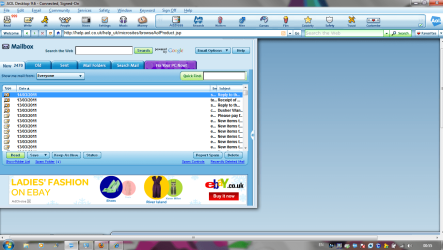
The screenshot I've attached, doesn't look too bad, but it is....I have to scroll so much to view a webpage; my e-mails are huge, and the AOL top taskbar is way to big (hogging lots of space) I did manage to reduce the bottom taskbar through Googling, but I can't find how to fix the main problem.

I have had a little fiddle with the 'Intel Graphics and Media Control Panel' but had no idea what I was doing and didn't want to wreck things!

Can you help please?

Many thanks :)
 

Attachments

  • Capture.PNG
    Capture.PNG
    142.6 KB · Views: 53

My Computer My Computer

At a glance

Windows 7 Home Premium 64 bitIntel(R) Core(TM) i33.00
Computer Manufacturer/Model Number
Acer Aspire 5742
OS
Windows 7 Home Premium 64 bit
CPU
Intel(R) Core(TM) i3
Memory
3.00
Monitor(s) Displays
Intel(R) HD Graphics [Display adapter]
Hard Drives
235.99 Gigabytes Usable Hard Drive Capacity
198.74 Gigabytes Hard Drive Free Space

MATSHITA DVD-RAM UJ890AS [Optical drive]

Hitachi HTS545025B9A300 [Hard drive] (250.06 GB)
The screenshot I've attached, doesn't look too bad, but it is....I have to scroll so much to view a webpage
Just use press 'Ctrl' and '+' or '-' to zoom pages

Concerning system tuners/tweaking utilities, be aware that TuneUp Utilities and Advanced System Care are actually useless on windows 7, Windows 7 does not need to be tweaked in any way
These programs are huge causes of BSODs and problems ;)
 

My Computer My Computer

At a glance

Windows 10 Pro x64, Arch LinuxIntel Core 2 Quad Q8200 OC'd 3.08GHz8GB DDR2 900MhzMSI GT730 2GB GDDR5 (Kepler)
Computer type
PC/Desktop
Computer Manufacturer/Model Number
Custom Build
OS
Windows 10 Pro x64, Arch Linux
CPU
Intel Core 2 Quad Q8200 OC'd 3.08GHz
Motherboard
Asus Rampage formula LGA775
Memory
8GB DDR2 900Mhz
Graphics Card(s)
MSI GT730 2GB GDDR5 (Kepler)
Sound Card
Supreme FX2
Monitor(s) Displays
Samsung LS22F350 LED
Screen Resolution
1080P
Hard Drives
Kingston SSDNow UV400 120GB, 500GB Hitachi, 2TB Samsung, 500GB Seagate FreeAgent, 640GB Samsung, 160GB Toshiba (Arch)
PSU
AeroCool 500W Bronze
Cooling
Cooler Master V6 + 3X fans
Keyboard
Prolink keyboard
Mouse
Logitech M705
Internet Speed
1MiB/s
Browser
Chrome Beta
You could also use Ctrl + 0 (the number zero) to return your screen to 100% (neither zoomed in nor zoomed out.)
 

My Computer My Computer

At a glance

Win 7 Pro 64-bitIntel i5 2.4 Ghz8GB DDR3Intel HD 3000
Computer type
Laptop
Computer Manufacturer/Model Number
Sony Vaio VPCEB47GM Laptop
OS
Win 7 Pro 64-bit
CPU
Intel i5 2.4 Ghz
Memory
8GB DDR3
Graphics Card(s)
Intel HD 3000
Sound Card
IDT High Definition
Monitor(s) Displays
15.6 WGXA Anti-Glare LED
Screen Resolution
1280x800
Hard Drives
640Gb 7200rpm
Antivirus
MSE
Browser
Opera (primary) with IE9 backup
Make sure all your drivers are installed. I had a similar problem years ago and it was a driver issue. In fact it was that episode that made me want to learn more about how these wonderful "magic boxes" and their software really works. ( The computer shop I took it to charged me $249.00 !!!!!!! to unzip 2 files and install them .... and they were already on my computer! 4 mouse clicks = $249.00!)
 

My Computer My Computer

At a glance

Windows 10x64 Build 1709Intel i7 7700HQ Kaby Lake16 GB DDR4 @2400Nvidia Geforce GTX 1060
Computer type
Laptop
Computer Manufacturer/Model Number
MSI GE72VR Apache Pro-416
OS
Windows 10x64 Build 1709
CPU
Intel i7 7700HQ Kaby Lake
Motherboard
Micro-Star Intl. MS-179B (U3C1)
Memory
16 GB DDR4 @2400
Graphics Card(s)
Nvidia Geforce GTX 1060
Screen Resolution
1920x1080 120Hz
Hard Drives
256 GB Nvme M.2 SSD

1TB HDD@7200
Cooling
Cooler Blast 4
Keyboard
Steel Series
Antivirus
Bit Defender Free
Browser
Edge
The screenshot I've attached, doesn't look too bad, but it is....I have to scroll so much to view a webpage
Just use press 'Ctrl' and '+' or '-' to zoom pages

Concerning system tuners/tweaking utilities, be aware that TuneUp Utilities and Advanced System Care are actually useless on windows 7, Windows 7 does not need to be tweaked in any way
These programs are huge cause of BSODs and problems ;)

Hello

I don't mean just text size (apologies, I should have explained this)
I've done another screenshot to show what I mean.....My other laptop has the same sized screen, yet as an example, the AOL top section is nowhere near as big. Its huge on this screen.

p.s
I've used Tune up and ASC for a long time and never had an issue - they keep this laptop running optimally (and the ASC nicely cleans up the crap leftover from browsing on shut down) I like especially like Tune Up, as I prefer to run a pc without the un-necessary whistles and bells in exchange for overall increased performance :)
 

Attachments

  • Capture 2.PNG
    Capture 2.PNG
    68.8 KB · Views: 26

My Computer My Computer

At a glance

Windows 7 Home Premium 64 bitIntel(R) Core(TM) i33.00
Computer Manufacturer/Model Number
Acer Aspire 5742
OS
Windows 7 Home Premium 64 bit
CPU
Intel(R) Core(TM) i3
Memory
3.00
Monitor(s) Displays
Intel(R) HD Graphics [Display adapter]
Hard Drives
235.99 Gigabytes Usable Hard Drive Capacity
198.74 Gigabytes Hard Drive Free Space

MATSHITA DVD-RAM UJ890AS [Optical drive]

Hitachi HTS545025B9A300 [Hard drive] (250.06 GB)
You could also use Ctrl + 0 (the number zero) to return your screen to 100% (neither zoomed in nor zoomed out.)

Ooh, that doesn't work for me....I just get taken to AOL Travel in a new tab :D
 

My Computer My Computer

At a glance

Windows 7 Home Premium 64 bitIntel(R) Core(TM) i33.00
Computer Manufacturer/Model Number
Acer Aspire 5742
OS
Windows 7 Home Premium 64 bit
CPU
Intel(R) Core(TM) i3
Memory
3.00
Monitor(s) Displays
Intel(R) HD Graphics [Display adapter]
Hard Drives
235.99 Gigabytes Usable Hard Drive Capacity
198.74 Gigabytes Hard Drive Free Space

MATSHITA DVD-RAM UJ890AS [Optical drive]

Hitachi HTS545025B9A300 [Hard drive] (250.06 GB)
You will not get better performance running tweaking suites on Win7. As those of us who went through beta for the past two years found out - often the hard way - Win7 is already optimized as light as can be and will not tolerate tweaks beyond normal system settings.

You can improve performance on a factory preinstall using these tips: http://www.sevenforums.com/installa...p-all-four-primary-partitions.html#post952573

If you have heavily tweaked Win7 then I would consider a clean http://www.sevenforums.com/installation-setup/125874-re-install-windows-7-a.html#post1086729

I gave you all the fixes for disproportionate web or windows display previously.
 
You will not get better performance running tweaking suites on Win7. As those of us who went through beta for the past two years found out - often the hard way - Win7 is already optimized as light as can be and will not tolerate tweaks beyond normal system settings.

So running the following prior to shut down can harm my system? (Spyware Removal, Privacy Sweep and Junk Files Clean)
 

Attachments

  • Capture.PNG
    Capture.PNG
    64.2 KB · Views: 11

My Computer My Computer

At a glance

Windows 7 Home Premium 64 bitIntel(R) Core(TM) i33.00
Computer Manufacturer/Model Number
Acer Aspire 5742
OS
Windows 7 Home Premium 64 bit
CPU
Intel(R) Core(TM) i3
Memory
3.00
Monitor(s) Displays
Intel(R) HD Graphics [Display adapter]
Hard Drives
235.99 Gigabytes Usable Hard Drive Capacity
198.74 Gigabytes Hard Drive Free Space

MATSHITA DVD-RAM UJ890AS [Optical drive]

Hitachi HTS545025B9A300 [Hard drive] (250.06 GB)
Not necessarily, but the same can be achieved with less impact on performance and potential harm to the OS by setting Internet Options>Advanced to Empty Temporary Internet Files when Browser is Closed, running CCleaner monthly (Run Cleaner on Disk tab, followed by Scan for Issues on Registry tab), using a good lightweight free AV like MS Security Essentials or Avast5 with Win7 firewall, then monthly Malwarebytes scan.

These tools are known to work well with Win7 with perfect performance - all we see from tweaking and optimization suites here are problems. You might uninstall the unknown app and try these to see if there is any difference - if not, use what you feel comfortable with.
 
Just thought I'd pop back to say that I haven't resolved this problem, so if anyone else has any suggestions please.... :)

(I need to change the size of the browser graphics / images / mailbox, not just the font size - that bit is very easy ;))

Regards
Tara
 

My Computer My Computer

At a glance

Windows 7 Home Premium 64 bitIntel(R) Core(TM) i33.00
Computer Manufacturer/Model Number
Acer Aspire 5742
OS
Windows 7 Home Premium 64 bit
CPU
Intel(R) Core(TM) i3
Memory
3.00
Monitor(s) Displays
Intel(R) HD Graphics [Display adapter]
Hard Drives
235.99 Gigabytes Usable Hard Drive Capacity
198.74 Gigabytes Hard Drive Free Space

MATSHITA DVD-RAM UJ890AS [Optical drive]

Hitachi HTS545025B9A300 [Hard drive] (250.06 GB)
Is this only specific to AOL or also with the IE for example. It may be an AOL setting that does that. I will see whether I can find it. Would like to have that on my systems because my AOL is itty-bitty and I can hardly read it.

BTW: none of the usual tricks suggested above like CTL and + work in AOL.
 

My Computer My Computer

At a glance

Vista, Windows7, Mint Mate, Zorin, Windows 8from 1.6GHz Duo to i7
Computer Manufacturer/Model Number
HP, Dell, Gateway, Toshiba - 4 laptops and 2 desktops
OS
Vista, Windows7, Mint Mate, Zorin, Windows 8
CPU
from 1.6GHz Duo to i7
Monitor(s) Displays
2x HP w2207
Hard Drives
5x HDD, 7x SSD, 12x Externals
Keyboard
with trackball - no mices
Mouse
Trackball mice
Internet Speed
DSL 6000
Is this only specific to AOL or also with the IE for example. It may be an AOL setting that does that. I will see whether I can find it. Would like to have that on my systems because my AOL is itty-bitty and I can hardly read it.

BTW: none of the usual tricks suggested above like CTL and + work in AOL.


Hello WHS

Yes IE and Firefox are affected, but not quite as much as AOL. It's going to drive me insane because I am having to endlessly scroll to see half of what I normally would see :confused:

My AOL mailbox is huge and even when it is stretched to its max, you can only see 12 mails inside - Now that doesn't sound bad, but believe me, it's not what I am used to on like on my XP machine, and the font is huge (as you say, you can't change the fonts within AOL e-mails etc)

The top info bar on my AOL page measures 1.5 inches depth (nearly double what it was, with very big icons) I have spent all night looking thru AOL settings / keywords and similar, and I can't find a solution :(

Just typing this reply, the font is size 14, when before it would have been 10.

I'm keeping my fingers crossed that you might find some info I've missed (I'm brain dead now)

Regards
Tara
 

My Computer My Computer

At a glance

Windows 7 Home Premium 64 bitIntel(R) Core(TM) i33.00
Computer Manufacturer/Model Number
Acer Aspire 5742
OS
Windows 7 Home Premium 64 bit
CPU
Intel(R) Core(TM) i3
Memory
3.00
Monitor(s) Displays
Intel(R) HD Graphics [Display adapter]
Hard Drives
235.99 Gigabytes Usable Hard Drive Capacity
198.74 Gigabytes Hard Drive Free Space

MATSHITA DVD-RAM UJ890AS [Optical drive]

Hitachi HTS545025B9A300 [Hard drive] (250.06 GB)
Just thought I'd pop back to say that I haven't resolved this problem, so if anyone else has any suggestions please.... :)

(I need to change the size of the browser graphics / images / mailbox, not just the font size - that bit is very easy ;))

Regards
Tara

Once again, check the Screen Resolution by rightclicking the desktop to make sure you have objects in correct proportion and close to the size you want.

On the screen res page, adjust the DPI size to further refine the sizing of windows, type, etc.

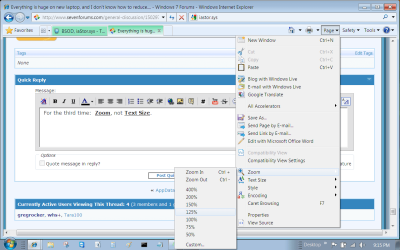
Next in Internet Explorer>Page tab adjust the Zoom so that the windows fit in their frame.

None of the given steps here refer to font size, although it may change in proportion to the rest of the sizing.
 
Just thought I'd pop back to say that I haven't resolved this problem, so if anyone else has any suggestions please.... :)

(I need to change the size of the browser graphics / images / mailbox, not just the font size - that bit is very easy ;))

Regards
Tara

Once again, check the Screen Resolution by rightclicking the desktop to make sure you have objects in correct proportion and close to the size you want.

On the screen res page, adjust the DPI size to further refine the sizing of windows, type, etc.

Next in Internet Explorer>Page tab adjust the Zoom so that the windows fit in their frame.

None of the given steps here refer to font size, although it may change in proportion to the rest of the sizing.

I have done the things you mention earlier today, and more. Altering the screen resolution just narrows the browser, making it disproportionate and leaving blank sides - the icons and graphics do not change size.

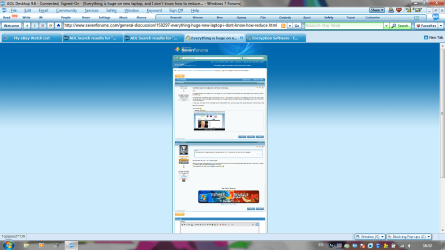
I have also made sure that 'Use large icons' in IE is NOT checked. Under 'view' in IE, text size is set at 'medium' - If I set it to 'smaller' then the page looks ridiculous...Here is IE with AOL set as my home page - The text is small set against those big graphics - if you are au fait with it, note the size of the usual AOL 'butterfly wing' then the System Mechanic advertisement and the ITN ad:
 

Attachments

  • Capture.PNG
    Capture.PNG
    82.8 KB · Views: 9

My Computer My Computer

At a glance

Windows 7 Home Premium 64 bitIntel(R) Core(TM) i33.00
Computer Manufacturer/Model Number
Acer Aspire 5742
OS
Windows 7 Home Premium 64 bit
CPU
Intel(R) Core(TM) i3
Memory
3.00
Monitor(s) Displays
Intel(R) HD Graphics [Display adapter]
Hard Drives
235.99 Gigabytes Usable Hard Drive Capacity
198.74 Gigabytes Hard Drive Free Space

MATSHITA DVD-RAM UJ890AS [Optical drive]

Hitachi HTS545025B9A300 [Hard drive] (250.06 GB)
WHS

If you are still about, here's almost how big my AOL mailbox is when it is opened and not expanded or decreased (I have hidden some of the top section so that my details are obscured, so it is actually bigger than seen here:
 

Attachments

  • Capture 2.PNG
    Capture 2.PNG
    85 KB · Views: 13

My Computer My Computer

At a glance

Windows 7 Home Premium 64 bitIntel(R) Core(TM) i33.00
Computer Manufacturer/Model Number
Acer Aspire 5742
OS
Windows 7 Home Premium 64 bit
CPU
Intel(R) Core(TM) i3
Memory
3.00
Monitor(s) Displays
Intel(R) HD Graphics [Display adapter]
Hard Drives
235.99 Gigabytes Usable Hard Drive Capacity
198.74 Gigabytes Hard Drive Free Space

MATSHITA DVD-RAM UJ890AS [Optical drive]

Hitachi HTS545025B9A300 [Hard drive] (250.06 GB)
WHS

If you are still about, here's almost how big my AOL mailbox is when it is opened and not expanded or decreased (I have hidden some of the top section so that my details are obscured, so it is actually bigger than seen here:
Hmm, looks normal to me. Mine is about the same.
 

Attachments

  • 2011-03-13_2110.png
    2011-03-13_2110.png
    126.4 KB · Views: 6

My Computer My Computer

At a glance

Vista, Windows7, Mint Mate, Zorin, Windows 8from 1.6GHz Duo to i7
Computer Manufacturer/Model Number
HP, Dell, Gateway, Toshiba - 4 laptops and 2 desktops
OS
Vista, Windows7, Mint Mate, Zorin, Windows 8
CPU
from 1.6GHz Duo to i7
Monitor(s) Displays
2x HP w2207
Hard Drives
5x HDD, 7x SSD, 12x Externals
Keyboard
with trackball - no mices
Mouse
Trackball mice
Internet Speed
DSL 6000
Hi again WHS

When using my old XP laptop, and opening my AOL mailbox, it took up about a fifth of the screen and you could see more than double the amount of e-mails compared to using the Windows 7 laptop.

What do you think about the Internet Explorer screenshot I posted at #15, particularly the size of the ads compared to the text size?

Sorry :o :)
 

My Computer My Computer

At a glance

Windows 7 Home Premium 64 bitIntel(R) Core(TM) i33.00
Computer Manufacturer/Model Number
Acer Aspire 5742
OS
Windows 7 Home Premium 64 bit
CPU
Intel(R) Core(TM) i3
Memory
3.00
Monitor(s) Displays
Intel(R) HD Graphics [Display adapter]
Hard Drives
235.99 Gigabytes Usable Hard Drive Capacity
198.74 Gigabytes Hard Drive Free Space

MATSHITA DVD-RAM UJ890AS [Optical drive]

Hitachi HTS545025B9A300 [Hard drive] (250.06 GB)

Attachments

  • Capture3.PNG
    Capture3.PNG
    124.9 KB · Views: 4

My Computer My Computer

At a glance

Windows 7 Home Premium 64 bitIntel(R) Core(TM) i33.00
Computer Manufacturer/Model Number
Acer Aspire 5742
OS
Windows 7 Home Premium 64 bit
CPU
Intel(R) Core(TM) i3
Memory
3.00
Monitor(s) Displays
Intel(R) HD Graphics [Display adapter]
Hard Drives
235.99 Gigabytes Usable Hard Drive Capacity
198.74 Gigabytes Hard Drive Free Space

MATSHITA DVD-RAM UJ890AS [Optical drive]

Hitachi HTS545025B9A300 [Hard drive] (250.06 GB)
Back
Top