Everything is huge on new laptop, and I don't know how to reduce....

Most all of my installs shake out with IE8 zoom at 125% and Larger Text size, with the native or maximum screen res. I think this is fairly standard for widescreens.

 

My Computer My Computer

At a glance

Vista, Windows7, Mint Mate, Zorin, Windows 8from 1.6GHz Duo to i7
Computer Manufacturer/Model Number
HP, Dell, Gateway, Toshiba - 4 laptops and 2 desktops
OS
Vista, Windows7, Mint Mate, Zorin, Windows 8
CPU
from 1.6GHz Duo to i7
Monitor(s) Displays
2x HP w2207
Hard Drives
5x HDD, 7x SSD, 12x Externals
Keyboard
with trackball - no mices
Mouse
Trackball mice
Internet Speed
DSL 6000
Hi again WHS

When using my old XP laptop, and opening my AOL mailbox, it took up about a fifth of the screen and you could see more than double the amount of e-mails compared to using the Windows 7 laptop.

What do you think about the Internet Explorer screenshot I posted at #15, particularly the size of the ads compared to the text size?

Sorry :o :)
This apparently the AOL on IE. Here is how mine looks (set at 100%) - I usually use 125% though.
 

Attachments

  • 2011-03-13_2152.png
    2011-03-13_2152.png
    194 KB · Views: 6

My Computer My Computer

At a glance

Vista, Windows7, Mint Mate, Zorin, Windows 8from 1.6GHz Duo to i7
Computer Manufacturer/Model Number
HP, Dell, Gateway, Toshiba - 4 laptops and 2 desktops
OS
Vista, Windows7, Mint Mate, Zorin, Windows 8
CPU
from 1.6GHz Duo to i7
Monitor(s) Displays
2x HP w2207
Hard Drives
5x HDD, 7x SSD, 12x Externals
Keyboard
with trackball - no mices
Mouse
Trackball mice
Internet Speed
DSL 6000
Most all of my installs shake out with IE8 zoom at 125% and Larger Text size, with the native or maximum screen res. I think this is fairly standard for widescreens.

Now that is interesting. I just tried those settings below and can only view about 1/5th of the webpage ..........
 

Attachments

  • Capture.PNG
    Capture.PNG
    152.1 KB · Views: 7

My Computer My Computer

At a glance

Windows 7 Home Premium 64 bitIntel(R) Core(TM) i33.00
Computer Manufacturer/Model Number
Acer Aspire 5742
OS
Windows 7 Home Premium 64 bit
CPU
Intel(R) Core(TM) i3
Memory
3.00
Monitor(s) Displays
Intel(R) HD Graphics [Display adapter]
Hard Drives
235.99 Gigabytes Usable Hard Drive Capacity
198.74 Gigabytes Hard Drive Free Space

MATSHITA DVD-RAM UJ890AS [Optical drive]

Hitachi HTS545025B9A300 [Hard drive] (250.06 GB)
Most all of my installs shake out with IE8 zoom at 125% and Larger Text size, with the native or maximum screen res. I think this is fairly standard for widescreens.

Now that is interesting. I just tried those settings below and can only view about 1/5th of the webpage ..........
That is normal. I just displayed your UK AOL on my 22" screen and at 125% I did not see a lot more.
 

My Computer My Computer

At a glance

Vista, Windows7, Mint Mate, Zorin, Windows 8from 1.6GHz Duo to i7
Computer Manufacturer/Model Number
HP, Dell, Gateway, Toshiba - 4 laptops and 2 desktops
OS
Vista, Windows7, Mint Mate, Zorin, Windows 8
CPU
from 1.6GHz Duo to i7
Monitor(s) Displays
2x HP w2207
Hard Drives
5x HDD, 7x SSD, 12x Externals
Keyboard
with trackball - no mices
Mouse
Trackball mice
Internet Speed
DSL 6000
Hmm. Are you using a lower Screen Res? The native (highest) resolution tends to make things quite small, requiring a higher zoom.

I dont' know if we've asked you yet if you've updated your Display Driver? Check optional Windows Updates, or the Support Downloads webpage for the computer or display adapter model.
 
This is definitely a screen resolution thing. On a laptop, you typically need to set it to the highest available resolution.
 

My Computer My Computer

At a glance

Windows 7 Ultimate RTM (Technet)3.00 gigahertz Intel Core2 Duo E84004GBATI Radeon X1950 Pro
Computer Manufacturer/Model Number
Custom
OS
Windows 7 Ultimate RTM (Technet)
CPU
3.00 gigahertz Intel Core2 Duo E8400
Motherboard
ASUSTeK Computer INC. P5K/EPU Rev 1.xx
Memory
4GB
Graphics Card(s)
ATI Radeon X1950 Pro
Sound Card
Built in HD Audio
Monitor(s) Displays
22" Gateway LCD
Screen Resolution
1920 x 1200
Hard Drives
ST3160023A [Hard drive] (160.04 GB) -- drive 0, rev 8.01, ST3500630AS [Hard drive] (500.11 GB) -- drive 2, rev 3.AAK
ST3500630AS [Hard drive] (500.11 GB) -- drive 1, rev 3.AAK
Keyboard
Logitech G11
Mouse
Microsoft Wireless Laser Mouse 5000
Internet Speed
13.44 Mbps
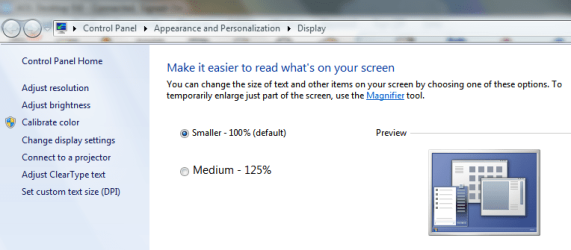
Has the OP tried: Start - Search - type "enlarge" and click on Make text and other items larger or smaller. ?
Mine defaulted at 125%. Can be reduced to 100%
 

My Computer My Computer

At a glance

Windows 7 Home Premium x64 OEM --> RTM clean ...Intel T44004Gb? - Mobile Intel(R) 4 Series Express Chipset ...
Computer Manufacturer/Model Number
Toshiba Satellite L500
OS
Windows 7 Home Premium x64 OEM --> RTM clean install
CPU
Intel T4400
Motherboard
? - laptop inbuilt ?
Memory
4Gb
Graphics Card(s)
? - Mobile Intel(R) 4 Series Express Chipset Family ?
Sound Card
Realtek
Monitor(s) Displays
? + extended to a 42" LG55PC plasma tele!
Screen Resolution
1366 * 768
Hard Drives
320Gb 5500rpm
PSU
?
Case
?
Cooling
?
Internet Speed
3Meg, when it works.
Other Info
A LOWLY LAPTOP!
Has the OP tried: Start - Search - type "enlarge" and click on Make text and other items larger or smaller. ?
Mine defaulted at 125%. Can be reduced to 100%

Hello

Yes, I checked those settings - my default is 100% and it is already on that setting. At 125% the webpages etc are huge.
 

Attachments

  • Capture.PNG
    Capture.PNG
    30.4 KB · Views: 5

My Computer My Computer

At a glance

Windows 7 Home Premium 64 bitIntel(R) Core(TM) i33.00
Computer Manufacturer/Model Number
Acer Aspire 5742
OS
Windows 7 Home Premium 64 bit
CPU
Intel(R) Core(TM) i3
Memory
3.00
Monitor(s) Displays
Intel(R) HD Graphics [Display adapter]
Hard Drives
235.99 Gigabytes Usable Hard Drive Capacity
198.74 Gigabytes Hard Drive Free Space

MATSHITA DVD-RAM UJ890AS [Optical drive]

Hitachi HTS545025B9A300 [Hard drive] (250.06 GB)
Hmm. Are you using a lower Screen Res? The native (highest) resolution tends to make things quite small, requiring a higher zoom.

I dont' know if we've asked you yet if you've updated your Display Driver? Check optional Windows Updates, or the Support Downloads webpage for the computer or display adapter model.


Hi again :)

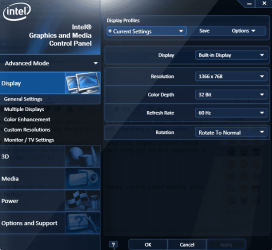
I updated everything available in Windows Update, and then the drivers were updated through the Intel 'Graphics and Media control panel' shortly after setting up the laptop.
My screen resolution is as high as it will go at 1366 x 768 (if I try adjusting this to a lower number, I just get narrow pages)

The screenshot below shows how I keep the resolution settings:
 

Attachments

  • Capture 2.PNG
    Capture 2.PNG
    61.6 KB · Views: 4

My Computer My Computer

At a glance

Windows 7 Home Premium 64 bitIntel(R) Core(TM) i33.00
Computer Manufacturer/Model Number
Acer Aspire 5742
OS
Windows 7 Home Premium 64 bit
CPU
Intel(R) Core(TM) i3
Memory
3.00
Monitor(s) Displays
Intel(R) HD Graphics [Display adapter]
Hard Drives
235.99 Gigabytes Usable Hard Drive Capacity
198.74 Gigabytes Hard Drive Free Space

MATSHITA DVD-RAM UJ890AS [Optical drive]

Hitachi HTS545025B9A300 [Hard drive] (250.06 GB)
This is definitely a screen resolution thing. On a laptop, you typically need to set it to the highest available resolution.

I am sure it is a resolution thing too, but I the settings have always been as high as they will go. I mailed AOL and they said the same as you, so I don't know how I can fix this :(

 

My Computer My Computer

At a glance

Windows 7 Home Premium 64 bitIntel(R) Core(TM) i33.00
Computer Manufacturer/Model Number
Acer Aspire 5742
OS
Windows 7 Home Premium 64 bit
CPU
Intel(R) Core(TM) i3
Memory
3.00
Monitor(s) Displays
Intel(R) HD Graphics [Display adapter]
Hard Drives
235.99 Gigabytes Usable Hard Drive Capacity
198.74 Gigabytes Hard Drive Free Space

MATSHITA DVD-RAM UJ890AS [Optical drive]

Hitachi HTS545025B9A300 [Hard drive] (250.06 GB)
I am sure it is a resolution thing too, but I the settings have always been as high as they will go. I mailed AOL and they said the same as you, so I don't know how I can fix this :(

This may be one of my dumber questions so apologies in advance. :)
You have a couple of snips in posts 29 and 30. In 29, did you try changing the DPI (dots per inch) to see if that has any effect? Post 30 indicates you're using the Intel dashboard to make your adjustments. Have you checked via your desktop to make sure screen resolution is set the same and not conflicting in some way? Right click empty part of desktop > screen resolution. Again, apologies if this has been asked and answered previously.
 

My Computer My Computer

At a glance

Win 7 Pro 64-bitIntel i5 2.4 Ghz8GB DDR3Intel HD 3000
Computer type
Laptop
Computer Manufacturer/Model Number
Sony Vaio VPCEB47GM Laptop
OS
Win 7 Pro 64-bit
CPU
Intel i5 2.4 Ghz
Memory
8GB DDR3
Graphics Card(s)
Intel HD 3000
Sound Card
IDT High Definition
Monitor(s) Displays
15.6 WGXA Anti-Glare LED
Screen Resolution
1280x800
Hard Drives
640Gb 7200rpm
Antivirus
MSE
Browser
Opera (primary) with IE9 backup
Hello Marsmimer

Thanks for the reply.
I have previously done as you suggested, and things stay the same. I only had a glimmer of hope when I saw there was a driver update, but even after the install everything was exactly the same.

I'm losing hope of fixing this now; there's nothing left to try.
 

My Computer My Computer

At a glance

Windows 7 Home Premium 64 bitIntel(R) Core(TM) i33.00
Computer Manufacturer/Model Number
Acer Aspire 5742
OS
Windows 7 Home Premium 64 bit
CPU
Intel(R) Core(TM) i3
Memory
3.00
Monitor(s) Displays
Intel(R) HD Graphics [Display adapter]
Hard Drives
235.99 Gigabytes Usable Hard Drive Capacity
198.74 Gigabytes Hard Drive Free Space

MATSHITA DVD-RAM UJ890AS [Optical drive]

Hitachi HTS545025B9A300 [Hard drive] (250.06 GB)
Back
Top