How to tell W7 that extra memory is for page file only

robilong

New member
Member
Local time
1:01 PM
Messages
87
or no virtual memory at all.

Probably the most asked question, which I hope I'm asking from a different angle :-)

In one sentence, it should be very logical, when 8 GB RAM is sufficient + adding 8 GB RAM extra= no need for slow HDD swapping.

That is, I have on my W7x64 PC 8 GB of RAM and virtual memory rotating on HD disk. Everything is fine, or for a Windows 7 at least, while I'm suffering of some impatience always, when W7 swaps Lightroom catalog to and from HDD...

But when I add another 8 GB of fresh memory, how to tell windows 7, that no need to use slow HDD as instead there is another 8 GB of extra memory, which Windows could eat or at least to move it's page file to this extra RAM memory?
 

My Computer My Computer

At a glance

Windows 7 Enterprise 64 bitIntel I5-7608 GBCLUB 3D HD5450 1GB GDDR3 CGAX-54524LI
OS
Windows 7 Enterprise 64 bit
CPU
Intel I5-760
Motherboard
INTEL P55 S1156 DDR3 GLAN RAID BLKDP55WB
Memory
8 GB
Graphics Card(s)
CLUB 3D HD5450 1GB GDDR3 CGAX-54524LI
Hard Drives
WD150HFLS 150GB/10000rpm
WD10EALS Blue 1TB
Start > right click on Computer > Properties > on left column advanced system settings > popup will open ant click on settings from performance (first button) another popup will open and when advanced tab and change button and select no paging file > set ok, ok, ok and restart.

Hope it helps.
 

My Computer My Computer

At a glance

Windows 7 Ultimate x64
OS
Windows 7 Ultimate x64
The LAST thing you want to do is start messing with these settings. This isn't Windows XP you are dealing with, so don't "tweak" it as such. Windows 7 is much smarter with your memory, so it will use what you throw at it. All OSes still using virtual memory, even if you think you have it disabled, so it was even debatable 10 years ago when Windows XP was released.

There's no reason to disable paging in Windows 7, and it will not give you any kind of performance increase. The best tweaking advice for Windows 7, for 18 months now...has been to leave it alone....

...unless of course you don't like stability.
 

My Computer My Computer

At a glance

Windows 7 Ultimate x64 SP1Intel Core i7-260012 GB Patriot Extreme DDR3-1333Nvidia GTX 470
OS
Windows 7 Ultimate x64 SP1
CPU
Intel Core i7-2600
Motherboard
Gigabyte GA-P67A-UD3P-B3
Memory
12 GB Patriot Extreme DDR3-1333
Graphics Card(s)
Nvidia GTX 470
Monitor(s) Displays
Dell UltraSharp 2209WA
Hard Drives
OCZ Agility3 240 GB, WD5001AALS, WD7501AALS
PSU
OCZ ModStream 700W
Case
CoolerMaster HAF 912 Advanced
Cooling
CoolerMaster Hyper 212 Plus
If you delete the page file, I guarantee your system will crash. You can try the minimum settings which is 200MB (I believe). But some programs need the pagefile even if you have acres of free space.

BTW: If you have a pagefile smaller than your RAM, you will not get any dump in the event of a BSOD. It is in the pagefile space where the system stores that dump.
 

My Computer My Computer

At a glance

Vista, Windows7, Mint Mate, Zorin, Windows 8from 1.6GHz Duo to i7
Computer Manufacturer/Model Number
HP, Dell, Gateway, Toshiba - 4 laptops and 2 desktops
OS
Vista, Windows7, Mint Mate, Zorin, Windows 8
CPU
from 1.6GHz Duo to i7
Monitor(s) Displays
2x HP w2207
Hard Drives
5x HDD, 7x SSD, 12x Externals
Keyboard
with trackball - no mices
Mouse
Trackball mice
Internet Speed
DSL 6000
Well, there is one possibility - if you actually go for 16 GB RAM (which seems a bit too much at the moment), you can use RAM-disk software (a free one you can find here) to create a virtual drive made out of RAM and place your pagefile on it.

There are opposing views (you can find them if you search the Forums on page file and RAM disk) on whether this makes any sense: on one hand, you gain in speed since your RAM is obviously faster than your hard drive; on the other hand, you're sort of wasting your RAM.

My personal experience with it was mixed. If I put the IE9 or FF cache on the RAM disk, then parts of web pages load instantly, but then you notice the delay with other parts (of the same page). Windows tmp folder did not work at all on RAM disk. Not sure why. In my SSD setup I moved it away from the SSD, but to a regular hard drive. If I put it on RAM disk, the system then created various temp folders across the system somehow.
 

My Computer My Computer

At a glance

Windows 7 Ultimate (x64)Q66008 GBATI Radeon HD 2600 XT
Computer Manufacturer/Model Number
Dell Inspiron 530
OS
Windows 7 Ultimate (x64)
CPU
Q6600
Memory
8 GB
Graphics Card(s)
ATI Radeon HD 2600 XT
Monitor(s) Displays
Samsung Syncmaster P2450
Screen Resolution
1920x1080
Hard Drives
Samsung HD103UJ
Samsung HD501LJ
Internet Speed
25 Mb/s
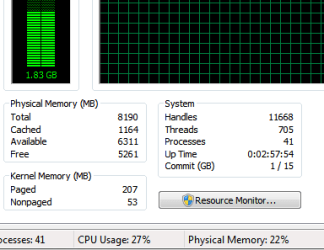
Bill, here's my typical workload. Of course, I am not editing any video at the moment, but even then (with 90% CPU load) I've never seen more that 3GB used memory. So, if the OP is thinking to go to 16GB ... well, I don't know what he's doing with his PC, but the possibility of memory overload seems rather remote to me. Of course, some programs actually need the page file no matter how much RAM is installed, for these placing the page file on a RAM disk might work just fine. Until some app will come up that will need all 16 GB. For now I am unaware of any such app.
 

Attachments

  • Capture.PNG
    Capture.PNG
    5.4 KB · Views: 9

My Computer My Computer

At a glance

Windows 7 Ultimate (x64)Q66008 GBATI Radeon HD 2600 XT
Computer Manufacturer/Model Number
Dell Inspiron 530
OS
Windows 7 Ultimate (x64)
CPU
Q6600
Memory
8 GB
Graphics Card(s)
ATI Radeon HD 2600 XT
Monitor(s) Displays
Samsung Syncmaster P2450
Screen Resolution
1920x1080
Hard Drives
Samsung HD103UJ
Samsung HD501LJ
Internet Speed
25 Mb/s
Bill, here's my typical workload. Of course, I am not editing any video at the moment, but even then (with 90% CPU load) I've never seen more that 3GB used memory. So, if the OP is thinking to go to 16GB ... well, I don't know what he's doing with his PC, but the possibility of memory overload seems rather remote to me. Of course, some programs actually need the page file no matter how much RAM is installed, for these placing the page file on a RAM disk might work just fine. Until some app will come up that will need all 16 GB. For now I am unaware of any such app.
Lol...I cant think of anything to do with 16 gig RAM either. I guess its about being future-proof. My ancient desktop started out with 64mb and most of my machines now have 4 gig- thats like 60 times over. So futureproofness is difficult to predict.

But my only point was no purpose is served by getting rid of the pf completely- whats a couple of 100 mb on giant sized disks?
 

My Computer My Computer

At a glance

Windows 7 x64 pro/ Windows 7 x86 Pro/ XP SP3 x86
Computer Manufacturer/Model Number
Too many to describe...
OS
Windows 7 x64 pro/ Windows 7 x86 Pro/ XP SP3 x86
Actually rather controversial if not to say absurd! HDD is times slower then DDR3. When we have 8GB of DDR memory and Windows suggests 1.5 times of it virtual memory, which is sooo muuuuch slower, why can't we add for this purposes more DDR3 memory???
Or even worse, when we add memory and have 16GB, the suggested virtual memory amount is also increased, as a result by adding memory we degrade our PC from other end (by pushing it to use more slower HDD memory).
I use a lot of imaging software, which likes to expand in memory and Windows doesn't let to stop it with physical RAM. Therefore my workflow is rather often interrupted by unexpected HDD page file swapping, which IMO doesn't have any justification except poor programming. Memory is cheep nowadays but still not waste.
 

My Computer My Computer

At a glance

Windows 7 Enterprise 64 bitIntel I5-7608 GBCLUB 3D HD5450 1GB GDDR3 CGAX-54524LI
OS
Windows 7 Enterprise 64 bit
CPU
Intel I5-760
Motherboard
INTEL P55 S1156 DDR3 GLAN RAID BLKDP55WB
Memory
8 GB
Graphics Card(s)
CLUB 3D HD5450 1GB GDDR3 CGAX-54524LI
Hard Drives
WD150HFLS 150GB/10000rpm
WD10EALS Blue 1TB
Actually rather controversial if not to say absurd! HDD is times slower then DDR3. When we have 8GB of DDR memory and Windows suggests 1.5 times of it virtual memory, which is sooo muuuuch slower, why can't we add for this purposes more DDR3 memory???
Or even worse, when we add memory and have 16GB, the suggested virtual memory amount is also increased, as a result by adding memory we degrade our PC from other end (by pushing it to use more slower HDD memory).
I use a lot of imaging software, which likes to expand in memory and Windows doesn't let to stop it with physical RAM. Therefore my workflow is rather often interrupted by unexpected HDD page file swapping, which IMO doesn't have any justification except poor programming. Memory is cheep nowadays but still not waste.
You'll mostly get cautious advice in this matter but there're many people out there who dont use a paging file particularly when they have 8 gigs or more of RAM. Its upto you, if it works, go ahead. If it doesnt, go back to a paging file.

You can read more here. Page also contains several good links.

windows server 2008 - Any benefit or detriment from removing a pagefile on an 8GB RAM machine? - Server Fault
 

My Computer My Computer

At a glance

Windows 7 x64 pro/ Windows 7 x86 Pro/ XP SP3 x86
Computer Manufacturer/Model Number
Too many to describe...
OS
Windows 7 x64 pro/ Windows 7 x86 Pro/ XP SP3 x86
Actually rather controversial if not to say absurd! HDD is times slower then DDR3. When we have 8GB of DDR memory and Windows suggests 1.5 times of it virtual memory, which is sooo muuuuch slower, why can't we add for this purposes more DDR3 memory???
I said it once in this thread, and it's been said countless times since Windows 7's release. It isn't XP, so please don't sell yourself short by assuming it works exactly like Windows XP.

What you are doing, is akin to arguing that cars are still powered by horses in front of them, not realizing the technology has changed quite a bit. Do yourself a favor and do some readon on the subject before calling other viewpoints absurd.

Windows 7 is not Windows XP, and should be left alone to tweak and optimize itself. Yes, that's the exact opposite of what one would do with XP...but that's just one of many reasons why Windows 7 is the most superior Windows desktop OS ever released.
 

My Computer My Computer

At a glance

Windows 7 Ultimate x64 SP1Intel Core i7-260012 GB Patriot Extreme DDR3-1333Nvidia GTX 470
OS
Windows 7 Ultimate x64 SP1
CPU
Intel Core i7-2600
Motherboard
Gigabyte GA-P67A-UD3P-B3
Memory
12 GB Patriot Extreme DDR3-1333
Graphics Card(s)
Nvidia GTX 470
Monitor(s) Displays
Dell UltraSharp 2209WA
Hard Drives
OCZ Agility3 240 GB, WD5001AALS, WD7501AALS
PSU
OCZ ModStream 700W
Case
CoolerMaster HAF 912 Advanced
Cooling
CoolerMaster Hyper 212 Plus
With 16GBs of RAM, the Ramdisk idea may make a certain sense. The controversy stems from the fact that the space that you take away for the Ramdisk will not be available for caching, thus working against you from that aspect. But if you take e.g. 4GBs away for the Ramdisk from a total RAM of 16GB, there is still ample space for caching that will probably never all be used.

Best is to observe your RAM usage behavior in Resource Monitor. There is also a graph on the bottom right of that page which shows you the recent history of hard page faults.
 

My Computer My Computer

At a glance

Vista, Windows7, Mint Mate, Zorin, Windows 8from 1.6GHz Duo to i7
Computer Manufacturer/Model Number
HP, Dell, Gateway, Toshiba - 4 laptops and 2 desktops
OS
Vista, Windows7, Mint Mate, Zorin, Windows 8
CPU
from 1.6GHz Duo to i7
Monitor(s) Displays
2x HP w2207
Hard Drives
5x HDD, 7x SSD, 12x Externals
Keyboard
with trackball - no mices
Mouse
Trackball mice
Internet Speed
DSL 6000
Definitely, and with 16 GB of memory, you won't be paging much and it won't be happening that often....but you need to always allow the OS the ability to do so. There's no need and certainly no benefit to disabling virtual memory.
 

My Computer My Computer

At a glance

Windows 7 Ultimate x64 SP1Intel Core i7-260012 GB Patriot Extreme DDR3-1333Nvidia GTX 470
OS
Windows 7 Ultimate x64 SP1
CPU
Intel Core i7-2600
Motherboard
Gigabyte GA-P67A-UD3P-B3
Memory
12 GB Patriot Extreme DDR3-1333
Graphics Card(s)
Nvidia GTX 470
Monitor(s) Displays
Dell UltraSharp 2209WA
Hard Drives
OCZ Agility3 240 GB, WD5001AALS, WD7501AALS
PSU
OCZ ModStream 700W
Case
CoolerMaster HAF 912 Advanced
Cooling
CoolerMaster Hyper 212 Plus
I think the whole discussion regarding the pagefile is kind of behind us. In previous times when RAM was scarce and paging happened a lot, attention to the pagefile was popular (although most tweaks were useless).

But with recent systems that come with at least 4GB of RAM, the whole subject is really irrelevant. There is so little paging going on, that it does not matter where the pagefile resides. The overall performance impct will be minimal even with the slowest device.

The main use for the pagefile is for the few processes that use it for whatever reason. They propably use the pagemanager as a subroutine because that was the easiest way to implement a certain function. That you find very often in the system (e.g. the partition shrink process using the defrag service).

The other use of the pagefile (as I said before) is for storing a memory dump in case of a BSOD.

So if you are not short in diskspace (like e.g. on a smaller SSD), I would just leavee it up to the system to manage. Deleting the hiberfile is a less consequential option - especially with 16GB of RAM.
 

My Computer My Computer

At a glance

Vista, Windows7, Mint Mate, Zorin, Windows 8from 1.6GHz Duo to i7
Computer Manufacturer/Model Number
HP, Dell, Gateway, Toshiba - 4 laptops and 2 desktops
OS
Vista, Windows7, Mint Mate, Zorin, Windows 8
CPU
from 1.6GHz Duo to i7
Monitor(s) Displays
2x HP w2207
Hard Drives
5x HDD, 7x SSD, 12x Externals
Keyboard
with trackball - no mices
Mouse
Trackball mice
Internet Speed
DSL 6000
to 'robilong':
...I'm suffering of some impatience always, when Windows 7 swaps Lightroom catalog to and from HDD...

Well the answer to your question is not really Windows 7 related.
Check your pagefile when using Lightroom and you will find little activity there.
Lightroom (LR) itself does what you think is swapping, because LR is constantly reading from and writing to the catalog ...\Lightroom 3 Catalog Previews.lrdata\
So even a RAM-Disk won't help to increase LR processing, unless your machine is always on and your LR-catalog resides on that RAM-Disk. Not very a advisable solution at all.

What you can do is to create a RAID1 on two identical disks connected the fastest controller you can get a hold off.
This is the simplest solution to increase LR processing speed.

I am using LR that way and I find it quite responsive with at catalog of 100'000 plus images.
Speaking of LR, in the catalog settings, deselect the option of deleting thumbnails after 30-days. This measure of course increases needs for disk space but that commodity is cheap and LR will not have to recreate thumbnails when they were not used for more than 30-days.
My 5-pennies of LR experience.
Good luck.
 

My Computer My Computer

At a glance

Windows 7 ProfessionalIntel i7 [email protected]8GBATI FirePro V5800
OS
Windows 7 Professional
CPU
Intel i7 [email protected]
Motherboard
ASUS P7P55D-E Deluxe
Memory
8GB
Graphics Card(s)
ATI FirePro V5800
Monitor(s) Displays
NEC PA241W
Hard Drives
many WDC & Seagate
Case
Lian-Li
Cooling
Liquid and quiet fans
Thanks for replies. Obviously I must work with my problem longer. It started from the fact that upgrading old XP Pro PC to new hardware with 8GB RAM and W7x64 didn't changed "wait times" during what the HDD red light is furiously blinking. That's most disturbing with Lightroom (today ver 3.3), that I can't browse photos fast and also I can't edit photos when I want but I must wait until W7 and PC agree with each other, that I can do it now.
And all my web searches ended with warning, that playing with page file is dangerous...

And in other hand adding into W7x64 PC extra DDR3 memory for page file instead of slow HDD, should be a most obvious conclusion now, when memory doesn't cost much.
 

My Computer My Computer

At a glance

Windows 7 Enterprise 64 bitIntel I5-7608 GBCLUB 3D HD5450 1GB GDDR3 CGAX-54524LI
OS
Windows 7 Enterprise 64 bit
CPU
Intel I5-760
Motherboard
INTEL P55 S1156 DDR3 GLAN RAID BLKDP55WB
Memory
8 GB
Graphics Card(s)
CLUB 3D HD5450 1GB GDDR3 CGAX-54524LI
Hard Drives
WD150HFLS 150GB/10000rpm
WD10EALS Blue 1TB
Lets get this out of the way. Your problem is not Windows, is not the pagefile, is not the amount of RAM, not anything related to hardware or Windows. Your problem is Lightroom. Any setting or alteration in Windows will not fix your problem with Lightroom. That is all there is to it.

Lightroom is moving its catalog to and from the HDD, not Windows, not to the pagefile.
 

My Computer My Computer

At a glance

Windows 10 Pro (x64)Intel Core i7-3930K (3.2GHz - 4.5GHz)4x Samsung 4GB PC3-12800 DDR3 (16GB 1600MHz)Nvidia Geforce GTX 690
Computer type
PC/Desktop
Computer Manufacturer/Model Number
Alienware Aurora ALX R4
OS
Windows 10 Pro (x64)
CPU
Intel Core i7-3930K (3.2GHz - 4.5GHz)
Motherboard
Alienware Aurora-R4 x79
Memory
4x Samsung 4GB PC3-12800 DDR3 (16GB 1600MHz)
Graphics Card(s)
Nvidia Geforce GTX 690
Sound Card
SteelSeries Siberia Elite
Monitor(s) Displays
Dell UltraSharp U3011
Screen Resolution
2560x1600
Hard Drives
Samsung 850 Pro 256 GB, Seagate 1TB Desktop Hybrid HDD, 2x Western Digital 4TB Green HDD
PSU
875W Some Dell PSU <.<
Case
Alienware Aurora ALX
Cooling
Custom Liquid Cooling (EK CPU & GPU blocks) dual EK 480RAD
Keyboard
Logitech G710+ Mechanical
Mouse
Logitech G700s
Internet Speed
Verizon Fios (50 mbps average)
Other Info
Server: Intel NUC D54250WYK: i5-4250U, 16GB, 256 GB mSATA, Windows Server 2012 R2
Lets get this out of the way. Your problem is not Windows, is not the pagefile, is not the amount of RAM, not anything related to hardware or Windows. Your problem is Lightroom. Any setting or alteration in Windows will not fix your problem with Lightroom. That is all there is to it.

Lightroom is moving its catalog to and from the HDD, not Windows, not to the pagefile.
Absolutely right. If you used "normal" tools, you would not have that problem. And Btw: rather than adding more RAM, I would consider an SSD - or even better: a Revo drive.
 

My Computer My Computer

At a glance

Vista, Windows7, Mint Mate, Zorin, Windows 8from 1.6GHz Duo to i7
Computer Manufacturer/Model Number
HP, Dell, Gateway, Toshiba - 4 laptops and 2 desktops
OS
Vista, Windows7, Mint Mate, Zorin, Windows 8
CPU
from 1.6GHz Duo to i7
Monitor(s) Displays
2x HP w2207
Hard Drives
5x HDD, 7x SSD, 12x Externals
Keyboard
with trackball - no mices
Mouse
Trackball mice
Internet Speed
DSL 6000
...upgrading old XP Pro PC
You need to make sure your disks used to upgrade from XP to Win7 are properly aligned.

...the HDD red light is furiously blinking
This is a possible reason that your disks are NOT properly aligned and thus all software (OS and programs, not only LR) has to work a lot harder to retrieve data off the disk(s).

My suggestion:
Clear your drives fully with 'diskpart.exe' using the 'clean' option.
Then make a proper clean install of windows 7.

Also, carefully read and follow the many great tutorials available in this forum.

Then when Windows7 is up and running properly AND you still have problems with LR, then it's time to move to a forum that is LR related.

Personally I do NOT recommend the use of a SSD to store your LR catalog. Yes it's very fast, but the many writes LR preforms constantly is also a burden to the SDD and may decrease the great performance of your SSD soon and dramatically.

Good luck.
 

My Computer My Computer

At a glance

Windows 7 ProfessionalIntel i7 [email protected]8GBATI FirePro V5800
OS
Windows 7 Professional
CPU
Intel i7 [email protected]
Motherboard
ASUS P7P55D-E Deluxe
Memory
8GB
Graphics Card(s)
ATI FirePro V5800
Monitor(s) Displays
NEC PA241W
Hard Drives
many WDC & Seagate
Case
Lian-Li
Cooling
Liquid and quiet fans
robilong please keep in mind that the people here give advice only to help others. I think it is plain to see that most agree on what to do with page filing. I also agree to let Windows 7 handle the page filing and the ram. Mr Bill and Microsoft have finely given us a Operating System that does the job correctly. IMHO I would not change things just to try to get one program to work better. As has been said before; it's the program and not the Operating System. Just a thought. Many have tried as the next step to install a 3rd part program to (tune up ram, operating system and the like). I have found no such program that works. Most do more damage than good.
 

My Computer My Computer

At a glance

Windows 10 Pro. 64/ version 1709 Windows 7 Pr...Intel i7-6800K @ 4.3Corsair Platinum 16 gig @2400EVGA GTX 1070 OC
Computer type
PC/Desktop
Computer Manufacturer/Model Number
Home made Desktop
OS
Windows 10 Pro. 64/ version 1709 Windows 7 Pro/64
CPU
Intel i7-6800K @ 4.3
Motherboard
ASUS X-99 Deluxe II
Memory
Corsair Platinum 16 gig @2400
Graphics Card(s)
EVGA GTX 1070 OC
Monitor(s) Displays
Asus 27" LED LCD/VE278Q
Screen Resolution
1920-1080 or 1280-720 HDMI
Hard Drives
INTEL SSD 730-240 Gb Sata 3.0/
PSU
EVGA Platium 1200W
Case
Phanteks Luxe Tempered Glass 8 fans/ one radiator
Cooling
XSPC/ Water Cooled CPU
Keyboard
Das 4 Professional
Mouse
Logitech M705/MX Anywhere 2-S
Internet Speed
100 mbits
Antivirus
Microsoft Security Essentials/ Malwarebytes Premium 3.0/ SAS
Browser
I.E. 11 default/Firefox/ ISP Time Warner Cable/Spectrum
Other Info
LG BluRay Burner/
Sound system-KLipsch-THX/
Icy Dock ssd Hot Swap bays.
Back
Top