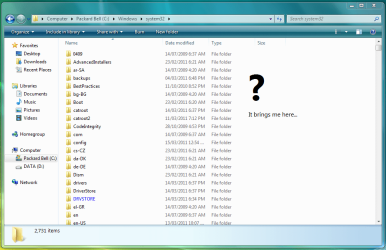
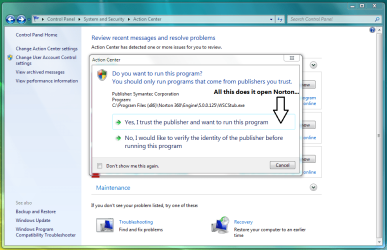
Action Center Showing Fake Issues

MadSupra354

Supra
Pro User
Local time
9:12 AM
Messages
792
Location
On my chair, in my room
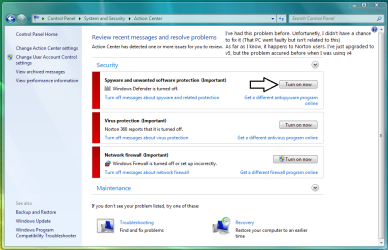
I wrote on these images to help understand, I'm using Windows 7 Home Premium x64 FYI. So here's what I'm getting...
Capture.PNG

Capture2.PNG

Capture5.png

Capture3.PNG

Capture6.png
I beileve this has to do with WMIUTILS.DLL? There is are multiple threads on the Norton Forums about this, and there was a solution, though I've tried it and was unsuccesful :(. Unless I may have done it wrong...
 

My Computer My Computer

Computer type
PC/Desktop
OS
10 Home x64
CPU
Intel Core i5 4670K
Motherboard
Gigabyte GA-Z87-D3HP
Memory
Corsair XMS3 8GB DDr3 1600MHz
Graphics Card(s)
Sapphire NITRO Radeon R9 Fury
Sound Card
Asus Xonar DX
Monitor(s) Displays
Acer H236HLbmjd
Screen Resolution
1920x1080
Hard Drives
Force GS 128GB - Seagate 320GB - WD Caviar Black 1TB - WD Caviar Blue 500GB
PSU
EVGA SuperNOVA 650 P2
Case
Silverstone Raven 3 RV03B-W
Keyboard
Topre Realforce 104UG-HiPro
Mouse
Mionix Naos 7000
Internet Speed
76/4 On a good day
Antivirus
SmartScreen
Browser
Internet Explorer 11

My Computer My Computer

Computer type
PC/Desktop
Computer Manufacturer/Model Number
Bruce ... somewhere in his 40's
OS
Windows 7 Ultimate 32bit SP1
CPU
Intel(R) Core(TM)2 Quad CPU @ 2.40GHz, 2400 MHz
Motherboard
INTEL/D975XBX2
Memory
4 GB
Graphics Card(s)
ATI Radeon HD 2600 Pro
Monitor(s) Displays
Samsung SyncMaster 914v
Screen Resolution
1280 x 1024
Hard Drives
2/500GB each ... ST3500630AS ATA Device.
One is not connected
PSU
Rocketfish 700 W
Case
G.Skill Gigabyte Chassis
Keyboard
Standard PS/2 Keyboard
Mouse
Microsoft PS/2 Mouse
Internet Speed
DSL
Antivirus
Avira Internet Security
Browser
IE 11
Other Info
ATI HDMI Audio

My Computer My Computer

Computer type
PC/Desktop
OS
10 Home x64
CPU
Intel Core i5 4670K
Motherboard
Gigabyte GA-Z87-D3HP
Memory
Corsair XMS3 8GB DDr3 1600MHz
Graphics Card(s)
Sapphire NITRO Radeon R9 Fury
Sound Card
Asus Xonar DX
Monitor(s) Displays
Acer H236HLbmjd
Screen Resolution
1920x1080
Hard Drives
Force GS 128GB - Seagate 320GB - WD Caviar Black 1TB - WD Caviar Blue 500GB
PSU
EVGA SuperNOVA 650 P2
Case
Silverstone Raven 3 RV03B-W
Keyboard
Topre Realforce 104UG-HiPro
Mouse
Mionix Naos 7000
Internet Speed
76/4 On a good day
Antivirus
SmartScreen
Browser
Internet Explorer 11
Follow Jacee's advice, if it doesnt help you can try the following.

Download and run a scan with free malwarebytes antimalware, I've read of malware that fake action center messages.

Also, try clearing the problem history- Click to open Action Center, Click Maintenance, under Check for solutions to problem reports, click View reliability history. Click View all problem reports. At the bottom of the Problem History page, click Clear all problem reports.

It is not advisable but if nothing helps and this thing's bothering you and you can take care of the security aspect, you can disable alerts. But again, its not advised.

http://www.sevenforums.com/tutorials/364-action-center-change-message-settings.html
 
Last edited by a moderator:

My Computer My Computer

Computer Manufacturer/Model Number
Too many to describe...
OS
Windows 7 x64 pro/ Windows 7 x86 Pro/ XP SP3 x86
I tried Jacee's info, but it didn't work :(
 
Last edited:

My Computer My Computer

Computer type
PC/Desktop
OS
10 Home x64
CPU
Intel Core i5 4670K
Motherboard
Gigabyte GA-Z87-D3HP
Memory
Corsair XMS3 8GB DDr3 1600MHz
Graphics Card(s)
Sapphire NITRO Radeon R9 Fury
Sound Card
Asus Xonar DX
Monitor(s) Displays
Acer H236HLbmjd
Screen Resolution
1920x1080
Hard Drives
Force GS 128GB - Seagate 320GB - WD Caviar Black 1TB - WD Caviar Blue 500GB
PSU
EVGA SuperNOVA 650 P2
Case
Silverstone Raven 3 RV03B-W
Keyboard
Topre Realforce 104UG-HiPro
Mouse
Mionix Naos 7000
Internet Speed
76/4 On a good day
Antivirus
SmartScreen
Browser
Internet Explorer 11
Well, this is worth a try. I've read numerous articles (and had personal experience with this issue...unfortunately) that mention Nortons Product Tamper Protection can cause some issues. I know you have to disable it in order to successfully do a sys restore and upgrade some programs.

Try turning it off, reboot and see if you can enable the settings and what they show. You'll have the option of turning Tamper Protection off for 15, 30 mins, 1 hr or permanently. Make sure it's turned off permanently when you try this. If that works, then re-enable it immediately.

(Note, this will not disable your AV, Tamper Protection stops select programs from being altered)

If it doesn't, then this isn't the problem, but nonetheless re-enable it immediately.

Norton tamper protection can be found in Settings/Administrative Settings/computer security (that's where it is on 360, your location may vary a bit)

But be aware you may indeed have a virus preventing the launching of security products. Anytime security products fail to launch, be very suspicious.
 
Last edited:

My Computer My Computer

Computer type
PC/Desktop
Computer Manufacturer/Model Number
Dell Hell oh Well
OS
Win 7 32 Home Premium, Win 7 64 Pro, Win 8.1, Win 10
CPU
Intel Core 2 Duo 2.93GHz
Memory
Not much with my ADHD
Graphics Card(s)
ATI Radeon HD 4350
Monitor(s) Displays
24" HDTV/Monitor
Screen Resolution
Blurry after a Scotch or 2
Hard Drives
1 HDD 250 GB, 1 HDD 1 TB, 3 - 1 TB Externals
Case
Don't get on my case...man :D
Cooling
I have an Air Conditioner & Diet Pepsi
Keyboard
Saitek Cyborg
Mouse
10 yr old MS optical mouse that still works
Internet Speed
Never fast enough
Antivirus
Various
Browser
Various
Well, this is worth a try. I've read numerous articles (and had personal experience with this issue...unfortunately) that mention Nortons Product Tamper Protection can cause some issues. I know you have to disable it in order to successfully do a sys restore and upgrade some programs.

Try turning it off, reboot and see if you can enable the settings and what they show. You'll have the option of turning Tamper Protection off for 15, 30 mins, 1 hr or permanently. Make sure it's turned off permanently when you try this. If that works, then re-enable it immediately.

(Note, this will not disable your AV, Tamper Protection stops select programs from being altered)

If it doesn't, then this isn't the problem, but nonetheless re-enable it immediately.

Norton tamper protection can be found in Settings/Administrative Settings/computer security (that's where it is on 360, your location may vary a bit)

But be aware you may indeed have a virus preventing the launching of security products. Anytime security products fail to launch, be very suspicious.
I'm pretty sure this isn't a virus, it's happend to me before. I'll try your advice and see what happens. :)
 

My Computer My Computer

Computer type
PC/Desktop
OS
10 Home x64
CPU
Intel Core i5 4670K
Motherboard
Gigabyte GA-Z87-D3HP
Memory
Corsair XMS3 8GB DDr3 1600MHz
Graphics Card(s)
Sapphire NITRO Radeon R9 Fury
Sound Card
Asus Xonar DX
Monitor(s) Displays
Acer H236HLbmjd
Screen Resolution
1920x1080
Hard Drives
Force GS 128GB - Seagate 320GB - WD Caviar Black 1TB - WD Caviar Blue 500GB
PSU
EVGA SuperNOVA 650 P2
Case
Silverstone Raven 3 RV03B-W
Keyboard
Topre Realforce 104UG-HiPro
Mouse
Mionix Naos 7000
Internet Speed
76/4 On a good day
Antivirus
SmartScreen
Browser
Internet Explorer 11
Back
Top