
IE9 RTM (Issues/Error: Logon, Sidebar, Sign in Assitant)

LagoonLegion

Banned
Local time
2:50 AM
Messages
22
Internet Explorer 9 RTM: Logon, Desktop Sidebar & Windows Live Sign in Assitant Issues

Hi Guys, guess no one acknowledge these problems in the early stage.

I came across with a few issues after installing the Internet Explorer (IE9 RTM) which currently known as the final version of IE9.

OS Platform: Windows 7 sp1 RTM
Browser: Internet Explorer 9 RTM (Version 9.0.8112.16421)

Issues:
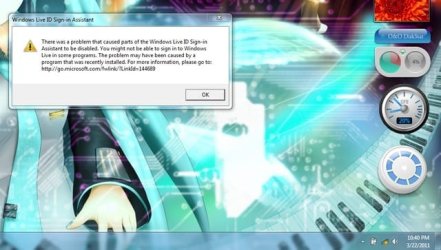
1) Error on Logon: After I log off my computer (pressed the log off button) and re-logon back, parts of the Windows Live Sign In Assistant were disabled (with an error message box). ~view snapshot 1

2) Desktop Sidebar issue: Some of the gadgets are not working properly or not fully functioning. Examples; usage gauge in O&O DiskStat is not working but the hard disk space gauge is working; Microsoft Blue Calendar is displaying with a white frame. Both gadgets had no such a problem previously.

3) Related with issues 1 and 2 above: When I disabled the Desktop Sidebar in Control Panel, restarted my pc. When the Windows started, parts of the Windows Live Sign In Assistant were disabled (with an error message box) which was the same error with issue 1 above and had the same error message box.

Note that, before I disabled the Desktop Sidebar, there was no error on starting the windows, but there was still an error on logon the Windows after pressing the log off button only, the rest were all fine.

Shapshot 1:
desktopmb.jpg

I am certain that my Windows Live Sign In Assitant and Desktop Gadget have no problem at all (tested with various ways). Actually, I am not sure whether is the IE9 RTM or Windows 7 sp1 RTM caused me the issues because I notice that after installing the IE9 RTM; before that, I was installing the Windows 7 sp1 RTM and did not pay attention with my Desktop Gadgets and further tested on the new service pack 1.

I can't go for further test as to restore my Windows 7 sp1 RTM to Windows 7 or revert my IE9 RTM back to IE8 as I accidentally cleared all my restore points with Disk Cleanup >.< ; my Window 7 old file and previous IE8 are gone forever (100% certain-we can delete IE forever if we clear the restore point which I just know ...). I am very sure about that and there is no way to restore them back. I can't download the IE8 for Windows 7 as there is no such installer provided by Microsoft as IE8 came as the default browser with Windows 7 and there is no one upload IE8 for Windows 7 in anywhere where I had searched the web for days and failed to find IE8 Installer for windows 7.

Help!!!
Please tell me what are the things that cause the issues 1, 2 and 3. Also, where can I get IE8 for Windows 7? Please place an url for me or can u develop an IE8 installer from the original IE8 on your Windows 7 for me and upload it?

Thanks

Legion
 

My Computer My Computer

At a glance

xp
OS
xp
Have you seen this: http://www.sevenforums.com/tutorials/112121-internet-explorer-9-uninstall.html ?

Also note "Make sure you revert any/all customizations made to Internet Explorer 9 prior to uninstalling it to prevent any issues from occuring." (Tools/Internet Options/Advanced Reset)

Note that this is an "Uninstall" not a "System Restore" so I suspect your lack of restore points may not matter.

If you can get back to IE8, I'd use it for a while as a test of SP1. And you may want to check this out before installing IE9: http://msdn.microsoft.com/en-us/ie/ff959805.aspx
 

My Computer My Computer

At a glance

Windows 8 Pro w/MC 32-bitIntel Atom 1.86 GHz2 GBIntel GMA 500
Computer type
PC/Desktop
Computer Manufacturer/Model Number
OQO 2+
OS
Windows 8 Pro w/MC 32-bit
CPU
Intel Atom 1.86 GHz
Motherboard
OQO 2+
Memory
2 GB
Graphics Card(s)
Intel GMA 500
Sound Card
IDT
Monitor(s) Displays
LCD
Screen Resolution
800 x 480 (portable) 1280 x 1024 (docked)
Hard Drives
64 GB SSD
PSU
9 Ah Battery (portable) or OQO Brick (docked)
Case
Shirt Pocket Sized
Cooling
Tiny Fan
Keyboard
Slide out (portable) DiNovo Edge (docked)
Mouse
Eraser head (portable) Logitech Bluetooth (docked)
Internet Speed
WWAN or 802.11G (portable) T1 (docked)
Browser
IE 10
Other Info
DVD-RW OQO Docking Station
Yeah, I saw that article before. I know how to unistall IE9 and the reset thing.

I have gone through the Release Notes for Internet Explorer 9 as I saw there was no issue related with mine. About the gpu setting in IE9, I had already tested that, issues 1, 2 and 3 were still occured.

Besides, my graphic driver is Intel® Graphics Media Accelerator Driver for Windows 7 (graphics driver version 15.12.75.4.1930 (8.15.10.1930).

I noted a post in Release Notes for Internet Explorer 9 stated:

Windows Live Mail, versions 15.4 and above, stops responding or fails to start if you have Intel integrated graphics driver Igdkmd32.sys (32-bit) / Igdkmd64.sys (64-bit) versions 8.15.10.2104 through 8.15.10.2141. These drivers have been found to cause compatibility issues with certain applications that use Direct2D (D2D). For example, if you have one of these drivers, Windows Live Mail could crash after update KB2454826, a prerequisite update for Internet Explorer 9, has been installed.

The thing is my graphic driver is version 8.15.10.1930, but the one Microsoft stated is version 8.15.10.2104 through 8.15.10.2141, which is different with mine for the 4 digits behind. Moreover, I do no install any Windows Live Mail; I only installed Windows Live Essential 2011 (Messenger and Windows Live Sign In Assistant were installed only) which worked fine for me prior to the installation of Windows 7 sp1 RTM and IE9 RTM).

What is going on? Any idea?
By the way, how to get back a copy of IE8 from Windows 7 on another computer. I really need an IE8, so I can run some further tests to determine the real cause of these issues 1, 2 and 3.

Thank You

Legion
 
Last edited:

My Computer My Computer

At a glance

xp
OS
xp
For live sign-in assistant, reinstallation of the Windows Live Essentials package after the IE9 install has worked for me in the past (multiple times). As to the gadgets, considering they're probably using wininet and/or browseui .dlls of the browsers, the gadget makers may have to change their code to properly work with the updated versions and potential changes to APIs used in those binaries (mshtml is updated as well, so any changes in IE9 to that binary could affect gadgets using it as well). Since the gadget platform is mostly .net code and HTML/script/xml, changes to IE could indeed affect gadget functionality, so the gadget dev might want to be notified to see if they can reproduce it (and fix it, if they can). I'm not sure IE is at fault in this particular instance at all.
 

My Computer My Computer

At a glance

Windows 10 Pro x64Intel Core i7 4790K @ 4.5GHz32GB DDR3Nvidia GeForce GTX970
Computer type
PC/Desktop
Computer Manufacturer/Model Number
Custom
OS
Windows 10 Pro x64
CPU
Intel Core i7 4790K @ 4.5GHz
Motherboard
Asus Maximus Hero VII
Memory
32GB DDR3
Graphics Card(s)
Nvidia GeForce GTX970
Sound Card
Realtek HD Audio
Screen Resolution
1920x1200
Hard Drives
1x Samsung 250GB SSD
4x WD RE 2TB (RAIDZ)
PSU
Corsair AX760i
Case
Fractal Design Define R4
Cooling
Noctua NH-D15
Thanks, your explaination on the gadget part is somehow acceptable but the Windows Live Sign In Assitant issue is still arrising (issues 1 and 3 above are still occuring).

Actually, I had tried to remove and reinstall the Windows Live Essentials 2011 pack but the issues are still occuring. I still can sign in with the messenger normally with no error and the Windows Live Plugins in IE9 RTM browser are all functioning properly as what I know.

The only issues I faced is the error message box that pops up (issues 1 and 3 above) and gadgets not working properly (issue 2 above).

The error message box screenshot:
http://www.sevenforums.com/attachme...ror-logon-sidebar-sign-assitant-desktopmb.jpg

Any idea?

Legion
 

My Computer My Computer

At a glance

xp
OS
xp
This may not help your issues, but the problem you mentioned with certain Intel graphics driver versions has a fix: Windows Live Mail stops responding or fails to start after installing KB2454826. Thanks for bringing it to my attention since I already have the IE9 perequisite via Windows Update and may eventually upgrade my Intel graphics driver and my older version of Windows Live Mail.
 

My Computer My Computer

At a glance

Windows 8 Pro w/MC 32-bitIntel Atom 1.86 GHz2 GBIntel GMA 500
Computer type
PC/Desktop
Computer Manufacturer/Model Number
OQO 2+
OS
Windows 8 Pro w/MC 32-bit
CPU
Intel Atom 1.86 GHz
Motherboard
OQO 2+
Memory
2 GB
Graphics Card(s)
Intel GMA 500
Sound Card
IDT
Monitor(s) Displays
LCD
Screen Resolution
800 x 480 (portable) 1280 x 1024 (docked)
Hard Drives
64 GB SSD
PSU
9 Ah Battery (portable) or OQO Brick (docked)
Case
Shirt Pocket Sized
Cooling
Tiny Fan
Keyboard
Slide out (portable) DiNovo Edge (docked)
Mouse
Eraser head (portable) Logitech Bluetooth (docked)
Internet Speed
WWAN or 802.11G (portable) T1 (docked)
Browser
IE 10
Other Info
DVD-RW OQO Docking Station
...For live sign-in assistant, reinstallation of the Windows Live Essentials package after the IE9 install has worked for me in the past (multiple times)...
Are you saying that after installing IE9, many of us may have to reinstall WLE to solve a problem with the Live Sign-in Assistant? How does the problem present itself? Will a repair of WLE via Programs and Features suffice?
 

My Computer My Computer

At a glance

Windows 8 Pro w/MC 32-bitIntel Atom 1.86 GHz2 GBIntel GMA 500
Computer type
PC/Desktop
Computer Manufacturer/Model Number
OQO 2+
OS
Windows 8 Pro w/MC 32-bit
CPU
Intel Atom 1.86 GHz
Motherboard
OQO 2+
Memory
2 GB
Graphics Card(s)
Intel GMA 500
Sound Card
IDT
Monitor(s) Displays
LCD
Screen Resolution
800 x 480 (portable) 1280 x 1024 (docked)
Hard Drives
64 GB SSD
PSU
9 Ah Battery (portable) or OQO Brick (docked)
Case
Shirt Pocket Sized
Cooling
Tiny Fan
Keyboard
Slide out (portable) DiNovo Edge (docked)
Mouse
Eraser head (portable) Logitech Bluetooth (docked)
Internet Speed
WWAN or 802.11G (portable) T1 (docked)
Browser
IE 10
Other Info
DVD-RW OQO Docking Station
Hmm, repairing the Windows Live Essential is similar with reinstalling it, guess that will not help to solve these issues. The problem will only exist if I log off the computer (by pressing the log off button only)and re-logon again the error message box in the snapshot 1 above will appear. If I disable the Desktop Sidebar in the Programs and Features, issue 3 will arise where the error message box will pop up when I start the Windows normally (by enabling back the Desktop Sidebar, issue 3 will not occur but issue 1 is still arising). Besides, I do not install Windows Live Mail, so the hotfix (patch) is not fix to resolve this issues.

Anyway, I managed to find a solution which was a bit improper where I removed the WLIDSVCM.EXE (Windows Live ID Service Monitor) from C>Program Files>Common Files> Microsoft Share>Window Live>WLIDSVCM.EXE , the problems (issues 1 and 3) solved. I can see all the Windows Live add on/plugins are all functioning properly; I can sign in my messenger normally with no error and the IE9 RTM can store my hotmail address on live sign in webpage like always. The only question that bugging my mind is that by removing WLIDSVCM.EXE (Windows Live ID Service Monitor) will really cause no problem? Till recent, issues 1 and 3 solved, Windows Live add on/plugins are working very fine, and my Messenger is good like usual, but is there any problem that may arrise by removing WLIDSVCM.EXE (Windows Live ID Service Monitor)? The WLIDSVCM.EXE (Windows Live ID Service Monitor) is come with Windows Live Essential 2011 or other version; I doubt that the WLIDSVCM.EXE (Windows Live ID Service Monitor) must has its own function.

Anyone has any other alternative to clear the issues 1, 2 and 3 above? Can you tell me the importance of WLIDSVCM.EXE (Windows Live ID Service Monitor) and the consequences of deleting it?

Issue 2 is still unsolved (Any opinion, kindly post it here).

Thank You

Legion
 

My Computer My Computer

At a glance

xp
OS
xp
Well, I managed to get a copy of IE8 from my friend's computer who currently using Windows 7.

I have reverted my IE9 RTM back to IE8 and the issues are still existing.

From here, I can make a conlcusion that IE9 RTM is not going to cause the issues 1, 2 and 3 above. Same to Windows Live Essential 2011 Pack (both without and with minnor update); it will work properly.

As the conclusion, these issues are 100% caused by Windows 7 sp1 RTM. Guess I am moving this post to Windows 7 discussion group.

Thank Pals.

Legion
 

My Computer My Computer

At a glance

xp
OS
xp
hi lagoonlegion..

i dont have win 7 sp1 rtm installed in my system but the issues 1 and 3 started appearing in my system after i installed ie9 rtm
 

My Computer My Computer

At a glance

Windows 7 Home Premium 64bit
OS
Windows 7 Home Premium 64bit
Back
Top