Second 6950 is not detected by device manager.

did some checking and there is a switch chip to add 8 extra pci-e lanes which aren't nativly active on your motherboard to enable support of 2 high end graphics cards

MSI P55A-GD65 Motherboard | Hardware Secrets

now i can only assume you need to do something from the bios to enable this but it could happen automaticly i honestly don't know and couldn't find anything in the bios menu to change it.


woow i dident even know that thank you so much. So what could be the best way to find out how i can activate it?
Where could i find something like this in the bios menu.
 

My Computer My Computer

At a glance

windows 7 64i5 7604gb ram ddr3 kingstone2X MSI 6950
OS
windows 7 64
CPU
i5 760
Motherboard
MSI p55a gd65
Memory
4gb ram ddr3 kingstone
Graphics Card(s)
2X MSI 6950
Monitor(s) Displays
samsung bx2431
Screen Resolution
1080P
Hard Drives
2x samsungs 1tb
PSU
seasonic m12D 850W
Case
haf 922
did some checking and there is a switch chip to add 8 extra pci-e lanes which aren't nativly active on your motherboard to enable support of 2 high end graphics cards

MSI P55A-GD65 Motherboard | Hardware Secrets

now i can only assume you need to do something from the bios to enable this but it could happen automaticly i honestly don't know and couldn't find anything in the bios menu to change it.


woow i dident even know that thank you so much. So what could be the best way to find out how i can activate it?
Where could i find something like this in the bios menu.


well that was the problem, i couldn't find anything to make a change with from the bios, that said the only bios screens i could find were for the p55 instead of the p55a which you have, the link i added doesn't actually say whether it's automatic or manual just that there is a chip which covers the change.

thats why i assume there may be a bios option for it but i couldn't find any evidence of it either.

the reason i posted the link is because your motherboard requires that the chip changes before it will recognise the second card as the card requires the 16 x pci-e slot.

as to how to get there...i have no idea sorry:(
 

My Computer My Computer

At a glance

....
Computer Manufacturer/Model Number
.
OS
.
CPU
.
Motherboard
.
Memory
.
Graphics Card(s)
.
Monitor(s) Displays
.
Screen Resolution
.
Hard Drives
.
PSU
.
Case
.
Cooling
.
Keyboard
.
Mouse
.
Internet Speed
.
Other Info
.
did some checking and there is a switch chip to add 8 extra pci-e lanes which aren't nativly active on your motherboard to enable support of 2 high end graphics cards

MSI P55A-GD65 Motherboard | Hardware Secrets

now i can only assume you need to do something from the bios to enable this but it could happen automaticly i honestly don't know and couldn't find anything in the bios menu to change it.


woow i dident even know that thank you so much. So what could be the best way to find out how i can activate it?
Where could i find something like this in the bios menu.


well that was the problem, i couldn't find anything to make a change with from the bios, that said the only bios screens i could find were for the p55 instead of the p55a which you have, the link i added doesn't actually say whether it's automatic or manual just that there is a chip which covers the change.

thats why i assume there may be a bios option for it but i couldn't find any evidence of it either.

the reason i posted the link is because your motherboard requires that the chip changes before it will recognise the second card as the card requires the 16 x pci-e slot.

as to how to get there...i have no idea sorry:(


well at least i know what the problem is now, because i was baffled by it. since both cards worked and both slots worked. but i have the card working in the second slot now without a card in the first slot and its running fine.
would it help if i made a picture of my bios screen?

also could you show me the screens of the p55 to see if my is any different.
also i think it has to be different since that link says the p55 is different in that regard
 

My Computer My Computer

At a glance

windows 7 64i5 7604gb ram ddr3 kingstone2X MSI 6950
OS
windows 7 64
CPU
i5 760
Motherboard
MSI p55a gd65
Memory
4gb ram ddr3 kingstone
Graphics Card(s)
2X MSI 6950
Monitor(s) Displays
samsung bx2431
Screen Resolution
1080P
Hard Drives
2x samsungs 1tb
PSU
seasonic m12D 850W
Case
haf 922
well i could not find anything in the bios menu besides pci latelcy and if i wanted the pci e or pci to be the lead thing.
 

My Computer My Computer

At a glance

windows 7 64i5 7604gb ram ddr3 kingstone2X MSI 6950
OS
windows 7 64
CPU
i5 760
Motherboard
MSI p55a gd65
Memory
4gb ram ddr3 kingstone
Graphics Card(s)
2X MSI 6950
Monitor(s) Displays
samsung bx2431
Screen Resolution
1080P
Hard Drives
2x samsungs 1tb
PSU
seasonic m12D 850W
Case
haf 922
indeed the p55 is quite a different board to the p55a from msi, why there should be such a wide disparity between them is odd to say the least.

heres the link for the p55 bios screens
MSI P55-GD65 Review » Page 5 - Closer Look(The BIOS) - Overclockers Club

they covered most of the bios but given the huge differences between the boards i'm kinda skeptical it will be of much help.

now i don't know if it's a mistake from msi that when they removed sli support they also reduced or screwed up crossfire support but it's not something i would rule out either.

i had a look at your thread on the msi forum and they seem to be concerned about power and your distribution of it, what you describe with the use of your power cables seems fine though and your psu does support crossfire as well as being within the watt range to power 2 of those cards.
http://www.sevenforums.com/graphic-cards/135087-planning-upgrade-your-graphics-card-read-first.html

that link shows power ratings for crossfire and your cards only require a 700w psu.

the 6950 in crossfire power requirments are
4 X 75 Watt 6-pin PCI Express power connector is required for CrossFireX system
and one crossfireX bridge connector

beyond that i'm coming up short of what could be the problem other than the motherboard:( it should work but i have a funny feeling that little switch chip isn't doing what it's suppose to.
 

My Computer My Computer

At a glance

....
Computer Manufacturer/Model Number
.
OS
.
CPU
.
Motherboard
.
Memory
.
Graphics Card(s)
.
Monitor(s) Displays
.
Screen Resolution
.
Hard Drives
.
PSU
.
Case
.
Cooling
.
Keyboard
.
Mouse
.
Internet Speed
.
Other Info
.
indeed the p55 is quite a different board to the p55a from msi, why there should be such a wide disparity between them is odd to say the least.

heres the link for the p55 bios screens
MSI P55-GD65 Review » Page 5 - Closer Look(The BIOS) - Overclockers Club

they covered most of the bios but given the huge differences between the boards i'm kinda skeptical it will be of much help.

now i don't know if it's a mistake from msi that when they removed sli support they also reduced or screwed up crossfire support but it's not something i would rule out either.

i had a look at your thread on the msi forum and they seem to be concerned about power and your distribution of it, what you describe with the use of your power cables seems fine though and your psu does support crossfire as well as being within the watt range to power 2 of those cards.
http://www.sevenforums.com/graphic-cards/135087-planning-upgrade-your-graphics-card-read-first.html

that link shows power ratings for crossfire and your cards only require a 700w psu.

the 6950 in crossfire power requirments are
4 X 75 Watt 6-pin PCI Express power connector is required for CrossFireX system
and one crossfireX bridge connector

beyond that i'm coming up short of what could be the problem other than the motherboard:( it should work but i have a funny feeling that little switch chip isn't doing what it's suppose to.


that is what im thinking as well, i did a clean install of windows 7 and again tried both cards individually and again both at the same time, and it only recognizes one in device manager. Also tried to remove all drivers and use the second card in the second slot and reinstall drivers and than put both in with crossfire bridge and that did not work either.
im thinking of just getting a new board or something
 

My Computer My Computer

At a glance

windows 7 64i5 7604gb ram ddr3 kingstone2X MSI 6950
OS
windows 7 64
CPU
i5 760
Motherboard
MSI p55a gd65
Memory
4gb ram ddr3 kingstone
Graphics Card(s)
2X MSI 6950
Monitor(s) Displays
samsung bx2431
Screen Resolution
1080P
Hard Drives
2x samsungs 1tb
PSU
seasonic m12D 850W
Case
haf 922
did some checking and there is a switch chip to add 8 extra pci-e lanes which aren't nativly active on your motherboard to enable support of 2 high end graphics cards

MSI P55A-GD65 Motherboard | Hardware Secrets

now i can only assume you need to do something from the bios to enable this but it could happen automaticly i honestly don't know and couldn't find anything in the bios menu to change it.


woow i dident even know that thank you so much. So what could be the best way to find out how i can activate it?
Where could i find something like this in the bios menu.

Can you not find the manual for the board?
 

My Computer My Computer

At a glance

Windows 10 ProIntel Core i7-4770K (3.5Ghz)32 gig Corsair Dominator Platinum (4x8Gig)Sapphire Tri-X R9 Fury
Computer type
PC/Desktop
Computer Manufacturer/Model Number
Custom built by me.
OS
Windows 10 Pro
CPU
Intel Core i7-4770K (3.5Ghz)
Motherboard
Gigabyte G1 Sniper 5 (F10 Bios)
Memory
32 gig Corsair Dominator Platinum (4x8Gig)
Graphics Card(s)
Sapphire Tri-X R9 Fury
Sound Card
Soundblaster ZXR
Monitor(s) Displays
NEC PA242W 24" LCD Monitor
Screen Resolution
1920 x 1200
Hard Drives
Primary - Samsung 850 Pro (512gig), Samsung 840 Pro (256gig), 2TB WD Caviar Black.
PSU
EVGA Supernova 1000 G2
Case
Cooler Master HAF X
Cooling
Corsair H100i with Corsair Air Series SP120 Quiet Fans
Keyboard
Logitech Wireless Wave
Mouse
Logitech Performance MX
Internet Speed
High Speed Cable
Antivirus
Norton Security
Browser
IE11
Other Info
Memory Timings - 1866MHz @ 9-9-9-27-1T @ 1.5 volts
did some checking and there is a switch chip to add 8 extra pci-e lanes which aren't nativly active on your motherboard to enable support of 2 high end graphics cards

MSI P55A-GD65 Motherboard | Hardware Secrets

now i can only assume you need to do something from the bios to enable this but it could happen automaticly i honestly don't know and couldn't find anything in the bios menu to change it.


woow i dident even know that thank you so much. So what could be the best way to find out how i can activate it?
Where could i find something like this in the bios menu.

Get and read the owner's manual for the motherboard.


I did yesterday it has 2 pages about crossfire, and no where does it say something about activating it with a switch or something.
It just says what the benefits of crossfire are, how to install it on the board with the bridges and a page about CCC how to enable it.
 

My Computer My Computer

At a glance

windows 7 64i5 7604gb ram ddr3 kingstone2X MSI 6950
OS
windows 7 64
CPU
i5 760
Motherboard
MSI p55a gd65
Memory
4gb ram ddr3 kingstone
Graphics Card(s)
2X MSI 6950
Monitor(s) Displays
samsung bx2431
Screen Resolution
1080P
Hard Drives
2x samsungs 1tb
PSU
seasonic m12D 850W
Case
haf 922
Reading here...... MSI P55A-GD65 Motherboard | Hardware Secrets

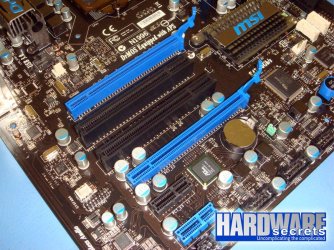
The other PCI Express slots are controlled by the chipset, which has a total of eight PCI Express x1 lanes. A small but very important detail is that MSI added a PLX PEX8608 PCI Express switch chip on this motherboard (see this chip near the black PCI Express x1 slot in Figure 2), which adds eight more PCI Express x1 lanes to it. The presence of this chip allows you to run two high-end video cards, SATA-600 hard disk drives and USB 3.0 devices at the same time without any drop in performance. On motherboards without a chip like this, performance may drop under this type of load, as the chipset doesn’t have enough PCI Express lanes to connect all these devices at the same time at their full speed.

imageview.jpg

The problem is that there's no mention of whether you have to do something to the switch or if it auto adjusts.

Can you post a link to your manual for me. Perhaps I could see if I can figure something out.

BTW your board does doe Crossfire....

MSI P55A-GD65 has two PCI Express x16 slots using this configuration. They support CrossFireX, but not SLI.

Thanks

The other question - have you did a BIOS update???
 

My Computer My Computer

At a glance

Windows 10 ProIntel Core i7-4770K (3.5Ghz)32 gig Corsair Dominator Platinum (4x8Gig)Sapphire Tri-X R9 Fury
Computer type
PC/Desktop
Computer Manufacturer/Model Number
Custom built by me.
OS
Windows 10 Pro
CPU
Intel Core i7-4770K (3.5Ghz)
Motherboard
Gigabyte G1 Sniper 5 (F10 Bios)
Memory
32 gig Corsair Dominator Platinum (4x8Gig)
Graphics Card(s)
Sapphire Tri-X R9 Fury
Sound Card
Soundblaster ZXR
Monitor(s) Displays
NEC PA242W 24" LCD Monitor
Screen Resolution
1920 x 1200
Hard Drives
Primary - Samsung 850 Pro (512gig), Samsung 840 Pro (256gig), 2TB WD Caviar Black.
PSU
EVGA Supernova 1000 G2
Case
Cooler Master HAF X
Cooling
Corsair H100i with Corsair Air Series SP120 Quiet Fans
Keyboard
Logitech Wireless Wave
Mouse
Logitech Performance MX
Internet Speed
High Speed Cable
Antivirus
Norton Security
Browser
IE11
Other Info
Memory Timings - 1866MHz @ 9-9-9-27-1T @ 1.5 volts
http://www.msi.com/product/mb/P55A-GD65.html#/?div=Manual

This is the manual from the msi website.
Also google did not show me any other people who had the same issue and figured a way to make it work.
Im realy thinking about just selling this board and buying a new one if the motherboard is the problem. Because its def not the cards or the slots. ( tested them again today )
 

My Computer My Computer

At a glance

windows 7 64i5 7604gb ram ddr3 kingstone2X MSI 6950
OS
windows 7 64
CPU
i5 760
Motherboard
MSI p55a gd65
Memory
4gb ram ddr3 kingstone
Graphics Card(s)
2X MSI 6950
Monitor(s) Displays
samsung bx2431
Screen Resolution
1080P
Hard Drives
2x samsungs 1tb
PSU
seasonic m12D 850W
Case
haf 922

My Computer My Computer

At a glance

Windows 10 ProIntel Core i7-4770K (3.5Ghz)32 gig Corsair Dominator Platinum (4x8Gig)Sapphire Tri-X R9 Fury
Computer type
PC/Desktop
Computer Manufacturer/Model Number
Custom built by me.
OS
Windows 10 Pro
CPU
Intel Core i7-4770K (3.5Ghz)
Motherboard
Gigabyte G1 Sniper 5 (F10 Bios)
Memory
32 gig Corsair Dominator Platinum (4x8Gig)
Graphics Card(s)
Sapphire Tri-X R9 Fury
Sound Card
Soundblaster ZXR
Monitor(s) Displays
NEC PA242W 24" LCD Monitor
Screen Resolution
1920 x 1200
Hard Drives
Primary - Samsung 850 Pro (512gig), Samsung 840 Pro (256gig), 2TB WD Caviar Black.
PSU
EVGA Supernova 1000 G2
Case
Cooler Master HAF X
Cooling
Corsair H100i with Corsair Air Series SP120 Quiet Fans
Keyboard
Logitech Wireless Wave
Mouse
Logitech Performance MX
Internet Speed
High Speed Cable
Antivirus
Norton Security
Browser
IE11
Other Info
Memory Timings - 1866MHz @ 9-9-9-27-1T @ 1.5 volts
Yes there is this msi liveupdate 5 thing, it scanned my hardware and i had 1.2 bios and i updated it to 1.5 now.
 

My Computer My Computer

At a glance

windows 7 64i5 7604gb ram ddr3 kingstone2X MSI 6950
OS
windows 7 64
CPU
i5 760
Motherboard
MSI p55a gd65
Memory
4gb ram ddr3 kingstone
Graphics Card(s)
2X MSI 6950
Monitor(s) Displays
samsung bx2431
Screen Resolution
1080P
Hard Drives
2x samsungs 1tb
PSU
seasonic m12D 850W
Case
haf 922
Yes there is this msi liveupdate 5 thing, it scanned my hardware and i had 1.2 bios and i updated it to 1.5 now.

Now - as in just now????

Anyways, on page 2.23 of your manual.....

The mainboard can auto detect the CrossFireXTM mode by software, therefore you don’t have to enable the CrossFireXTM in BIOS by yourself.
So that means you don't need any BIOS tweaks. That's good.​

How many "video links" are you using? Try using two. If using two, try using one.​

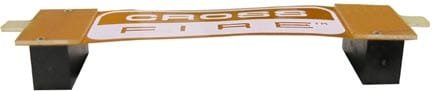
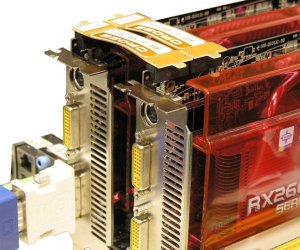
Crossfire link.jpg
Crossfire.jpg

Check that both cards are connected to a power source in addition to the video links.

If you've done all of this you "may" have an issue where your power supply isn't supplying enough power to both cards.

Also a 6950 requires a 6-pin power connector. To do crossfire you need two 6-pin conncetors - one for each card

Let me know.
 

My Computer My Computer

At a glance

Windows 10 ProIntel Core i7-4770K (3.5Ghz)32 gig Corsair Dominator Platinum (4x8Gig)Sapphire Tri-X R9 Fury
Computer type
PC/Desktop
Computer Manufacturer/Model Number
Custom built by me.
OS
Windows 10 Pro
CPU
Intel Core i7-4770K (3.5Ghz)
Motherboard
Gigabyte G1 Sniper 5 (F10 Bios)
Memory
32 gig Corsair Dominator Platinum (4x8Gig)
Graphics Card(s)
Sapphire Tri-X R9 Fury
Sound Card
Soundblaster ZXR
Monitor(s) Displays
NEC PA242W 24" LCD Monitor
Screen Resolution
1920 x 1200
Hard Drives
Primary - Samsung 850 Pro (512gig), Samsung 840 Pro (256gig), 2TB WD Caviar Black.
PSU
EVGA Supernova 1000 G2
Case
Cooler Master HAF X
Cooling
Corsair H100i with Corsair Air Series SP120 Quiet Fans
Keyboard
Logitech Wireless Wave
Mouse
Logitech Performance MX
Internet Speed
High Speed Cable
Antivirus
Norton Security
Browser
IE11
Other Info
Memory Timings - 1866MHz @ 9-9-9-27-1T @ 1.5 volts
The ati site recommends 4 x 6 pin 75w power connections 2 x 6 pin 75w per card and only 1 crossfireX bridge, his psu has that support as well so it shouldn't be the problem of power, unless his psu has a fault and isn't supplying enough power to the 12v rails.
 

My Computer My Computer

At a glance

....
Computer Manufacturer/Model Number
.
OS
.
CPU
.
Motherboard
.
Memory
.
Graphics Card(s)
.
Monitor(s) Displays
.
Screen Resolution
.
Hard Drives
.
PSU
.
Case
.
Cooling
.
Keyboard
.
Mouse
.
Internet Speed
.
Other Info
.
The ati site recommends 4 x 6 pin 75w power connections 2 x 6 pin 75w per card and only 1 crossfireX bridge, his psu has that support as well so it shouldn't be the problem of power, unless his psu has a fault and isn't supplying enough power to the 12v rails.

You are correct. And I actually have one (a 6950)

So yes, you need 4 6-pin connectors - 2 per card.

unless his psu has a fault and isn't supplying enough power to the 12v rails.

That's the point

And though I agree that he should only use one bridge..... there should also be no reason that his crossfire shouldn't be working.... yet here we are ;)
 

My Computer My Computer

At a glance

Windows 10 ProIntel Core i7-4770K (3.5Ghz)32 gig Corsair Dominator Platinum (4x8Gig)Sapphire Tri-X R9 Fury
Computer type
PC/Desktop
Computer Manufacturer/Model Number
Custom built by me.
OS
Windows 10 Pro
CPU
Intel Core i7-4770K (3.5Ghz)
Motherboard
Gigabyte G1 Sniper 5 (F10 Bios)
Memory
32 gig Corsair Dominator Platinum (4x8Gig)
Graphics Card(s)
Sapphire Tri-X R9 Fury
Sound Card
Soundblaster ZXR
Monitor(s) Displays
NEC PA242W 24" LCD Monitor
Screen Resolution
1920 x 1200
Hard Drives
Primary - Samsung 850 Pro (512gig), Samsung 840 Pro (256gig), 2TB WD Caviar Black.
PSU
EVGA Supernova 1000 G2
Case
Cooler Master HAF X
Cooling
Corsair H100i with Corsair Air Series SP120 Quiet Fans
Keyboard
Logitech Wireless Wave
Mouse
Logitech Performance MX
Internet Speed
High Speed Cable
Antivirus
Norton Security
Browser
IE11
Other Info
Memory Timings - 1866MHz @ 9-9-9-27-1T @ 1.5 volts
So i tried using 2 crossfire bridges like you said, and no result. And both cards are connected by 2 6 pin cables. 2 cables coming from modular side of the psu and two other cables who come within the psu ( sorry for the vague explanation English is not my first language)
So if its not the bios it has to be the switch that does it automaticaly is either broken or not functioning well.
Any other trouble shooting techniques i could use.
 

My Computer My Computer

At a glance

windows 7 64i5 7604gb ram ddr3 kingstone2X MSI 6950
OS
windows 7 64
CPU
i5 760
Motherboard
MSI p55a gd65
Memory
4gb ram ddr3 kingstone
Graphics Card(s)
2X MSI 6950
Monitor(s) Displays
samsung bx2431
Screen Resolution
1080P
Hard Drives
2x samsungs 1tb
PSU
seasonic m12D 850W
Case
haf 922
So i tried using 2 crossfire bridges like you said, and no result. And both cards are connected by 2 6 pin cables. 2 cables coming from modular side of the psu and two other cables who come within the psu ( sorry for the vague explanation English is not my first language)
So if its not the bios it has to be the switch that does it automaticaly is either broken or not functioning well.
Any other trouble shooting techniques i could use.

Have you checked to make sure both set of connectors are getting power. Just install one card that try both set of power connectors to see that they are working.

Other than that I would suggest you give MSI a call or visit a support forum. Sounds like you're doing everything you're supposed to. Why it isn't working is beyond me. It could actually be a problem with the board.

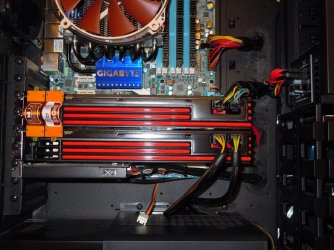
BTW this is what my system looked like when I had a chance to play with crossfire...

6950-Crossfire.jpg

And yes, both cards should show up in Device manager.

Good luck.
 

My Computer My Computer

At a glance

Windows 10 ProIntel Core i7-4770K (3.5Ghz)32 gig Corsair Dominator Platinum (4x8Gig)Sapphire Tri-X R9 Fury
Computer type
PC/Desktop
Computer Manufacturer/Model Number
Custom built by me.
OS
Windows 10 Pro
CPU
Intel Core i7-4770K (3.5Ghz)
Motherboard
Gigabyte G1 Sniper 5 (F10 Bios)
Memory
32 gig Corsair Dominator Platinum (4x8Gig)
Graphics Card(s)
Sapphire Tri-X R9 Fury
Sound Card
Soundblaster ZXR
Monitor(s) Displays
NEC PA242W 24" LCD Monitor
Screen Resolution
1920 x 1200
Hard Drives
Primary - Samsung 850 Pro (512gig), Samsung 840 Pro (256gig), 2TB WD Caviar Black.
PSU
EVGA Supernova 1000 G2
Case
Cooler Master HAF X
Cooling
Corsair H100i with Corsair Air Series SP120 Quiet Fans
Keyboard
Logitech Wireless Wave
Mouse
Logitech Performance MX
Internet Speed
High Speed Cable
Antivirus
Norton Security
Browser
IE11
Other Info
Memory Timings - 1866MHz @ 9-9-9-27-1T @ 1.5 volts
i tried everything, at this point im thinking about just selling my board and getting a new one.
 

My Computer My Computer

At a glance

windows 7 64i5 7604gb ram ddr3 kingstone2X MSI 6950
OS
windows 7 64
CPU
i5 760
Motherboard
MSI p55a gd65
Memory
4gb ram ddr3 kingstone
Graphics Card(s)
2X MSI 6950
Monitor(s) Displays
samsung bx2431
Screen Resolution
1080P
Hard Drives
2x samsungs 1tb
PSU
seasonic m12D 850W
Case
haf 922
If the board is still under warranty why not have is checked out? Have you even done what I suggested - calling tech support???
 

My Computer My Computer

At a glance

Windows 10 ProIntel Core i7-4770K (3.5Ghz)32 gig Corsair Dominator Platinum (4x8Gig)Sapphire Tri-X R9 Fury
Computer type
PC/Desktop
Computer Manufacturer/Model Number
Custom built by me.
OS
Windows 10 Pro
CPU
Intel Core i7-4770K (3.5Ghz)
Motherboard
Gigabyte G1 Sniper 5 (F10 Bios)
Memory
32 gig Corsair Dominator Platinum (4x8Gig)
Graphics Card(s)
Sapphire Tri-X R9 Fury
Sound Card
Soundblaster ZXR
Monitor(s) Displays
NEC PA242W 24" LCD Monitor
Screen Resolution
1920 x 1200
Hard Drives
Primary - Samsung 850 Pro (512gig), Samsung 840 Pro (256gig), 2TB WD Caviar Black.
PSU
EVGA Supernova 1000 G2
Case
Cooler Master HAF X
Cooling
Corsair H100i with Corsair Air Series SP120 Quiet Fans
Keyboard
Logitech Wireless Wave
Mouse
Logitech Performance MX
Internet Speed
High Speed Cable
Antivirus
Norton Security
Browser
IE11
Other Info
Memory Timings - 1866MHz @ 9-9-9-27-1T @ 1.5 volts
the board is 6 months old so it should still have warranty.
i emailed msi contact support all they said was, did u hook it up to a powersupply, did you try putting a card alone in the top spot.
if that does not work you may have to go to the shop were you bought it.
 

My Computer My Computer

At a glance

windows 7 64i5 7604gb ram ddr3 kingstone2X MSI 6950
OS
windows 7 64
CPU
i5 760
Motherboard
MSI p55a gd65
Memory
4gb ram ddr3 kingstone
Graphics Card(s)
2X MSI 6950
Monitor(s) Displays
samsung bx2431
Screen Resolution
1080P
Hard Drives
2x samsungs 1tb
PSU
seasonic m12D 850W
Case
haf 922
Back
Top