Monitor port changes after boot and at random ATI Radeon HD5700 HIS.

harleygator

New member
Local time
1:15 PM
Messages
4
I just went from Vista to Win 7 as I had a hard drive crash. However, now as I am reloading programs, after a restart I have to change my monitor to the other port on my graphics card. I went into device manager to check for a conflict and found none, but while there I clicked on "details" on the device tab and the screen went dark! I swapped the cable to the other port and my display was there. Also right click on desktop to check screen res and when I click on detect or monitor it swaps again. Any ideas on this?

I have newest driver ATI 8,821.0 too.
 

My Computer My Computer

At a glance

Windows 7 Home Premium 64I7 Quad Core3gbATI Radeon HD5770 HIS
Computer Manufacturer/Model Number
Gateway FX6800
OS
Windows 7 Home Premium 64
CPU
I7 Quad Core
Memory
3gb
Graphics Card(s)
ATI Radeon HD5770 HIS
That's a weird one. If you're using a single monitor it shouldn't be jumping around. Have you checked to see if the drivers for the monitor is installed?
 

My Computer My Computer

At a glance

Windows 10 ProIntel Core i7-4770K (3.5Ghz)32 gig Corsair Dominator Platinum (4x8Gig)Sapphire Tri-X R9 Fury
Computer type
PC/Desktop
Computer Manufacturer/Model Number
Custom built by me.
OS
Windows 10 Pro
CPU
Intel Core i7-4770K (3.5Ghz)
Motherboard
Gigabyte G1 Sniper 5 (F10 Bios)
Memory
32 gig Corsair Dominator Platinum (4x8Gig)
Graphics Card(s)
Sapphire Tri-X R9 Fury
Sound Card
Soundblaster ZXR
Monitor(s) Displays
NEC PA242W 24" LCD Monitor
Screen Resolution
1920 x 1200
Hard Drives
Primary - Samsung 850 Pro (512gig), Samsung 840 Pro (256gig), 2TB WD Caviar Black.
PSU
EVGA Supernova 1000 G2
Case
Cooler Master HAF X
Cooling
Corsair H100i with Corsair Air Series SP120 Quiet Fans
Keyboard
Logitech Wireless Wave
Mouse
Logitech Performance MX
Internet Speed
High Speed Cable
Antivirus
Norton Security
Browser
IE11
Other Info
Memory Timings - 1866MHz @ 9-9-9-27-1T @ 1.5 volts
Yes I tried to update the driver too and it says I have the latest one even though it is dated 6-21-2006, Microsoft, 6.1.7600.16385. I be stumped on this one. :huh:
 

My Computer My Computer

At a glance

Windows 7 Home Premium 64I7 Quad Core3gbATI Radeon HD5770 HIS
Computer Manufacturer/Model Number
Gateway FX6800
OS
Windows 7 Home Premium 64
CPU
I7 Quad Core
Memory
3gb
Graphics Card(s)
ATI Radeon HD5770 HIS
Yes I tried to update the driver too and it says I have the latest one even though it is dated 6-21-2006, Microsoft, 6.1.7600.16385. I be stumped on this one. :huh:

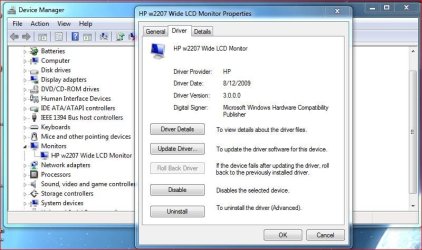
Yeah I'm not surprised there. Is the monitor name listed?

Monitor.JPG

At any rate I can't see why the ports would be switching unless there's an issue somewhere. Even if you didn't have drivers installed, the ports still shouldn't/wouldn't switch. So your issue is weird.

Try running without drivers to see if the ports still switch. And just to make sure, we are talking about the vga/dvi ports right? Also how many monitors do have connected?

Thanks.
 

My Computer My Computer

At a glance

Windows 10 ProIntel Core i7-4770K (3.5Ghz)32 gig Corsair Dominator Platinum (4x8Gig)Sapphire Tri-X R9 Fury
Computer type
PC/Desktop
Computer Manufacturer/Model Number
Custom built by me.
OS
Windows 10 Pro
CPU
Intel Core i7-4770K (3.5Ghz)
Motherboard
Gigabyte G1 Sniper 5 (F10 Bios)
Memory
32 gig Corsair Dominator Platinum (4x8Gig)
Graphics Card(s)
Sapphire Tri-X R9 Fury
Sound Card
Soundblaster ZXR
Monitor(s) Displays
NEC PA242W 24" LCD Monitor
Screen Resolution
1920 x 1200
Hard Drives
Primary - Samsung 850 Pro (512gig), Samsung 840 Pro (256gig), 2TB WD Caviar Black.
PSU
EVGA Supernova 1000 G2
Case
Cooler Master HAF X
Cooling
Corsair H100i with Corsair Air Series SP120 Quiet Fans
Keyboard
Logitech Wireless Wave
Mouse
Logitech Performance MX
Internet Speed
High Speed Cable
Antivirus
Norton Security
Browser
IE11
Other Info
Memory Timings - 1866MHz @ 9-9-9-27-1T @ 1.5 volts
Yes, the 2 ports on the graphics card, and I have only one monitor. The name shows up as Generic PnP monitor.
 

My Computer My Computer

At a glance

Windows 7 Home Premium 64I7 Quad Core3gbATI Radeon HD5770 HIS
Computer Manufacturer/Model Number
Gateway FX6800
OS
Windows 7 Home Premium 64
CPU
I7 Quad Core
Memory
3gb
Graphics Card(s)
ATI Radeon HD5770 HIS
Like I said, try running without drivers and see what happens.
 

My Computer My Computer

At a glance

Windows 10 ProIntel Core i7-4770K (3.5Ghz)32 gig Corsair Dominator Platinum (4x8Gig)Sapphire Tri-X R9 Fury
Computer type
PC/Desktop
Computer Manufacturer/Model Number
Custom built by me.
OS
Windows 10 Pro
CPU
Intel Core i7-4770K (3.5Ghz)
Motherboard
Gigabyte G1 Sniper 5 (F10 Bios)
Memory
32 gig Corsair Dominator Platinum (4x8Gig)
Graphics Card(s)
Sapphire Tri-X R9 Fury
Sound Card
Soundblaster ZXR
Monitor(s) Displays
NEC PA242W 24" LCD Monitor
Screen Resolution
1920 x 1200
Hard Drives
Primary - Samsung 850 Pro (512gig), Samsung 840 Pro (256gig), 2TB WD Caviar Black.
PSU
EVGA Supernova 1000 G2
Case
Cooler Master HAF X
Cooling
Corsair H100i with Corsair Air Series SP120 Quiet Fans
Keyboard
Logitech Wireless Wave
Mouse
Logitech Performance MX
Internet Speed
High Speed Cable
Antivirus
Norton Security
Browser
IE11
Other Info
Memory Timings - 1866MHz @ 9-9-9-27-1T @ 1.5 volts
Hey Sygnus I figured it out....finally. My monitor(Sony SDM-M81) has a switch on the back for analog/digital. It was set to digital which worked with Vista. I changed it to analog and it seems to be ok now. I have done a few restarts and the display stays on the same port. Thanks for your help!!!
 

My Computer My Computer

At a glance

Windows 7 Home Premium 64I7 Quad Core3gbATI Radeon HD5770 HIS
Computer Manufacturer/Model Number
Gateway FX6800
OS
Windows 7 Home Premium 64
CPU
I7 Quad Core
Memory
3gb
Graphics Card(s)
ATI Radeon HD5770 HIS
What cable are you using - VGA/DVI/HDMI?

For the VGA cable yeah the monitor should be set to analog, for DVI/HDMI, digital.

Also make sure you're using the Catalyst drivers with the Catalyst Control Center panel - ATI Radeon
 

My Computer My Computer

At a glance

Windows 10 ProIntel Core i7-4770K (3.5Ghz)32 gig Corsair Dominator Platinum (4x8Gig)Sapphire Tri-X R9 Fury
Computer type
PC/Desktop
Computer Manufacturer/Model Number
Custom built by me.
OS
Windows 10 Pro
CPU
Intel Core i7-4770K (3.5Ghz)
Motherboard
Gigabyte G1 Sniper 5 (F10 Bios)
Memory
32 gig Corsair Dominator Platinum (4x8Gig)
Graphics Card(s)
Sapphire Tri-X R9 Fury
Sound Card
Soundblaster ZXR
Monitor(s) Displays
NEC PA242W 24" LCD Monitor
Screen Resolution
1920 x 1200
Hard Drives
Primary - Samsung 850 Pro (512gig), Samsung 840 Pro (256gig), 2TB WD Caviar Black.
PSU
EVGA Supernova 1000 G2
Case
Cooler Master HAF X
Cooling
Corsair H100i with Corsair Air Series SP120 Quiet Fans
Keyboard
Logitech Wireless Wave
Mouse
Logitech Performance MX
Internet Speed
High Speed Cable
Antivirus
Norton Security
Browser
IE11
Other Info
Memory Timings - 1866MHz @ 9-9-9-27-1T @ 1.5 volts
Back
Top