Windows 7 internet explorer 32bit version not working

tallman27

New member
Local time
8:09 AM
Messages
4
:cry: so my "hp g60-247cl notebook pc" laptop's 32 bit ie just randomly stopped working. whenever i open it it says internet explorer can not be display the webpage. but my 64 bit ie works just fine i have done everything i could find to do on the internet and nothing works and i just dont know what to do please help.
 

My Computer My Computer

At a glance

windows 7 ultimate x64
Computer Manufacturer/Model Number
g60-247cl
OS
windows 7 ultimate x64
Hello tallman27 Welcome to the Seven Foorums!

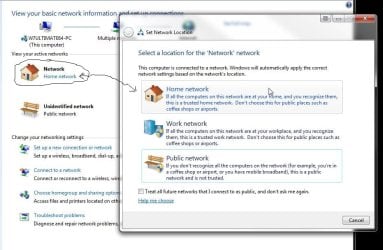
There are a pairr of steps you can try to resolve this. Since you are running one of the full featured editions of W7 you can try disabling the TCP Checksum Offload as well as verify you have the correct option selected in the Network & Sharing Center found in the Control Panel.

If you are running into the "DNS server cannot be found" error you would try disabling that. First however click on the network icon seen the N&S Center to bring up the screen and select the Home option to see if you reconnect as shown in the first screen below.

If that doesn't work you then go to the N&S Center and click on the change network adapter setting link found on the left column. A right click on the connection for the properties>configure button>Adanced tab will bring you to the second screen where you simply scroll down the list of items.
 

Attachments

  • Network and Sharing Center Home selection.jpg
    Network and Sharing Center Home selection.jpg
    82.3 KB · Views: 196
  • Disabled TCP Checksum Offload.jpg
    Disabled TCP Checksum Offload.jpg
    81.8 KB · Views: 337

My Computers My Computers

  • At a glance

    W7 Ultimate x64/W10 Pro x64/W11 Pro Triple Bo...AMD Phenom II X4 975 Deneb 3.6ghz - 965 2nd r...Kingston Hyper X DDR3 1600 1.5v 16gb - Hyper ...MSI HD Radeon 5750 1gb - MSI HD Radeon 6450 o...
    Computer type
    PC/Desktop
    Computer Manufacturer/Model Number
    Custom builds = 2
    OS
    W7 Ultimate x64/W10 Pro x64/W11 Pro Triple Boot - Main PC W7 Remote PC Micro ATX W7 Pro x64/W11 Pro
    CPU
    AMD Phenom II X4 975 Deneb 3.6ghz - 965 2nd remote pc
    Motherboard
    Gigabyte GA-790XTA-UD4-Gigabyte GA-880GM-D2H remote pc
    Memory
    Kingston Hyper X DDR3 1600 1.5v 16gb - Hyper X Fury 8gb 2nd
    Graphics Card(s)
    MSI HD Radeon 5750 1gb - MSI HD Radeon 6450 on mini tower
    Sound Card
    Creative Labs X-Fi Xtreme Audio P - Realtek onooard 2nd case
    Monitor(s) Displays
    ASUS VW199T-P 19" HP 2082a Main-HP 2082a 20" remote pc
    Screen Resolution
    Asus 1440x900 - HP 1600x900
    Hard Drives
    WD Black 1TB HD per OS W7, W10, and pending W11 presently on 500gb OS Drive - Pending Triple 1TB HDs for Spanned Storage/backup volume
    Single 2TB external USB enclosure, single 1TB System 7 Host/Boot drive, Pending 8TB external HD for system image b
    PSU
    Corsair 750TX - primary / Corsair CX600 - second
    Case
    Antec 900-2 - SSD compatible / NZXT Vulcan mini tower
    Cooling
    Zalman CNPS9900A
    Keyboard
    AZIO L70 Backlit Letters Gaming - ONN Cordless/USB
    Mouse
    MSI DS200 Programmable, Logitech Cordless
    Internet Speed
    30mbps upgrade - primary hard wired - mini tower usb WiFi
    Antivirus
    GFI VIPRE Internet Security 2014 on W7 2016 beta on W10,
    Browser
    Cyberfox, WaterFox 64bit FF variants, FireFox x64, Pale Moon
    Other Info
    Accomdata fan cooled usb 2.0 PIDE/Sata II, III external enclosure.
    Sambient usb/eSata PATA/Sata II, III external enclosure.
  • At a glance

    W7 Pro x64/W11 ProAMD Deneb 3.6ghz - 965Kingston Hyper X Fury 8gbMSI HD Radeon 6450 DVI Output
    Computer type
    PC/Desktop
    System Manufacturer/Model Number
    CUSTOM ASSEMBLY
    OS
    W7 Pro x64/W11 Pro
    CPU
    AMD Deneb 3.6ghz - 965
    Motherboard
    Gigabyte GA-880GM-D2H remote pc
    Memory
    Kingston Hyper X Fury 8gb
    Graphics Card(s)
    MSI HD Radeon 6450 DVI Output
    Sound Card
    Realtek onooard Creative or Other separate PENDING
    Monitor(s) Displays
    VIZIO 32" LCD TV Separate LCD Pending
    Screen Resolution
    1600x1080
    Hard Drives
    WD 500GB OS Host/Boot WD Green 1TB Storage/Backup
    PSU
    Corsair 600W - THERMALTAKE 600W spare case
    Case
    NZXT Vulcan mini tower
    Cooling
    Twin 120mm Top Fans - 240mm Side Cover
    Keyboard
    ONN Cordless/USB Logitech Cordless
    Mouse
    ONN USB/Cordless - Logitech Cordless
    Internet Speed
    DSL 5G
    Browser
    MS Edge, FireFox, WaterFox x64, FireFox Nightly
    Other Info
    OS Testing-Remote Access to Main TeamViewer
Welcome to Seven Forums tallman27. Try this:

1. Go to start
2. In search box, type cmd , right click cmd.exe, and then click "Run as administrator"
3. Then type:

netsh winsock reset

4. Press enter
5. Restart PC

Hopefully that will fix it

A Guy
 

My Computer My Computer

At a glance

Windows 10 Home x64INTEL Core i5-750 Quad-Core 3.37GHzHyperX Fury Black Series 8GB (2 x 4GB) 1866MhzEVGA GeForce GTX 750 Superclocked 1GB 128-Bit...
Computer type
PC/Desktop
OS
Windows 10 Home x64
CPU
INTEL Core i5-750 Quad-Core 3.37GHz
Motherboard
ASUS P7P55D
Memory
HyperX Fury Black Series 8GB (2 x 4GB) 1866Mhz
Graphics Card(s)
EVGA GeForce GTX 750 Superclocked 1GB 128-Bit GDDR5
Monitor(s) Displays
LG 32MA68HY 32" IPS
Screen Resolution
1920 x 1080
Hard Drives
Samsung 840 Evo 120GB, SEAGATE 500GB Barracuda® 7200.12, SATA 3 Gb/s, 7200 RPM, 16MB cache
PSU
ANTEC TruePower New TP-550, 80 PLUS, 550W
Case
ANTEC Three Hundred Illusion
Cooling
COOLER MASTER Hyper 212 Plus, 4 x 120mm 1 x 140mm Noctua's
Internet Speed
85 + Mbps
Antivirus
Avast
Browser
Vivaldi
thank you so much guy i have been searching for the answer to this forever and your idea worked thank you thank you thank you
 

My Computer My Computer

At a glance

windows 7 ultimate x64
Computer Manufacturer/Model Number
g60-247cl
OS
windows 7 ultimate x64
I'm glad we could help. You are very welcome :)

A Guy
 

My Computer My Computer

At a glance

Windows 10 Home x64INTEL Core i5-750 Quad-Core 3.37GHzHyperX Fury Black Series 8GB (2 x 4GB) 1866MhzEVGA GeForce GTX 750 Superclocked 1GB 128-Bit...
Computer type
PC/Desktop
OS
Windows 10 Home x64
CPU
INTEL Core i5-750 Quad-Core 3.37GHz
Motherboard
ASUS P7P55D
Memory
HyperX Fury Black Series 8GB (2 x 4GB) 1866Mhz
Graphics Card(s)
EVGA GeForce GTX 750 Superclocked 1GB 128-Bit GDDR5
Monitor(s) Displays
LG 32MA68HY 32" IPS
Screen Resolution
1920 x 1080
Hard Drives
Samsung 840 Evo 120GB, SEAGATE 500GB Barracuda® 7200.12, SATA 3 Gb/s, 7200 RPM, 16MB cache
PSU
ANTEC TruePower New TP-550, 80 PLUS, 550W
Case
ANTEC Three Hundred Illusion
Cooling
COOLER MASTER Hyper 212 Plus, 4 x 120mm 1 x 140mm Noctua's
Internet Speed
85 + Mbps
Antivirus
Avast
Browser
Vivaldi
Windows 7 32 bit XP Mode

Hello tallman27 Welcome to the Seven Foorums!

There are a pairr of steps you can try to resolve this. Since you are running one of the full featured editions of W7 you can try disabling the TCP Checksum Offload as well as verify you have the correct option selected in the Network & Sharing Center found in the Control Panel.

If you are running into the "DNS server cannot be found" error you would try disabling that. First however click on the network icon seen the N&S Center to bring up the screen and select the Home option to see if you reconnect as shown in the first screen below.

If that doesn't work you then go to the N&S Center and click on the change network adapter setting link found on the left column. A right click on the connection for the properties>configure button>Adanced tab will bring you to the second screen where you simply scroll down the list of items.

I have the same problem with Internet Explorer 8 in the XP Mode using Windows 7 32 bit. Internet Explorer works okay in Windows 7. Internet Explorer was working for a while in the XP Mode. Mozilla works without any problems in the XP Mode.

Internet Explorer open with MSN Home Page. When I try to go to microsoft.com I receive the message Webpage Cannot be found HTTP 400. I tried yahoo.com Internet Explorer stalled.

I uninstalled XP Mode and reinstalled it I get the same error with Internet Explorer. I checked Mozilla and it works fine.
 
Last edited:

My Computer My Computer

At a glance

32 bit Windows 7 UltimateIntel 2 Quad Q9550 @ 2.83GHz8.00 GB
Computer Manufacturer/Model Number
Clone
OS
32 bit Windows 7 Ultimate
CPU
Intel 2 Quad Q9550 @ 2.83GHz
Motherboard
MSI
Memory
8.00 GB
Welcome to SF! courtyard

The situation with the XP Mode is a bit different from the start there over what is seen with the 7 host OS. On the XP Mode you use XP's not 7's network setup wizard, settings, and troubleshooting tools.

There is one thing you can try however which would be downloading the XP version of IE 8 to the XP Mode's own C drive on the VPC there and reinstalling IE 8 over itself to correct any problems. Back when running both 7 RCs and the XP Mode's own RC was first seen I ran into a similar problem and simply downloaded a fresh copy of IE 8 to clear that up.

The image attached here shows the device manager item as well as bringing up the network properties screen on the XP Mode. Here that one time only was when IE 8 or any other browser tried out on the XP Mode failed to connect.
 

Attachments

  • XP Mode Network Properties.jpg
    XP Mode Network Properties.jpg
    151.6 KB · Views: 34

My Computers My Computers

  • At a glance

    W7 Ultimate x64/W10 Pro x64/W11 Pro Triple Bo...AMD Phenom II X4 975 Deneb 3.6ghz - 965 2nd r...Kingston Hyper X DDR3 1600 1.5v 16gb - Hyper ...MSI HD Radeon 5750 1gb - MSI HD Radeon 6450 o...
    Computer type
    PC/Desktop
    Computer Manufacturer/Model Number
    Custom builds = 2
    OS
    W7 Ultimate x64/W10 Pro x64/W11 Pro Triple Boot - Main PC W7 Remote PC Micro ATX W7 Pro x64/W11 Pro
    CPU
    AMD Phenom II X4 975 Deneb 3.6ghz - 965 2nd remote pc
    Motherboard
    Gigabyte GA-790XTA-UD4-Gigabyte GA-880GM-D2H remote pc
    Memory
    Kingston Hyper X DDR3 1600 1.5v 16gb - Hyper X Fury 8gb 2nd
    Graphics Card(s)
    MSI HD Radeon 5750 1gb - MSI HD Radeon 6450 on mini tower
    Sound Card
    Creative Labs X-Fi Xtreme Audio P - Realtek onooard 2nd case
    Monitor(s) Displays
    ASUS VW199T-P 19" HP 2082a Main-HP 2082a 20" remote pc
    Screen Resolution
    Asus 1440x900 - HP 1600x900
    Hard Drives
    WD Black 1TB HD per OS W7, W10, and pending W11 presently on 500gb OS Drive - Pending Triple 1TB HDs for Spanned Storage/backup volume
    Single 2TB external USB enclosure, single 1TB System 7 Host/Boot drive, Pending 8TB external HD for system image b
    PSU
    Corsair 750TX - primary / Corsair CX600 - second
    Case
    Antec 900-2 - SSD compatible / NZXT Vulcan mini tower
    Cooling
    Zalman CNPS9900A
    Keyboard
    AZIO L70 Backlit Letters Gaming - ONN Cordless/USB
    Mouse
    MSI DS200 Programmable, Logitech Cordless
    Internet Speed
    30mbps upgrade - primary hard wired - mini tower usb WiFi
    Antivirus
    GFI VIPRE Internet Security 2014 on W7 2016 beta on W10,
    Browser
    Cyberfox, WaterFox 64bit FF variants, FireFox x64, Pale Moon
    Other Info
    Accomdata fan cooled usb 2.0 PIDE/Sata II, III external enclosure.
    Sambient usb/eSata PATA/Sata II, III external enclosure.
  • At a glance

    W7 Pro x64/W11 ProAMD Deneb 3.6ghz - 965Kingston Hyper X Fury 8gbMSI HD Radeon 6450 DVI Output
    Computer type
    PC/Desktop
    System Manufacturer/Model Number
    CUSTOM ASSEMBLY
    OS
    W7 Pro x64/W11 Pro
    CPU
    AMD Deneb 3.6ghz - 965
    Motherboard
    Gigabyte GA-880GM-D2H remote pc
    Memory
    Kingston Hyper X Fury 8gb
    Graphics Card(s)
    MSI HD Radeon 6450 DVI Output
    Sound Card
    Realtek onooard Creative or Other separate PENDING
    Monitor(s) Displays
    VIZIO 32" LCD TV Separate LCD Pending
    Screen Resolution
    1600x1080
    Hard Drives
    WD 500GB OS Host/Boot WD Green 1TB Storage/Backup
    PSU
    Corsair 600W - THERMALTAKE 600W spare case
    Case
    NZXT Vulcan mini tower
    Cooling
    Twin 120mm Top Fans - 240mm Side Cover
    Keyboard
    ONN Cordless/USB Logitech Cordless
    Mouse
    ONN USB/Cordless - Logitech Cordless
    Internet Speed
    DSL 5G
    Browser
    MS Edge, FireFox, WaterFox x64, FireFox Nightly
    Other Info
    OS Testing-Remote Access to Main TeamViewer
INTERNET EXPLORER XP MODE

Welcome to SF! courtyard

The situation with the XP Mode is a bit different from the start there over what is seen with the 7 host OS. On the XP Mode you use XP's not 7's network setup wizard, settings, and troubleshooting tools.

There is one thing you can try however which would be downloading the XP version of IE 8 to the XP Mode's own C drive on the VPC there and reinstalling IE 8 over itself to correct any problems. Back when running both 7 RCs and the XP Mode's own RC was first seen I ran into a similar problem and simply downloaded a fresh copy of IE 8 to clear that up.

The image attached here shows the device manager item as well as bringing up the network properties screen on the XP Mode. Here that one time only was when IE 8 or any other browser tried out on the XP Mode failed to connect.

I unisntalled IE 8 and replaced with IE 6 SP3. I get the same error message HTTP 400. I ran the diagnose connection problems there are no connection errors. I can now get to microsoft.com but any link I try to go in microsoft.com the message HTTP 400 appears.
 

My Computer My Computer

At a glance

32 bit Windows 7 UltimateIntel 2 Quad Q9550 @ 2.83GHz8.00 GB
Computer Manufacturer/Model Number
Clone
OS
32 bit Windows 7 Ultimate
CPU
Intel 2 Quad Q9550 @ 2.83GHz
Motherboard
MSI
Memory
8.00 GB
Since you continue to see the same problem when reverting to the old version one suggestion would be trying the general tips for fixing HTTP 400 errors at HTTP Error 400 Bad request

You will want to stay with IE 8 however over reverting to the now outdated and far less secure older version. Another MSDN reference for troubleshooting HTTP 400 errors can be seen at How to troubleshoot HTTP 400 errors
 

My Computers My Computers

  • At a glance

    W7 Ultimate x64/W10 Pro x64/W11 Pro Triple Bo...AMD Phenom II X4 975 Deneb 3.6ghz - 965 2nd r...Kingston Hyper X DDR3 1600 1.5v 16gb - Hyper ...MSI HD Radeon 5750 1gb - MSI HD Radeon 6450 o...
    Computer type
    PC/Desktop
    Computer Manufacturer/Model Number
    Custom builds = 2
    OS
    W7 Ultimate x64/W10 Pro x64/W11 Pro Triple Boot - Main PC W7 Remote PC Micro ATX W7 Pro x64/W11 Pro
    CPU
    AMD Phenom II X4 975 Deneb 3.6ghz - 965 2nd remote pc
    Motherboard
    Gigabyte GA-790XTA-UD4-Gigabyte GA-880GM-D2H remote pc
    Memory
    Kingston Hyper X DDR3 1600 1.5v 16gb - Hyper X Fury 8gb 2nd
    Graphics Card(s)
    MSI HD Radeon 5750 1gb - MSI HD Radeon 6450 on mini tower
    Sound Card
    Creative Labs X-Fi Xtreme Audio P - Realtek onooard 2nd case
    Monitor(s) Displays
    ASUS VW199T-P 19" HP 2082a Main-HP 2082a 20" remote pc
    Screen Resolution
    Asus 1440x900 - HP 1600x900
    Hard Drives
    WD Black 1TB HD per OS W7, W10, and pending W11 presently on 500gb OS Drive - Pending Triple 1TB HDs for Spanned Storage/backup volume
    Single 2TB external USB enclosure, single 1TB System 7 Host/Boot drive, Pending 8TB external HD for system image b
    PSU
    Corsair 750TX - primary / Corsair CX600 - second
    Case
    Antec 900-2 - SSD compatible / NZXT Vulcan mini tower
    Cooling
    Zalman CNPS9900A
    Keyboard
    AZIO L70 Backlit Letters Gaming - ONN Cordless/USB
    Mouse
    MSI DS200 Programmable, Logitech Cordless
    Internet Speed
    30mbps upgrade - primary hard wired - mini tower usb WiFi
    Antivirus
    GFI VIPRE Internet Security 2014 on W7 2016 beta on W10,
    Browser
    Cyberfox, WaterFox 64bit FF variants, FireFox x64, Pale Moon
    Other Info
    Accomdata fan cooled usb 2.0 PIDE/Sata II, III external enclosure.
    Sambient usb/eSata PATA/Sata II, III external enclosure.
  • At a glance

    W7 Pro x64/W11 ProAMD Deneb 3.6ghz - 965Kingston Hyper X Fury 8gbMSI HD Radeon 6450 DVI Output
    Computer type
    PC/Desktop
    System Manufacturer/Model Number
    CUSTOM ASSEMBLY
    OS
    W7 Pro x64/W11 Pro
    CPU
    AMD Deneb 3.6ghz - 965
    Motherboard
    Gigabyte GA-880GM-D2H remote pc
    Memory
    Kingston Hyper X Fury 8gb
    Graphics Card(s)
    MSI HD Radeon 6450 DVI Output
    Sound Card
    Realtek onooard Creative or Other separate PENDING
    Monitor(s) Displays
    VIZIO 32" LCD TV Separate LCD Pending
    Screen Resolution
    1600x1080
    Hard Drives
    WD 500GB OS Host/Boot WD Green 1TB Storage/Backup
    PSU
    Corsair 600W - THERMALTAKE 600W spare case
    Case
    NZXT Vulcan mini tower
    Cooling
    Twin 120mm Top Fans - 240mm Side Cover
    Keyboard
    ONN Cordless/USB Logitech Cordless
    Mouse
    ONN USB/Cordless - Logitech Cordless
    Internet Speed
    DSL 5G
    Browser
    MS Edge, FireFox, WaterFox x64, FireFox Nightly
    Other Info
    OS Testing-Remote Access to Main TeamViewer
HTTP ERROR 400 BAD REQUEST

Since you continue to see the same problem when reverting to the old version one suggestion would be trying the general tips for fixing HTTP 400 errors at HTTP Error 400 Bad request

You will want to stay with IE 8 however over reverting to the now outdated and far less secure older version. Another MSDN reference for troubleshooting HTTP 400 errors can be seen at How to troubleshoot HTTP 400 errors

I have reinstalled IE 8. I run a couple of applications in the XP Mode that do not work in Windows 7 32 bit. I only use IE for Windows Updates. Once in a while to upgrade the application software.

It may be the Virus Protection not being monitored with all the Windows updates. I will try adding anti-virus software.
 

My Computer My Computer

At a glance

32 bit Windows 7 UltimateIntel 2 Quad Q9550 @ 2.83GHz8.00 GB
Computer Manufacturer/Model Number
Clone
OS
32 bit Windows 7 Ultimate
CPU
Intel 2 Quad Q9550 @ 2.83GHz
Motherboard
MSI
Memory
8.00 GB
What was ironic here was finding several old XP programs, games that would install and run on the 32bit 7 but on the previous version's 32bit editions.. Backward compatibilty has been improved with 7 it seems! :D

If your av program has a firewall included or another active filter that is unattended that could explain some of the problems you have been running into. You could try those same links with the present software you have on the XP Mode disabled to confirm or rule it out. For the XP Mode I simply left that with the MS Security Essentials while the 64bit host has a retail software in use.

Another thing found was when performing a internet speed test on both the 7 host and XP Mode to find the 7 host fared far better at 18434kbps over the XP Mode's 12456kbps. In most circumstances the host will see the faster speeds while I also found a Linux distro being run on VirtualBox fared better with 15000kbps.

The primary purpose for the XP Mode however isn't for web browsing but an environment to keep old programs going long after upgrading out of an older OS.(2000, XP, Server 2003 mostly XP) The links posted before however should be looked over since those provide several steps for troubleshooting IE problems.

 

My Computers My Computers

  • At a glance

    W7 Ultimate x64/W10 Pro x64/W11 Pro Triple Bo...AMD Phenom II X4 975 Deneb 3.6ghz - 965 2nd r...Kingston Hyper X DDR3 1600 1.5v 16gb - Hyper ...MSI HD Radeon 5750 1gb - MSI HD Radeon 6450 o...
    Computer type
    PC/Desktop
    Computer Manufacturer/Model Number
    Custom builds = 2
    OS
    W7 Ultimate x64/W10 Pro x64/W11 Pro Triple Boot - Main PC W7 Remote PC Micro ATX W7 Pro x64/W11 Pro
    CPU
    AMD Phenom II X4 975 Deneb 3.6ghz - 965 2nd remote pc
    Motherboard
    Gigabyte GA-790XTA-UD4-Gigabyte GA-880GM-D2H remote pc
    Memory
    Kingston Hyper X DDR3 1600 1.5v 16gb - Hyper X Fury 8gb 2nd
    Graphics Card(s)
    MSI HD Radeon 5750 1gb - MSI HD Radeon 6450 on mini tower
    Sound Card
    Creative Labs X-Fi Xtreme Audio P - Realtek onooard 2nd case
    Monitor(s) Displays
    ASUS VW199T-P 19" HP 2082a Main-HP 2082a 20" remote pc
    Screen Resolution
    Asus 1440x900 - HP 1600x900
    Hard Drives
    WD Black 1TB HD per OS W7, W10, and pending W11 presently on 500gb OS Drive - Pending Triple 1TB HDs for Spanned Storage/backup volume
    Single 2TB external USB enclosure, single 1TB System 7 Host/Boot drive, Pending 8TB external HD for system image b
    PSU
    Corsair 750TX - primary / Corsair CX600 - second
    Case
    Antec 900-2 - SSD compatible / NZXT Vulcan mini tower
    Cooling
    Zalman CNPS9900A
    Keyboard
    AZIO L70 Backlit Letters Gaming - ONN Cordless/USB
    Mouse
    MSI DS200 Programmable, Logitech Cordless
    Internet Speed
    30mbps upgrade - primary hard wired - mini tower usb WiFi
    Antivirus
    GFI VIPRE Internet Security 2014 on W7 2016 beta on W10,
    Browser
    Cyberfox, WaterFox 64bit FF variants, FireFox x64, Pale Moon
    Other Info
    Accomdata fan cooled usb 2.0 PIDE/Sata II, III external enclosure.
    Sambient usb/eSata PATA/Sata II, III external enclosure.
  • At a glance

    W7 Pro x64/W11 ProAMD Deneb 3.6ghz - 965Kingston Hyper X Fury 8gbMSI HD Radeon 6450 DVI Output
    Computer type
    PC/Desktop
    System Manufacturer/Model Number
    CUSTOM ASSEMBLY
    OS
    W7 Pro x64/W11 Pro
    CPU
    AMD Deneb 3.6ghz - 965
    Motherboard
    Gigabyte GA-880GM-D2H remote pc
    Memory
    Kingston Hyper X Fury 8gb
    Graphics Card(s)
    MSI HD Radeon 6450 DVI Output
    Sound Card
    Realtek onooard Creative or Other separate PENDING
    Monitor(s) Displays
    VIZIO 32" LCD TV Separate LCD Pending
    Screen Resolution
    1600x1080
    Hard Drives
    WD 500GB OS Host/Boot WD Green 1TB Storage/Backup
    PSU
    Corsair 600W - THERMALTAKE 600W spare case
    Case
    NZXT Vulcan mini tower
    Cooling
    Twin 120mm Top Fans - 240mm Side Cover
    Keyboard
    ONN Cordless/USB Logitech Cordless
    Mouse
    ONN USB/Cordless - Logitech Cordless
    Internet Speed
    DSL 5G
    Browser
    MS Edge, FireFox, WaterFox x64, FireFox Nightly
    Other Info
    OS Testing-Remote Access to Main TeamViewer
XP MODE INTERNET EXPLORER ERRORS

What was ironic here was finding several old XP programs, games that would install and run on the 32bit 7 but on the previous version's 32bit editions.. Backward compatibilty has been improved with 7 it seems! :D

If your av program has a firewall included or another active filter that is unattended that could explain some of the problems you have been running into. You could try those same links with the present software you have on the XP Mode disabled to confirm or rule it out. For the XP Mode I simply left that with the MS Security Essentials while the 64bit host has a retail software in use.

Another thing found was when performing a internet speed test on both the 7 host and XP Mode to find the 7 host fared far better at 18434kbps over the XP Mode's 12456kbps. In most circumstances the host will see the faster speeds while I also found a Linux distro being run on VirtualBox fared better with 15000kbps.

The primary purpose for the XP Mode however isn't for web browsing but an environment to keep old programs going long after upgrading out of an older OS.(2000, XP, Server 2003 mostly XP) The links posted before however should be looked over since those provide several steps for troubleshooting IE problems.

(I lost my previous text)

I only use the IE for updates of the software that only runs in XP Mode. The host Internet speed is very good. The XP Mode speed is slower than dial up.

I was looking at the security issue. I was going to install AVG from a disc. I could use the Windows Essentials if I can download it using Mozilla. It may run a little faster than IE.
 

My Computer My Computer

At a glance

32 bit Windows 7 UltimateIntel 2 Quad Q9550 @ 2.83GHz8.00 GB
Computer Manufacturer/Model Number
Clone
OS
32 bit Windows 7 Ultimate
CPU
Intel 2 Quad Q9550 @ 2.83GHz
Motherboard
MSI
Memory
8.00 GB
I use the MS SE on the XP Mode but have had AVG on it previously. You should be able to download that directly to the VHD and install from a folder there.

The connection speed on the XP Mode is typically a little slower being that you are using a virtual network adapter for a shared connection with the 7 host. What's ironic is that someone I'm trying to help is seeing the 7 host with limitations of 1mbps while the XP Mode seems to be at the connection speed the 7 host should be seeing at around 6-7mbps.
 

My Computers My Computers

  • At a glance

    W7 Ultimate x64/W10 Pro x64/W11 Pro Triple Bo...AMD Phenom II X4 975 Deneb 3.6ghz - 965 2nd r...Kingston Hyper X DDR3 1600 1.5v 16gb - Hyper ...MSI HD Radeon 5750 1gb - MSI HD Radeon 6450 o...
    Computer type
    PC/Desktop
    Computer Manufacturer/Model Number
    Custom builds = 2
    OS
    W7 Ultimate x64/W10 Pro x64/W11 Pro Triple Boot - Main PC W7 Remote PC Micro ATX W7 Pro x64/W11 Pro
    CPU
    AMD Phenom II X4 975 Deneb 3.6ghz - 965 2nd remote pc
    Motherboard
    Gigabyte GA-790XTA-UD4-Gigabyte GA-880GM-D2H remote pc
    Memory
    Kingston Hyper X DDR3 1600 1.5v 16gb - Hyper X Fury 8gb 2nd
    Graphics Card(s)
    MSI HD Radeon 5750 1gb - MSI HD Radeon 6450 on mini tower
    Sound Card
    Creative Labs X-Fi Xtreme Audio P - Realtek onooard 2nd case
    Monitor(s) Displays
    ASUS VW199T-P 19" HP 2082a Main-HP 2082a 20" remote pc
    Screen Resolution
    Asus 1440x900 - HP 1600x900
    Hard Drives
    WD Black 1TB HD per OS W7, W10, and pending W11 presently on 500gb OS Drive - Pending Triple 1TB HDs for Spanned Storage/backup volume
    Single 2TB external USB enclosure, single 1TB System 7 Host/Boot drive, Pending 8TB external HD for system image b
    PSU
    Corsair 750TX - primary / Corsair CX600 - second
    Case
    Antec 900-2 - SSD compatible / NZXT Vulcan mini tower
    Cooling
    Zalman CNPS9900A
    Keyboard
    AZIO L70 Backlit Letters Gaming - ONN Cordless/USB
    Mouse
    MSI DS200 Programmable, Logitech Cordless
    Internet Speed
    30mbps upgrade - primary hard wired - mini tower usb WiFi
    Antivirus
    GFI VIPRE Internet Security 2014 on W7 2016 beta on W10,
    Browser
    Cyberfox, WaterFox 64bit FF variants, FireFox x64, Pale Moon
    Other Info
    Accomdata fan cooled usb 2.0 PIDE/Sata II, III external enclosure.
    Sambient usb/eSata PATA/Sata II, III external enclosure.
  • At a glance

    W7 Pro x64/W11 ProAMD Deneb 3.6ghz - 965Kingston Hyper X Fury 8gbMSI HD Radeon 6450 DVI Output
    Computer type
    PC/Desktop
    System Manufacturer/Model Number
    CUSTOM ASSEMBLY
    OS
    W7 Pro x64/W11 Pro
    CPU
    AMD Deneb 3.6ghz - 965
    Motherboard
    Gigabyte GA-880GM-D2H remote pc
    Memory
    Kingston Hyper X Fury 8gb
    Graphics Card(s)
    MSI HD Radeon 6450 DVI Output
    Sound Card
    Realtek onooard Creative or Other separate PENDING
    Monitor(s) Displays
    VIZIO 32" LCD TV Separate LCD Pending
    Screen Resolution
    1600x1080
    Hard Drives
    WD 500GB OS Host/Boot WD Green 1TB Storage/Backup
    PSU
    Corsair 600W - THERMALTAKE 600W spare case
    Case
    NZXT Vulcan mini tower
    Cooling
    Twin 120mm Top Fans - 240mm Side Cover
    Keyboard
    ONN Cordless/USB Logitech Cordless
    Mouse
    ONN USB/Cordless - Logitech Cordless
    Internet Speed
    DSL 5G
    Browser
    MS Edge, FireFox, WaterFox x64, FireFox Nightly
    Other Info
    OS Testing-Remote Access to Main TeamViewer
XP MODE ERRORS

I use the MS SE on the XP Mode but have had AVG on it previously. You should be able to download that directly to the VHD and install from a folder there.

The connection speed on the XP Mode is typically a little slower being that you are using a virtual network adapter for a shared connection with the 7 host. What's ironic is that someone I'm trying to help is seeing the 7 host with limitations of 1mbps while the XP Mode seems to be at the connection speed the 7 host should be seeing at around 6-7mbps.

I got IE to work with the assistance of Microsoft. The Internet is working fine now. I tried to download the MS Essentials but I received an error message "mseinstall.exe is not a valid Win32 application."
I am using a Palm m515 that I sync in the XP Mode. It was working fine then it stopped working in Windows 7 32 bit XP Mode.
I also have a notebook with Windows 7 64 bits everything works without any problems in the XP Mode.
 

My Computer My Computer

At a glance

32 bit Windows 7 UltimateIntel 2 Quad Q9550 @ 2.83GHz8.00 GB
Computer Manufacturer/Model Number
Clone
OS
32 bit Windows 7 Ultimate
CPU
Intel 2 Quad Q9550 @ 2.83GHz
Motherboard
MSI
Memory
8.00 GB
XP MODE ERRORS

I use the MS SE on the XP Mode but have had AVG on it previously. You should be able to download that directly to the VHD and install from a folder there.

The connection speed on the XP Mode is typically a little slower being that you are using a virtual network adapter for a shared connection with the 7 host. What's ironic is that someone I'm trying to help is seeing the 7 host with limitations of 1mbps while the XP Mode seems to be at the connection speed the 7 host should be seeing at around 6-7mbps.

I updated IE 6 to IE 8. I was able to to install MS Essential. I will run it and try to update the Palm by USB.
 

My Computer My Computer

At a glance

32 bit Windows 7 UltimateIntel 2 Quad Q9550 @ 2.83GHz8.00 GB
Computer Manufacturer/Model Number
Clone
OS
32 bit Windows 7 Ultimate
CPU
Intel 2 Quad Q9550 @ 2.83GHz
Motherboard
MSI
Memory
8.00 GB
That's encouraging! For the Palm you can give that a try by way of usb flash drive to see how that goes. With Tablet PCs, netbooks, and other small portables that would be the alternate since they tend to have limited drive space to start with over laptops and notebooks.
 

My Computers My Computers

  • At a glance

    W7 Ultimate x64/W10 Pro x64/W11 Pro Triple Bo...AMD Phenom II X4 975 Deneb 3.6ghz - 965 2nd r...Kingston Hyper X DDR3 1600 1.5v 16gb - Hyper ...MSI HD Radeon 5750 1gb - MSI HD Radeon 6450 o...
    Computer type
    PC/Desktop
    Computer Manufacturer/Model Number
    Custom builds = 2
    OS
    W7 Ultimate x64/W10 Pro x64/W11 Pro Triple Boot - Main PC W7 Remote PC Micro ATX W7 Pro x64/W11 Pro
    CPU
    AMD Phenom II X4 975 Deneb 3.6ghz - 965 2nd remote pc
    Motherboard
    Gigabyte GA-790XTA-UD4-Gigabyte GA-880GM-D2H remote pc
    Memory
    Kingston Hyper X DDR3 1600 1.5v 16gb - Hyper X Fury 8gb 2nd
    Graphics Card(s)
    MSI HD Radeon 5750 1gb - MSI HD Radeon 6450 on mini tower
    Sound Card
    Creative Labs X-Fi Xtreme Audio P - Realtek onooard 2nd case
    Monitor(s) Displays
    ASUS VW199T-P 19" HP 2082a Main-HP 2082a 20" remote pc
    Screen Resolution
    Asus 1440x900 - HP 1600x900
    Hard Drives
    WD Black 1TB HD per OS W7, W10, and pending W11 presently on 500gb OS Drive - Pending Triple 1TB HDs for Spanned Storage/backup volume
    Single 2TB external USB enclosure, single 1TB System 7 Host/Boot drive, Pending 8TB external HD for system image b
    PSU
    Corsair 750TX - primary / Corsair CX600 - second
    Case
    Antec 900-2 - SSD compatible / NZXT Vulcan mini tower
    Cooling
    Zalman CNPS9900A
    Keyboard
    AZIO L70 Backlit Letters Gaming - ONN Cordless/USB
    Mouse
    MSI DS200 Programmable, Logitech Cordless
    Internet Speed
    30mbps upgrade - primary hard wired - mini tower usb WiFi
    Antivirus
    GFI VIPRE Internet Security 2014 on W7 2016 beta on W10,
    Browser
    Cyberfox, WaterFox 64bit FF variants, FireFox x64, Pale Moon
    Other Info
    Accomdata fan cooled usb 2.0 PIDE/Sata II, III external enclosure.
    Sambient usb/eSata PATA/Sata II, III external enclosure.
  • At a glance

    W7 Pro x64/W11 ProAMD Deneb 3.6ghz - 965Kingston Hyper X Fury 8gbMSI HD Radeon 6450 DVI Output
    Computer type
    PC/Desktop
    System Manufacturer/Model Number
    CUSTOM ASSEMBLY
    OS
    W7 Pro x64/W11 Pro
    CPU
    AMD Deneb 3.6ghz - 965
    Motherboard
    Gigabyte GA-880GM-D2H remote pc
    Memory
    Kingston Hyper X Fury 8gb
    Graphics Card(s)
    MSI HD Radeon 6450 DVI Output
    Sound Card
    Realtek onooard Creative or Other separate PENDING
    Monitor(s) Displays
    VIZIO 32" LCD TV Separate LCD Pending
    Screen Resolution
    1600x1080
    Hard Drives
    WD 500GB OS Host/Boot WD Green 1TB Storage/Backup
    PSU
    Corsair 600W - THERMALTAKE 600W spare case
    Case
    NZXT Vulcan mini tower
    Cooling
    Twin 120mm Top Fans - 240mm Side Cover
    Keyboard
    ONN Cordless/USB Logitech Cordless
    Mouse
    ONN USB/Cordless - Logitech Cordless
    Internet Speed
    DSL 5G
    Browser
    MS Edge, FireFox, WaterFox x64, FireFox Nightly
    Other Info
    OS Testing-Remote Access to Main TeamViewer
XP MODE ERRORS

That's encouraging! For the Palm you can give that a try by way of usb flash drive to see how that goes. With Tablet PCs, netbooks, and other small portables that would be the alternate since they tend to have limited drive space to start with over laptops and notebooks.

The Palm m515 is very old and the only way to sync is by USB. The Palm is detected but does not sync. It worked for few months then stopped on the 32 bit. The 64 bit still works. The setting appears to be the same.
 

My Computer My Computer

At a glance

32 bit Windows 7 UltimateIntel 2 Quad Q9550 @ 2.83GHz8.00 GB
Computer Manufacturer/Model Number
Clone
OS
32 bit Windows 7 Ultimate
CPU
Intel 2 Quad Q9550 @ 2.83GHz
Motherboard
MSI
Memory
8.00 GB
XP MODE ERRORS

That's encouraging! For the Palm you can give that a try by way of usb flash drive to see how that goes. With Tablet PCs, netbooks, and other small portables that would be the alternate since they tend to have limited drive space to start with over laptops and notebooks.

I finally synced the handheld with the desktop in the XP Mode. I uninstalled and reinstalled the XP Mode. I installed MS Essential and IE 8. I did not install any up dates since I do not browse in the XP Mode. One the security must have been preventing the syncing.
 

My Computer My Computer

At a glance

32 bit Windows 7 UltimateIntel 2 Quad Q9550 @ 2.83GHz8.00 GB
Computer Manufacturer/Model Number
Clone
OS
32 bit Windows 7 Ultimate
CPU
Intel 2 Quad Q9550 @ 2.83GHz
Motherboard
MSI
Memory
8.00 GB
Sometimes the protections can tend to be over protective and block normal functions of different services when being seen as a false positive. With a firewall you can add exceptions while other programs will simply put a halt on them.

As for updates for the XP Mode when starting that after a lengthy ilde period the only updates were for the integrated components. With a fresh reinstall however you would expect to see a larger total while nowhere what you would see if Windows was seeing a clean install.

I haven't heard of anyone slipstreaming any updates into the XP Mode's installer and wouldn't expect to there.
 

My Computers My Computers

  • At a glance

    W7 Ultimate x64/W10 Pro x64/W11 Pro Triple Bo...AMD Phenom II X4 975 Deneb 3.6ghz - 965 2nd r...Kingston Hyper X DDR3 1600 1.5v 16gb - Hyper ...MSI HD Radeon 5750 1gb - MSI HD Radeon 6450 o...
    Computer type
    PC/Desktop
    Computer Manufacturer/Model Number
    Custom builds = 2
    OS
    W7 Ultimate x64/W10 Pro x64/W11 Pro Triple Boot - Main PC W7 Remote PC Micro ATX W7 Pro x64/W11 Pro
    CPU
    AMD Phenom II X4 975 Deneb 3.6ghz - 965 2nd remote pc
    Motherboard
    Gigabyte GA-790XTA-UD4-Gigabyte GA-880GM-D2H remote pc
    Memory
    Kingston Hyper X DDR3 1600 1.5v 16gb - Hyper X Fury 8gb 2nd
    Graphics Card(s)
    MSI HD Radeon 5750 1gb - MSI HD Radeon 6450 on mini tower
    Sound Card
    Creative Labs X-Fi Xtreme Audio P - Realtek onooard 2nd case
    Monitor(s) Displays
    ASUS VW199T-P 19" HP 2082a Main-HP 2082a 20" remote pc
    Screen Resolution
    Asus 1440x900 - HP 1600x900
    Hard Drives
    WD Black 1TB HD per OS W7, W10, and pending W11 presently on 500gb OS Drive - Pending Triple 1TB HDs for Spanned Storage/backup volume
    Single 2TB external USB enclosure, single 1TB System 7 Host/Boot drive, Pending 8TB external HD for system image b
    PSU
    Corsair 750TX - primary / Corsair CX600 - second
    Case
    Antec 900-2 - SSD compatible / NZXT Vulcan mini tower
    Cooling
    Zalman CNPS9900A
    Keyboard
    AZIO L70 Backlit Letters Gaming - ONN Cordless/USB
    Mouse
    MSI DS200 Programmable, Logitech Cordless
    Internet Speed
    30mbps upgrade - primary hard wired - mini tower usb WiFi
    Antivirus
    GFI VIPRE Internet Security 2014 on W7 2016 beta on W10,
    Browser
    Cyberfox, WaterFox 64bit FF variants, FireFox x64, Pale Moon
    Other Info
    Accomdata fan cooled usb 2.0 PIDE/Sata II, III external enclosure.
    Sambient usb/eSata PATA/Sata II, III external enclosure.
  • At a glance

    W7 Pro x64/W11 ProAMD Deneb 3.6ghz - 965Kingston Hyper X Fury 8gbMSI HD Radeon 6450 DVI Output
    Computer type
    PC/Desktop
    System Manufacturer/Model Number
    CUSTOM ASSEMBLY
    OS
    W7 Pro x64/W11 Pro
    CPU
    AMD Deneb 3.6ghz - 965
    Motherboard
    Gigabyte GA-880GM-D2H remote pc
    Memory
    Kingston Hyper X Fury 8gb
    Graphics Card(s)
    MSI HD Radeon 6450 DVI Output
    Sound Card
    Realtek onooard Creative or Other separate PENDING
    Monitor(s) Displays
    VIZIO 32" LCD TV Separate LCD Pending
    Screen Resolution
    1600x1080
    Hard Drives
    WD 500GB OS Host/Boot WD Green 1TB Storage/Backup
    PSU
    Corsair 600W - THERMALTAKE 600W spare case
    Case
    NZXT Vulcan mini tower
    Cooling
    Twin 120mm Top Fans - 240mm Side Cover
    Keyboard
    ONN Cordless/USB Logitech Cordless
    Mouse
    ONN USB/Cordless - Logitech Cordless
    Internet Speed
    DSL 5G
    Browser
    MS Edge, FireFox, WaterFox x64, FireFox Nightly
    Other Info
    OS Testing-Remote Access to Main TeamViewer
XP MODE ERRORS 32 BIT

Sometimes the protections can tend to be over protective and block normal functions of different services when being seen as a false positive. With a firewall you can add exceptions while other programs will simply put a halt on them.

As for updates for the XP Mode when starting that after a lengthy ilde period the only updates were for the integrated components. With a fresh reinstall however you would expect to see a larger total while nowhere what you would see if Windows was seeing a clean install.

I haven't heard of anyone slipstreaming any updates into the XP Mode's installer and wouldn't expect to there.

The 64 bit notebook does not have problems with the up dates.

The 32 bit desktop is the one with the problem. Since I do not browse in the XP Mode do I need to install the updates? It must have been an update within the last month or two.
 

My Computer My Computer

At a glance

32 bit Windows 7 UltimateIntel 2 Quad Q9550 @ 2.83GHz8.00 GB
Computer Manufacturer/Model Number
Clone
OS
32 bit Windows 7 Ultimate
CPU
Intel 2 Quad Q9550 @ 2.83GHz
Motherboard
MSI
Memory
8.00 GB
Back
Top