Problems with usb ports and express card slot

yogibear

New member
Local time
2:38 PM
Messages
34
Location
Leicester, UK
Hello, First of all I apoligise if this is in the wrong section, so please move it if it is.

Im having massive trouble with my USB ports, I have searched and searched the internet using different search fields and I keep coming across the same answers.

My computer knowledge is only that of an ammeture, so please excuse me if I have overseen something or am unable to provide more technical information.

All 3 usb ports where working correctly before this incident.

It started when I plugged in a "Y" cable to use an old HDD as an external storage device. My plan was to have 1 old HDD for my music, and the other for photos and videos.

When I plugged the "Y" cable in, my laptop turned off instantly, I have since discovered that the protective cover inside the port is missing so the "prongs" are un-protected, and that one the "prongs" had bent over, causing a short.

I have un bent the "prong", which has half solved the problem, as I no longer get the unknown device message even when there is nothing plugged in, and I no longer hear the "ding dong" when a device is connected or connected as this was going on and on and on, with nothing plugged in to any port.

I have been into BIOS, and USB ports are enabled, (that took me ages as the BIOS had a password set which I didnt know, so I removed the battery to reset it), In the device manager I have un-installed all the usb drivers, reset the machine, and windows has installed them, this has been done several times.

Now, anything I plug in to the USB ports (Ive stopped using the damaged one) is not recognized, ive tried all my things on my wifes laptop which all work fine (ipod, iphone and flash stick) so I know the problem is with my machine.

I bought a USB 2 port express card, 54mm, so I could have USB ports, but im having trouble with this aswell, first of all the express card came with a a USB lead, which im guessing supplies the express card with power as on the other end of the cable is a jack similar to that of a Nokia charger, I have tried using my USB wall charger to give the express card power through the cable, but this did not work, (had to this as USB ports are not working). Secondly, when I insert the card, i hear the "DING DONG", and then nothing else happens, it shows up in device manager under the USB section, which I find strange, as it is plugged in via the express slot, not USB, so surely it should be in the "PCI card" section of the device manager!!

Please please please can any body share some light as to why my portsare not working, and why my express card is not being recognized properly, and how I can fix them!!

I can make a video if you like and post it on you tube, if that helps anyone.

Thanks in advance,

Yogi.:cool:
 

My Computer My Computer

At a glance

windows 7 premium 64bit3gb
Computer Manufacturer/Model Number
Samsung rv510 laptop
OS
windows 7 premium 64bit
Memory
3gb
Hard Drives
500 gb
It sadly does seem quite likely you have caused a problem with the motherboard usb 'power grid' It is possible the bios has simply stuck the system into a protected mode in order to protect the hardware inside.
The only way I know to check that this is the case is to power down, unplug the laptop and remove the battery for about an hour, then attempt starting back up with no usb devices connected, and see if proper functionality returns. It could simply be as of the moment the laptop has never fully shutdown and been given a chance for the hardware to reset after the fault caused by the faulty plug.

Sadly in your current situation that would probably be the best case scenario.
 

My Computer My Computer

At a glance

Windows 7 x64Intel i7 2600kG.skill Ripjaw 16gigs @ 1866Nvidia gtx580 (evga)
Computer Manufacturer/Model Number
Insane hobo technologies. ;-)
OS
Windows 7 x64
CPU
Intel i7 2600k
Motherboard
Asrock z68 extreme 4 gen 3
Memory
G.skill Ripjaw 16gigs @ 1866
Graphics Card(s)
Nvidia gtx580 (evga)
Sound Card
Integrated HD audio + hdmi
Monitor(s) Displays
24" ASUS widescreen + 42" insignia
Screen Resolution
1080p (1920x1080)
Hard Drives
128 Samsung 830
256 Samsung 840
3 x 1tb storage drive (various)
1 western digital 1tb (eSATA)
1 Seagate 1tb (eSATA)
PSU
1 kilowatt SLI/Crossfire rated Silverstone modular
Case
NZXT Phantom + additional 220 fan
Cooling
Zalmann
Keyboard
Microsoft wireless 3000 (v2)
Mouse
MS - wireless 5000 (bluetrack)
Internet Speed
depends on if you ask me or my provider.
Other Info
The above information is provided as is, and the author assumes no responsibility for issues it may cause with your sanity or fanboyism.
Thanks for the advice Maguscreed, I shall try that, as I discovered the faulty port this afternoon, and the lap top has been on all the time since.

Shall I remove the bios battery aswell?

thanks,

Yogi.
 

My Computer My Computer

At a glance

windows 7 premium 64bit3gb
Computer Manufacturer/Model Number
Samsung rv510 laptop
OS
windows 7 premium 64bit
Memory
3gb
Hard Drives
500 gb
resetting the escd data should be sufficient and the bios battery can be difficult to reach on some laptops. It's your call but I don't think it would be necessary
 

My Computer My Computer

At a glance

Windows 7 x64Intel i7 2600kG.skill Ripjaw 16gigs @ 1866Nvidia gtx580 (evga)
Computer Manufacturer/Model Number
Insane hobo technologies. ;-)
OS
Windows 7 x64
CPU
Intel i7 2600k
Motherboard
Asrock z68 extreme 4 gen 3
Memory
G.skill Ripjaw 16gigs @ 1866
Graphics Card(s)
Nvidia gtx580 (evga)
Sound Card
Integrated HD audio + hdmi
Monitor(s) Displays
24" ASUS widescreen + 42" insignia
Screen Resolution
1080p (1920x1080)
Hard Drives
128 Samsung 830
256 Samsung 840
3 x 1tb storage drive (various)
1 western digital 1tb (eSATA)
1 Seagate 1tb (eSATA)
PSU
1 kilowatt SLI/Crossfire rated Silverstone modular
Case
NZXT Phantom + additional 220 fan
Cooling
Zalmann
Keyboard
Microsoft wireless 3000 (v2)
Mouse
MS - wireless 5000 (bluetrack)
Internet Speed
depends on if you ask me or my provider.
Other Info
The above information is provided as is, and the author assumes no responsibility for issues it may cause with your sanity or fanboyism.
resetting the escd data should be sufficient and the bios battery can be difficult to reach on some laptops. It's your call but I don't think it would be necessary


Luckily my BIOS Battery is beneath my keyboard, which has 4 sliding clips which hold it in place, so its simple to get to.

Im going to power down the laptop before I go to bed, and do what you said, I shall report back in the morning.

Thanks
 

My Computer My Computer

At a glance

windows 7 premium 64bit3gb
Computer Manufacturer/Model Number
Samsung rv510 laptop
OS
windows 7 premium 64bit
Memory
3gb
Hard Drives
500 gb
It sadly does seem quite likely you have caused a problem with the motherboard usb 'power grid' It is possible the bios has simply stuck the system into a protected mode in order to protect the hardware inside.
The only way I know to check that this is the case is to power down, unplug the laptop and remove the battery for about an hour, then attempt starting back up with no usb devices connected, and see if proper functionality returns. It could simply be as of the moment the laptop has never fully shutdown and been given a chance for the hardware to reset after the fault caused by the faulty plug.

Sadly in your current situation that would probably be the best case scenario.


Hello again Maguscreed,

I powered down the laptop last night, removed the charger, and the batterey, and left it to stand all night long, Ive just powered it up, and It has picked up a un-recogonized device but there is nothing plugged in, so the problems are all still there.

Im thinking that I may have fried the motherboard usb controls, but thats just my ammeture opinion.

(Thought there would be more people on here to help with my problems, or is that down to me being a newb??!!)
 

My Computer My Computer

At a glance

windows 7 premium 64bit3gb
Computer Manufacturer/Model Number
Samsung rv510 laptop
OS
windows 7 premium 64bit
Memory
3gb
Hard Drives
500 gb
I have been into BIOS, and USB ports are enabled,

If the USB ports have been damaged it would be good to disable them in the BIOS
you will need to try it with the card installed to see if it is affected I suspect not

I bought a USB 2 port express card, 54mm, so I could have USB ports, but im having trouble with this aswell, first of all the express card came with a a USB lead, which im guessing supplies the express card with power as on the other end of the cable is a jack similar to that of a Nokia charger, I have tried using my USB wall charger to give the express card power through the cable, but this did not work, (had to this as USB ports are not working). Secondly, when I insert the card, i hear the "DING DONG", and then nothing else happens, it shows up in device manager under the USB section, which I find strange, as it is plugged in via the express slot, not USB, so surely it should be in the "PCI card" section of the device manager!!


The card is a USB device so it will show up in device manager under USB
Did you not get instructions with the card as to how it should be connected/installed?
It seems to me to be a waste getting two new USB ports if you are going to have to use one of the old ones to power it.
If it does need to be powered by the old ports it is no answer to your problems
 

My Computer My Computer

At a glance

Windows 7 Ultimate x64Intel Core i7-2600K16 GB G Skill F3-10666 CL9D-4GBRLATI Radeon HD 6870
Computer Manufacturer/Model Number
Something I threw together
OS
Windows 7 Ultimate x64
CPU
Intel Core i7-2600K
Motherboard
Asus P8P67
Memory
16 GB G Skill F3-10666 CL9D-4GBRL
Graphics Card(s)
ATI Radeon HD 6870
Sound Card
ATI Radeon HDMI / Realtek ALC892
Monitor(s) Displays
2 x 22" standard monitors / LG32LC56v TV to watch films
Screen Resolution
1920 x1080
Hard Drives
2 x OCZ Vertex2 111.79GB
3 x Samsung103SJ
1 x Samsung103UJ
1 x WD3200BEVT
1 x Hitachi5K320-160
PSU
Thermaltake Toughpower Cable Management 750W
Case
Antec 300
Cooling
Noctua NH-U12P SE2 and 5 120mm Case fans
Keyboard
Microsoft Comfort Curve Keyboard 2000
Mouse
Hama M3110 / Logitech M305
Internet Speed
16000
Other Info
I have also used Fedora, Suse, Ubuntu Linux
And all other Windows from 95 to date except ME
I have been into BIOS, and USB ports are enabled,

If the USB ports have been damaged it would be good to disable them in the BIOS
you will need to try it with the card installed to see if it is affected I suspect not

I bought a USB 2 port express card, 54mm, so I could have USB ports, but im having trouble with this aswell, first of all the express card came with a a USB lead, which im guessing supplies the express card with power as on the other end of the cable is a jack similar to that of a Nokia charger, I have tried using my USB wall charger to give the express card power through the cable, but this did not work, (had to this as USB ports are not working). Secondly, when I insert the card, i hear the "DING DONG", and then nothing else happens, it shows up in device manager under the USB section, which I find strange, as it is plugged in via the express slot, not USB, so surely it should be in the "PCI card" section of the device manager!!


The card is a USB device so it will show up in device manager under USB
Did you not get instructions with the card as to how it should be connected/installed?
It seems to me to be a waste getting two new USB ports if you are going to have to use one of the old ones to power it.
If it does need to be powered by the old ports it is no answer to your problems


I will try disabling them in BIOS, and then enabling them, and shall report back.

The express card came with no instructions or driver disc, it is an cheap unbranded one from ebay, and i wasnt aware at the time of purchasing it that it requires a power source, untill in arrived, otherwise i wouldnt have bought it!!
 

My Computer My Computer

At a glance

windows 7 premium 64bit3gb
Computer Manufacturer/Model Number
Samsung rv510 laptop
OS
windows 7 premium 64bit
Memory
3gb
Hard Drives
500 gb
I have been into BIOS, and USB ports are enabled,

If the USB ports have been damaged it would be good to disable them in the BIOS
you will need to try it with the card installed to see if it is affected I suspect not

I bought a USB 2 port express card, 54mm, so I could have USB ports, but im having trouble with this aswell, first of all the express card came with a a USB lead, which im guessing supplies the express card with power as on the other end of the cable is a jack similar to that of a Nokia charger, I have tried using my USB wall charger to give the express card power through the cable, but this did not work, (had to this as USB ports are not working). Secondly, when I insert the card, i hear the "DING DONG", and then nothing else happens, it shows up in device manager under the USB section, which I find strange, as it is plugged in via the express slot, not USB, so surely it should be in the "PCI card" section of the device manager!!


The card is a USB device so it will show up in device manager under USB
Did you not get instructions with the card as to how it should be connected/installed?
It seems to me to be a waste getting two new USB ports if you are going to have to use one of the old ones to power it.
If it does need to be powered by the old ports it is no answer to your problems


Ive tried disabling and enabling the usb and express card control in BIOS, and they are still not working.

Thanks for suggesting the above.
 

My Computer My Computer

At a glance

windows 7 premium 64bit3gb
Computer Manufacturer/Model Number
Samsung rv510 laptop
OS
windows 7 premium 64bit
Memory
3gb
Hard Drives
500 gb
Ive tried disabling and enabling the usb and express card control in BIOS, and they are still not working.

Thanks for suggesting the above.

Disabling the USB in the BIOS was not meant to fix it but to turn the USB ports off so they cannot do more damage
 

My Computer My Computer

At a glance

Windows 7 Ultimate x64Intel Core i7-2600K16 GB G Skill F3-10666 CL9D-4GBRLATI Radeon HD 6870
Computer Manufacturer/Model Number
Something I threw together
OS
Windows 7 Ultimate x64
CPU
Intel Core i7-2600K
Motherboard
Asus P8P67
Memory
16 GB G Skill F3-10666 CL9D-4GBRL
Graphics Card(s)
ATI Radeon HD 6870
Sound Card
ATI Radeon HDMI / Realtek ALC892
Monitor(s) Displays
2 x 22" standard monitors / LG32LC56v TV to watch films
Screen Resolution
1920 x1080
Hard Drives
2 x OCZ Vertex2 111.79GB
3 x Samsung103SJ
1 x Samsung103UJ
1 x WD3200BEVT
1 x Hitachi5K320-160
PSU
Thermaltake Toughpower Cable Management 750W
Case
Antec 300
Cooling
Noctua NH-U12P SE2 and 5 120mm Case fans
Keyboard
Microsoft Comfort Curve Keyboard 2000
Mouse
Hama M3110 / Logitech M305
Internet Speed
16000
Other Info
I have also used Fedora, Suse, Ubuntu Linux
And all other Windows from 95 to date except ME
Ive tried disabling and enabling the usb and express card control in BIOS, and they are still not working.

Thanks for suggesting the above.

Disabling the USB in the BIOS was not meant to fix it but to turn the USB ports off so they cannot do more damage


Ah, I see!!
 

My Computer My Computer

At a glance

windows 7 premium 64bit3gb
Computer Manufacturer/Model Number
Samsung rv510 laptop
OS
windows 7 premium 64bit
Memory
3gb
Hard Drives
500 gb
Ive tried disabling and enabling the usb and express card control in BIOS, and they are still not working.

Thanks for suggesting the above.

Disabling the USB in the BIOS was not meant to fix it but to turn the USB ports off so they cannot do more damage


Ah, I see!!
When USB is disabled the idea was to see if the usb card would work
what make of card is it? any numbers / names might help me to identify it
 

My Computer My Computer

At a glance

Windows 7 Ultimate x64Intel Core i7-2600K16 GB G Skill F3-10666 CL9D-4GBRLATI Radeon HD 6870
Computer Manufacturer/Model Number
Something I threw together
OS
Windows 7 Ultimate x64
CPU
Intel Core i7-2600K
Motherboard
Asus P8P67
Memory
16 GB G Skill F3-10666 CL9D-4GBRL
Graphics Card(s)
ATI Radeon HD 6870
Sound Card
ATI Radeon HDMI / Realtek ALC892
Monitor(s) Displays
2 x 22" standard monitors / LG32LC56v TV to watch films
Screen Resolution
1920 x1080
Hard Drives
2 x OCZ Vertex2 111.79GB
3 x Samsung103SJ
1 x Samsung103UJ
1 x WD3200BEVT
1 x Hitachi5K320-160
PSU
Thermaltake Toughpower Cable Management 750W
Case
Antec 300
Cooling
Noctua NH-U12P SE2 and 5 120mm Case fans
Keyboard
Microsoft Comfort Curve Keyboard 2000
Mouse
Hama M3110 / Logitech M305
Internet Speed
16000
Other Info
I have also used Fedora, Suse, Ubuntu Linux
And all other Windows from 95 to date except ME
Disabling the USB in the BIOS was not meant to fix it but to turn the USB ports off so they cannot do more damage


Ah, I see!!
When USB is disabled the idea was to see if the usb card would work
what make of card is it? any numbers / names might help me to identify it

The card did not work, even with it with it plugged in to my usb wall charger.

it is...

AKE USB2.0 CARD note book adaptor
54mm
S/N 09081100169

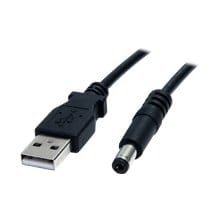
with this wire....
 

Attachments

  • usb wire.jpg
    usb wire.jpg
    3.4 KB · Views: 234

My Computer My Computer

At a glance

windows 7 premium 64bit3gb
Computer Manufacturer/Model Number
Samsung rv510 laptop
OS
windows 7 premium 64bit
Memory
3gb
Hard Drives
500 gb

My Computer My Computer

At a glance

Windows 7 Ultimate x64Intel Core i7-2600K16 GB G Skill F3-10666 CL9D-4GBRLATI Radeon HD 6870
Computer Manufacturer/Model Number
Something I threw together
OS
Windows 7 Ultimate x64
CPU
Intel Core i7-2600K
Motherboard
Asus P8P67
Memory
16 GB G Skill F3-10666 CL9D-4GBRL
Graphics Card(s)
ATI Radeon HD 6870
Sound Card
ATI Radeon HDMI / Realtek ALC892
Monitor(s) Displays
2 x 22" standard monitors / LG32LC56v TV to watch films
Screen Resolution
1920 x1080
Hard Drives
2 x OCZ Vertex2 111.79GB
3 x Samsung103SJ
1 x Samsung103UJ
1 x WD3200BEVT
1 x Hitachi5K320-160
PSU
Thermaltake Toughpower Cable Management 750W
Case
Antec 300
Cooling
Noctua NH-U12P SE2 and 5 120mm Case fans
Keyboard
Microsoft Comfort Curve Keyboard 2000
Mouse
Hama M3110 / Logitech M305
Internet Speed
16000
Other Info
I have also used Fedora, Suse, Ubuntu Linux
And all other Windows from 95 to date except ME
Go here; 3 Port Cardbus USB 2.0 PC Adapter Card | StarTech.com
and download the driver insert the card into the slot install the driver DO NOT INSERT the cable I do not know what it is for but I have seen no description saying it was necessary

The card did not work, even with it with it plugged in to my usb wall charger.

I hope this has not destroyed the card

Thanks for the linky, am trying it now.

As for the cable, i shouldnt have thought i have damaged the card, as usb voltage is 5v, and thats what voltage my wall charger gives out, but you may be correct, we shall see...

Thanks for your help so far Pooch
 

My Computer My Computer

At a glance

windows 7 premium 64bit3gb
Computer Manufacturer/Model Number
Samsung rv510 laptop
OS
windows 7 premium 64bit
Memory
3gb
Hard Drives
500 gb
Were getting there slowly, as i inserted the card, nothing happened so i opened device managers and pressed the scan for new hardware button, this resulted in the driver being located and installed.

When plugging in my ipod touch to the usb port on the card, it does exactly the same as plugging it into the other usb ports, The orange indicator light turns in, blinks and flashes a few times, and the it goes off, and the ipod does not show up in the device list.

so there is some sort of connection there as the lights do come on and flash/blink for a short while, but it is not a "full" connection.

Is there a way using "Command" to control the usb ports/card slot?

(the card or ipod do not show up in the "safley remove hardware" list either)
 

My Computer My Computer

At a glance

windows 7 premium 64bit3gb
Computer Manufacturer/Model Number
Samsung rv510 laptop
OS
windows 7 premium 64bit
Memory
3gb
Hard Drives
500 gb
Were getting there slowly, as i inserted the card, nothing happened so i opened device managers and pressed the scan for new hardware button, this resulted in the driver being located and installed.

When plugging in my ipod touch to the usb port on the card, it does exactly the same as plugging it into the other usb ports, The orange indicator light turns in, blinks and flashes a few times, and the it goes off, and the ipod does not show up in the device list.

so there is some sort of connection there as the lights do come on and flash/blink for a short while, but it is not a "full" connection.

Is there a way using "Command" to control the usb ports/card slot?

(the card or ipod do not show up in the "safley remove hardware" list either)
I am not quite sure where to go now as these problems are new to me as well
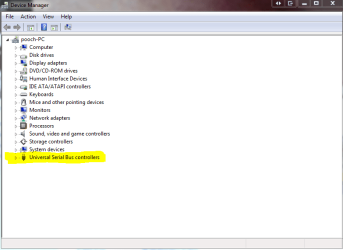
Look in Device Manager
does it look like the marked part of the attachment?
 

Attachments

  • Capture.PNG
    Capture.PNG
    16.9 KB · Views: 10

My Computer My Computer

At a glance

Windows 7 Ultimate x64Intel Core i7-2600K16 GB G Skill F3-10666 CL9D-4GBRLATI Radeon HD 6870
Computer Manufacturer/Model Number
Something I threw together
OS
Windows 7 Ultimate x64
CPU
Intel Core i7-2600K
Motherboard
Asus P8P67
Memory
16 GB G Skill F3-10666 CL9D-4GBRL
Graphics Card(s)
ATI Radeon HD 6870
Sound Card
ATI Radeon HDMI / Realtek ALC892
Monitor(s) Displays
2 x 22" standard monitors / LG32LC56v TV to watch films
Screen Resolution
1920 x1080
Hard Drives
2 x OCZ Vertex2 111.79GB
3 x Samsung103SJ
1 x Samsung103UJ
1 x WD3200BEVT
1 x Hitachi5K320-160
PSU
Thermaltake Toughpower Cable Management 750W
Case
Antec 300
Cooling
Noctua NH-U12P SE2 and 5 120mm Case fans
Keyboard
Microsoft Comfort Curve Keyboard 2000
Mouse
Hama M3110 / Logitech M305
Internet Speed
16000
Other Info
I have also used Fedora, Suse, Ubuntu Linux
And all other Windows from 95 to date except ME

My Computer My Computer

At a glance

Windows 7 Ultimate x64Intel Core i7-2600K16 GB G Skill F3-10666 CL9D-4GBRLATI Radeon HD 6870
Computer Manufacturer/Model Number
Something I threw together
OS
Windows 7 Ultimate x64
CPU
Intel Core i7-2600K
Motherboard
Asus P8P67
Memory
16 GB G Skill F3-10666 CL9D-4GBRL
Graphics Card(s)
ATI Radeon HD 6870
Sound Card
ATI Radeon HDMI / Realtek ALC892
Monitor(s) Displays
2 x 22" standard monitors / LG32LC56v TV to watch films
Screen Resolution
1920 x1080
Hard Drives
2 x OCZ Vertex2 111.79GB
3 x Samsung103SJ
1 x Samsung103UJ
1 x WD3200BEVT
1 x Hitachi5K320-160
PSU
Thermaltake Toughpower Cable Management 750W
Case
Antec 300
Cooling
Noctua NH-U12P SE2 and 5 120mm Case fans
Keyboard
Microsoft Comfort Curve Keyboard 2000
Mouse
Hama M3110 / Logitech M305
Internet Speed
16000
Other Info
I have also used Fedora, Suse, Ubuntu Linux
And all other Windows from 95 to date except ME
Were getting there slowly, as i inserted the card, nothing happened so i opened device managers and pressed the scan for new hardware button, this resulted in the driver being located and installed.

When plugging in my ipod touch to the usb port on the card, it does exactly the same as plugging it into the other usb ports, The orange indicator light turns in, blinks and flashes a few times, and the it goes off, and the ipod does not show up in the device list.

so there is some sort of connection there as the lights do come on and flash/blink for a short while, but it is not a "full" connection.

Is there a way using "Command" to control the usb ports/card slot?

(the card or ipod do not show up in the "safley remove hardware" list either)
I am not quite sure where to go now as these problems are new to me as well
Look in Device Manager
does it look like the marked part of the attachment?


Yes, my device manager does look like that, and when I expand the USB section, all looks normal, no yellow or grey tags, just the list of the ATI controllers for each port, and then each port is listed again,

I'm currently at work, but I shall try tomorrow the info on the microsoft page you gave me the link for about "select and suspend". Have dealt with registry issues before so I'm not scared to do this.

Will report back once I've done it.


Just one more thing, just before I left the house for work, I got the blue screen warning, and that has never happened on that machine before, I think the driver I installed is conflicting with something else, not had chance to investigate that as I had to go to work.

Thanks again for your help Pooch.
 

My Computer My Computer

At a glance

windows 7 premium 64bit3gb
Computer Manufacturer/Model Number
Samsung rv510 laptop
OS
windows 7 premium 64bit
Memory
3gb
Hard Drives
500 gb
Tried the info about select suspend, made no difference.

I uninstalled the driver you gave me the link to as this was giving me the bluscreen

Now when i plug in a usb device, it doesnt make the "BING BONG" noise, and nothing shows up in the device manager or devices / printers!!
 

My Computer My Computer

At a glance

windows 7 premium 64bit3gb
Computer Manufacturer/Model Number
Samsung rv510 laptop
OS
windows 7 premium 64bit
Memory
3gb
Hard Drives
500 gb
Back
Top