My Memtest86 (v4.20) results

Yea, you should have no problems. I'm not trying to introduce doubt or anything. My statements are just for informational purposes in explaining a bit how your particular memory affects your computer. What you got will work perfectly fine and shouldn't cause any issues. I'm speaking in terms of optimization, if you ever choose to go that route once this issue is fixed.
 

My Computer My Computer

At a glance

XP / Win7 x64 ProIntel Quad-Core Q9450 @ 3.2GHz2x2GB GSkill DDR2NVIDIA GeForce 8600 GTS (EVGA)
OS
XP / Win7 x64 Pro
CPU
Intel Quad-Core Q9450 @ 3.2GHz
Motherboard
Asus P5-E
Memory
2x2GB GSkill DDR2
Graphics Card(s)
NVIDIA GeForce 8600 GTS (EVGA)
Monitor(s) Displays
Dell 2408WFP
Screen Resolution
1920x1200
Yea, you should have no problems. I'm not trying to introduce doubt or anything. My statements are just for informational purposes in explaining a bit how your particular memory affects your computer. What you got will work perfectly fine and shouldn't cause any issues. I'm speaking in terms of optimization, if you ever choose to go that route once this issue is fixed.

Yeah, I appreciate your help. My MemTest is like giving me hundreds of errors. This is the most reasonable core of a problem.

==

Oh, I see my topic is sticked together in 1 again. Thanks mates :)

==
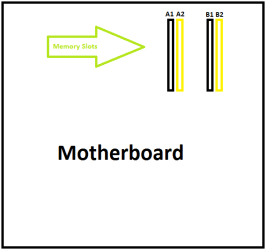
Thumbs up for awesome paint-platform job. I was just wondering, what slot I should use when I get my new RAM. Kingston HyperX 2 x 2 GB - KHX8500D2K2 is the ID.
 

Attachments

  • module.png
    module.png
    3.3 KB · Views: 0
Last edited:

My Computer My Computer

At a glance

Microsoft Windows 7 Ultimate: x64 (SP1)Intel® Core™ i5-2500K ProcessorKingston DDR3 HyperX 1600MHz 8GBASUS GTX 560 TI DirectCU II 900MHz
Computer Manufacturer/Model Number
Brewed
OS
Microsoft Windows 7 Ultimate: x64 (SP1)
CPU
Intel® Core™ i5-2500K Processor
Motherboard
ASUS P8Z68-V PRO
Memory
Kingston DDR3 HyperX 1600MHz 8GB
Graphics Card(s)
ASUS GTX 560 TI DirectCU II 900MHz
Sound Card
Realtek® ALC892 8-Channel High Definition Audio CODEC
Monitor(s) Displays
ACER LCD P246HBD 1920x1080 (24") - Dell 1280x800
Screen Resolution
ACER LCD P246HBD ~ [1920X1080] - DELL ~ [1280x800]
Hard Drives
500 GB WD Caviar SE116 7200rpm SATA2
PSU
Corsair 750W Power Supply
Case
Coolermaster CM Scout
Cooling
Zalman FS-C77 Fatal1ty CPU Cooler
Keyboard
Logitech G15
Mouse
Coolermaster Sentinel Advanced
Internet Speed
[↓ 10 MB/s DL] [↑ 1 MB/s UL]
Other Info
- ROCCAT™ Kave – Solid 5.1 Surround Sound Gaming Headset
- Not overclocking
It shouldn't matter, as long as you keep the channels the same...so either the two black slots or the two yellow slots.
 

My Computer My Computer

At a glance

Windows 7 Ultimate x64 SP1Intel Core i7-260012 GB Patriot Extreme DDR3-1333Nvidia GTX 470
OS
Windows 7 Ultimate x64 SP1
CPU
Intel Core i7-2600
Motherboard
Gigabyte GA-P67A-UD3P-B3
Memory
12 GB Patriot Extreme DDR3-1333
Graphics Card(s)
Nvidia GTX 470
Monitor(s) Displays
Dell UltraSharp 2209WA
Hard Drives
OCZ Agility3 240 GB, WD5001AALS, WD7501AALS
PSU
OCZ ModStream 700W
Case
CoolerMaster HAF 912 Advanced
Cooling
CoolerMaster Hyper 212 Plus
It shouldn't matter, as long as you keep the channels the same...so either the two black slots or the two yellow slots.

Oh yeah, just discovered on ASUS' website, that you'll need to plug them into yellow for better overclock capability.

Actually it's not only Blue Screens of Deaths I had as a problem, but also problems like (I don't know if you ever tried this before), "touching" the front panel USB slots with your USB. Not putting them in there, just touching, and then your computer just freezes and says a weird sound. Sorry for bringing up and old topic of mine, but I think it's worth posting :)
 

My Computer My Computer

At a glance

Microsoft Windows 7 Ultimate: x64 (SP1)Intel® Core™ i5-2500K ProcessorKingston DDR3 HyperX 1600MHz 8GBASUS GTX 560 TI DirectCU II 900MHz
Computer Manufacturer/Model Number
Brewed
OS
Microsoft Windows 7 Ultimate: x64 (SP1)
CPU
Intel® Core™ i5-2500K Processor
Motherboard
ASUS P8Z68-V PRO
Memory
Kingston DDR3 HyperX 1600MHz 8GB
Graphics Card(s)
ASUS GTX 560 TI DirectCU II 900MHz
Sound Card
Realtek® ALC892 8-Channel High Definition Audio CODEC
Monitor(s) Displays
ACER LCD P246HBD 1920x1080 (24") - Dell 1280x800
Screen Resolution
ACER LCD P246HBD ~ [1920X1080] - DELL ~ [1280x800]
Hard Drives
500 GB WD Caviar SE116 7200rpm SATA2
PSU
Corsair 750W Power Supply
Case
Coolermaster CM Scout
Cooling
Zalman FS-C77 Fatal1ty CPU Cooler
Keyboard
Logitech G15
Mouse
Coolermaster Sentinel Advanced
Internet Speed
[↓ 10 MB/s DL] [↑ 1 MB/s UL]
Other Info
- ROCCAT™ Kave – Solid 5.1 Surround Sound Gaming Headset
- Not overclocking
I mentioned in post #23 that you would be advised to download the manufacturers manual for your mobo. The memory..Kingston HyperX 2 x 2 GB - KHX8500D2K2 is NOT on the manufacturers recommended list....up to you, but maybe you should consult the manual.
 

My Computer My Computer

At a glance

win7
OS
win7
I mentioned in post #23 that you would be advised to download the manufacturers manual for your mobo. The memory..Kingston HyperX 2 x 2 GB - KHX8500D2K2 is NOT on the manufacturers recommended list....up to you, but maybe you should consult the manual.

I actually spotted the stick. Was the the updated one you had a look at? Also, not every RAM is there, I just take the one that matches and the company is having my reputation. The QVL is a somewhat example of what you can use.

Clickie on the picture below
 

Attachments

  • QVL.PNG
    QVL.PNG
    4.1 KB · Views: 8

My Computer My Computer

At a glance

Microsoft Windows 7 Ultimate: x64 (SP1)Intel® Core™ i5-2500K ProcessorKingston DDR3 HyperX 1600MHz 8GBASUS GTX 560 TI DirectCU II 900MHz
Computer Manufacturer/Model Number
Brewed
OS
Microsoft Windows 7 Ultimate: x64 (SP1)
CPU
Intel® Core™ i5-2500K Processor
Motherboard
ASUS P8Z68-V PRO
Memory
Kingston DDR3 HyperX 1600MHz 8GB
Graphics Card(s)
ASUS GTX 560 TI DirectCU II 900MHz
Sound Card
Realtek® ALC892 8-Channel High Definition Audio CODEC
Monitor(s) Displays
ACER LCD P246HBD 1920x1080 (24") - Dell 1280x800
Screen Resolution
ACER LCD P246HBD ~ [1920X1080] - DELL ~ [1280x800]
Hard Drives
500 GB WD Caviar SE116 7200rpm SATA2
PSU
Corsair 750W Power Supply
Case
Coolermaster CM Scout
Cooling
Zalman FS-C77 Fatal1ty CPU Cooler
Keyboard
Logitech G15
Mouse
Coolermaster Sentinel Advanced
Internet Speed
[↓ 10 MB/s DL] [↑ 1 MB/s UL]
Other Info
- ROCCAT™ Kave – Solid 5.1 Surround Sound Gaming Headset
- Not overclocking
Don't treat the QVL lists as bibles for memory. They don't test every memory chip out there. It's a starting point, but isn't considered a definitive list of what works and what doesn't. If the memory speeds and voltage both are supported by the board, and you are buying a quality brand, you should be fine. From the QVL and motherboard specs, you can find out if you need ECC, how much is supported, how much per channel, etc.
 

My Computer My Computer

At a glance

Windows 7 Ultimate x64 SP1Intel Core i7-260012 GB Patriot Extreme DDR3-1333Nvidia GTX 470
OS
Windows 7 Ultimate x64 SP1
CPU
Intel Core i7-2600
Motherboard
Gigabyte GA-P67A-UD3P-B3
Memory
12 GB Patriot Extreme DDR3-1333
Graphics Card(s)
Nvidia GTX 470
Monitor(s) Displays
Dell UltraSharp 2209WA
Hard Drives
OCZ Agility3 240 GB, WD5001AALS, WD7501AALS
PSU
OCZ ModStream 700W
Case
CoolerMaster HAF 912 Advanced
Cooling
CoolerMaster Hyper 212 Plus
Yeah, also I updated post #86 following with a lil' picture :)
 

My Computer My Computer

At a glance

Microsoft Windows 7 Ultimate: x64 (SP1)Intel® Core™ i5-2500K ProcessorKingston DDR3 HyperX 1600MHz 8GBASUS GTX 560 TI DirectCU II 900MHz
Computer Manufacturer/Model Number
Brewed
OS
Microsoft Windows 7 Ultimate: x64 (SP1)
CPU
Intel® Core™ i5-2500K Processor
Motherboard
ASUS P8Z68-V PRO
Memory
Kingston DDR3 HyperX 1600MHz 8GB
Graphics Card(s)
ASUS GTX 560 TI DirectCU II 900MHz
Sound Card
Realtek® ALC892 8-Channel High Definition Audio CODEC
Monitor(s) Displays
ACER LCD P246HBD 1920x1080 (24") - Dell 1280x800
Screen Resolution
ACER LCD P246HBD ~ [1920X1080] - DELL ~ [1280x800]
Hard Drives
500 GB WD Caviar SE116 7200rpm SATA2
PSU
Corsair 750W Power Supply
Case
Coolermaster CM Scout
Cooling
Zalman FS-C77 Fatal1ty CPU Cooler
Keyboard
Logitech G15
Mouse
Coolermaster Sentinel Advanced
Internet Speed
[↓ 10 MB/s DL] [↑ 1 MB/s UL]
Other Info
- ROCCAT™ Kave – Solid 5.1 Surround Sound Gaming Headset
- Not overclocking
Not be used as an example or correct practice, but I'm not sure I've ever used RAM that was on my motherboard's QVL list.
 

My Computer My Computer

At a glance

XP / Win7 x64 ProIntel Quad-Core Q9450 @ 3.2GHz2x2GB GSkill DDR2NVIDIA GeForce 8600 GTS (EVGA)
OS
XP / Win7 x64 Pro
CPU
Intel Quad-Core Q9450 @ 3.2GHz
Motherboard
Asus P5-E
Memory
2x2GB GSkill DDR2
Graphics Card(s)
NVIDIA GeForce 8600 GTS (EVGA)
Monitor(s) Displays
Dell 2408WFP
Screen Resolution
1920x1200
Not be used as an example or correct practice, but I'm not sure I've ever used RAM that was on my motherboard's QVL list.

Haha, yeah. And I believe your computer is running ok?
 

My Computer My Computer

At a glance

Microsoft Windows 7 Ultimate: x64 (SP1)Intel® Core™ i5-2500K ProcessorKingston DDR3 HyperX 1600MHz 8GBASUS GTX 560 TI DirectCU II 900MHz
Computer Manufacturer/Model Number
Brewed
OS
Microsoft Windows 7 Ultimate: x64 (SP1)
CPU
Intel® Core™ i5-2500K Processor
Motherboard
ASUS P8Z68-V PRO
Memory
Kingston DDR3 HyperX 1600MHz 8GB
Graphics Card(s)
ASUS GTX 560 TI DirectCU II 900MHz
Sound Card
Realtek® ALC892 8-Channel High Definition Audio CODEC
Monitor(s) Displays
ACER LCD P246HBD 1920x1080 (24") - Dell 1280x800
Screen Resolution
ACER LCD P246HBD ~ [1920X1080] - DELL ~ [1280x800]
Hard Drives
500 GB WD Caviar SE116 7200rpm SATA2
PSU
Corsair 750W Power Supply
Case
Coolermaster CM Scout
Cooling
Zalman FS-C77 Fatal1ty CPU Cooler
Keyboard
Logitech G15
Mouse
Coolermaster Sentinel Advanced
Internet Speed
[↓ 10 MB/s DL] [↑ 1 MB/s UL]
Other Info
- ROCCAT™ Kave – Solid 5.1 Surround Sound Gaming Headset
- Not overclocking
Yea. Of all the systems I've built and used, I've only had one or two memory corruption problems which were unrelated to being qualified for use in the mobo, rather just poor quality pieces of memory. I'm not saying you should disregard the list or that there aren't actually incompatible pieces of memory (which there obviously are).
 

My Computer My Computer

At a glance

XP / Win7 x64 ProIntel Quad-Core Q9450 @ 3.2GHz2x2GB GSkill DDR2NVIDIA GeForce 8600 GTS (EVGA)
OS
XP / Win7 x64 Pro
CPU
Intel Quad-Core Q9450 @ 3.2GHz
Motherboard
Asus P5-E
Memory
2x2GB GSkill DDR2
Graphics Card(s)
NVIDIA GeForce 8600 GTS (EVGA)
Monitor(s) Displays
Dell 2408WFP
Screen Resolution
1920x1200
Yea. Of all the systems I've built and used, I've only had one or two memory corruption problems which were unrelated to being qualified for use in the mobo, rather just poor quality pieces of memory. I'm not saying you should disregard the list or that there aren't actually incompatible pieces of memory (which there obviously are).

Nice. Again, I'll report back when I have my new RAM to see what happens. Have a nice day, and please, keep topic alive with more basic information around everything :)
This is obviously the core.

FredeGail,
 

My Computer My Computer

At a glance

Microsoft Windows 7 Ultimate: x64 (SP1)Intel® Core™ i5-2500K ProcessorKingston DDR3 HyperX 1600MHz 8GBASUS GTX 560 TI DirectCU II 900MHz
Computer Manufacturer/Model Number
Brewed
OS
Microsoft Windows 7 Ultimate: x64 (SP1)
CPU
Intel® Core™ i5-2500K Processor
Motherboard
ASUS P8Z68-V PRO
Memory
Kingston DDR3 HyperX 1600MHz 8GB
Graphics Card(s)
ASUS GTX 560 TI DirectCU II 900MHz
Sound Card
Realtek® ALC892 8-Channel High Definition Audio CODEC
Monitor(s) Displays
ACER LCD P246HBD 1920x1080 (24") - Dell 1280x800
Screen Resolution
ACER LCD P246HBD ~ [1920X1080] - DELL ~ [1280x800]
Hard Drives
500 GB WD Caviar SE116 7200rpm SATA2
PSU
Corsair 750W Power Supply
Case
Coolermaster CM Scout
Cooling
Zalman FS-C77 Fatal1ty CPU Cooler
Keyboard
Logitech G15
Mouse
Coolermaster Sentinel Advanced
Internet Speed
[↓ 10 MB/s DL] [↑ 1 MB/s UL]
Other Info
- ROCCAT™ Kave – Solid 5.1 Surround Sound Gaming Headset
- Not overclocking
Received my new RAM today. Installed it and I'm back up and running.

MemTest has NO errors. Only ran it for a short time as with the old RAM errors showed up right away.

I'm running a Asus P7P55D-E Pro with a i5 760 2.8GHz CPU overclocked to 3.8GHz.

We'll see how long this lasts.
 

My Computer My Computer

At a glance

Windows 7 Pro x64i5 76016GBNvidia GTS450
Computer Manufacturer/Model Number
Built be Me
OS
Windows 7 Pro x64
CPU
i5 760
Motherboard
Asus P7P55D-E Pro
Memory
16GB
Graphics Card(s)
Nvidia GTS450
Sound Card
On board
Monitor(s) Displays
Dell 2007WFP Dell 1800FP
Screen Resolution
1680x1050 1280x1024
Hard Drives
Seagate 250GB & 750GB
WD 1TB
PSU
Antec 750
Case
In Win
Cooling
Cooler Master Hyper 212+
Keyboard
IBM
Mouse
MS
Received my new RAM today. Installed it and I'm back up and running.

MemTest has NO errors. Only ran it for a short time as with the old RAM errors showed up right away.

I'm running a Asus P7P55D-E Pro with a i5 760 2.8GHz CPU overclocked to 3.8GHz.

We'll see how long this lasts.

What RAM did you get and what OC settings are you running for both the FSB and RAM frequencies?
 

My Computer My Computer

At a glance

XP / Win7 x64 ProIntel Quad-Core Q9450 @ 3.2GHz2x2GB GSkill DDR2NVIDIA GeForce 8600 GTS (EVGA)
OS
XP / Win7 x64 Pro
CPU
Intel Quad-Core Q9450 @ 3.2GHz
Motherboard
Asus P5-E
Memory
2x2GB GSkill DDR2
Graphics Card(s)
NVIDIA GeForce 8600 GTS (EVGA)
Monitor(s) Displays
Dell 2408WFP
Screen Resolution
1920x1200
Received my new RAM today. Installed it and I'm back up and running.

MemTest has NO errors. Only ran it for a short time as with the old RAM errors showed up right away.

I'm running a Asus P7P55D-E Pro with a i5 760 2.8GHz CPU overclocked to 3.8GHz.

We'll see how long this lasts.

What RAM did you get and what OC settings are you running for both the FSB and RAM frequencies?

With these new boards and CPUs you set the BCLK. Mine is set to 200 with a multiplier of 19. Basically everything else is set to Auto.

When I first built this system I tried many variations of settings and could only get the system to 3.4+. I then tried the built in Asus BIOS Auto Tuning option and that set the system to 3.66. From there I manually changed some settings, voltages (actually lower the CPU voltage) and timings, and got it to run at 3.8. But from day one I would get memory errors when running my drive imaging program from a boot CD or CF card. That would happen even at the stock settings.
One of the first things I did once I had the system back up to 3.8 was to boot from a CF card with MustangPE, Win7 environment, with Acronis True Image and Disk Director and when I did the same operations, A backup and a restore using the Acronis Universal restore option, I didn't get any error or program shutdown. So I know I was good to go.
Hope fully it will stay this way.
I need to take some pictures of the BIOS screens and post them.

Oh the RAM was Kingston DDR3 1600. KHX1600C9D3K2/8G 8GB 1600MHz DDR3 Non-ECC CL9 DIMM
I also have so on order some Crucial and I'll see if I can get this system up to 16GB of RAM at the 3.8.

 

My Computer My Computer

At a glance

Windows 7 Pro x64i5 76016GBNvidia GTS450
Computer Manufacturer/Model Number
Built be Me
OS
Windows 7 Pro x64
CPU
i5 760
Motherboard
Asus P7P55D-E Pro
Memory
16GB
Graphics Card(s)
Nvidia GTS450
Sound Card
On board
Monitor(s) Displays
Dell 2007WFP Dell 1800FP
Screen Resolution
1680x1050 1280x1024
Hard Drives
Seagate 250GB & 750GB
WD 1TB
PSU
Antec 750
Case
In Win
Cooling
Cooler Master Hyper 212+
Keyboard
IBM
Mouse
MS
Received my new RAM today. Installed it and I'm back up and running.

MemTest has NO errors. Only ran it for a short time as with the old RAM errors showed up right away.

I'm running a Asus P7P55D-E Pro with a i5 760 2.8GHz CPU overclocked to 3.8GHz.

We'll see how long this lasts.

What RAM did you get and what OC settings are you running for both the FSB and RAM frequencies?

With these new boards and CPUs you set the BCLK. Mine is set to 200 with a multiplier of 19. Basically everything else is set to Auto.

When I first built this system I tried many variations of settings and could only get the system to 3.4+. I then tried the built in Asus BIOS Auto Tuning option and that set the system to 3.66. From there I manually changed some settings, voltages (actually lower the CPU voltage) and timings, and got it to run at 3.8. But from day one I would get memory errors when running my drive imaging program from a boot CD or CF card. That would happen even at the stock settings.
One of the first things I did once I had the system back up to 3.8 was to boot from a CF card with MustangPE, Win7 environment, with Acronis True Image and Disk Director and when I did the same operations, A backup and a restore using the Acronis Universal restore option, I didn't get any error or program shutdown. So I know I was good to go.
Hope fully it will stay this way.
I need to take some pictures of the BIOS screens and post them.

Oh the RAM was Kingston DDR3 1600. KHX1600C9D3K2/8G 8GB 1600MHz DDR3 Non-ECC CL9 DIMM
I also have so on order some Crucial and I'll see if I can get this system up to 16GB of RAM at the 3.8.

Nice to see it worked. Let's see if this is working for me as well. I don't know if these Kingston is running on another clock than my Corsair. Is it possible to set your clock to [AUTO], and how?

=================================================


In order to properly help figure out what's wrong with your RAM you need to provide "full" systems specs. Specifically the motherboards's make and model, the RAM's manufacturer and model number of the RAM.

The reason for this is that certain RAM requires certain voltages that the board my not be "automatically" providing. Therefore this may require setting manually setting the RAM's specs.

Example my Corsair Dominator TR3X6G1600C8D 1600MHz RAM requires a voltage of 1.65volts. If I let my Gigabyte GA-X58A-UD5 motherboard set it "Automatically" it will set the RAM (to 1.5volts) below it's required voltage of 1.65volts.... and it will most likely fail memtest.

My two cents.

Sorry I didn't pay attention to your post. I've tried to remove the [AUTO], but something interesting strange came up. BIOS is supporting 0.02V between. And my Corsair requires 2.15, but it can't because of the 0.02V between each voltage.

- Again, reporting back when I've got my new RAM

=================================================

Shootist how's your computer working? I believe you have the same problem as me, and it seems your new RAM is cool :)
 
Last edited:

My Computer My Computer

At a glance

Microsoft Windows 7 Ultimate: x64 (SP1)Intel® Core™ i5-2500K ProcessorKingston DDR3 HyperX 1600MHz 8GBASUS GTX 560 TI DirectCU II 900MHz
Computer Manufacturer/Model Number
Brewed
OS
Microsoft Windows 7 Ultimate: x64 (SP1)
CPU
Intel® Core™ i5-2500K Processor
Motherboard
ASUS P8Z68-V PRO
Memory
Kingston DDR3 HyperX 1600MHz 8GB
Graphics Card(s)
ASUS GTX 560 TI DirectCU II 900MHz
Sound Card
Realtek® ALC892 8-Channel High Definition Audio CODEC
Monitor(s) Displays
ACER LCD P246HBD 1920x1080 (24") - Dell 1280x800
Screen Resolution
ACER LCD P246HBD ~ [1920X1080] - DELL ~ [1280x800]
Hard Drives
500 GB WD Caviar SE116 7200rpm SATA2
PSU
Corsair 750W Power Supply
Case
Coolermaster CM Scout
Cooling
Zalman FS-C77 Fatal1ty CPU Cooler
Keyboard
Logitech G15
Mouse
Coolermaster Sentinel Advanced
Internet Speed
[↓ 10 MB/s DL] [↑ 1 MB/s UL]
Other Info
- ROCCAT™ Kave – Solid 5.1 Surround Sound Gaming Headset
- Not overclocking
Just leave all of that on Auto. It will run at the correct voltage needed for its native timings.
 

My Computer My Computer

At a glance

XP / Win7 x64 ProIntel Quad-Core Q9450 @ 3.2GHz2x2GB GSkill DDR2NVIDIA GeForce 8600 GTS (EVGA)
OS
XP / Win7 x64 Pro
CPU
Intel Quad-Core Q9450 @ 3.2GHz
Motherboard
Asus P5-E
Memory
2x2GB GSkill DDR2
Graphics Card(s)
NVIDIA GeForce 8600 GTS (EVGA)
Monitor(s) Displays
Dell 2408WFP
Screen Resolution
1920x1200
Just leave all of that on Auto. It will run at the correct voltage needed for its native timings.

Cool. Thanks for responding.
 

My Computer My Computer

At a glance

Microsoft Windows 7 Ultimate: x64 (SP1)Intel® Core™ i5-2500K ProcessorKingston DDR3 HyperX 1600MHz 8GBASUS GTX 560 TI DirectCU II 900MHz
Computer Manufacturer/Model Number
Brewed
OS
Microsoft Windows 7 Ultimate: x64 (SP1)
CPU
Intel® Core™ i5-2500K Processor
Motherboard
ASUS P8Z68-V PRO
Memory
Kingston DDR3 HyperX 1600MHz 8GB
Graphics Card(s)
ASUS GTX 560 TI DirectCU II 900MHz
Sound Card
Realtek® ALC892 8-Channel High Definition Audio CODEC
Monitor(s) Displays
ACER LCD P246HBD 1920x1080 (24") - Dell 1280x800
Screen Resolution
ACER LCD P246HBD ~ [1920X1080] - DELL ~ [1280x800]
Hard Drives
500 GB WD Caviar SE116 7200rpm SATA2
PSU
Corsair 750W Power Supply
Case
Coolermaster CM Scout
Cooling
Zalman FS-C77 Fatal1ty CPU Cooler
Keyboard
Logitech G15
Mouse
Coolermaster Sentinel Advanced
Internet Speed
[↓ 10 MB/s DL] [↑ 1 MB/s UL]
Other Info
- ROCCAT™ Kave – Solid 5.1 Surround Sound Gaming Headset
- Not overclocking
Hello again FredeGail, hope you got your memory sorted out now. I didn't post back with settings because I know only enough to get myself in trouble.:o

I emailed GSkill with my errors and spec and they were nice to reply with the needed BIOS settings to make the memory work just fine.
 

My Computer My Computer

At a glance

Windows 7 Ultimate X64 SP1Intel i5-2550K, Differing ~4.4-4.8GHz No buil...16GB G.Skill Sniper 1866MHz @ 2133MHz 2x8GBASUS GTX650TIB-DC2OC-2GD5, (650TI Boost)
Computer type
PC/Desktop
Computer Manufacturer/Model Number
Home Built Desktop By DataTech
OS
Windows 7 Ultimate X64 SP1
CPU
Intel i5-2550K, Differing ~4.4-4.8GHz No built in GPU
Motherboard
ASUS P8Z68-V PRO/GEN3
Memory
16GB G.Skill Sniper 1866MHz @ 2133MHz 2x8GB
Graphics Card(s)
ASUS GTX650TIB-DC2OC-2GD5, (650TI Boost)
Sound Card
Onboard Realtek 5-1
Monitor(s) Displays
Samsung P2570HD
Screen Resolution
1920x1080
Hard Drives
Samsung 840 Pro 256GB SSD for OS, 500GB Seagate Constellation (Enterprise drive) for Data
PSU
Corsair HX650W
Case
Inwin Dragon Rider
Cooling
Hyper 212 EVO w/two Noctua fans, push-pull, @1300 RPM
Keyboard
E-Z Eyes, bright yellow keys with large characters
Mouse
steelseries SENSEI Laser Pro Gaming
Internet Speed
48-51Mbs Mbs down, 11 Mbs up Xfinity Cable
Antivirus
Norton Internet Security 2013
Browser
IE 10, Opera, Pale Moon if needed
Other Info
4 case fans, LG BluRay-RE, ASUS DVD-RW, Mr. Fusion power supply, 1.21 gigawatts.
Hello again FredeGail, hope you got your memory sorted out now. I didn't post back with settings because I know only enough to get myself in trouble.:o

I emailed GSkill with my errors and spec and they were nice to reply with the needed BIOS settings to make the memory work just fine.

Nice to see you again. So they just emailed you the BIOS settings which is needed? Sounds great!
 

My Computer My Computer

At a glance

Microsoft Windows 7 Ultimate: x64 (SP1)Intel® Core™ i5-2500K ProcessorKingston DDR3 HyperX 1600MHz 8GBASUS GTX 560 TI DirectCU II 900MHz
Computer Manufacturer/Model Number
Brewed
OS
Microsoft Windows 7 Ultimate: x64 (SP1)
CPU
Intel® Core™ i5-2500K Processor
Motherboard
ASUS P8Z68-V PRO
Memory
Kingston DDR3 HyperX 1600MHz 8GB
Graphics Card(s)
ASUS GTX 560 TI DirectCU II 900MHz
Sound Card
Realtek® ALC892 8-Channel High Definition Audio CODEC
Monitor(s) Displays
ACER LCD P246HBD 1920x1080 (24") - Dell 1280x800
Screen Resolution
ACER LCD P246HBD ~ [1920X1080] - DELL ~ [1280x800]
Hard Drives
500 GB WD Caviar SE116 7200rpm SATA2
PSU
Corsair 750W Power Supply
Case
Coolermaster CM Scout
Cooling
Zalman FS-C77 Fatal1ty CPU Cooler
Keyboard
Logitech G15
Mouse
Coolermaster Sentinel Advanced
Internet Speed
[↓ 10 MB/s DL] [↑ 1 MB/s UL]
Other Info
- ROCCAT™ Kave – Solid 5.1 Surround Sound Gaming Headset
- Not overclocking
Back
Top