
advance systemcare wont remove

ive uninstalled it. but ccleaner only deletes all but 1 of restore points. should i delete them from system properties where u configure syst restore? then run ccleaner?

It doesn't really matter right now as you have backups and are about to change the system anyway.

You can switch it off if you want, this will disable system restore and remove all restore points.

Once you have done that, have a look at your partitions again.

Regards....Mike Connor
 

My Computer My Computer

OS
Several, including Windows 7 x64 Ultimate
alright chap.
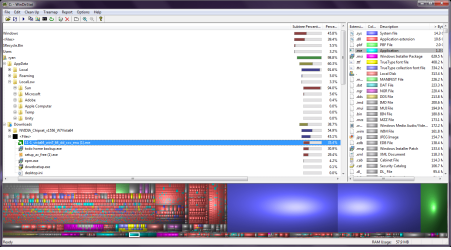
ive deleted restore points. ive managed to get it down to 34.50GB. i think ive foud all the files i think. some of them r installers and drivers that have been downloaded... is it ok to delete these using the clean option at the top left. delete(cant b undeleted) or send to the recycle bin. sorry again lol. nearly there
edit forgot to add pic lol
 

Attachments

  • Untitled2.png
    Untitled2.png
    146.3 KB · Views: 6

My Computer My Computer

Computer type
PC/Desktop
Computer Manufacturer/Model Number
Custom build
OS
Win7 Home Premium x64 SP1
CPU
i7 4770k
Motherboard
Asus maximus VI Hero
Memory
8Gb Kingston HyperX Beast 2400MHz @2133MHz 11-12-11-30
Graphics Card(s)
MSI GTX 780ti Gaming Oc x2
Sound Card
Onboard ROG SupremeFX
Monitor(s) Displays
Asus VG248QE
Screen Resolution
3840X1080 144Hz
Hard Drives
Samung Evo 256Gb, OCZ Agility4 128Gb
1x1TB hitachi storage
PSU
EVGA Supernova 1000w Platinum
Case
Corsair Air 540
Cooling
Corsair H100i
Keyboard
Coolermaster Quickfire Pro
Mouse
Corsair M65 RGB
Internet Speed
74mb dwn/16up
Antivirus
MSE,Malwarebytes
Browser
Chrome
You have managed to gain over 50GB by deleting the old stuff so far. You could just leave it at that for now, but if you are sure that these are merely installers etc, then by all means delete them.

Post again when you have done that, and have your partition manager running.

Regards....Mike Connor
 

My Computer My Computer

OS
Several, including Windows 7 x64 Ultimate
I have just installed another disc in this machine so that I can do a step by step for you.

I will post a screen shot of every step as we go through it. If anything is unclear at any step, wait until you see the screenshot before continuing, and if still unclear, ASK!

Regards....Mike Connor
 

My Computer My Computer

OS
Several, including Windows 7 x64 Ultimate
This is the start screen;


My Computer My Computer

OS
Several, including Windows 7 x64 Ultimate
This is the partition we want to resize;


As you can see this partition C: contains the Boot partition, and has 902.81 GBytes of unused space.

We want to retain at least 50 Gbytes for the Boot partition.
 

My Computer My Computer

OS
Several, including Windows 7 x64 Ultimate
i can tell u the folders and files. wen i download any programs i always leave them in my downloads folder and install from there.ill make a seperate folder or somethin nxt time. the ones that are showing up(in the attached pic) are, nvidia chipset driver, avast installer, ati graphic card driver,todo backup,epm installer, there was loads of thumbnail caches and backups from programs in the virtual store. thats pretty much all it is. ive got it down to 29.57GB and stopped as u said leave it now. shall i just delete those installers and stuff then as i hav it backed up?

i have the partitian program running
:hot:lol
reduce to 5000mb?
 

My Computer My Computer

Computer type
PC/Desktop
Computer Manufacturer/Model Number
Custom build
OS
Win7 Home Premium x64 SP1
CPU
i7 4770k
Motherboard
Asus maximus VI Hero
Memory
8Gb Kingston HyperX Beast 2400MHz @2133MHz 11-12-11-30
Graphics Card(s)
MSI GTX 780ti Gaming Oc x2
Sound Card
Onboard ROG SupremeFX
Monitor(s) Displays
Asus VG248QE
Screen Resolution
3840X1080 144Hz
Hard Drives
Samung Evo 256Gb, OCZ Agility4 128Gb
1x1TB hitachi storage
PSU
EVGA Supernova 1000w Platinum
Case
Corsair Air 540
Cooling
Corsair H100i
Keyboard
Coolermaster Quickfire Pro
Mouse
Corsair M65 RGB
Internet Speed
74mb dwn/16up
Antivirus
MSE,Malwarebytes
Browser
Chrome
( I have a slightly older version of partition manager on this disc, so the pictures are not identical to your version, but they should suffice. If not, then ask).

OK. I have resized the Boot partition by selecting "Resize/move Partition" and then moved the slider to about 50GBytes, and rebooted the machine. This is the result;


Disk 1 = C: now has the system reserved partition of 100.00 MB

The boot partition of roughly 50 Gbytes,

and 882.91 GBytes of unallocated space;


My Computer My Computer

OS
Several, including Windows 7 x64 Ultimate
i can tell u the folders and files. wen i download any programs i always leave them in my downloads folder and install from there.ill make a seperate folder or somethin nxt time. the ones that are showing up(in the attached pic) are, nvidia chipset driver, avast installer, ati graphic card driver,todo backup,epm installer, there was loads of thumbnail caches and backups from programs in the virtual store. thats pretty much all it is. ive got it down to 29.57GB and stopped as u said leave it now. shall i just delete those installers and stuff then as i hav it backed up?

i have the partitian program running
:hot:lol

reduce to 5000mb?

If you are happy with that, ( you can delete other stuff later if you want),
yes, you can go for it....................
 

My Computer My Computer

OS
Several, including Windows 7 x64 Ultimate
ive done it to just over 56GB. id didnt c the slider at first lol i was tring 2 do it with txt at first lol
 

Attachments

  • Untitled3.png
    Untitled3.png
    19.2 KB · Views: 2

My Computer My Computer

Computer type
PC/Desktop
Computer Manufacturer/Model Number
Custom build
OS
Win7 Home Premium x64 SP1
CPU
i7 4770k
Motherboard
Asus maximus VI Hero
Memory
8Gb Kingston HyperX Beast 2400MHz @2133MHz 11-12-11-30
Graphics Card(s)
MSI GTX 780ti Gaming Oc x2
Sound Card
Onboard ROG SupremeFX
Monitor(s) Displays
Asus VG248QE
Screen Resolution
3840X1080 144Hz
Hard Drives
Samung Evo 256Gb, OCZ Agility4 128Gb
1x1TB hitachi storage
PSU
EVGA Supernova 1000w Platinum
Case
Corsair Air 540
Cooling
Corsair H100i
Keyboard
Coolermaster Quickfire Pro
Mouse
Corsair M65 RGB
Internet Speed
74mb dwn/16up
Antivirus
MSE,Malwarebytes
Browser
Chrome
I have now clicked on the "unallocated" space, and on "Create Partition", I then just accepted the defaults in the box, and clicked "OK"


This results in;


Now I just need to click "Apply". I get the confirmation box;


Click on "Yes".................

The partition is created and....


That's it! You're done.

You can now keep all your data etc on this partition, and leave the Boot partition for the system.

Hope everything went well for you..........

Regards....Mike Connor
 

My Computer My Computer

OS
Several, including Windows 7 x64 Ultimate
If you now look at "Computer", in Explorer, you will see the results;


Regards....Mike Connor
 

My Computer My Computer

OS
Several, including Windows 7 x64 Ultimate
:thumbsup: thank you so much for ALL your patients lol. in the newer version u dnt get the apply button. just comfirm it. im just about 2 reboot now.
so now when installing programs i just change the default location to E instead of C. its pretty straight forward is'nt really.

well thank you loads again. u managed to teach me somethin and ive learned something new. very much apreciated

:sleep:sleep me thinks. then crack on with replacing files
 

My Computer My Computer

Computer type
PC/Desktop
Computer Manufacturer/Model Number
Custom build
OS
Win7 Home Premium x64 SP1
CPU
i7 4770k
Motherboard
Asus maximus VI Hero
Memory
8Gb Kingston HyperX Beast 2400MHz @2133MHz 11-12-11-30
Graphics Card(s)
MSI GTX 780ti Gaming Oc x2
Sound Card
Onboard ROG SupremeFX
Monitor(s) Displays
Asus VG248QE
Screen Resolution
3840X1080 144Hz
Hard Drives
Samung Evo 256Gb, OCZ Agility4 128Gb
1x1TB hitachi storage
PSU
EVGA Supernova 1000w Platinum
Case
Corsair Air 540
Cooling
Corsair H100i
Keyboard
Coolermaster Quickfire Pro
Mouse
Corsair M65 RGB
Internet Speed
74mb dwn/16up
Antivirus
MSE,Malwarebytes
Browser
Chrome
My pleasure, glad to hear you enjoyed it and it was successful. One learns a great deal by actually doing these things, which one would not learn easily by simply reading about them, or hearing them described.

Pleasant dreams, and happy file shoveling! :)

Regards....Mike Connor
 

My Computer My Computer

OS
Several, including Windows 7 x64 Ultimate
My pleasure, glad to hear you enjoyed it and it was successful. One learns a great deal by actually doing these things, which one would not learn easily by simply reading about them, or hearing them described.

Pleasant dreams, and happy file shoveling! :)

Regards....Mike Connor

thanks. i do enjoy learning as once i see or do something just once then it sticks in ere lol! good night
 

My Computer My Computer

Computer type
PC/Desktop
Computer Manufacturer/Model Number
Custom build
OS
Win7 Home Premium x64 SP1
CPU
i7 4770k
Motherboard
Asus maximus VI Hero
Memory
8Gb Kingston HyperX Beast 2400MHz @2133MHz 11-12-11-30
Graphics Card(s)
MSI GTX 780ti Gaming Oc x2
Sound Card
Onboard ROG SupremeFX
Monitor(s) Displays
Asus VG248QE
Screen Resolution
3840X1080 144Hz
Hard Drives
Samung Evo 256Gb, OCZ Agility4 128Gb
1x1TB hitachi storage
PSU
EVGA Supernova 1000w Platinum
Case
Corsair Air 540
Cooling
Corsair H100i
Keyboard
Coolermaster Quickfire Pro
Mouse
Corsair M65 RGB
Internet Speed
74mb dwn/16up
Antivirus
MSE,Malwarebytes
Browser
Chrome
sorry chap. just 1 more thing. r my libraries automatically moved? is E drive thier default now?
 

My Computer My Computer

Computer type
PC/Desktop
Computer Manufacturer/Model Number
Custom build
OS
Win7 Home Premium x64 SP1
CPU
i7 4770k
Motherboard
Asus maximus VI Hero
Memory
8Gb Kingston HyperX Beast 2400MHz @2133MHz 11-12-11-30
Graphics Card(s)
MSI GTX 780ti Gaming Oc x2
Sound Card
Onboard ROG SupremeFX
Monitor(s) Displays
Asus VG248QE
Screen Resolution
3840X1080 144Hz
Hard Drives
Samung Evo 256Gb, OCZ Agility4 128Gb
1x1TB hitachi storage
PSU
EVGA Supernova 1000w Platinum
Case
Corsair Air 540
Cooling
Corsair H100i
Keyboard
Coolermaster Quickfire Pro
Mouse
Corsair M65 RGB
Internet Speed
74mb dwn/16up
Antivirus
MSE,Malwarebytes
Browser
Chrome
sorry chap. just 1 more thing. r my libraries automatically moved? is E drive thier default now?

You have not changed any defaults. C: is still your system drive, and it is the drive which programs and other stuff will be automatically installed to.

The only difference to your machine is that you now have a system partition, and a data partition. Separate from each other.

Because your system drive now only basically has the system on it, you can image it very quickly.

You can add folders from your data partition to your libraries. The libraries are merely data indices, not physical data, it doesn't matter where the data is, the library will point to it.

You can also install programs on your data partition if you want to and the program allows it. Some programs have to be installed on C:

I thought you were going to sleep? Or are you just dreaming this? :)

Regards....Mike Connor
 

My Computer My Computer

OS
Several, including Windows 7 x64 Ultimate
I thought you were going to sleep? Or are you just dreaming this? :)

Regards....Mike Connor[/QUOTE]

lmao! ahh i got u lol. not thinking straight again. i dont like leaving things unfinished so ent gone bed yet.BUT! im smokin again now so i'll b leavin it till the morn now. if id of gone to bed. idd b up again by 2am. so draggin it out a bit.:doh::sleep::what::sleep:

we should b able to rep people more than once
 

My Computer My Computer

Computer type
PC/Desktop
Computer Manufacturer/Model Number
Custom build
OS
Win7 Home Premium x64 SP1
CPU
i7 4770k
Motherboard
Asus maximus VI Hero
Memory
8Gb Kingston HyperX Beast 2400MHz @2133MHz 11-12-11-30
Graphics Card(s)
MSI GTX 780ti Gaming Oc x2
Sound Card
Onboard ROG SupremeFX
Monitor(s) Displays
Asus VG248QE
Screen Resolution
3840X1080 144Hz
Hard Drives
Samung Evo 256Gb, OCZ Agility4 128Gb
1x1TB hitachi storage
PSU
EVGA Supernova 1000w Platinum
Case
Corsair Air 540
Cooling
Corsair H100i
Keyboard
Coolermaster Quickfire Pro
Mouse
Corsair M65 RGB
Internet Speed
74mb dwn/16up
Antivirus
MSE,Malwarebytes
Browser
Chrome
I thought you were going to sleep? Or are you just dreaming this? :)

Regards....Mike Connor

lmao! ahh i got u lol. not thinking straight again. i dont like leaving things unfinished so ent gone bed yet.BUT! im smokin again now so i'll b leavin it till the morn now. if id of gone to bed. idd b up again by 2am. so draggin it out a bit.:doh::sleep::what::sleep:

we should b able to rep people more than once[/QUOTE]

Don't worry about rep and stuff like that. Get some sleep!

Regards....Mike Connor
 

My Computer My Computer

OS
Several, including Windows 7 x64 Ultimate
hiya mike,:rolleyes:
i got all my libraries sorted.
just bumped into little problem. i was tryimg 2 install a game but as it needs more disc space than is in my partion i couldnt install it. do i 1 increase the size of the partition? or can i go about it a different way?
cheers chap
 

My Computer My Computer

Computer type
PC/Desktop
Computer Manufacturer/Model Number
Custom build
OS
Win7 Home Premium x64 SP1
CPU
i7 4770k
Motherboard
Asus maximus VI Hero
Memory
8Gb Kingston HyperX Beast 2400MHz @2133MHz 11-12-11-30
Graphics Card(s)
MSI GTX 780ti Gaming Oc x2
Sound Card
Onboard ROG SupremeFX
Monitor(s) Displays
Asus VG248QE
Screen Resolution
3840X1080 144Hz
Hard Drives
Samung Evo 256Gb, OCZ Agility4 128Gb
1x1TB hitachi storage
PSU
EVGA Supernova 1000w Platinum
Case
Corsair Air 540
Cooling
Corsair H100i
Keyboard
Coolermaster Quickfire Pro
Mouse
Corsair M65 RGB
Internet Speed
74mb dwn/16up
Antivirus
MSE,Malwarebytes
Browser
Chrome
Back
Top