
Solved Can you disable FF's virus scan?

RoloDman

HWIC
Pro User
Local time
9:06 AM
Messages
634
Location
New York City, New York

My Computer My Computer

At a glance

7 Ultimate 64 bit Service Pack 1Intel Core 2 Duo P9500 @ 2.53GHz (lower watta...4.0GB Dual-Channel DDR 2 @ 398MHz (5-5-5-18)512MB GeForce 9600M GT
Computer Manufacturer/Model Number
Sager NP2096
OS
7 Ultimate 64 bit Service Pack 1
CPU
Intel Core 2 Duo P9500 @ 2.53GHz (lower wattage chip)
Motherboard
JHL 90 (U2E1)
Memory
4.0GB Dual-Channel DDR 2 @ 398MHz (5-5-5-18)
Graphics Card(s)
512MB GeForce 9600M GT
Sound Card
Realtek High Definition Audio
Monitor(s) Displays
Generic PnP Monitor
Screen Resolution
1680x1050
Hard Drives
Hitachi 244GB @ 7200rpm (IDE)
Cooling
nature
Keyboard
generic
Mouse
Microsoft Wireless Mobile Mouse 3500
Internet Speed
30 megabits down, 5 megabits up
Other Info
1.)Staples 4-Port USB 2.0 Mobile Hub
2.)WNDR3700 - NETGEAR RangeMax Dual Band Wireless-N Gigabit Router
3.)Logitech Webcam C250
4.)Logitech M570

My Computer My Computer

At a glance

Windows Seven Ultimate x64 SP1Intel Core i7 x980 @ 3.33GHz12.0 GBNvidia GeForce GTX 260
Computer type
PC/Desktop
Computer Manufacturer/Model Number
HP
OS
Windows Seven Ultimate x64 SP1
CPU
Intel Core i7 x980 @ 3.33GHz
Memory
12.0 GB
Graphics Card(s)
Nvidia GeForce GTX 260
i don't which firefox version you have but you can check this out

Browser.download.manager.scanWhenDone - MozillaZine Knowledge Base

Thank you very much for that link, BTNH108464.

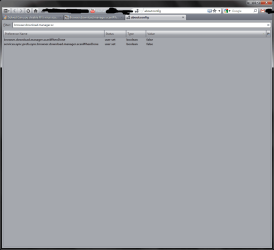
The article does not seem to address FF 4, which I am using, so I decided to try setting the values to false and seeing what happens. Pleasee see attached image for the exact changes I made.

After setting both values to false restarted FF and went to: eicar | THE ANTI-VIRUS OR ANTI-MALWARE TEST FILE

I downloaded some normal safe files and then downloaded some virus test files from EICAR. FF 4 did not scan files but MSE did catch the eicar files. I assume this means that the FF values are not overriding Window's security policy checks.

is this a safe assumption?

Thanks again
 

Attachments

  • b.PNG
    b.PNG
    23.4 KB · Views: 82

My Computer My Computer

At a glance

7 Ultimate 64 bit Service Pack 1Intel Core 2 Duo P9500 @ 2.53GHz (lower watta...4.0GB Dual-Channel DDR 2 @ 398MHz (5-5-5-18)512MB GeForce 9600M GT
Computer Manufacturer/Model Number
Sager NP2096
OS
7 Ultimate 64 bit Service Pack 1
CPU
Intel Core 2 Duo P9500 @ 2.53GHz (lower wattage chip)
Motherboard
JHL 90 (U2E1)
Memory
4.0GB Dual-Channel DDR 2 @ 398MHz (5-5-5-18)
Graphics Card(s)
512MB GeForce 9600M GT
Sound Card
Realtek High Definition Audio
Monitor(s) Displays
Generic PnP Monitor
Screen Resolution
1680x1050
Hard Drives
Hitachi 244GB @ 7200rpm (IDE)
Cooling
nature
Keyboard
generic
Mouse
Microsoft Wireless Mobile Mouse 3500
Internet Speed
30 megabits down, 5 megabits up
Other Info
1.)Staples 4-Port USB 2.0 Mobile Hub
2.)WNDR3700 - NETGEAR RangeMax Dual Band Wireless-N Gigabit Router
3.)Logitech Webcam C250
4.)Logitech M570
I think that it boils down to how quickly an AV finds a problem, as well as which ones it finds. Since FF only triggers which ever AV that you use, there would be no difference in it's detection rate, and even if it causes a double scan, it does not seem to cause any problems on my computer. The fact that I can see that the scan is actually performed makes me feel a bit more secure, whether I am or not.
 

My Computer My Computer

At a glance

W7x64 Pro, SuSe 12.1/** W7 x64 Pro, XP MCEPhenom II 1090T w/Noctua NH-D14 /**4400+ X2 w...2 x 2GB Patriot PGS34g1600LLKA/**4x1GB Corsai...EVGA GTX460 SC/**EVGA 8800GTS
Computer Manufacturer/Model Number
DIY
OS
W7x64 Pro, SuSe 12.1/** W7 x64 Pro, XP MCE
CPU
Phenom II 1090T w/Noctua NH-D14 /**4400+ X2 w/CM Hyper TX 3
Motherboard
ASRock 890FX Deluxe 4/**A8N-SLI
Memory
2 x 2GB Patriot PGS34g1600LLKA/**4x1GB Corsair VS
Graphics Card(s)
EVGA GTX460 SC/**EVGA 8800GTS
Sound Card
Asus Xonar D2X/**Xonar D1
Monitor(s) Displays
Acer X233H, Dell E152FPc /**LG M237-WD
Screen Resolution
1920x1080 & 1024x768/**1980x1080
Hard Drives
WDC 2TB, 1.5TB, 1TB, 500GB,Seagate 500GB , Maxtor 80GB /**500GB Seagate & WDC 1TB Black
PSU
CM RS600 w/ APC BX1000G/**Antec 500 TP w/ APC BX1000
Case
HAF922/**Antec 1040IIB
Cooling
3x200mm, 1x140 and 1x120mm/**5x80mm fans
Keyboard
Logitech Media USB/**Saitek Eclipse
Mouse
Cordless Trackman Wheel/**Ditto
Internet Speed
3.3Mbps
Other Info
SB 560 5.1 w/ Sennheiser RS140/**Creative T20 speakers, Dvico FusionHDTV7 Gold RT, Cisco E3000, HP 5510V AIO, Linksys E3000, Belkin F5U237 hub and **F5D8055 adapter
(** = 2nd rig)
i don't which firefox version you have but you can check this out

Browser.download.manager.scanWhenDone - MozillaZine Knowledge Base

Thank you very much for that link, BTNH108464.

The article does not seem to address FF 4, which I am using, so I decided to try setting the values to false and seeing what happens. Pleasee see attached image for the exact changes I made.

After setting both values to false restarted FF and went to: eicar | THE ANTI-VIRUS OR ANTI-MALWARE TEST FILE

I downloaded some normal safe files and then downloaded some virus test files from EICAR. FF 4 did not scan files but MSE did catch the eicar files. I assume this means that the FF values are not overriding Window's security policy checks.

is this a safe assumption?

Thanks again

Sounds great, on older versions of firefox it would override windows security checks, guess not in ff4. Safe to assume? Yes, but it is never a bad idea to do more tests :)
 

My Computer My Computer

At a glance

Windows Seven Ultimate x64 SP1Intel Core i7 x980 @ 3.33GHz12.0 GBNvidia GeForce GTX 260
Computer type
PC/Desktop
Computer Manufacturer/Model Number
HP
OS
Windows Seven Ultimate x64 SP1
CPU
Intel Core i7 x980 @ 3.33GHz
Memory
12.0 GB
Graphics Card(s)
Nvidia GeForce GTX 260
services.sync.prefs.sync.browser.download.manager.scanWhenDone

This preference should be left alone. It controls whether or not Firefox Sync includes your virus scanning preference when syncing. Keep it set to "true"


[FINAL UPDATE]


thanks to everybody for helping
 

My Computer My Computer

At a glance

7 Ultimate 64 bit Service Pack 1Intel Core 2 Duo P9500 @ 2.53GHz (lower watta...4.0GB Dual-Channel DDR 2 @ 398MHz (5-5-5-18)512MB GeForce 9600M GT
Computer Manufacturer/Model Number
Sager NP2096
OS
7 Ultimate 64 bit Service Pack 1
CPU
Intel Core 2 Duo P9500 @ 2.53GHz (lower wattage chip)
Motherboard
JHL 90 (U2E1)
Memory
4.0GB Dual-Channel DDR 2 @ 398MHz (5-5-5-18)
Graphics Card(s)
512MB GeForce 9600M GT
Sound Card
Realtek High Definition Audio
Monitor(s) Displays
Generic PnP Monitor
Screen Resolution
1680x1050
Hard Drives
Hitachi 244GB @ 7200rpm (IDE)
Cooling
nature
Keyboard
generic
Mouse
Microsoft Wireless Mobile Mouse 3500
Internet Speed
30 megabits down, 5 megabits up
Other Info
1.)Staples 4-Port USB 2.0 Mobile Hub
2.)WNDR3700 - NETGEAR RangeMax Dual Band Wireless-N Gigabit Router
3.)Logitech Webcam C250
4.)Logitech M570
Back
Top