
Can't save as - program stops responding

Touching Base - the files are still backing up LOL there are hundreds of thousands of them.

No Problem Ilene, these things can take a very long time, especially on damaged drives or drives with various problems.

I recently spent eight days backing up a drive for a friend. He was just about tearing his hair out! But everything worked and he got his data back.

Let us know when you are ready to try a recovery, ( which does not take so long by the way!), or if you need to.

Regards....Mike Connor
 

My Computer My Computer

OS
Several, including Windows 7 x64 Ultimate
Thanks :D


We are going on day 4 of the back up - I didn't realize I had so much stored on this external hard drive .... I am still hoping that it will back up the 2 most important files which right now I do not see them as being backed up.... **Keeping fingers crossed as I am noticing it isn't backing up in Alphabetical Order - When the back up is done I shall return.
 
Last edited:

My Computer My Computer

OS
I am not sure
Believe it or not - the files are still backing up - I have been checking the back up hard drive and it looks like all of the files are copying there.... So when it finishes transferring everything over, I will need to know how to delete it all from the "K" drive - reformat the drive and then what to do next. I can't believe the back up is still running - BOY did I have loads of files on there. Thanks, Ilene :D
 

My Computer My Computer

OS
I am not sure
Hi Ilene,

Nice to hear from you. What happens in such a case is that the drive has to try many many times before it can read all the file and copy it properly. This takes a long time. Also, simply "copying" large amounts of data from one place to another can take a very long time with "standard" system copy defaults. As long as the files are showing up correctly on wherever you are backing them up to, that's OK.

Once it stops copying, get back to us and we'll sort out the rest, which should be a fairly easy and quick job.

Regards....Mike Connor
 

My Computer My Computer

OS
Several, including Windows 7 x64 Ultimate
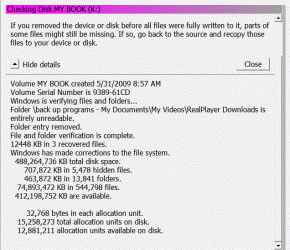
Well it finally stopped copying and I have attached the message that was left on my desktop. From what I can see all the files that I wanted to trasnfer has transfered except for the music file - I can live with out it as much of it I had already put onto CD's for when I travel to listen to. I have done nothing and I am waiting to hear from you as to what I should do next. Thanks so much.....
 

Attachments

  • Animation391.gif
    Animation391.gif
    30 KB · Views: 3

My Computer My Computer

OS
I am not sure
Well it finally stopped copying and I have attached the message that was left on my desktop. From what I can see all the files that I wanted to trasnfer has transfered except for the music file - I can live with out it as much of it I had already put onto CD's for when I travel to listen to. I have done nothing and I am waiting to hear from you as to what I should do next. Thanks so much.....


Hi Ilene, give me a minute or two to study that carefully..........

OK. Had a good look at that.

Well, you had some errors which Windows tried to correct. Are you really happy that you managed to recover everything you needed? Have you checked the files you recovered to make sure you can open and read or use them?

If so, we can proceed to the next step...........

Regards....Mike Connor
 

My Computer My Computer

OS
Several, including Windows 7 x64 Ultimate
Yes, I am able to open and use what was transfered
 

My Computer My Computer

OS
I am not sure
OK. Just a few observations and questions in advance. In light of what has occurred to date, I think your drive is probably OK. And the problems have been caused by massive file fragmentation on the drive. You can prevent this by regularly checking and defragmenting the drive as previously discussed.

If this is the case, we can easily repair that.

Does your drive make any strange noises? Noises you have not heard before, when copying?
 

My Computer My Computer

OS
Several, including Windows 7 x64 Ultimate
No, I didn't hear any noises at all
 

My Computer My Computer

OS
I am not sure
Okay I did that...do i select quick format and hit start?
 

My Computer My Computer

OS
I am not sure
Okay done

OK. I am going to direct you to some test utilities in order to check that drive. If anything at all is unclear, or you are unsure about something, please ask about it before you actually do anything.

Go to this site;

HD Tune website

and download the utility. This is free for personal use.
 

My Computer My Computer

OS
Several, including Windows 7 x64 Ultimate
okay downloading it now
 

My Computer My Computer

OS
I am not sure
Once you have downloaded and installed this utility, run it, and you will get a window like this;


Choose your drive in the drop down box, and then click on the tab "Error Scan" and then on "Start".

This can take a little while.............
 

My Computer My Computer

OS
Several, including Windows 7 x64 Ultimate
I clicked the download button and nothing is happening. Was that what I was supposed to do?
Okay I clicked the link by the file name and got it installed. Now following your other instructions.
 
Last edited:

My Computer My Computer

OS
I am not sure
I clicked the download button and nothing is happening. Was that what I was supposed to do?


You have to click on this;


Take your time, there is no rush. Good that you asked.
 

My Computer My Computer

OS
Several, including Windows 7 x64 Ultimate
Okay it is in the process of scanning -
I think I choose the right drive.... I knew it wasn't the seagate one because that is what I backed up everything from the other drive to.... so I guess it was the other drive that said external.
 

My Computer My Computer

OS
I am not sure
Yep that is what I finally figured out that I should click.... It is running now. :)
 

My Computer My Computer

OS
I am not sure
Back
Top