Resolution Help

JaxEx

New member
Local time
12:49 AM
Messages
3
So jax did a no no i was messing around with my Appearance on my laptop i have windows 7. So my Resolution was 1280x800 and i accidentally decreased it to 1024x768
icon_sad.gif
and now it wont let me go back up to 1280x800 i tried everything its just not there
icon_sad.gif


Note: 1280x800 dont even show up when i go to resolution
 

My Computer My Computer

OS
7
Hi JaxEx, welcome to the forums, sorry for the late reply.

The best option is to try and re-install the latest drivers for your video card. If you fill in your 'System Specs' (User CP) then we can give more in depth advice.


Jeff
 

My Computer My Computer

Computer Manufacturer/Model Number
Compaq Desktop
OS
Windows 7 Ultimate x64
CPU
AMD Sempron Dual Core
Memory
3GB
Graphics Card(s)
NVIDIA GeForce 6150SE nForce 430
Screen Resolution
1024x768
Hard Drives
150GB Sata
Thanks Jeff for the Welcome (I hope i can be active but i dont know much about computers lol)

U203-1245167727.png


What ells do u guys need? bansh where do i find out what graphics card i have?
 

My Computer My Computer

OS
7
You can find it in your device manager!

Start -> Control Panel -> System and Security -> System -> Device Manager -> Display Adapter
 
You can find it in your device manager!

Start -> Control Panel -> System and Security -> System -> Device Manager -> Display Adapter

+1

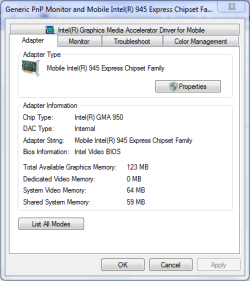
You can also right-click the desktop & select 'Screen Resolution' and then click 'Advanced settings' and this will bring up a detailed view of your current GFX card. See example below
Capture.PNG
 

My Computer My Computer

Computer Manufacturer/Model Number
Compaq Desktop
OS
Windows 7 Ultimate x64
CPU
AMD Sempron Dual Core
Memory
3GB
Graphics Card(s)
NVIDIA GeForce 6150SE nForce 430
Screen Resolution
1024x768
Hard Drives
150GB Sata
U203-1245252154.png


I Hope this helps you guys :) thanks for evrything!
 

My Computer My Computer

OS
7
U203-1245252154.png


I Hope this helps you guys :) thanks for evrything!

You're display adapter has been disabled. You can right click & enable it and you should be 100% active again :p
   Tip
The down arrow is the indication that it's disabled.
 

My Computer My Computer

Computer Manufacturer/Model Number
Compaq Desktop
OS
Windows 7 Ultimate x64
CPU
AMD Sempron Dual Core
Memory
3GB
Graphics Card(s)
NVIDIA GeForce 6150SE nForce 430
Screen Resolution
1024x768
Hard Drives
150GB Sata
Back
Top