Resolution Help

JaxEx

New member
Local time
2:32 PM
Messages
3
So jax did a no no i was messing around with my Appearance on my laptop i have windows 7. So my Resolution was 1280x800 and i accidentally decreased it to 1024x768
icon_sad.gif
and now it wont let me go back up to 1280x800 i tried everything its just not there
icon_sad.gif


Note: 1280x800 dont even show up when i go to resolution
 

My Computer

OS
7
Hi JaxEx, welcome to the forums, sorry for the late reply.

The best option is to try and re-install the latest drivers for your video card. If you fill in your 'System Specs' (User CP) then we can give more in depth advice.


Jeff
 

My Computer

Computer Manufacturer/Model Number
Compaq Desktop
OS
Windows 7 Ultimate x64
CPU
AMD Sempron Dual Core
Memory
3GB
Graphics Card(s)
NVIDIA GeForce 6150SE nForce 430
Screen Resolution
1024x768
Hard Drives
150GB Sata
Thanks Jeff for the Welcome (I hope i can be active but i dont know much about computers lol)

U203-1245167727.png


What ells do u guys need? bansh where do i find out what graphics card i have?
 

My Computer

OS
7
You can find it in your device manager!

Start -> Control Panel -> System and Security -> System -> Device Manager -> Display Adapter
 
You can find it in your device manager!

Start -> Control Panel -> System and Security -> System -> Device Manager -> Display Adapter

+1

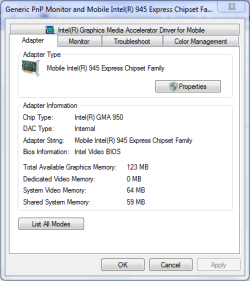
You can also right-click the desktop & select 'Screen Resolution' and then click 'Advanced settings' and this will bring up a detailed view of your current GFX card. See example below
Capture.PNG
 

My Computer

Computer Manufacturer/Model Number
Compaq Desktop
OS
Windows 7 Ultimate x64
CPU
AMD Sempron Dual Core
Memory
3GB
Graphics Card(s)
NVIDIA GeForce 6150SE nForce 430
Screen Resolution
1024x768
Hard Drives
150GB Sata
U203-1245252154.png


I Hope this helps you guys :) thanks for evrything!
 

My Computer

OS
7
U203-1245252154.png


I Hope this helps you guys :) thanks for evrything!

You're display adapter has been disabled. You can right click & enable it and you should be 100% active again :p
   Tip
The down arrow is the indication that it's disabled.
 

My Computer

Computer Manufacturer/Model Number
Compaq Desktop
OS
Windows 7 Ultimate x64
CPU
AMD Sempron Dual Core
Memory
3GB
Graphics Card(s)
NVIDIA GeForce 6150SE nForce 430
Screen Resolution
1024x768
Hard Drives
150GB Sata
Back
Top