No Search Suggestions in IE 9

JamesJ

New member
Member
Local time
6:05 PM
Messages
53
Although I have suggestions enabled, when I begin to type in the address bar I see no search suggestions in a drop down like I did with IE8 and the search bar.
Am I missing something.

James
 

My Computer My Computer

At a glance

Windows 7 64 bit
OS
Windows 7 64 bit
Although I have suggestions enabled, when I begin to type in the address bar I see no search suggestions in a drop down like I did with IE8 and the search bar.
Am I missing something.

James
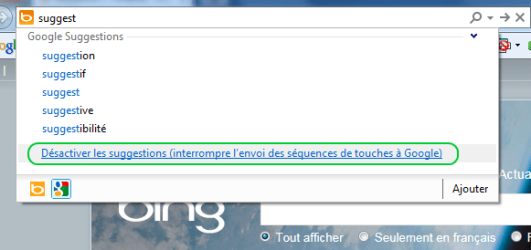
Hello James. When you doing a search, have you a line who is propose to active a suggestion ?
IE suggest.png
 

My Computer My Computer

At a glance

Windows 7 pro 64 bit2 GoNvidia
OS
Windows 7 pro 64 bit
Memory
2 Go
Graphics Card(s)
Nvidia
Mouse
Microsoft optical mouse
Sorry, I don't think I quite understand your question. As far as the screen shot is concerned, I get no drop down like the picture shows.

James
 

My Computer My Computer

At a glance

Windows 7 64 bit
OS
Windows 7 64 bit
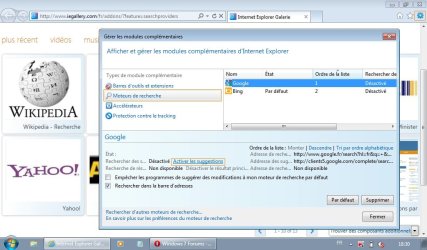
Try this. Go to Manage Add-ons in IE9. Go to Search Providers. Click on the search provider that you have chosen/ enabled. When you click it, you will see some info at the bottom of the Manage Add-on Box. There you will see the option to turn on/off site sugggestions. Maybe this will help?

Edit:

Once you have done the above. Go to the url/ search box (or whatever it is called) in IE9. Enter a ramdom word. At the bottom of the dropdown bown you will see a prompt which says "Turn On (if it is not already on) Search Suggestions". It will also say something about sending keystrokes to Google (if that is your search engine) or to Bing.

Hope this helps.
 

My Computer My Computer

At a glance

Win 7 Professional 64bit
OS
Win 7 Professional 64bit
The suggestions is enabled for my default search provider (Google).
 

My Computer My Computer

At a glance

Windows 7 64 bit
OS
Windows 7 64 bit
Sorry, I don't think I quite understand your question. As far as the screen shot is concerned, I get no drop down like the picture shows.

James
I have find. Click on tools icon and manage add-ons.
In the new windows click on search engine.
IE9.jpg
 

My Computer My Computer

At a glance

Windows 7 pro 64 bit2 GoNvidia
OS
Windows 7 pro 64 bit
Memory
2 Go
Graphics Card(s)
Nvidia
Mouse
Microsoft optical mouse
I do have suggestions turned on for the provider I'm using (Google).
Out of curiosity I installed Firefox for the first time. No issues with suggestions with Firefox. The browser is surprisingly nice.
 

My Computer My Computer

At a glance

Windows 7 64 bit
OS
Windows 7 64 bit
As an additional suggestion, when you start to type an address in the URL box, in the box that opens beneath, there is a section "History" and below that "Turn on or Turn off Safe Search" If you turn this ON it will offer up suggestions as you type.
 

My Computer My Computer

At a glance

Vista 64 bit and 32 bit (SP2)Intel(R) Core(TM)2 Duo Processor T9400 (2.53 GHz4GB DDR2 System Memory (2 Dimm)512 MB NVIDIA GeForce 9600M GT
Computer Manufacturer/Model Number
HP Pavillion dv5t (generation 1)
OS
Vista 64 bit and 32 bit (SP2)
CPU
Intel(R) Core(TM)2 Duo Processor T9400 (2.53 GHz
Memory
4GB DDR2 System Memory (2 Dimm)
Graphics Card(s)
512 MB NVIDIA GeForce 9600M GT
Monitor(s) Displays
15.4" diagonal WSXGA+ High-Definition HP BrightView Widescre
Screen Resolution
1680 x 1050
Hard Drives
320GB 5400RPM SATA Hard Drive with HP ProtectSmart Hard Drive Protection
Keyboard
Built-in HP
Mouse
Built in - Synaptics TouchPad V6.5 on PS/2 Port
Internet Speed
Max
Other Info
~ Intel Next-Gen Wireless-N Mini-card w/Bluetooth ~ Blu-Ray ROM DVD+/-R/RW ~ Integ. HDTV Hybrid Tuner ~ 12 Cell Battery ~ MS Office (Home Premium) 2007 ~
That's just it. Whether I type an address or something to search NO drop-down box opens beneath it.

James
 

My Computer My Computer

At a glance

Windows 7 64 bit
OS
Windows 7 64 bit
That's just it. Whether I type an address or something to search NO drop-down box opens beneath it.

James
I too am having this exact same problem. I have Google as my default search provider with search suggestions turned on, but I don't get a drop-down menu...halp :o

RIeQe.jpg
 

My Computer My Computer

At a glance

Windows 7 Home Premium x64Intel SU7300 (1.3GHz, 800MHz, 3MB)4GB, 1066MHz, DDR3Intel GMA X4500HD
Computer Manufacturer/Model Number
Dell Inspiron 1570 (15z)
OS
Windows 7 Home Premium x64
CPU
Intel SU7300 (1.3GHz, 800MHz, 3MB)
Memory
4GB, 1066MHz, DDR3
Graphics Card(s)
Intel GMA X4500HD
Screen Resolution
1366x768
Hard Drives
320GB @7200RPM
I have finally got it working. Problem is it wasn't a simple one-step process that fixed it. I was being helped by an experienced Microsoft MVP. I'm not experienced enough to go through all the steps the MVP put me through to help you. It was a very time consuming fix. I would suggest going to the Microsoft Answer Forums and post to the Internet Explorer group. You will need a Windows Live ID to log on and post, (as in any forum).

Good luck,
James
 

My Computer My Computer

At a glance

Windows 7 64 bit
OS
Windows 7 64 bit
Thanks. Turns out I had autocomplete turned off.

Tools -> Internet options -> Content -> Autocomplete Settings -> Turned on autocomplete for search only.
 

My Computer My Computer

At a glance

Windows 7 Home Premium x64Intel SU7300 (1.3GHz, 800MHz, 3MB)4GB, 1066MHz, DDR3Intel GMA X4500HD
Computer Manufacturer/Model Number
Dell Inspiron 1570 (15z)
OS
Windows 7 Home Premium x64
CPU
Intel SU7300 (1.3GHz, 800MHz, 3MB)
Memory
4GB, 1066MHz, DDR3
Graphics Card(s)
Intel GMA X4500HD
Screen Resolution
1366x768
Hard Drives
320GB @7200RPM
We messed around fo 2 days. I'm wondering if it was all necessary.
He even hinted that my computer might have been highjacked. I was getting ready to format my HD.
 

My Computer My Computer

At a glance

Windows 7 64 bit
OS
Windows 7 64 bit
To add a search to IE 9, 10, 11 search and install the Quero Toolbar.
It adds a search box to the right of the Menu toolbar in IE 9, 10, 11.

Please print out and read about all the options.
 

Attachments

  • Quero Toolbar.jpg
    Quero Toolbar.jpg
    17 KB · Views: 0

My Computer My Computer

At a glance

Windows 7 32 bit & 64 bit
Computer type
PC/Desktop
Computer Manufacturer/Model Number
Custom
OS
Windows 7 32 bit & 64 bit

My Computer My Computer

At a glance

Win-7-Pro64bit 7-H-Prem-64biti7-5930K 2nd i9-9940x both water blocked VRM'...Trident-z 3200C14 2nd Trident-z 3600C16EVGA 1080ti ftw3 2nd Titan Xp both water blocked
Computer type
PC/Desktop
Computer Manufacturer/Model Number
Custom assembled by me :}
OS
Win-7-Pro64bit 7-H-Prem-64bit
CPU
i7-5930K 2nd i9-9940x both water blocked VRM's too
Motherboard
ASUS SABERTOOTH X99 2nd ASUS x299 Apex
Memory
Trident-z 3200C14 2nd Trident-z 3600C16
Graphics Card(s)
EVGA 1080ti ftw3 2nd Titan Xp both water blocked
Sound Card
Built-in Realtek
Monitor(s) Displays
1-AOC G2460PG 24"G-Sync 144Hz/ 2nd 1-ASUS VG248QE 24" 144Hz
Screen Resolution
1920 x 1080 144Hz
Hard Drives
2-Samsung M.2 Evo & Evo Plus
2-Samsung 850 EVO 500GB SSD's/ 3-2.5 W.D. Black 1tb-&3-1tb/3-3.5 WD Black 1tb hdd's
PSU
EVGA SuperNOVA 1000-P2 2nd 1200-P2
Case
2-Corsair Obsidian Series 450D Black ATX Mid Tower
Cooling
Custom water loops
Keyboard
Logitech G710+/ 2nd Logitech G910
Mouse
2-RedDragon M901 Perdition 16400 dpi Gaming mouse = wired
Internet Speed
Comcast Ping 19ms 89.31mbps download speed 6.12mbps upload
Antivirus
Malwarebytes Pro/ Superantispyware Pro
Browser
FireFox & Pale moon
Other Info
2nd ASUS X299 Apex/Intel i9-9940x with Custom water loop/7H-Prem-x64/Corsair 450D case/Ram Trident-z 3600C16 4x8gb / Samsung970Evo plus 500gb SSD/Dual ssd EZ swap evo/PSU EVGA SuperNova 1200w-P2 80+Platinum/GPU Titan Xp /8-ML-140 on push-pull on 2-280GTX rads
The first reason for using the Quero toolbar is that it does not occupy any additional screen area like a normal toolbar would. It uses the free screen area to the right of the menu toolbar, but if you do not use the menu toolbar then I guess this is a problem.

The second reason for using it is that the search provider is not fixed to a specific provider, like Google or Yahoo toolbar are.

The Quero Toolbar allows you select your search provider from the right most drop down list box, i.e.
Google, Yahoo, Bing, etc.

You can add your own search providers to the list or delete any of the standard providers listed.
I just selected Google as my default.

Options allow you to setup the Search Box to only display your entered search text just like IE 8 worked.

If you only want to search using Google then just use the Goggle toolbar.

 

Attachments

  • Quero2.jpg
    Quero2.jpg
    35.1 KB · Views: 0

My Computer My Computer

At a glance

Windows 7 32 bit & 64 bit
Computer type
PC/Desktop
Computer Manufacturer/Model Number
Custom
OS
Windows 7 32 bit & 64 bit
Yea that's nice but you can also use Ctrl+E as long as you have downloaded another search provider it will be listed ;)
google%20search.jpg
 

My Computer My Computer

At a glance

Win-7-Pro64bit 7-H-Prem-64biti7-5930K 2nd i9-9940x both water blocked VRM'...Trident-z 3200C14 2nd Trident-z 3600C16EVGA 1080ti ftw3 2nd Titan Xp both water blocked
Computer type
PC/Desktop
Computer Manufacturer/Model Number
Custom assembled by me :}
OS
Win-7-Pro64bit 7-H-Prem-64bit
CPU
i7-5930K 2nd i9-9940x both water blocked VRM's too
Motherboard
ASUS SABERTOOTH X99 2nd ASUS x299 Apex
Memory
Trident-z 3200C14 2nd Trident-z 3600C16
Graphics Card(s)
EVGA 1080ti ftw3 2nd Titan Xp both water blocked
Sound Card
Built-in Realtek
Monitor(s) Displays
1-AOC G2460PG 24"G-Sync 144Hz/ 2nd 1-ASUS VG248QE 24" 144Hz
Screen Resolution
1920 x 1080 144Hz
Hard Drives
2-Samsung M.2 Evo & Evo Plus
2-Samsung 850 EVO 500GB SSD's/ 3-2.5 W.D. Black 1tb-&3-1tb/3-3.5 WD Black 1tb hdd's
PSU
EVGA SuperNOVA 1000-P2 2nd 1200-P2
Case
2-Corsair Obsidian Series 450D Black ATX Mid Tower
Cooling
Custom water loops
Keyboard
Logitech G710+/ 2nd Logitech G910
Mouse
2-RedDragon M901 Perdition 16400 dpi Gaming mouse = wired
Internet Speed
Comcast Ping 19ms 89.31mbps download speed 6.12mbps upload
Antivirus
Malwarebytes Pro/ Superantispyware Pro
Browser
FireFox & Pale moon
Other Info
2nd ASUS X299 Apex/Intel i9-9940x with Custom water loop/7H-Prem-x64/Corsair 450D case/Ram Trident-z 3600C16 4x8gb / Samsung970Evo plus 500gb SSD/Dual ssd EZ swap evo/PSU EVGA SuperNova 1200w-P2 80+Platinum/GPU Titan Xp /8-ML-140 on push-pull on 2-280GTX rads
Back
Top