Dock that works for Win 7 64 bit?

djaef

New member
Local time
12:09 AM
Messages
24
Location
Noosa Heads
Hi
I'm running Object Dock, but there's a problem with window focus not working properly in Windows when the program is running (goes away when I close Object Dock).

Does anyone have a suggestion for some free dock software that will run properly under Win 7 64 bit?

Thanks a heap.

Geoff
 

My Computer My Computer

At a glance

Windows 7 Ultimate x64Core i7 920Kingston Hyperx 6GB 16000Mhz DDR3 CL8 Intel XMPSapphire HD4890 1GB GDDR5 PCI-E
Computer Manufacturer/Model Number
Custom Build
OS
Windows 7 Ultimate x64
CPU
Core i7 920
Motherboard
Gigabyte GA-EX58-UD4
Memory
Kingston Hyperx 6GB 16000Mhz DDR3 CL8 Intel XMP
Graphics Card(s)
Sapphire HD4890 1GB GDDR5 PCI-E
Sound Card
on board
Monitor(s) Displays
ViewSonic VP1930b
Hard Drives
Western Digital 150G SATA II VelociRaptor
Western Digital 1TB SATAII HDD 32M Cache Green Power
PSU
Corsair HX-620 ATX Power Supply
Case
SilverStone Raven Black ATX Tower
Cooling
Thermalright Ultra-120 eXtreme
Keyboard
Logitech Wave Pro
Mouse
Logitech
Internet Speed
ADSL2

My Computer My Computer

At a glance

ultimate 64 sp1i5 2500K [email protected]8 gigs GSkill Ripjaws 1600amd hd6950
Computer Manufacturer/Model Number
mickey megabyte 1234
OS
ultimate 64 sp1
CPU
i5 2500K [email protected]
Motherboard
MSI P67A-GD53
Memory
8 gigs GSkill Ripjaws 1600
Graphics Card(s)
amd hd6950
Sound Card
creative x-fi gamer
Monitor(s) Displays
samsung 24"
Screen Resolution
1920x1080
Hard Drives
ocz vertex 2e 60 gig, samsung f3 1tb, buffalo 2tb ext
PSU
antec 550
Case
antec three hundred
Cooling
i'm a cooling fan
Keyboard
saitek eclipse ii
Mouse
logitech g3
Internet Speed
about 4 Mbps
Other Info
i love win7

My Computer My Computer

At a glance

Win 7 Pro x64 / Win 10 ProIntel(R) Core(TM) i7-3630QM CPU @ 2.40GHz12 GB(1) Intel(R) HD Graphics 4000 (2) NVIDIA GeFo...
Computer type
Laptop
Computer Manufacturer/Model Number
Sager NP9170
OS
Win 7 Pro x64 / Win 10 Pro
CPU
Intel(R) Core(TM) i7-3630QM CPU @ 2.40GHz
Motherboard
CLEVO P170EM
Memory
12 GB
Graphics Card(s)
(1) Intel(R) HD Graphics 4000 (2) NVIDIA GeForce GTX 675M
Sound Card
(1) Realtek High Definition Audio (2) Intel(R) Display Aud
Monitor(s) Displays
17.3
Screen Resolution
1920x1080
Hard Drives
(1) Samsung 860 EVO 500GB(OS) (1) Samsung 860 EVO 500GB(Data)
Keyboard
Backlite
Antivirus
MSE, Malwarebytes Pro
Browser
Firefox
Other Info
DESKTOP: Custom-built.
OS: Win 10 Pro x64.
CASE: Rosewill R5.
CPU: Intel I5 4670K CPU @ 3.40GHz.
CPU COOLER: Cool Master Hyper 212 EVO.
MOTHERBOARD: Asus Z87-A.
MEMORY: Kingston HyperX 2x4 GB.
GPU: Nvidia Geforce 650 TI.
PSU: Corsair TX750.
DRIVES: (1) Samsung 840 120 GB SSD (2) Western Digital blue 500 GB 7200 RPM.

My Computer My Computer

At a glance

Windows 7 Pro 64 bitAMD Phenom(tm) 9950 Quad-Core P beG.SKILL 16GB (4 x 4GB) 240-Pin DDR2Galaxy 80XLH5HS8GUX GeForce GTX 480 (Fermi) 1...
Computer Manufacturer/Model Number
Custom Build
OS
Windows 7 Pro 64 bit
CPU
AMD Phenom(tm) 9950 Quad-Core P be
Motherboard
Gigabyte GA-MA785G-UD3H
Memory
G.SKILL 16GB (4 x 4GB) 240-Pin DDR2
Graphics Card(s)
Galaxy 80XLH5HS8GUX GeForce GTX 480 (Fermi) 1536MB 384-bit D
Sound Card
ASUS XONAR_XENSE 7.1 Channels 24-bit 192KHz PCI Express x1 I
Monitor(s) Displays
32 inch Philips lcd 1080p and a 60 inch Mitsubishi 1080p dlp
Hard Drives
2, WD's VelociRaptor 600GB, Model WD6000HLHX, 1 Seagate ST32000641AS Barracuda XT Hard Drive - 2TB, 7200 RPM, SATA 6G, 64MB Cache
PSU
High Power Rock Solid Series Model: HPC-1000-G14C
Case
Thermaltake Level 10 Aluminum ATX Super Full Tower Gaming St
Cooling
Swiftech H20-220 Ultima XT CPU,Thermaltake TMG ND4 CL-W0153
Hi
I'm running Object Dock, but there's a problem with window focus not working properly in Windows when the program is running (goes away when I close Object Dock).

Does anyone have a suggestion for some free dock software that will run properly under Win 7 64 bit?

Thanks a heap.

Geoff

I have Object Dock on 64bit windows 7, never noticed a problem with it.
 

My Computer My Computer

At a glance

Windows11 ProIntel Skt 1200 Comet Lake Core i-7 3.80 GHZ32GB [4 x 8gb] Crucial Ballistix XMP DDR 4ATI [MSI] Radeon RX 5500 XT 8GB DDR6
Computer type
PC/Desktop
Computer Manufacturer/Model Number
Self Built with TLC
OS
Windows11 Pro
CPU
Intel Skt 1200 Comet Lake Core i-7 3.80 GHZ
Motherboard
Gigabyte Z590 UD AC
Memory
32GB [4 x 8gb] Crucial Ballistix XMP DDR 4
Graphics Card(s)
ATI [MSI] Radeon RX 5500 XT 8GB DDR6
Sound Card
Realtek HD 7.1 Onboard
Monitor(s) Displays
iiyama G2730HSU-B1 27" G-Master 75Mhz HD LED
Screen Resolution
1920 X 1080
Hard Drives
Samsung EVO 970 NVMe 1TB [Boot drive]
Samsung EVO 850 SSD 500GB
Western Digital DC WD10EFRX-68PJCN0 1TB
Western Digital DC WD1002FBYS-02A6B0 Enterprise 1TB
PSU
Corsair TX750M
Case
Zalman Z9 Plus
Cooling
Thermalright True Spirit 120 BW
Keyboard
Havit KB432L blue key mechanical
Mouse
Havit KB 432L Programmable
Internet Speed
Fibre To The Home 100Mbps from KCom
Antivirus
Avast Free
Browser
Firefox
Other Info
Logitech C525 HD Webcam
Epson XP-640 Expression-Premium printer with direct CD/DVD printing
I have Object Dock on 64bit windows 7, never noticed a problem with it.

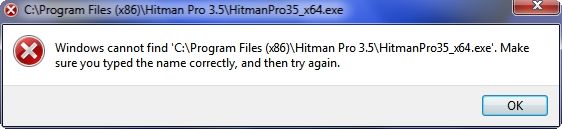
I just installed Object Dock Free on my Win 7 x64 desktop and it looks great just as it does on my Vista computer. The only problem I am having is that it refuses to open any 64 bit programs that are installed in the Programs Folder and it will only open 32 bit programs installed in the Program Files (x86) Folder. Every time I try to open a 64 bit program I get this message...

ObjectDockMessage.jpg


It seems as though Object Dock is assuming that all programs are located in C:\Program File (x86). Is there some kind of a hack to get Object Dock Free to open x64 programs under Win 7 x64? Is Object Dock Plus shareware capable of opening x64 programs under Win 7 x64?

~Maxx~

.
Win7_50.png
 

My Computer My Computer

At a glance

Windows 7 x64 Home PremiumIntel Core i7 930 @ 2.8 Ghz Socket 1366 LGA8 GB 1366 Mhz DDR3 (PC3-10700) RAMATI Radeon 5770 1 GB DDR5 RAM
Computer Manufacturer/Model Number
HP HPE 270f
OS
Windows 7 x64 Home Premium
CPU
Intel Core i7 930 @ 2.8 Ghz Socket 1366 LGA
Motherboard
Pegatron Truckee v1.04E41
Memory
8 GB 1366 Mhz DDR3 (PC3-10700) RAM
Graphics Card(s)
ATI Radeon 5770 1 GB DDR5 RAM
Sound Card
Realtech High Definition
Monitor(s) Displays
32" Sony Bravia
Screen Resolution
1366 X 768
Hard Drives
Intel 25nm 120 GB Series 320 SSD HD Tune- 265 MBps Read/ 130 MBps Write

LaCie 1TB + 1TB RAID 0 eSATA Drive HD Tune- 160 MBps Read/ 90 MBps Write
Keyboard
Logitech Illuminated
Mouse
Logitech MX Revolution
Internet Speed
36.4 Mbps Maximum on a 37 Mbps Motorola SB501 Modem
I have Object Dock on 64bit windows 7, never noticed a problem with it.

I just installed Object Dock Free on my Win 7 x64 desktop and it looks great just as it does on my Vista computer. The only problem I am having is that it refuses to open any 64 bit programs that are installed in the Programs Folder and it will only open 32 bit programs installed in the Program Files (x86) Folder. Every time I try to open a 64 bit program I get this message...

ObjectDockMessage.jpg


It seems as though Object Dock is assuming that all programs are located in C:\Program File (x86). Is there some kind of a hack to get Object Dock Free to open x64 programs under Win 7 x64? Is Object Dock Plus shareware capable of opening x64 programs under Win 7 x64?

~Maxx~

.
Win7_50.png

Hi Maxx

Just edit the shortcut location.Right click on the icon on the dock and go to edit shortcut.Under link edit the location by removing the (x86) part.It will now find the 64 bit program in program files rather than program files(x86).

I have 64bit programs on my dock and all run fine using this method

Danny
 

My Computer My Computer

At a glance

Windows 7 Home Premium x64 SP1intel(R)core(TM)2 duo CPU T6600 @ 2.20GHz3 gb ddr3ati radeon hd4570/512mb
Computer Manufacturer/Model Number
acer aspire 5935g
OS
Windows 7 Home Premium x64 SP1
CPU
intel(R)core(TM)2 duo CPU T6600 @ 2.20GHz
Motherboard
intel gm45/gm47 revision 07
Memory
3 gb ddr3
Graphics Card(s)
ati radeon hd4570/512mb
Monitor(s) Displays
lop156wh2-tle1 15.3 flat
Screen Resolution
1366x768
Hard Drives
OCZ-Agility3 60gig ssd
320gig external hdd
500gig external hdd
Mouse
Optical
Internet Speed
30Mbps Down/30Mbps Up
Danny- I finally got my Win 7 x64 desktop back from the shop loaded up with one of the new 25nm 120 GB Intel 320 SSD's and as much of a thrill as it was to see the computer benchmark speeds 3X as fast as before and boot in 14.5 seconds it was you who made my day by showing me how to get 100% full use out of the newly installed Object Dock.

Thanks; Object Doc...

FirstAid.png


~Maxx~
 

My Computer My Computer

At a glance

Windows 7 x64 Home PremiumIntel Core i7 930 @ 2.8 Ghz Socket 1366 LGA8 GB 1366 Mhz DDR3 (PC3-10700) RAMATI Radeon 5770 1 GB DDR5 RAM
Computer Manufacturer/Model Number
HP HPE 270f
OS
Windows 7 x64 Home Premium
CPU
Intel Core i7 930 @ 2.8 Ghz Socket 1366 LGA
Motherboard
Pegatron Truckee v1.04E41
Memory
8 GB 1366 Mhz DDR3 (PC3-10700) RAM
Graphics Card(s)
ATI Radeon 5770 1 GB DDR5 RAM
Sound Card
Realtech High Definition
Monitor(s) Displays
32" Sony Bravia
Screen Resolution
1366 X 768
Hard Drives
Intel 25nm 120 GB Series 320 SSD HD Tune- 265 MBps Read/ 130 MBps Write

LaCie 1TB + 1TB RAID 0 eSATA Drive HD Tune- 160 MBps Read/ 90 MBps Write
Keyboard
Logitech Illuminated
Mouse
Logitech MX Revolution
Internet Speed
36.4 Mbps Maximum on a 37 Mbps Motorola SB501 Modem
Danny- I finally got my Win 7 x64 desktop back from the shop loaded up with one of the new 25nm 120 GB Intel 320 SSD's and as much of a thrill as it was to see the computer benchmark speeds 3X as fast as before and boot in 14.5 seconds it was you who made my day by showing me how to get 100% full use out of the newly installed Object Dock.

Thanks; Object Doc...

FirstAid.png


~Maxx~

No worries and have fun with the new hardware

Danny
 

My Computer My Computer

At a glance

Windows 7 Home Premium x64 SP1intel(R)core(TM)2 duo CPU T6600 @ 2.20GHz3 gb ddr3ati radeon hd4570/512mb
Computer Manufacturer/Model Number
acer aspire 5935g
OS
Windows 7 Home Premium x64 SP1
CPU
intel(R)core(TM)2 duo CPU T6600 @ 2.20GHz
Motherboard
intel gm45/gm47 revision 07
Memory
3 gb ddr3
Graphics Card(s)
ati radeon hd4570/512mb
Monitor(s) Displays
lop156wh2-tle1 15.3 flat
Screen Resolution
1366x768
Hard Drives
OCZ-Agility3 60gig ssd
320gig external hdd
500gig external hdd
Mouse
Optical
Internet Speed
30Mbps Down/30Mbps Up
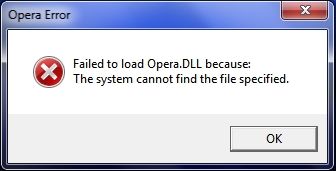
Object Doc- Object Dock was running 100% great last night, but this morning it refuses to start the Opera 11.10 browser Opera starts normally from both the desktop and task bar while Object Dock gives me this message...

ObjectDockOperadll.jpg


~Maxx~

OperaGold_60.png
 

My Computer My Computer

At a glance

Windows 7 x64 Home PremiumIntel Core i7 930 @ 2.8 Ghz Socket 1366 LGA8 GB 1366 Mhz DDR3 (PC3-10700) RAMATI Radeon 5770 1 GB DDR5 RAM
Computer Manufacturer/Model Number
HP HPE 270f
OS
Windows 7 x64 Home Premium
CPU
Intel Core i7 930 @ 2.8 Ghz Socket 1366 LGA
Motherboard
Pegatron Truckee v1.04E41
Memory
8 GB 1366 Mhz DDR3 (PC3-10700) RAM
Graphics Card(s)
ATI Radeon 5770 1 GB DDR5 RAM
Sound Card
Realtech High Definition
Monitor(s) Displays
32" Sony Bravia
Screen Resolution
1366 X 768
Hard Drives
Intel 25nm 120 GB Series 320 SSD HD Tune- 265 MBps Read/ 130 MBps Write

LaCie 1TB + 1TB RAID 0 eSATA Drive HD Tune- 160 MBps Read/ 90 MBps Write
Keyboard
Logitech Illuminated
Mouse
Logitech MX Revolution
Internet Speed
36.4 Mbps Maximum on a 37 Mbps Motorola SB501 Modem
Object Doc- Strangely enough as soon as I made the previous post I closed Opera and tried once again to start it from Object Dock and it started Opera 11.10 perfectly 3 times in a row! Could it be that just going to the Object Doc about a problem is the cure?

~Maxx~

OperaGold_60.png


Edit- Alas, Object Dock fails to run Opera 11.10 once again. What could be causing this sporadic behavior?
 

My Computer My Computer

At a glance

Windows 7 x64 Home PremiumIntel Core i7 930 @ 2.8 Ghz Socket 1366 LGA8 GB 1366 Mhz DDR3 (PC3-10700) RAMATI Radeon 5770 1 GB DDR5 RAM
Computer Manufacturer/Model Number
HP HPE 270f
OS
Windows 7 x64 Home Premium
CPU
Intel Core i7 930 @ 2.8 Ghz Socket 1366 LGA
Motherboard
Pegatron Truckee v1.04E41
Memory
8 GB 1366 Mhz DDR3 (PC3-10700) RAM
Graphics Card(s)
ATI Radeon 5770 1 GB DDR5 RAM
Sound Card
Realtech High Definition
Monitor(s) Displays
32" Sony Bravia
Screen Resolution
1366 X 768
Hard Drives
Intel 25nm 120 GB Series 320 SSD HD Tune- 265 MBps Read/ 130 MBps Write

LaCie 1TB + 1TB RAID 0 eSATA Drive HD Tune- 160 MBps Read/ 90 MBps Write
Keyboard
Logitech Illuminated
Mouse
Logitech MX Revolution
Internet Speed
36.4 Mbps Maximum on a 37 Mbps Motorola SB501 Modem
Best dock type application I have found to date is "True Launch Bar", the freeware, "Free Launch Bar" also works fine, but of course some things are not available in the free version.

Regards....Mike Connor
 

My Computer My Computer

At a glance

Several, including Windows 7 x64 Ultimate
OS
Several, including Windows 7 x64 Ultimate
In my experience docks like objectdock are just not worth it. As cool as some of them can look with the right skin, when it comes to practical reasons the taskbar destroys it. You can modify your taskbar with visual styles and icon changing to make it look pretty good too.
 

My Computer My Computer

At a glance

Windows 7 Home Premium x64
OS
Windows 7 Home Premium x64
You can modify your taskbar with visual styles and icon changing to make it look pretty good too.

Could you share with us how to get windows to display icons in the task bar as they actually look and not the shriveled up and degraded look it gives almost all great looking 3rd party icons like this one with Object Docks rendering of the exact same original 256 x 256 Opera icon on the bottom and the Windows 7 desktop rendering on the top because it looks much much worse in the task bar...

DesktopOperaicons.png


~Maxx~

.
Win7_50.png
 

My Computer My Computer

At a glance

Windows 7 x64 Home PremiumIntel Core i7 930 @ 2.8 Ghz Socket 1366 LGA8 GB 1366 Mhz DDR3 (PC3-10700) RAMATI Radeon 5770 1 GB DDR5 RAM
Computer Manufacturer/Model Number
HP HPE 270f
OS
Windows 7 x64 Home Premium
CPU
Intel Core i7 930 @ 2.8 Ghz Socket 1366 LGA
Motherboard
Pegatron Truckee v1.04E41
Memory
8 GB 1366 Mhz DDR3 (PC3-10700) RAM
Graphics Card(s)
ATI Radeon 5770 1 GB DDR5 RAM
Sound Card
Realtech High Definition
Monitor(s) Displays
32" Sony Bravia
Screen Resolution
1366 X 768
Hard Drives
Intel 25nm 120 GB Series 320 SSD HD Tune- 265 MBps Read/ 130 MBps Write

LaCie 1TB + 1TB RAID 0 eSATA Drive HD Tune- 160 MBps Read/ 90 MBps Write
Keyboard
Logitech Illuminated
Mouse
Logitech MX Revolution
Internet Speed
36.4 Mbps Maximum on a 37 Mbps Motorola SB501 Modem
Object Doc- Strangely enough as soon as I made the previous post I closed Opera and tried once again to start it from Object Dock and it started Opera 11.10 perfectly 3 times in a row! Could it be that just going to the Object Doc about a problem is the cure?

~Maxx~

OperaGold_60.png


Edit- Alas, Object Dock fails to run Opera 11.10 once again. What could be causing this sporadic behavior?

Hi Max

Opera still launches from my dock with no problems.You could try removing the shortcut and then adding it back from another created shortcut.Also check under the shorcut settings to make sure the shortcut target is the right location.
Other than that not sure why it would be ok one minute and not the next.

Danny
 

My Computer My Computer

At a glance

Windows 7 Home Premium x64 SP1intel(R)core(TM)2 duo CPU T6600 @ 2.20GHz3 gb ddr3ati radeon hd4570/512mb
Computer Manufacturer/Model Number
acer aspire 5935g
OS
Windows 7 Home Premium x64 SP1
CPU
intel(R)core(TM)2 duo CPU T6600 @ 2.20GHz
Motherboard
intel gm45/gm47 revision 07
Memory
3 gb ddr3
Graphics Card(s)
ati radeon hd4570/512mb
Monitor(s) Displays
lop156wh2-tle1 15.3 flat
Screen Resolution
1366x768
Hard Drives
OCZ-Agility3 60gig ssd
320gig external hdd
500gig external hdd
Mouse
Optical
Internet Speed
30Mbps Down/30Mbps Up
Other than that not sure why it would be ok one minute and not the next.
Danny

I'm not sure either, but since Object Dock is once again launching Opera 11.10 I'm just going to enjoy it and not worry about it.

ObjectDock2011-04-15.png


~Maxx~

.
Win7_50.png
 

My Computer My Computer

At a glance

Windows 7 x64 Home PremiumIntel Core i7 930 @ 2.8 Ghz Socket 1366 LGA8 GB 1366 Mhz DDR3 (PC3-10700) RAMATI Radeon 5770 1 GB DDR5 RAM
Computer Manufacturer/Model Number
HP HPE 270f
OS
Windows 7 x64 Home Premium
CPU
Intel Core i7 930 @ 2.8 Ghz Socket 1366 LGA
Motherboard
Pegatron Truckee v1.04E41
Memory
8 GB 1366 Mhz DDR3 (PC3-10700) RAM
Graphics Card(s)
ATI Radeon 5770 1 GB DDR5 RAM
Sound Card
Realtech High Definition
Monitor(s) Displays
32" Sony Bravia
Screen Resolution
1366 X 768
Hard Drives
Intel 25nm 120 GB Series 320 SSD HD Tune- 265 MBps Read/ 130 MBps Write

LaCie 1TB + 1TB RAID 0 eSATA Drive HD Tune- 160 MBps Read/ 90 MBps Write
Keyboard
Logitech Illuminated
Mouse
Logitech MX Revolution
Internet Speed
36.4 Mbps Maximum on a 37 Mbps Motorola SB501 Modem
Looks great Max

Danny
 

My Computer My Computer

At a glance

Windows 7 Home Premium x64 SP1intel(R)core(TM)2 duo CPU T6600 @ 2.20GHz3 gb ddr3ati radeon hd4570/512mb
Computer Manufacturer/Model Number
acer aspire 5935g
OS
Windows 7 Home Premium x64 SP1
CPU
intel(R)core(TM)2 duo CPU T6600 @ 2.20GHz
Motherboard
intel gm45/gm47 revision 07
Memory
3 gb ddr3
Graphics Card(s)
ati radeon hd4570/512mb
Monitor(s) Displays
lop156wh2-tle1 15.3 flat
Screen Resolution
1366x768
Hard Drives
OCZ-Agility3 60gig ssd
320gig external hdd
500gig external hdd
Mouse
Optical
Internet Speed
30Mbps Down/30Mbps Up
you should try xwindowsdock 5.6 is the best dock i have found and have stack options like the dock in OSX

the only problem with these dock is that you can place it just on the botton of the screen, but the xwindowsdock 2.0.3 you can place it anywhere and is like the 5.6 but with a few less options the two are free
 

My Computer My Computer

At a glance

Windows 7Core 2 Duo E64002gbGigabyte Geforce GTX 260
OS
Windows 7
CPU
Core 2 Duo E6400
Motherboard
Intel D975XBX
Memory
2gb
Graphics Card(s)
Gigabyte Geforce GTX 260
Screen Resolution
1600x900
Hard Drives
300gb
Hi Max

Opera still launches from my dock with no problems.You could try removing the shortcut and then adding it back from another created shortcut.Also check under the shorcut settings to make sure the shortcut target is the right location.
Danny

I think I have discovered the problem I was having and its no fault of Object Dock's. After I realized that the 2 browsers and internet radio that were having problems launching were all being launched into Sandboxie I checked and Object Dock was on the compatibility list in Sandboxie and then after changing its compatibility under Win 7 to 'XP SP2' and restarting Object Dock all of the programs now launch every time without a problem!

~Maxx~

ODLogo_1.png
 

My Computer My Computer

At a glance

Windows 7 x64 Home PremiumIntel Core i7 930 @ 2.8 Ghz Socket 1366 LGA8 GB 1366 Mhz DDR3 (PC3-10700) RAMATI Radeon 5770 1 GB DDR5 RAM
Computer Manufacturer/Model Number
HP HPE 270f
OS
Windows 7 x64 Home Premium
CPU
Intel Core i7 930 @ 2.8 Ghz Socket 1366 LGA
Motherboard
Pegatron Truckee v1.04E41
Memory
8 GB 1366 Mhz DDR3 (PC3-10700) RAM
Graphics Card(s)
ATI Radeon 5770 1 GB DDR5 RAM
Sound Card
Realtech High Definition
Monitor(s) Displays
32" Sony Bravia
Screen Resolution
1366 X 768
Hard Drives
Intel 25nm 120 GB Series 320 SSD HD Tune- 265 MBps Read/ 130 MBps Write

LaCie 1TB + 1TB RAID 0 eSATA Drive HD Tune- 160 MBps Read/ 90 MBps Write
Keyboard
Logitech Illuminated
Mouse
Logitech MX Revolution
Internet Speed
36.4 Mbps Maximum on a 37 Mbps Motorola SB501 Modem
Hi Max

Opera still launches from my dock with no problems.You could try removing the shortcut and then adding it back from another created shortcut.Also check under the shorcut settings to make sure the shortcut target is the right location.
Danny

I think I have discovered the problem I was having and its no fault of Object Dock's. After I realized that the 2 browsers and internet radio that were having problems launching were all being launched into Sandboxie I checked and Object Dock was on the compatibility list in Sandboxie and then after changing its compatibility under Win 7 to 'XP SP2' and restarting Object Dock all of the programs now launch every time without a problem!

~Maxx~


ODLogo_1.png

Glad you found the problem Maxx :D

Danny
 

My Computer My Computer

At a glance

Windows 7 Home Premium x64 SP1intel(R)core(TM)2 duo CPU T6600 @ 2.20GHz3 gb ddr3ati radeon hd4570/512mb
Computer Manufacturer/Model Number
acer aspire 5935g
OS
Windows 7 Home Premium x64 SP1
CPU
intel(R)core(TM)2 duo CPU T6600 @ 2.20GHz
Motherboard
intel gm45/gm47 revision 07
Memory
3 gb ddr3
Graphics Card(s)
ati radeon hd4570/512mb
Monitor(s) Displays
lop156wh2-tle1 15.3 flat
Screen Resolution
1366x768
Hard Drives
OCZ-Agility3 60gig ssd
320gig external hdd
500gig external hdd
Mouse
Optical
Internet Speed
30Mbps Down/30Mbps Up
Back
Top