Multiple tabs in ie9, without clicking the tab button?

flycaster

New member
Member
VIP
Local time
10:59 PM
Messages
472
Location
Boynton Beach, FL
I'm a Maxthon user, but as ie9's Trident also drives Maxthon (thus necessitating my having ie9), I figured I'll fool around with it. My biggest problem is that I just can't get multiple tabs to show without clicking the New Tab button...and I have manipulated the Tab Settings in Tools every which way from Sunday without success. What i would like to happen (as it does in Maxthon), is to click a link on an open page and then have that page replaced by the new page and to have a its tab open next to the already open tab. Personally, I think that it is rediculous to have to click an Open New Tab button in order to have a new link's tab open next to an already opened tab...
 

My Computer My Computer

Computer Manufacturer/Model Number
Gateway DX4720-03/HP Pavilion dv6
OS
Windows 7 HP 64-bit
Memory
4GB/4GB
Antivirus
Avast Pro
Browser
Firefox, the latest
Hi,

You can try clicking the mouse wheel (middle button) which should open up a new tab for the clicked link.


OS
 

My Computer My Computer

Computer Manufacturer/Model Number
Compaq Desktop
OS
Windows 7 Ultimate x64
CPU
AMD Sempron Dual Core
Memory
3GB
Graphics Card(s)
NVIDIA GeForce 6150SE nForce 430
Screen Resolution
1024x768
Hard Drives
150GB Sata
You can just right click a link then on the context menu you'll see "Open in new tab" and that will open the link in another tab besides the one already opened. As simple as that on IE9, mate.
 

My Computer My Computer

Computer Manufacturer/Model Number
Custom Built
OS
Windows 7 Ultimate 32 Bit, Windows Developer Preview, Linux Mint 9 Gnome 32 Bit
CPU
Intel Pentium Dual CPU E2180@2GHz
Motherboard
Elitegroup 671T-M3
Graphics Card(s)
NVIDIA GeForce 7200 GS
Monitor(s) Displays
AOC TFT1560 15" LCD Monitor
Screen Resolution
1024x768
Keyboard
Logitech USB Keyboard
Right click on the link you want to open and choose "Open link in new tab"


Clicking on the mouse wheel while over the link will also open a new tab.

Regards and tight lines!

Mike Connor
 

My Computer My Computer

OS
Several, including Windows 7 x64 Ultimate

My Computer My Computer

Computer Manufacturer/Model Number
Hopalong/ Godzilla
OS
Windows7 Pro 64bit SP-1; Windows XP Pro 32bit
CPU
Intel Core i7-870 Lynnfield 2.93GHz LGA 1156 95W Quad-Core
Motherboard
ASUS P7P55D-E PRO
Memory
8GB@1400MHz Crucial Ballistix DDR3-1600 4x2GB
Graphics Card(s)
ASUS ENGTX460 DirectCU/2DI/1GD5 1GB 256-bit GDDR5
Sound Card
VIA Onboard
Monitor(s) Displays
Asus VS248H-P 24"; Samsung SyncMaster 941BW 19"ws
Screen Resolution
1920x1080; 1440x900
Hard Drives
Samsung 830 120GB SSD
Intel 320 120GB SSD
Western Digital Caviar Black WD7501AALS 750GB 7200 RPM SATA 3.0Gb/s
Western Digital Caviar Black WD6401AALS 640GB 7200 RPM SATA 3.0Gb/s
PSU
COOLER MASTER Silent Pro RS850-AMBAJ3-US 850W Modular
Case
COOLER MASTER HAF 932 RC-932-KKN5-GP Black
Cooling
Scythe "Mugen-2 Rev.B" (2 ScytheKaze-Jyuni PWM fans)
Keyboard
Logitech K-320
Mouse
Kensington
Antivirus
Avast Inernet Suite
Browser
IE 9 ; Chrome
Thanks for your suggestions, but I don't think I made my request clear enough as all your responses indicate that in order to open another tab, one has to do multiple clicking. Let me try to make my question a little clearer.

Let's say I already have a page opened and there is its corresponding tab in the tabs row. I then click a link within the already opened page. I want the link's new page to replace the presently opened page and then I want within the tabs row to have the original tab and the new tab. To do this all I want to have to select is the link (as I do in maxthon) in the first opened page. I do not want to have to right click, left click, click the Open Tab button, or anything else other than click the link in order to open another tab.
 

My Computer My Computer

Computer Manufacturer/Model Number
Gateway DX4720-03/HP Pavilion dv6
OS
Windows 7 HP 64-bit
Memory
4GB/4GB
Antivirus
Avast Pro
Browser
Firefox, the latest
Thanks for your suggestions, but I don't think I made my request clear enough as all your responses indicate that in order to open another tab, one has to do multiple clicking. Let me try to make my question a little clearer.

Let's say I already have a page opened and there is its corresponding tab in the tabs row. I then click a link within the already opened page. I want the link's new page to replace the presently opened page and then I want within the tabs row to have the original tab and the new tab. To do this all I want to have to select is the link (as I do in maxthon) in the first opened page. I do not want to have to right click, left click, click the Open Tab button, or anything else other than click the link in order to open another tab.

You can't do that. If you left-click on a link it will be opened in the current tab. If you want a new tab for the link then you have to either click the middle button (wheel) while the mouse is over the link, OR right click and use the context menu. This will open the link in a new tab and retain the old one.

You don't need to click on any tabs at all, only on the hyperlinks ( URL's) you want to open.

If you right click on a tab, you get a different context menu;


Regards....Mike Connor
 

My Computer My Computer

OS
Several, including Windows 7 x64 Ultimate
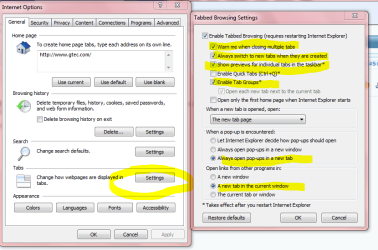
Go to Tools> Internet Options

Make your settings as mine in below Snip.

I think??? what your asking is the way mine is working.
Set it and give it a try.

If I'm wrong sorry.
Trying to help. :D
Mike
 

Attachments

  • Tabs.PNG
    Tabs.PNG
    36.3 KB · Views: 115

My Computer My Computer

Computer Manufacturer/Model Number
Hopalong/ Godzilla
OS
Windows7 Pro 64bit SP-1; Windows XP Pro 32bit
CPU
Intel Core i7-870 Lynnfield 2.93GHz LGA 1156 95W Quad-Core
Motherboard
ASUS P7P55D-E PRO
Memory
8GB@1400MHz Crucial Ballistix DDR3-1600 4x2GB
Graphics Card(s)
ASUS ENGTX460 DirectCU/2DI/1GD5 1GB 256-bit GDDR5
Sound Card
VIA Onboard
Monitor(s) Displays
Asus VS248H-P 24"; Samsung SyncMaster 941BW 19"ws
Screen Resolution
1920x1080; 1440x900
Hard Drives
Samsung 830 120GB SSD
Intel 320 120GB SSD
Western Digital Caviar Black WD7501AALS 750GB 7200 RPM SATA 3.0Gb/s
Western Digital Caviar Black WD6401AALS 640GB 7200 RPM SATA 3.0Gb/s
PSU
COOLER MASTER Silent Pro RS850-AMBAJ3-US 850W Modular
Case
COOLER MASTER HAF 932 RC-932-KKN5-GP Black
Cooling
Scythe "Mugen-2 Rev.B" (2 ScytheKaze-Jyuni PWM fans)
Keyboard
Logitech K-320
Mouse
Kensington
Antivirus
Avast Inernet Suite
Browser
IE 9 ; Chrome
Thanks for the try, Hopalong X. New links still open in the same tab as the link resided in...I don't get a separate new tab.

Unfortunately, Mike C appears to be right in that what I want IE9 to do, it can't do...at least for me. That is, I have a Logitech cordless trackman with very programable buttons but can't use the middle button to opnen a new tab. I have the middle button programmed for Enter and since I use Maxthon way more than IE, it wouldn't pay to free-up the mouse's middle button to use IE.
 

My Computer My Computer

Computer Manufacturer/Model Number
Gateway DX4720-03/HP Pavilion dv6
OS
Windows 7 HP 64-bit
Memory
4GB/4GB
Antivirus
Avast Pro
Browser
Firefox, the latest
Now I think I'm getting you.

I'm using sevenforums Aero wide. At the top of this page right are New Posts, User CP, Vista etc.
The internal links all open in this window not a new tab.
The Vista being an outside link opens the Vista forum in a new tab as per my Tab settings.

I have to right click and choose open in new tab if I want the internal links to open a new tab.
Opening all of them in a new tab with a single click that would be nice I totally agree.
Sorry I was a bit slow on understanding what you want.


Mike
 

My Computer My Computer

Computer Manufacturer/Model Number
Hopalong/ Godzilla
OS
Windows7 Pro 64bit SP-1; Windows XP Pro 32bit
CPU
Intel Core i7-870 Lynnfield 2.93GHz LGA 1156 95W Quad-Core
Motherboard
ASUS P7P55D-E PRO
Memory
8GB@1400MHz Crucial Ballistix DDR3-1600 4x2GB
Graphics Card(s)
ASUS ENGTX460 DirectCU/2DI/1GD5 1GB 256-bit GDDR5
Sound Card
VIA Onboard
Monitor(s) Displays
Asus VS248H-P 24"; Samsung SyncMaster 941BW 19"ws
Screen Resolution
1920x1080; 1440x900
Hard Drives
Samsung 830 120GB SSD
Intel 320 120GB SSD
Western Digital Caviar Black WD7501AALS 750GB 7200 RPM SATA 3.0Gb/s
Western Digital Caviar Black WD6401AALS 640GB 7200 RPM SATA 3.0Gb/s
PSU
COOLER MASTER Silent Pro RS850-AMBAJ3-US 850W Modular
Case
COOLER MASTER HAF 932 RC-932-KKN5-GP Black
Cooling
Scythe "Mugen-2 Rev.B" (2 ScytheKaze-Jyuni PWM fans)
Keyboard
Logitech K-320
Mouse
Kensington
Antivirus
Avast Inernet Suite
Browser
IE 9 ; Chrome
Thanks for the try, Hopalong X. New links still open in the same tab as the link resided in...I don't get a separate new tab.

Unfortunately, Mike C appears to be right in that what I want IE9 to do, it can't do...at least for me. That is, I have a Logitech cordless trackman with very programable buttons but can't use the middle button to opnen a new tab. I have the middle button programmed for Enter and since I use Maxthon way more than IE, it wouldn't pay to free-up the mouse's middle button to use IE.

That's the only way to open new tabs with 1 click. If you can't use that option then IE9 may not be the best choice if 2 clicks are not feasable.
 

My Computer My Computer

Computer Manufacturer/Model Number
Compaq Desktop
OS
Windows 7 Ultimate x64
CPU
AMD Sempron Dual Core
Memory
3GB
Graphics Card(s)
NVIDIA GeForce 6150SE nForce 430
Screen Resolution
1024x768
Hard Drives
150GB Sata
CTRL+SHIFT then Left Click is all you can do right now since you are limited on the mouse buttons
 

My Computer My Computer

Computer Manufacturer/Model Number
HAL-9000
OS
Windows 7 Ultimate 64bit
CPU
Intel i7 3770K
Motherboard
Asus Sabertooth Z77
Memory
16GB DDR3 1333 Corsair XMS3
Graphics Card(s)
XFX HD6950 2GB EyeFinity
Sound Card
Logitech G35 & Sennheiser PC135 & VIA HD
Monitor(s) Displays
23" HP 2310e, 23" Samsung B2230, 21.5" Viewsonic
Screen Resolution
5760x1080
Hard Drives
16TB of Storage
128GB & 256GB Crucial M4 SSD's, 2X 1TB WD Black, 3x 2TB WD, 3x 2TB Samsung F4, 1.5TB Seagate, WD 500GB,
PSU
Antec True Power New 650watt
Case
Cooler Master HAF-932
Cooling
Corsair H60 Hydro Cooler, 3x 230mm Fans, 2x120mm Fan
Keyboard
Logitech G15 and G13
Mouse
Logitech G700 Gaming Mouse
Internet Speed
50/10 Mbit
Other Info
Speakers : Alesis M1 Active Mk2 Studio Monitors , APC RS 1200 UPS, HP 4500DN Color Laser, HP P1006 mono Laser, Kodak 8500 Dye-Sub, Epson 1280 inkjet, Epson Worforce 610 MFC
Thanks, all. Until IE gets a single click/new tab that I can use given my mouse's setup, I'll be sticking with maxthon.
 

My Computer My Computer

Computer Manufacturer/Model Number
Gateway DX4720-03/HP Pavilion dv6
OS
Windows 7 HP 64-bit
Memory
4GB/4GB
Antivirus
Avast Pro
Browser
Firefox, the latest
Thanks, all. Until IE gets a single click/new tab that I can use given my mouse's setup, I'll be sticking with maxthon.

This might be a suitable workaround for you. All you need to do is hover on the link, ( you can set the time ) and that will open it for you. You don't even need to click! :)

I sat down to write a script for you that would do this, and then I remembered this utility;

1 Hour Software by Skrommel - DonationCoder.com

You want "Mouse Activate". If you need the hover delay changing or anything like that. you can do so in the .ini file which is created in the same folder when the program is run for the first time;

;MouseActivate.ini
;
;[Settings]
;autoactivate=1 ;0,1 0=No 1=yes Enable or disable autoactivation
;activatedelay=200 ; Time in ms the mouse must stand still before activating a window
;startdisabled=0 ;0,1 0=No 1=yes Starts MouseActivate disabled
;activatecontrols=1 ;0,1 0=No 1=yes Also activates controls inside a window
;leftedgefrombottom=1 ;0,1 0=No 1=yes Mouse on left screenedge brings bottommost window to the top
;topedgetobottom=1 ;0,1 0=No 1=yes Mouse on top screenedge sends active windows to the bottom
;topleftshowdesktop=1 ;0,1 0=No 1=yes Mouse on topleft of screen minimizes all windows
;autoclick=0 ;0,1 0=No 1=yes Enable or disable autoclicking
;clickdelay=1000 ; Time in ms the mouse must stand still before clicking
;disableonmouseaction=0 ;0,1 0=No 1=yes Disable autoclicking when user clicks or drags

[Settings]
autoactivate=1
activatedelay=200
startdisabled=0
activatecontrols=1
leftedgefrombottom=1
topedgetobottom=1
topleftshowdesktop=1
autoclick=0
clickdelay=1000
disableonmouseaction=0


This is the code if you want to change it yourself, for instance to "Auto-middle-click" on a link. If "disableonmouseaction" in the .ini file is set to 1, then any other mouse action will be carried out as normal, and the "auto-click" ignored. You will need autohotkey to compile it, or run it as a script.

The executable is a standalone program which runs in your system tray.

Code:
;MouseActivate.ahk ; Automatically activates a window or a control when the mouse hovers over it. ;Skrommel @2005  #SingleInstance,Force CoordMode,Mouse,Screen SetBatchLines,-1 SetWinDelay,0  applicationname=MouseActivate  SysGet,dblx,36     ;SM_CXDOUBLECLK SysGet,dbly,37     ;SM_CYDOUBLECLK  Gosub,READINI Gosub,TRAYMENU If startdisabled=1   Gosub,TOGGLE  oldwinid= oldcontrolid= oldtitle= disable=0 counter=0 Loop {   oldmx=%mx%   oldmy=%my%   counter+=1    If disableonmouseaction=1   {       disable=0     KeyWait,LButton,D T0.05     If ErrorLevel=0       disable=1     KeyWait,RButton,D T0.05     If ErrorLevel=0       disable=1   }   Else     Sleep,100   WinGetTitle,title,ahk_id %winid%   WinGetClass,class,ahk_id %winid%   WinGetPos,wx,wy,ww,wh,ahk_id %winid%   MouseGetPos,mx,my,winid,controlid   If (mx<oldmx-dblx or mx>oldmx+dblx or my<oldmy-dbly or my>oldmy+dbly)     counter=0    If counter=%clickdelay%    If autoclick=1   If disable=0     MouseClick,left     If counter=%activatedelay%   {     If topleftshowdesktop=1     If mx=0     If my=0     If minimized=0     {       minimized=1       WinMinimizeAll       Continue     }     Else     {       minimized=0       WinMinimizeAllUndo       Continue     }      If topedgetobottom=1     If my=0     {       WinSet,Bottom,,A       WinGet,allwinids,List,,,Program Manager       StringTrimRight,allwinids1,allwinids1,0       WinActivate,ahk_id %allwinids2%       Continue     }      If leftedgefrombottom=1     If mx=0     {       WinGet,allwinids,List,,,Program Manager       bottomid:=allwinids%allwinids%       StringTrimRight,bottomid,bottomid,0       WinActivate,ahk_id %bottomid%       Continue     }      If autoactivate=1     {       If title<>       {         If winid<>%oldwinid%         {           WinActivate,ahk_id %winid%           oldwinid=%winid%           oldtitle=%title%         }          If activatecontrols<>0         If controlid<>         If controlid<>%oldcontrolid%         {           ControlFocus,%controlid%,ahk_id %winid%           oldcontrolid=%controlid%         }       }        If (controlid="SysTabControl321" Or (controlid="ToolbarWindow322" And class="Shell_TrayWnd"))       {         WinGetPos,x,y,w,h,ahk_id %winid% ;ControlGetPos,x,y,w,h,%controlid%,ahk_id %winid%         x:=mx-x         y:=my-y         ControlClick,X%x% Y%y%,ahk_id %winid%,,L,1 ;        If disableonmouseaction=1           counter=9999         oldtab=%tab%         oldcontrolid=%controlid%         oldwinid=%winid%         Continue       }     }   } }  READINI: IfNotExist,%applicationname%.ini { ini=`;%applicationname%.ini ini=%ini%`n`; ini=%ini%`n`;[Settings] ini=%ini%`n`;autoactivate=1         `;0,1  0=No 1=yes  Enable or disable autoactivation ini=%ini%`n`;activatedelay=200      `;     Time in ms the mouse must stand still before activating a window ini=%ini%`n`;startdisabled=0        `;0,1  0=No 1=yes  Starts %applicationname% disabled ini=%ini%`n`;activatecontrols=1     `;0,1  0=No 1=yes  Also activates controls inside a window ini=%ini%`n`;leftedgefrombottom=1   `;0,1  0=No 1=yes  Mouse on left screenedge brings bottommost window to the top ini=%ini%`n`;topedgetobottom=1      `;0,1  0=No 1=yes  Mouse on top screenedge sends active windows to the bottom ini=%ini%`n`;topleftshowdesktop=1   `;0,1  0=No 1=yes  Mouse on topleft of screen minimizes all windows ini=%ini%`n`;autoclick=0            `;0,1  0=No 1=yes  Enable or disable autoclicking ini=%ini%`n`;clickdelay=1000        `;     Time in ms the mouse must stand still before clicking ini=%ini%`n`;disableonmouseaction=0 `;0,1  0=No 1=yes  Disable autoclicking when user clicks or drags    ini=%ini%`n ini=%ini%`n[Settings] ini=%ini%`nautoactivate=1 ini=%ini%`nactivatedelay=200 ini=%ini%`nstartdisabled=0 ini=%ini%`nactivatecontrols=1 ini=%ini%`nleftedgefrombottom=1 ini=%ini%`ntopedgetobottom=1 ini=%ini%`ntopleftshowdesktop=1 ini=%ini%`nautoclick=0 ini=%ini%`nclickdelay=1000 ini=%ini%`ndisableonmouseaction=0 FileAppend,%ini%,%applicationname%.ini } IniRead,autoactivate,%applicationname%.ini,Settings,autoactivate IniRead,activatedelay,%applicationname%.ini,Settings,activatedelay IniRead,startdisabled,%applicationname%.ini,Settings,startdisabled IniRead,activatecontrols,%applicationname%.ini,Settings,activatecontrols IniRead,leftedgefrombottom,%applicationname%.ini,Settings,leftedgefrombottom IniRead,topedgetobottom,%applicationname%.ini,Settings,topedgetobottom IniRead,topleftshowdesktop,%applicationname%.ini,Settings,topleftshowdesktop IniRead,autoclick,%applicationname%.ini,Settings,autoclick IniRead,clickdelay,%applicationname%.ini,Settings,clickdelay IniRead,disableonmouseaction,%applicationname%.ini,Settings,disableonmouseaction activatedelay/=100 clickdelay/=100 Return  TRAYMENU: Menu,Tray,NoStandard Menu,Tray,DeleteAll Menu,Tray,Add,%applicationname%,TOGGLE Menu,Tray,Add, Menu,Tray,Add,&Enabled,TOGGLE Menu,Tray,Add, Menu,Tray,Add,&Settings...,SETTINGS Menu,Tray,Add,&About...,ABOUT Menu,Tray,Add,E&xit,EXIT Menu,Tray,Check,&Enabled Menu,Tray,Default,%applicationname% Menu,Tray,Tip,%applicationname% Return  TOGGLE: Menu,Tray,ToggleCheck,&Enabled Pause,Toggle Return  SETTINGS: Gosub,READINI Run,%applicationname%.ini Return  ABOUT: Gui,99:Destroy Gui,99:Margin,20,20 Gui,99:Add,Picture,xm Icon1,%applicationname%.exe Gui,99:Font,Bold Gui,99:Add,Text,x+10 yp+10,%applicationname% v1.0 Gui,99:Font Gui,99:Add,Text,y+10,Automatically activates a window or a control when the mouse hovers over it Gui,99:Add,Text,y+5 ,or clicks the left button if the mouse is left in the same place for 1 second. Gui,99:Add,Text,y+5,- Move the mouse to the upper left corner of the screen to show or hide the desktop. Gui,99:Add,Text,y+5,- Move the mouse to the top egde of the screen to send the active window to the back. Gui,99:Add,Text,y+5,- Move the mouse to the left egde of the screen to bring the bottommost window to the top. Gui,99:Add,Text,y+5,- To change the settings, choose the Settings menu in the Tray.  Gui,99:Add,Picture,xm y+20 Icon5,%applicationname%.exe Gui,99:Font,Bold Gui,99:Add,Text,x+10 yp+10,1 Hour Software by Skrommel Gui,99:Font Gui,99:Add,Text,y+10,For more tools, information and donations, please visit  Gui,99:Font,CBlue Underline Gui,99:Add,Text,y+5 G1HOURSOFTWARE,www.1HourSoftware.com Gui,99:Font  Gui,99:Add,Picture,xm y+20 Icon7,%applicationname%.exe Gui,99:Font,Bold Gui,99:Add,Text,x+10 yp+10,DonationCoder Gui,99:Font Gui,99:Add,Text,y+10,Please support the contributors at Gui,99:Font,CBlue Underline Gui,99:Add,Text,y+5 GDONATIONCODER,www.DonationCoder.com Gui,99:Font  Gui,99:Add,Picture,xm y+20 Icon6,%applicationname%.exe Gui,99:Font,Bold Gui,99:Add,Text,x+10 yp+10,AutoHotkey Gui,99:Font Gui,99:Add,Text,y+10,This tool was made using the powerful Gui,99:Font,CBlue Underline Gui,99:Add,Text,y+5 GAUTOHOTKEY,www.AutoHotkey.com Gui,99:Font  Gui,99:Show,,%applicationname% About hCurs:=DllCall("LoadCursor","UInt",NULL,"Int",32649,"UInt") ;IDC_HAND OnMessage(0x200,"WM_MOUSEMOVE")  Return  1HOURSOFTWARE:   Run,http://www.1hoursoftware.com,,UseErrorLevel Return  DONATIONCODER:   Run,http://www.donationcoder.com,,UseErrorLevel Return  AUTOHOTKEY:   Run,http://www.autohotkey.com,,UseErrorLevel Return  99GuiClose:   Gui,99:Destroy   OnMessage(0x200,"")   DllCall("DestroyCursor","Uint",hCur) Return  WM_MOUSEMOVE(wParam,lParam) {   Global hCurs   MouseGetPos,,,,ctrl   If ctrl in Static12,Static16,Static20     DllCall("SetCursor","UInt",hCurs)   Return } Return   EXIT: ExitApp

Regards....Mike Connor
 
Last edited:

My Computer My Computer

OS
Several, including Windows 7 x64 Ultimate
OK. I altered the script so that hovering on a link automatically sends a "middle-click" after 1 second. ( You can change the settings in the ini file, right click on the program icon in the tray). You can also enable or disable the autoclick feature by clicking on the tray icon. Change the delay times till they suit you. I have tested this on Explorer and it does exactly what you want.

Here is the executable;

mouseclick.exe - download now for free. File sharing. Software file sharing. Free file hosting. File upload. FileFactory.com

Regards....Mike Connor
 

My Computer My Computer

OS
Several, including Windows 7 x64 Ultimate
CTRL + T = new tab
CTRL + W = close window
 

My Computer My Computer

Computer Manufacturer/Model Number
Windows 7 Ultimate 64-bit
OS
Windows 7 Ultimate N 64-bit
CPU
AMD Black Edition - AMD Phenom X4 2.5 GHz Processor
Motherboard
Bio Star
Memory
8GB DDR2 800MHZ BRANDED
Graphics Card(s)
Palti NVIDIA GeForce GTX 460
Monitor(s) Displays
3D 23.6" & 22"
Screen Resolution
1920x1080@120Hz
Hard Drives
313GB SAMSUNG SAMSUNG HD321KJ
PSU
OCZ 600W StealthXStream PSU, PowerWhisper, Active PFC
Internet Speed
22793
CTRL + T = new tab
CTRL + W = close window

True enough, but some people prefer to use a mouse more or less exclusively! Just how it is..........

Regards....Mike Connor
 

My Computer My Computer

OS
Several, including Windows 7 x64 Ultimate
Hey Mike C, good job and thanks. I won't be able to try it out right away, but I will get to it and check it out.
 

My Computer My Computer

Computer Manufacturer/Model Number
Gateway DX4720-03/HP Pavilion dv6
OS
Windows 7 HP 64-bit
Memory
4GB/4GB
Antivirus
Avast Pro
Browser
Firefox, the latest
Hey Mike C, good job and thanks. I won't be able to try it out right away, but I will get to it and check it out.

My pleasure. Hope it suits you.


Don't wait too long to download it. I have no idea how "safe" these file sharing sites are. I think it most unlikely that anybody would alter a file I uploaded, but better safe than sorry!

Just for information, the only thing I had to alter was the mouse button click which is sent, from "Left" to "Middle". Works fine with IE9, I had a good play with it.

Regards....Mike Connor
 

My Computer My Computer

OS
Several, including Windows 7 x64 Ultimate
Back
Top