Edit displayed EXIF data in details view

Andacar

New member
Member
Local time
2:17 PM
Messages
43
Location
New Mexico
When you open up a folder full of images and select Details view, Windows 7 displays a lot of information down at the bottom of the list about the image. All well and good, except that the ones that are shown by default are aimed mostly at photographers, and show things like camera model or lens setting. I want have a big folder full of, say, car images, and I'd like the bottom to display things like Year make and model, all of which you can select for display in the columns above. But there seems to be no way to do this. Ideas?
 

My Computer My Computer

Computer Manufacturer/Model Number
Custom machine
OS
Windows 7 Professional 64 bit
CPU
i7 920
Motherboard
ASUS P6T Deluxe V2
Memory
6 gigabytes
Graphics Card(s)
nVidia Quadro FX 1800
Sound Card
Creative SB Audigy 2
Monitor(s) Displays
IBM 21" CRT
Screen Resolution
1600 x 1200
Hard Drives
Hitachi 1 TB Main Drive
Western Digital 1 TB Storage
Western Digital 2 TB Projects
Keyboard
Logitec Access 600
Mouse
Logitec M100
Go into the details box, and right-click on what you want to change, comments, add a tag, add a name, Author, etc etc. You can add or edit anything you like in the edit boxes that pop up.

Regards....Mike Connor
 

My Computer My Computer

OS
Several, including Windows 7 x64 Ultimate
OK, update

Tried that, and still looks the same. I've included a screenshot with the new columns. It would be nice to have the new categories show up at the bottom as well as get rid of ones I don't want, but I can't seem to do that. Perhaps I'm just being dense.

Thanks,

Darrell Leland
 

Attachments

  • Screenshot.jpg
    Screenshot.jpg
    238.6 KB · Views: 160

My Computer My Computer

Computer Manufacturer/Model Number
Custom machine
OS
Windows 7 Professional 64 bit
CPU
i7 920
Motherboard
ASUS P6T Deluxe V2
Memory
6 gigabytes
Graphics Card(s)
nVidia Quadro FX 1800
Sound Card
Creative SB Audigy 2
Monitor(s) Displays
IBM 21" CRT
Screen Resolution
1600 x 1200
Hard Drives
Hitachi 1 TB Main Drive
Western Digital 1 TB Storage
Western Digital 2 TB Projects
Keyboard
Logitec Access 600
Mouse
Logitec M100
Well for one thing if you want the year make and model to show you need to edit that info yourself.
But heres the rub. As far as I can see there is no entry for year make and model in the EXIF. Maybe in the description section. I'm looking at some images in Adobe Bridge.
 

My Computer My Computer

Computer Manufacturer/Model Number
Built be Me
OS
Windows 7 Pro x64
CPU
i5 760
Motherboard
Asus P7P55D-E Pro
Memory
16GB
Graphics Card(s)
Nvidia GTS450
Sound Card
On board
Monitor(s) Displays
Dell 2007WFP Dell 1800FP
Screen Resolution
1680x1050 1280x1024
Hard Drives
Seagate 250GB & 750GB
WD 1TB
PSU
Antec 750
Case
In Win
Cooling
Cooler Master Hyper 212+
Keyboard
IBM
Mouse
MS
Thanks.

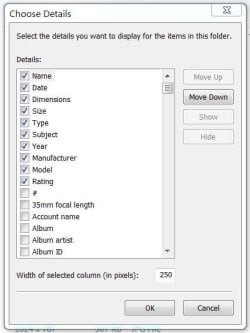
Sure, I know I need to add that information. I expected that. Here's where I found Year, Make, and Model, among other things:
 

Attachments

  • Capture2.JPG
    Capture2.JPG
    33.9 KB · Views: 21

My Computer My Computer

Computer Manufacturer/Model Number
Custom machine
OS
Windows 7 Professional 64 bit
CPU
i7 920
Motherboard
ASUS P6T Deluxe V2
Memory
6 gigabytes
Graphics Card(s)
nVidia Quadro FX 1800
Sound Card
Creative SB Audigy 2
Monitor(s) Displays
IBM 21" CRT
Screen Resolution
1600 x 1200
Hard Drives
Hitachi 1 TB Main Drive
Western Digital 1 TB Storage
Western Digital 2 TB Projects
Keyboard
Logitec Access 600
Mouse
Logitec M100
Thanks.

Sure, I know I need to add that information. I expected that. Here's where I found Year, Make, and Model, among other things:

Yeah they are in the column list but not sure what those entries are referring to.
Could be for some other data then images. Like for a database entries.
 

My Computer My Computer

Computer Manufacturer/Model Number
Built be Me
OS
Windows 7 Pro x64
CPU
i5 760
Motherboard
Asus P7P55D-E Pro
Memory
16GB
Graphics Card(s)
Nvidia GTS450
Sound Card
On board
Monitor(s) Displays
Dell 2007WFP Dell 1800FP
Screen Resolution
1680x1050 1280x1024
Hard Drives
Seagate 250GB & 750GB
WD 1TB
PSU
Antec 750
Case
In Win
Cooling
Cooler Master Hyper 212+
Keyboard
IBM
Mouse
MS
The EXIF is centered around photographers and cameras because...that is what it was made for! For more abstract/generic metadata you would need to come up with your own system.
 

My Computer My Computer

Computer type
PC/Desktop
Computer Manufacturer/Model Number
Alienware Aurora ALX R4
OS
Windows 10 Pro (x64)
CPU
Intel Core i7-3930K (3.2GHz - 4.5GHz)
Motherboard
Alienware Aurora-R4 x79
Memory
4x Samsung 4GB PC3-12800 DDR3 (16GB 1600MHz)
Graphics Card(s)
Nvidia Geforce GTX 690
Sound Card
SteelSeries Siberia Elite
Monitor(s) Displays
Dell UltraSharp U3011
Screen Resolution
2560x1600
Hard Drives
Samsung 850 Pro 256 GB, Seagate 1TB Desktop Hybrid HDD, 2x Western Digital 4TB Green HDD
PSU
875W Some Dell PSU <.<
Case
Alienware Aurora ALX
Cooling
Custom Liquid Cooling (EK CPU & GPU blocks) dual EK 480RAD
Keyboard
Logitech G710+ Mechanical
Mouse
Logitech G700s
Internet Speed
Verizon Fios (50 mbps average)
Other Info
Server: Intel NUC D54250WYK: i5-4250U, 16GB, 256 GB mSATA, Windows Server 2012 R2
Tried that, and still looks the same. I've included a screenshot with the new columns. It would be nice to have the new categories show up at the bottom as well as get rid of ones I don't want, but I can't seem to do that. Perhaps I'm just being dense.

Thanks,

Darrell Leland

As far as I can see you have not edited anything at all. You have to go into the details box itself, and actually edit the things you want changed. If you click on "Add Comments" for instance, you can add comments!


You can also edit all the other boxes as desired. If you edit these, and then choose these criteria in your "Details" display, then you will see exactly what you edited.

The details box is at the bottom of your screen;


The "Details View" is where you can change the criteria you want displayed.

Regards....Mike Connor
 

My Computer My Computer

OS
Several, including Windows 7 x64 Ultimate
Back
Top