

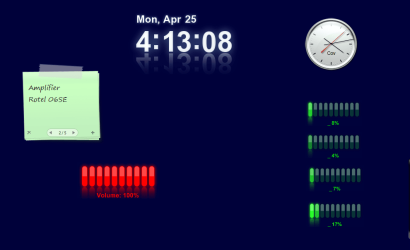
Hi, I find the neon gauges absolutely beautiful.
In the widget preferences you have extensive options for them to be customized.
Only condition for these gadgets to run is that you install Yahoo! Widgets application first. Don't really understand why you can't just add them to your usual Windows gadgets folder.
On the left hand side of my desktop you can see ...
01. the CPU load
02. RAM usage
03. Swap usage
04. remaining space of drive c:
05. remaining space on drive d:
06. download speed
07. upload speed
And on the right hand side you can see ...
08. CPU load core 1
09. CPU load core 2
10. CPU load core 3
11. CPU load core 4
12. Volume
In addition to that available are ...
13. WiFi strength
14. Folder space usage
15. Battery level
16. The neon (digital) clock is a seperate beautiful gadget
I don't know why volume doesn't seem to work.
When I change the system volume, the gadget always stays the same.
Any ideas please ?
In the widget preferences you have extensive options for them to be customized.
Only condition for these gadgets to run is that you install Yahoo! Widgets application first. Don't really understand why you can't just add them to your usual Windows gadgets folder.
On the left hand side of my desktop you can see ...
01. the CPU load
02. RAM usage
03. Swap usage
04. remaining space of drive c:
05. remaining space on drive d:
06. download speed
07. upload speed
And on the right hand side you can see ...
08. CPU load core 1
09. CPU load core 2
10. CPU load core 3
11. CPU load core 4
12. Volume
In addition to that available are ...
13. WiFi strength
14. Folder space usage
15. Battery level
16. The neon (digital) clock is a seperate beautiful gadget
I don't know why volume doesn't seem to work.
When I change the system volume, the gadget always stays the same.
Any ideas please ?
Attachments

My Computer
At a glance
Windos 7 x64i5 3570K2 x 8GB G.SkillHD4000
- OS
- Windos 7 x64
- CPU
- i5 3570K
- Motherboard
- Intel DH77DF
- Memory
- 2 x 8GB G.Skill
- Graphics Card(s)
- HD4000
- Sound Card
- on board
- Monitor(s) Displays
- LG IPS236 x 2
- Screen Resolution
- 1920 x 1200
- Hard Drives
- Samsung 840 Pro 256GB
- PSU
- BeQuiet 480 E9 CM Modular
- Case
- Lian Li PC-Q25 Silver
- Cooling
- Titan
- Keyboard
- Dell
- Mouse
- Microsoft Basic Optical Mouse
- Internet Speed
- 6 MB
- Other Info
- Don't talk if you can't improve the silence.


 only joking, but what do you think about the ideas?


