Half of memory is not usable - Please help me understand where it is

pendraggon87

New member
Local time
6:55 PM
Messages
19
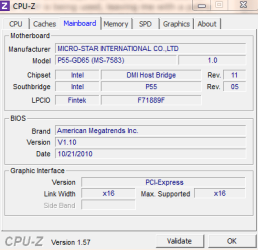
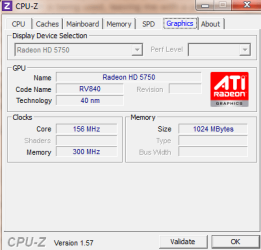
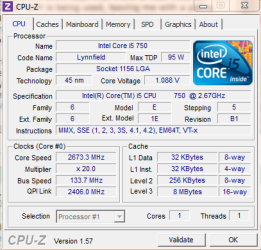
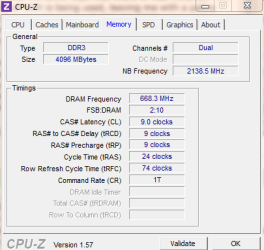
So here is the short story: I have 4GB of Ram (2x2GB Gskill Ripjaw series) installed. Yet, Ubuntu only recognizes 2GB, Windows recognizes that 4GB is installed, but only 1.99 useable, and the BIOS says that there is 4GB installed. On Windows, running idle, over 1GB of RAM is being used, leaving me with a paltry 1GB left to do anything with. I have an Intel Core i5 750 @2.67Ghz proc and an MSI P55-GD65 mobo, and there is no memory remapping feature. I have an ATI Radeon HD 5750 1GB graphics card.

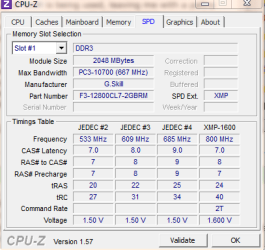
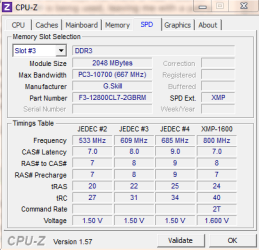
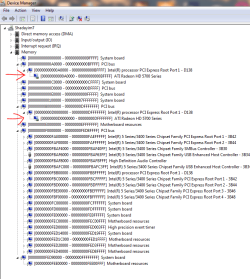
The RAM is good, I have switched it around, it is in the appropriate channels. Attached are screenshots of performance manager, device manager, and cpu-z. If anyone can help I will sincerely appreciate it! I am VERY bad at converting hex, so am unsure how to read the memory management screenshot, but it should hopefully help identify where all my memory is going.

Additionally, I reran the Windows rating system, and my CPU score dropped from 7.1 to 4.7...is there any way to test if there is now a problem with my CPU? My BIOS settings are Optimized Defaults. I tried generating a system health report, but only the summary would show I could not view any details.
 

Attachments
  • memory issues.PNG
    memory issues.PNG
    25.4 KB · Views: 182
  • mainboard.PNG
    mainboard.PNG
    10.3 KB · Views: 60
  • graphics.PNG
    graphics.PNG
    10.5 KB · Views: 42
  • cpu.PNG
    cpu.PNG
    18.3 KB · Views: 38
  • memory.PNG
    memory.PNG
    11.4 KB · Views: 36
  • ddr slot one.PNG
    ddr slot one.PNG
    12.5 KB · Views: 33
  • ddr slot three.PNG
    ddr slot three.PNG
    12.9 KB · Views: 31
Last edited:

My Computer My Computer

At a glance

Windows 7 x64 ProfessionalIntel Core i5 7502x2GB Gskill Ripjaw SeriesATI Radeon HD 5750
OS
Windows 7 x64 Professional
CPU
Intel Core i5 750
Motherboard
MSI P55 GD65
Memory
2x2GB Gskill Ripjaw Series
Graphics Card(s)
ATI Radeon HD 5750
What does BIOS report for total installed memory?
Make sure PAE is enabled in the BIOS (HPET has nothing to do with the issue you have so it can be 32 bit or 64 bit doesn't matter).

Have you tried MemTest86+? Does it indicate 4 GB total installed memory?

Did you check if newer version of BIOS is available?

Each single hex digit is equal to 4 bits (or half byte). It is very clear that the memory address space is 64-bit long in the arrows you pointed out. I can do the conversion for you if you like but not sure if it would help resolve the particular problem you have.
 
Last edited:

My Computer My Computer

At a glance

Ubuntu 10.10 64 bit/Window 7 VMCore 2 Duo 2.2 Ghz4 GB Kingston ValueRAM (DDR2 800)nVidia 240 GT
Computer Manufacturer/Model Number
Custom
OS
Ubuntu 10.10 64 bit/Window 7 VM
CPU
Core 2 Duo 2.2 Ghz
Motherboard
ECS g31 mATX
Memory
4 GB Kingston ValueRAM (DDR2 800)
Graphics Card(s)
nVidia 240 GT
Sound Card
Onboard
Monitor(s) Displays
19" Dell LCD
Hard Drives
500 GB Seagate Drive x 2
PSU
Antec 430 Watt
Case
Coolermaster
Keyboard
Microsoft Ergonomic Keyboard 4000
Mouse
Laser Mouse (Logitech)
BIOS reports 4096MB physical memory. I ran the windows memory diagnostic and it came back with no errors. I ran memtest awhile ago and also no issues. In the arrows I pointed out, I had noticed that the graphics card was reserving two blocks of memory, but I was not sure how large - it shouldn't reserve any. I upgraded BIOS to 1.10, newest available.
 

My Computer My Computer

At a glance

Windows 7 x64 ProfessionalIntel Core i5 7502x2GB Gskill Ripjaw SeriesATI Radeon HD 5750
OS
Windows 7 x64 Professional
CPU
Intel Core i5 750
Motherboard
MSI P55 GD65
Memory
2x2GB Gskill Ripjaw Series
Graphics Card(s)
ATI Radeon HD 5750
Does your BIOS have a Memory Remap feature?
 

My Computer My Computer

At a glance

Windows 10 Pro (x64)Intel Core i7-3930K (3.2GHz - 4.5GHz)4x Samsung 4GB PC3-12800 DDR3 (16GB 1600MHz)Nvidia Geforce GTX 690
Computer type
PC/Desktop
Computer Manufacturer/Model Number
Alienware Aurora ALX R4
OS
Windows 10 Pro (x64)
CPU
Intel Core i7-3930K (3.2GHz - 4.5GHz)
Motherboard
Alienware Aurora-R4 x79
Memory
4x Samsung 4GB PC3-12800 DDR3 (16GB 1600MHz)
Graphics Card(s)
Nvidia Geforce GTX 690
Sound Card
SteelSeries Siberia Elite
Monitor(s) Displays
Dell UltraSharp U3011
Screen Resolution
2560x1600
Hard Drives
Samsung 850 Pro 256 GB, Seagate 1TB Desktop Hybrid HDD, 2x Western Digital 4TB Green HDD
PSU
875W Some Dell PSU <.<
Case
Alienware Aurora ALX
Cooling
Custom Liquid Cooling (EK CPU & GPU blocks) dual EK 480RAD
Keyboard
Logitech G710+ Mechanical
Mouse
Logitech G700s
Internet Speed
Verizon Fios (50 mbps average)
Other Info
Server: Intel NUC D54250WYK: i5-4250U, 16GB, 256 GB mSATA, Windows Server 2012 R2
See if you can open up C:\boot.ini and append the following near the end of the file:
Code:
/PAE
Save and restart.
 

My Computer My Computer

At a glance

Ubuntu 10.10 64 bit/Window 7 VMCore 2 Duo 2.2 Ghz4 GB Kingston ValueRAM (DDR2 800)nVidia 240 GT
Computer Manufacturer/Model Number
Custom
OS
Ubuntu 10.10 64 bit/Window 7 VM
CPU
Core 2 Duo 2.2 Ghz
Motherboard
ECS g31 mATX
Memory
4 GB Kingston ValueRAM (DDR2 800)
Graphics Card(s)
nVidia 240 GT
Sound Card
Onboard
Monitor(s) Displays
19" Dell LCD
Hard Drives
500 GB Seagate Drive x 2
PSU
Antec 430 Watt
Case
Coolermaster
Keyboard
Microsoft Ergonomic Keyboard 4000
Mouse
Laser Mouse (Logitech)
See if you can open up C:\boot.ini and append the following near the end of the file:
Code:
/PAE
Save and restart.

boot.ini is for previous version of Windows below Windows Vista. Nor is PAE going to have any affect on a 64-bit system.
 

My Computer My Computer

At a glance

Windows 10 Pro (x64)Intel Core i7-3930K (3.2GHz - 4.5GHz)4x Samsung 4GB PC3-12800 DDR3 (16GB 1600MHz)Nvidia Geforce GTX 690
Computer type
PC/Desktop
Computer Manufacturer/Model Number
Alienware Aurora ALX R4
OS
Windows 10 Pro (x64)
CPU
Intel Core i7-3930K (3.2GHz - 4.5GHz)
Motherboard
Alienware Aurora-R4 x79
Memory
4x Samsung 4GB PC3-12800 DDR3 (16GB 1600MHz)
Graphics Card(s)
Nvidia Geforce GTX 690
Sound Card
SteelSeries Siberia Elite
Monitor(s) Displays
Dell UltraSharp U3011
Screen Resolution
2560x1600
Hard Drives
Samsung 850 Pro 256 GB, Seagate 1TB Desktop Hybrid HDD, 2x Western Digital 4TB Green HDD
PSU
875W Some Dell PSU <.<
Case
Alienware Aurora ALX
Cooling
Custom Liquid Cooling (EK CPU & GPU blocks) dual EK 480RAD
Keyboard
Logitech G710+ Mechanical
Mouse
Logitech G700s
Internet Speed
Verizon Fios (50 mbps average)
Other Info
Server: Intel NUC D54250WYK: i5-4250U, 16GB, 256 GB mSATA, Windows Server 2012 R2
See if you can open up C:\boot.ini and append the following near the end of the file:
Code:
/PAE
Save and restart.

boot.ini is for previous version of Windows below Windows Vista. Nor is PAE going to have any affect on a 64-bit system.

Correct - BCDEdit is what is used now. Also, the BIOS does not have any memory remapping feature on it.
 

My Computer My Computer

At a glance

Windows 7 x64 ProfessionalIntel Core i5 7502x2GB Gskill Ripjaw SeriesATI Radeon HD 5750
OS
Windows 7 x64 Professional
CPU
Intel Core i5 750
Motherboard
MSI P55 GD65
Memory
2x2GB Gskill Ripjaw Series
Graphics Card(s)
ATI Radeon HD 5750
Since no one decided to do the math for you, i'll do it for you. Just follow along and let me know if you have questions.

You have 4 GB of memory, your total address space is: 2^32-1=4294967295. To test that answer, Convert that value back into gigabyte 4294967295/(1024^3)=4 GB

I am looking at the second arrow so let's compute the total number of addresses mapped by the ATI Card. We have 8 hex digits which gives us (8x4)=32 bits.

hex code goes from 0-9 then A, B, C, D and so on. So A is 10, B is 11, C is 12 and D is 13 (all in base 10).

13 (Base 10) is 1101 (Base 2). Computing the bits we get 2^31+2^30+2^28=3489660928.
For the second range we have 2^31+2^30+2^28+2^28-1=3758096383.
Difference between the two is 268435455 which is equal to 256 Megabytes reserved by the ATI card.
 
Last edited:

My Computer My Computer

At a glance

Ubuntu 10.10 64 bit/Window 7 VMCore 2 Duo 2.2 Ghz4 GB Kingston ValueRAM (DDR2 800)nVidia 240 GT
Computer Manufacturer/Model Number
Custom
OS
Ubuntu 10.10 64 bit/Window 7 VM
CPU
Core 2 Duo 2.2 Ghz
Motherboard
ECS g31 mATX
Memory
4 GB Kingston ValueRAM (DDR2 800)
Graphics Card(s)
nVidia 240 GT
Sound Card
Onboard
Monitor(s) Displays
19" Dell LCD
Hard Drives
500 GB Seagate Drive x 2
PSU
Antec 430 Watt
Case
Coolermaster
Keyboard
Microsoft Ergonomic Keyboard 4000
Mouse
Laser Mouse (Logitech)
You want to know what is using your ram. Open Task Manager/Performance/Resource Monitor. This is easier, Windows key+ R and type in resmon. It will show you what is using your ram.
 

My Computer My Computer

At a glance

Windows 10 Pro. 64/ version 1709 Windows 7 Pr...Intel i7-6800K @ 4.3Corsair Platinum 16 gig @2400EVGA GTX 1070 OC
Computer type
PC/Desktop
Computer Manufacturer/Model Number
Home made Desktop
OS
Windows 10 Pro. 64/ version 1709 Windows 7 Pro/64
CPU
Intel i7-6800K @ 4.3
Motherboard
ASUS X-99 Deluxe II
Memory
Corsair Platinum 16 gig @2400
Graphics Card(s)
EVGA GTX 1070 OC
Monitor(s) Displays
Asus 27" LED LCD/VE278Q
Screen Resolution
1920-1080 or 1280-720 HDMI
Hard Drives
INTEL SSD 730-240 Gb Sata 3.0/
PSU
EVGA Platium 1200W
Case
Phanteks Luxe Tempered Glass 8 fans/ one radiator
Cooling
XSPC/ Water Cooled CPU
Keyboard
Das 4 Professional
Mouse
Logitech M705/MX Anywhere 2-S
Internet Speed
100 mbits
Antivirus
Microsoft Security Essentials/ Malwarebytes Premium 3.0/ SAS
Browser
I.E. 11 default/Firefox/ ISP Time Warner Cable/Spectrum
Other Info
LG BluRay Burner/
Sound system-KLipsch-THX/
Icy Dock ssd Hot Swap bays.
Same thing here,

[Solved] P55 SLI not reading 4GB of memory only shows as 2GB

Start with making sure that the heatsink isn't on too tight.. Back off each screw 1/8-1/4 turn, then see if all the memory is available. If that doesn't do it work your way around loosening one screw at a time.

@ gpost3, this isn't as Windows problem at all as he also said Ubuntu only sees 2 GB of the 4 GB.
 

My Computer My Computer

At a glance

Win 7 Ultimate x64FX-8350 @ 4.6 GHz so farADATA XPG V1 Series Black 8GB DDR3 1600Sapphire R9 270x Dual-X
Computer type
PC/Desktop
Computer Manufacturer/Model Number
Me
OS
Win 7 Ultimate x64
CPU
FX-8350 @ 4.6 GHz so far
Motherboard
Asus M5A97 EVO
Memory
ADATA XPG V1 Series Black 8GB DDR3 1600
Graphics Card(s)
Sapphire R9 270x Dual-X
Sound Card
Xonar DGX w/ Corsair Vengence 1300
Monitor(s) Displays
Acer S232HL Abid
Screen Resolution
1920x1080
Hard Drives
120 GB OCZ Vertex 3
500 GB Seagate 7200.12
PSU
Antec Earthwatts 650W Green
Case
Antec Three Hundred
Cooling
Cooler Master 212 EVO
Keyboard
Logitech G510
Mouse
Logitech G500s
Internet Speed
35000/3000
Good point Stormy.
 

My Computer My Computer

At a glance

Windows 10 Pro. 64/ version 1709 Windows 7 Pr...Intel i7-6800K @ 4.3Corsair Platinum 16 gig @2400EVGA GTX 1070 OC
Computer type
PC/Desktop
Computer Manufacturer/Model Number
Home made Desktop
OS
Windows 10 Pro. 64/ version 1709 Windows 7 Pro/64
CPU
Intel i7-6800K @ 4.3
Motherboard
ASUS X-99 Deluxe II
Memory
Corsair Platinum 16 gig @2400
Graphics Card(s)
EVGA GTX 1070 OC
Monitor(s) Displays
Asus 27" LED LCD/VE278Q
Screen Resolution
1920-1080 or 1280-720 HDMI
Hard Drives
INTEL SSD 730-240 Gb Sata 3.0/
PSU
EVGA Platium 1200W
Case
Phanteks Luxe Tempered Glass 8 fans/ one radiator
Cooling
XSPC/ Water Cooled CPU
Keyboard
Das 4 Professional
Mouse
Logitech M705/MX Anywhere 2-S
Internet Speed
100 mbits
Antivirus
Microsoft Security Essentials/ Malwarebytes Premium 3.0/ SAS
Browser
I.E. 11 default/Firefox/ ISP Time Warner Cable/Spectrum
Other Info
LG BluRay Burner/
Sound system-KLipsch-THX/
Icy Dock ssd Hot Swap bays.
You want to know what is using your ram. Open Task Manager/Performance/Resource Monitor. This is easier, Windows key+ R and type in resmon. It will show you what is using your ram.

It just says Hardware Reserved for 2GB, does not say what is using it. I discovered through some other resources on the system that going into the system information I can view each device and the range of memory it is using. One of the earlier posts did the math for me there.

However, I am unsure why my graphics card, which should have 1GB on the card, is using 2GB of my RAM...
 

My Computer My Computer

At a glance

Windows 7 x64 ProfessionalIntel Core i5 7502x2GB Gskill Ripjaw SeriesATI Radeon HD 5750
OS
Windows 7 x64 Professional
CPU
Intel Core i5 750
Motherboard
MSI P55 GD65
Memory
2x2GB Gskill Ripjaw Series
Graphics Card(s)
ATI Radeon HD 5750
Same thing here,

[Solved] P55 SLI not reading 4GB of memory only shows as 2GB

Start with making sure that the heatsink isn't on too tight.. Back off each screw 1/8-1/4 turn, then see if all the memory is available. If that doesn't do it work your way around loosening one screw at a time.

@ gpost3, this isn't as Windows problem at all as he also said Ubuntu only sees 2 GB of the 4 GB.

While it may seem that Ubuntu was having that problem also, the problems seem slightly different. Ubuntu didn't even recognize the other 2, but I never really use it except when windows craps up. Windows however will recognize the other two, but as gpost3 discovered, my graphics card is using up 2GB of my RAM...extremely annoying. I will try your heatsink suggestion when I get home. I stupidly put in a monster of a heatsink that makes cable management a nightmare, and need a new fan as well, so much to do...
 

My Computer My Computer

At a glance

Windows 7 x64 ProfessionalIntel Core i5 7502x2GB Gskill Ripjaw SeriesATI Radeon HD 5750
OS
Windows 7 x64 Professional
CPU
Intel Core i5 750
Motherboard
MSI P55 GD65
Memory
2x2GB Gskill Ripjaw Series
Graphics Card(s)
ATI Radeon HD 5750

My Computer My Computer

At a glance

Win 7 Ultimate x64FX-8350 @ 4.6 GHz so farADATA XPG V1 Series Black 8GB DDR3 1600Sapphire R9 270x Dual-X
Computer type
PC/Desktop
Computer Manufacturer/Model Number
Me
OS
Win 7 Ultimate x64
CPU
FX-8350 @ 4.6 GHz so far
Motherboard
Asus M5A97 EVO
Memory
ADATA XPG V1 Series Black 8GB DDR3 1600
Graphics Card(s)
Sapphire R9 270x Dual-X
Sound Card
Xonar DGX w/ Corsair Vengence 1300
Monitor(s) Displays
Acer S232HL Abid
Screen Resolution
1920x1080
Hard Drives
120 GB OCZ Vertex 3
500 GB Seagate 7200.12
PSU
Antec Earthwatts 650W Green
Case
Antec Three Hundred
Cooling
Cooler Master 212 EVO
Keyboard
Logitech G510
Mouse
Logitech G500s
Internet Speed
35000/3000
Go right above that colored bar you are looking at to processes and it will show you what and how much ram is being used for what. I don't use Ubuntu. You can use Windows 7 all by it's self to see a lot of things.
 

My Computer My Computer

At a glance

Windows 10 Pro. 64/ version 1709 Windows 7 Pr...Intel i7-6800K @ 4.3Corsair Platinum 16 gig @2400EVGA GTX 1070 OC
Computer type
PC/Desktop
Computer Manufacturer/Model Number
Home made Desktop
OS
Windows 10 Pro. 64/ version 1709 Windows 7 Pro/64
CPU
Intel i7-6800K @ 4.3
Motherboard
ASUS X-99 Deluxe II
Memory
Corsair Platinum 16 gig @2400
Graphics Card(s)
EVGA GTX 1070 OC
Monitor(s) Displays
Asus 27" LED LCD/VE278Q
Screen Resolution
1920-1080 or 1280-720 HDMI
Hard Drives
INTEL SSD 730-240 Gb Sata 3.0/
PSU
EVGA Platium 1200W
Case
Phanteks Luxe Tempered Glass 8 fans/ one radiator
Cooling
XSPC/ Water Cooled CPU
Keyboard
Das 4 Professional
Mouse
Logitech M705/MX Anywhere 2-S
Internet Speed
100 mbits
Antivirus
Microsoft Security Essentials/ Malwarebytes Premium 3.0/ SAS
Browser
I.E. 11 default/Firefox/ ISP Time Warner Cable/Spectrum
Other Info
LG BluRay Burner/
Sound system-KLipsch-THX/
Icy Dock ssd Hot Swap bays.
I don't buy that the heatsink will cause software to malfunction. I think there is a confounding variable here which was fixed while the heatsink was being replaced. It is like the old days when they used to say that coffee is a potential cause of lung cancer but later discovered that people who smoke tend to drink a lot of coffee (and smoking was causing lung cancer). Try the heatsink idea but it sounds stupid to me.
 

My Computer My Computer

At a glance

Ubuntu 10.10 64 bit/Window 7 VMCore 2 Duo 2.2 Ghz4 GB Kingston ValueRAM (DDR2 800)nVidia 240 GT
Computer Manufacturer/Model Number
Custom
OS
Ubuntu 10.10 64 bit/Window 7 VM
CPU
Core 2 Duo 2.2 Ghz
Motherboard
ECS g31 mATX
Memory
4 GB Kingston ValueRAM (DDR2 800)
Graphics Card(s)
nVidia 240 GT
Sound Card
Onboard
Monitor(s) Displays
19" Dell LCD
Hard Drives
500 GB Seagate Drive x 2
PSU
Antec 430 Watt
Case
Coolermaster
Keyboard
Microsoft Ergonomic Keyboard 4000
Mouse
Laser Mouse (Logitech)
Go right above that colored bar you are looking at to processes and it will show you what and how much ram is being used for what. I don't use Ubuntu. You can use Windows 7 all by it's self to see a lot of things.

In Windows, it says 2GB hardware reserved. I cannot trace where that is in resource monitor or performance monitor. In Ubuntu, it ONLY registers that I have 2GB of RAM.
 

My Computer My Computer

At a glance

Windows 7 x64 ProfessionalIntel Core i5 7502x2GB Gskill Ripjaw SeriesATI Radeon HD 5750
OS
Windows 7 x64 Professional
CPU
Intel Core i5 750
Motherboard
MSI P55 GD65
Memory
2x2GB Gskill Ripjaw Series
Graphics Card(s)
ATI Radeon HD 5750
I don't buy that the heatsink will cause software to malfunction.

Who said anything about software? It has also been confirmed that mounting the heatsink too tight can cause the same issue that pendraggon87 is having. now as far as stupid, might want to take that up with these guys,

RAM Problems? Cooling too Tight? - [H]ard|Forum

Troubleshooting Thread for Incorrect Memory Amounts on X58 and P55/H55/H57 Platforms - The Corsair Support Forums

and just in case you don't like links, this is from the link on the Corsair forums (and no the big red text isn't my doing),

Also, be sure to inspect your CPU cooler mount. Over tightening or unequal pressure on the CPU socket can cause the CPU to not seat correctly. Frequently, this translates into what appears to be memory related problems because the CPU/IMC is not making proper contact with the pins leading to the memory sockets. The fundamentals here apply to systems with 3 modules also and especially when overclocking. This applies to P55/H55/H57 also. In any situation where you have these issues and where the above steps do not work, please remove your CPU and inspect the socket for bent pins

which makes it even more fun in that you can possibly bend pins in the socket due to over tightening.
 

My Computer My Computer

At a glance

Win 7 Ultimate x64FX-8350 @ 4.6 GHz so farADATA XPG V1 Series Black 8GB DDR3 1600Sapphire R9 270x Dual-X
Computer type
PC/Desktop
Computer Manufacturer/Model Number
Me
OS
Win 7 Ultimate x64
CPU
FX-8350 @ 4.6 GHz so far
Motherboard
Asus M5A97 EVO
Memory
ADATA XPG V1 Series Black 8GB DDR3 1600
Graphics Card(s)
Sapphire R9 270x Dual-X
Sound Card
Xonar DGX w/ Corsair Vengence 1300
Monitor(s) Displays
Acer S232HL Abid
Screen Resolution
1920x1080
Hard Drives
120 GB OCZ Vertex 3
500 GB Seagate 7200.12
PSU
Antec Earthwatts 650W Green
Case
Antec Three Hundred
Cooling
Cooler Master 212 EVO
Keyboard
Logitech G510
Mouse
Logitech G500s
Internet Speed
35000/3000
pendra, have you tried running the RAM in single channel mode? And also see if you can take your system to a friend's place and borrow/test his memory on your machine.
 

My Computer My Computer

At a glance

Ubuntu 10.10 64 bit/Window 7 VMCore 2 Duo 2.2 Ghz4 GB Kingston ValueRAM (DDR2 800)nVidia 240 GT
Computer Manufacturer/Model Number
Custom
OS
Ubuntu 10.10 64 bit/Window 7 VM
CPU
Core 2 Duo 2.2 Ghz
Motherboard
ECS g31 mATX
Memory
4 GB Kingston ValueRAM (DDR2 800)
Graphics Card(s)
nVidia 240 GT
Sound Card
Onboard
Monitor(s) Displays
19" Dell LCD
Hard Drives
500 GB Seagate Drive x 2
PSU
Antec 430 Watt
Case
Coolermaster
Keyboard
Microsoft Ergonomic Keyboard 4000
Mouse
Laser Mouse (Logitech)
Lets keep it a little less Kick you in the xxxx. We all want to learn and help. Questions; can ram be seated wrong; answer yes, please check. Can the M/B have a problem, yes please check this or that. We all do this. We are all on a WINDOWS 7 forum to try and help people using Windows 7 if at all possible. Every thing you see here may or may not help but who ever posted it meant well. If some one thinks another O.S. is better that's okay. Why are you here? If Ubuntu gives you information you like I'm sure they have a web site. Many people here leave instruction of how to use Ubuntu to help with problems and we use them and say thank you. Or don't use them and say thank you, it's your computer you choose. To the best of my little pea brains knowledge their is no operating system that suites every body in every way. Work with us and we will work with you!!!! Layback Bear.
 

My Computer My Computer

At a glance

Windows 10 Pro. 64/ version 1709 Windows 7 Pr...Intel i7-6800K @ 4.3Corsair Platinum 16 gig @2400EVGA GTX 1070 OC
Computer type
PC/Desktop
Computer Manufacturer/Model Number
Home made Desktop
OS
Windows 10 Pro. 64/ version 1709 Windows 7 Pro/64
CPU
Intel i7-6800K @ 4.3
Motherboard
ASUS X-99 Deluxe II
Memory
Corsair Platinum 16 gig @2400
Graphics Card(s)
EVGA GTX 1070 OC
Monitor(s) Displays
Asus 27" LED LCD/VE278Q
Screen Resolution
1920-1080 or 1280-720 HDMI
Hard Drives
INTEL SSD 730-240 Gb Sata 3.0/
PSU
EVGA Platium 1200W
Case
Phanteks Luxe Tempered Glass 8 fans/ one radiator
Cooling
XSPC/ Water Cooled CPU
Keyboard
Das 4 Professional
Mouse
Logitech M705/MX Anywhere 2-S
Internet Speed
100 mbits
Antivirus
Microsoft Security Essentials/ Malwarebytes Premium 3.0/ SAS
Browser
I.E. 11 default/Firefox/ ISP Time Warner Cable/Spectrum
Other Info
LG BluRay Burner/
Sound system-KLipsch-THX/
Icy Dock ssd Hot Swap bays.
Back
Top