New 1tb Drive best practice for partitions

i really wouldn't bother - i doubt whether you would notice the milliseconds of difference.

you would probably waste more time setting it up than you would ever save in performance.

but in the end, it's up to you!
 

My Computer My Computer

At a glance

ultimate 64 sp1i5 2500K [email protected]8 gigs GSkill Ripjaws 1600amd hd6950
Computer Manufacturer/Model Number
mickey megabyte 1234
OS
ultimate 64 sp1
CPU
i5 2500K [email protected]
Motherboard
MSI P67A-GD53
Memory
8 gigs GSkill Ripjaws 1600
Graphics Card(s)
amd hd6950
Sound Card
creative x-fi gamer
Monitor(s) Displays
samsung 24"
Screen Resolution
1920x1080
Hard Drives
ocz vertex 2e 60 gig, samsung f3 1tb, buffalo 2tb ext
PSU
antec 550
Case
antec three hundred
Cooling
i'm a cooling fan
Keyboard
saitek eclipse ii
Mouse
logitech g3
Internet Speed
about 4 Mbps
Other Info
i love win7
Imaging is the safest and fastest option to get your system back. And depending how often you make an image, it may be very close to today. I always have an image that is at most 3 days old.

I have used and tried many imaging programs and found free Macrium to be the easiest and fastest. It is also very reliable and has never failed me. I made a video tutorial that can you watch and go from there: http://www.sevenforums.com/tutorials/73828-imaging-free-macrium.html?ltr=I

If you want more general information, you can read this: http://www.sevenforums.com/backup-restore/128494-imaging-strategies.html

Agreed on free Macrium, I still use it for imaging my XP machines. Unfortunately I never got it to work on several Windows 7 machines as it refuses to recognise some video drivers.

I use this on my 7 machines, and am extremely pleased with it:

Free Download EASEUS Todo Backup Freeware and Trial version. Complete Backup and Restore Software for Windows & Linux.

Regards....Mike Connor
 

My Computer My Computer

At a glance

Several, including Windows 7 x64 Ultimate
OS
Several, including Windows 7 x64 Ultimate
I had some questions similar to the OP floating around in my head about a new W7 installation on a new HDD, Partitioning and Gaming performance and now you guys have really screwed my head thx :(
 

My Computer My Computer

At a glance

Windows 7 Pro x64 SP1Intel i7 2600k @ 4.4ghz with Antec Kuhler H2O...Corsair Vengeance 1600C9R 8GB DDR3 (2x4GB)Gainward GTX 260+ [Golden Edition] (216sp) 17...
Computer Manufacturer/Model Number
Custom Built by (me)
OS
Windows 7 Pro x64 SP1
CPU
Intel i7 2600k @ 4.4ghz with Antec Kuhler H2O 920 CPU Cooler
Motherboard
ASUS P8Z68-V Motherboard B3
Memory
Corsair Vengeance 1600C9R 8GB DDR3 (2x4GB)
Graphics Card(s)
Gainward GTX 260+ [Golden Edition] (216sp) 1796MB OC
Sound Card
onboard
Monitor(s) Displays
Acer X233H [ 23"] HD LCD
Screen Resolution
1920x1080
Hard Drives
Seagate/Western Digital/Maxtor (2+TB Total) SATA II
PSU
Silverstone 850w
Case
Antec Dark Fleet DF-85 Black & Red Full Tower
Cooling
plenty of fans in this baby
Keyboard
Logitech G15 Gaming Keyboard
Mouse
Logitech G500
Internet Speed
ADSL2+
Other Info
http://fmr-clan.com
that's what we're here for ;)

seriously though, what are you confused about?
 

My Computer My Computer

At a glance

ultimate 64 sp1i5 2500K [email protected]8 gigs GSkill Ripjaws 1600amd hd6950
Computer Manufacturer/Model Number
mickey megabyte 1234
OS
ultimate 64 sp1
CPU
i5 2500K [email protected]
Motherboard
MSI P67A-GD53
Memory
8 gigs GSkill Ripjaws 1600
Graphics Card(s)
amd hd6950
Sound Card
creative x-fi gamer
Monitor(s) Displays
samsung 24"
Screen Resolution
1920x1080
Hard Drives
ocz vertex 2e 60 gig, samsung f3 1tb, buffalo 2tb ext
PSU
antec 550
Case
antec three hundred
Cooling
i'm a cooling fan
Keyboard
saitek eclipse ii
Mouse
logitech g3
Internet Speed
about 4 Mbps
Other Info
i love win7
System Image with macrium free

Instead of initializing my new disk in acronis I just ran windows setup from the partition made with this ( just to see if it works.) It was Flawless and way faster than the MS DVD !!!http://www.sevenforums.com/tutorials/58455-recovery-partition-create.html
VERY VERY AWESOME YOU GUYS!!
Could somebody Please provide me a link to a system image maker I just realized that this free version of Macrium Reflect doesn't do differential backups and has the schedule function gimped out.

Anyway the partion with the setup cd and the bcd edit thing is Awesome you guys.

Edit: The system image wasn't too long and really more compressed than I figured it would be, but is there something that I can use that will schedule itself (or has command line switches I can put into a task in task scheduler) and is differential.
 
Last edited:

My Computer My Computer

At a glance

Windows 7 Profesional 64 BitAMD Athlon II X4 6206 Gigsgts 450
OS
Windows 7 Profesional 64 Bit
CPU
AMD Athlon II X4 620
Motherboard
GA-MA770-UD3
Memory
6 Gigs
Graphics Card(s)
gts 450
Sound Card
built in
Monitor(s) Displays
HP w2338h
Screen Resolution
1920 X 1080
Hard Drives
sata barracuda 1tb seagate X2 IDE Mode
PSU
huh
Case
generic
Cooling
box w/cpu
Internet Speed
LOL 3mbs
Ok, got my new 1TB HD :D
One more stupid question regarding seek speed. As you move in the access time slows down, but my question is wouldn't that be platter specific or not? I read that my Seagate Barracuda drive has two 500G platters. So would it still fall off if I made 2 500G partitions or does it always start at the begining of the drive regardless of platter?
My post #26 was for a Seagate Barracuda (see model stated). CrystalDiskMark show similar speed differences. The main speed advantages are for sequential transfers. Of course for small random file I/O where seek times start to dominate, SSDs shine.

I don't know what an earlier reference to "milliseconds of difference" was about. The test results speak for themselves.
 

My Computer My Computer

At a glance

Windows 7x64 Home Premium SP1Intel i7 2600kG.Skill Ripjaws (DDR3-1600) 2x4GBNvidia GeForce GTS 450; Intel HD Graphics 300...
Computer type
PC/Desktop
Computer Manufacturer/Model Number
Own build
OS
Windows 7x64 Home Premium SP1
CPU
Intel i7 2600k
Motherboard
ASUS P8Z68 Deluxe
Memory
G.Skill Ripjaws (DDR3-1600) 2x4GB
Graphics Card(s)
Nvidia GeForce GTS 450; Intel HD Graphics 3000(GT2+)
Monitor(s) Displays
Dell Ultrasharp IPS panel U2311H, Samsung SyncMaster P2350
Screen Resolution
1920x1080
Hard Drives
Samsung 850 Pro SSD 256GB, Samsung SSD 840 120GB, Seagates 1TB Barracuda ST31000528AS x2
PSU
Seasonic M12II 520W
Case
Lian Li Lancool PC-K60
Cooling
Case: 1x120mm, 3x140mm CPU: Hyper 212+
Keyboard
Logitech MK520 (wireless)
Mouse
Logitech MK520
Internet Speed
6-7 Mbps
Antivirus
Norton Security Premium, Malwarebytes on 2 (MSE on 3rd PC)
Browser
FireFox
Other Info
Audio: Logitech Z523 2.1
whoever said this takes like 30 minutes must have the fastest PC in the world!
I have an Intel Core 2 Quad Q8300 @ 2.5GHz; 4GB Ram imaging to/from USB2 external HDDs.
Imaging Performance for 55GB:
Windows imaging - 35 minutes (I do this often). Reimage ~ same time.
Macrium Imaging ~ 25 minutes (I do this occassionally). Reimage is slower.

True cloning is a bit for bit copy and 1TB would take quite some time and it requires the same size disk to clone to. Not a regular mainentance strategy in my book.
 

My Computer My Computer

At a glance

Windows 7x64 Home Premium SP1Intel i7 2600kG.Skill Ripjaws (DDR3-1600) 2x4GBNvidia GeForce GTS 450; Intel HD Graphics 300...
Computer type
PC/Desktop
Computer Manufacturer/Model Number
Own build
OS
Windows 7x64 Home Premium SP1
CPU
Intel i7 2600k
Motherboard
ASUS P8Z68 Deluxe
Memory
G.Skill Ripjaws (DDR3-1600) 2x4GB
Graphics Card(s)
Nvidia GeForce GTS 450; Intel HD Graphics 3000(GT2+)
Monitor(s) Displays
Dell Ultrasharp IPS panel U2311H, Samsung SyncMaster P2350
Screen Resolution
1920x1080
Hard Drives
Samsung 850 Pro SSD 256GB, Samsung SSD 840 120GB, Seagates 1TB Barracuda ST31000528AS x2
PSU
Seasonic M12II 520W
Case
Lian Li Lancool PC-K60
Cooling
Case: 1x120mm, 3x140mm CPU: Hyper 212+
Keyboard
Logitech MK520 (wireless)
Mouse
Logitech MK520
Internet Speed
6-7 Mbps
Antivirus
Norton Security Premium, Malwarebytes on 2 (MSE on 3rd PC)
Browser
FireFox
Other Info
Audio: Logitech Z523 2.1
whoever said this takes like 30 minutes must have the fastest PC in the world!
I have an Intel Core 2 Quad Q8300 @ 2.5GHz; 4GB Ram imaging to/from USB2 external HDDs.
Imaging Performance for 55GB:
Windows imaging - 35 minutes (I do this often). Reimage ~ same time.
Macrium Imaging ~ 25 minutes (I do this occassionally). Reimage is slower.

True cloning is a bit for bit copy and 1TB would take quite some time and it requires the same size disk to clone to. Not a regular mainentance strategy in my book.

Agreed +1
 

My Computer My Computer

At a glance

Several, including Windows 7 x64 Ultimate
OS
Several, including Windows 7 x64 Ultimate
just realized that this free version of Macrium Reflect doesn't do differential backups and has the schedule function gimped out.
True, free Macrium cannot do differentials (which I hate anyhow) - you loose one in the chain and you lost it all.
But scheduling is easy, just right click on the XML file to see the option.

whoever said this takes like 30 minutes must have the fastest PC in the world!
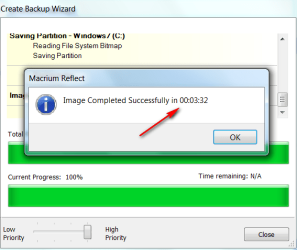
This is the imaging time for my system - 32GB real, 17.5GB compressed:
 

Attachments

  • 2010-08-25_144413.png
    2010-08-25_144413.png
    20.4 KB · Views: 3

My Computer My Computer

At a glance

Vista, Windows7, Mint Mate, Zorin, Windows 8from 1.6GHz Duo to i7
Computer Manufacturer/Model Number
HP, Dell, Gateway, Toshiba - 4 laptops and 2 desktops
OS
Vista, Windows7, Mint Mate, Zorin, Windows 8
CPU
from 1.6GHz Duo to i7
Monitor(s) Displays
2x HP w2207
Hard Drives
5x HDD, 7x SSD, 12x Externals
Keyboard
with trackball - no mices
Mouse
Trackball mice
Internet Speed
DSL 6000
well my C is 176 Gigs used now so that's quite a bit larger.
And if I could schedule it I guess it really doesn't matter how long it takes, so would someone be kind enough to either give me a link to something that can be scheduled or tell me how to get one please.
 

My Computer My Computer

At a glance

Windows 7 Profesional 64 BitAMD Athlon II X4 6206 Gigsgts 450
OS
Windows 7 Profesional 64 Bit
CPU
AMD Athlon II X4 620
Motherboard
GA-MA770-UD3
Memory
6 Gigs
Graphics Card(s)
gts 450
Sound Card
built in
Monitor(s) Displays
HP w2338h
Screen Resolution
1920 X 1080
Hard Drives
sata barracuda 1tb seagate X2 IDE Mode
PSU
huh
Case
generic
Cooling
box w/cpu
Internet Speed
LOL 3mbs
just realized that this free version of Macrium Reflect doesn't do differential backups and has the schedule function gimped out.
True, free Macrium cannot do differentials (which I hate anyhow) - you loose one in the chain and you lost it all.
Actually that is an incremental backup. A differential backup is a full backup the first time and everything that has changed since the last full backup. As long as you have the full backup and the latest differential, you are right back in business.

i think it takes me between 4-8 minutes to image my computer. It's about 40GB on the SSD drive and I image to an internal 1TB WD Caviar Black drive.
 

My Computer My Computer

At a glance

Windows 7 Ultimate x64Intel Q9550 2.83Ghz OC'd to 3.40Ghz8GB G.Skill PI DDR2-800, 4-4-4-12 timingsEVGA 1280MB Nvidia GeForce GTX570
Computer Manufacturer/Model Number
Self-Built in July 2009
OS
Windows 7 Ultimate x64
CPU
Intel Q9550 2.83Ghz OC'd to 3.40Ghz
Motherboard
Gigabyte GA-EP45-UD3R rev. 1.1, F12 BIOS
Memory
8GB G.Skill PI DDR2-800, 4-4-4-12 timings
Graphics Card(s)
EVGA 1280MB Nvidia GeForce GTX570
Sound Card
Realtek ALC899A 8 channel onboard audio
Monitor(s) Displays
23" Acer x233H
Screen Resolution
1920x1080
Hard Drives
Intel X25-M 80GB Gen 2 SSD
Western Digital 1TB Caviar Black, 32MB cache. WD1001FALS
PSU
Corsair 620HX modular
Case
Antec P182
Cooling
stock
Keyboard
ABS M1 Mechanical
Mouse
Logitech G9 Laser Mouse
Internet Speed
15/2 cable modem
Other Info
Windows and Linux enthusiast. Logitech G35 Headset.
Actually that is an incremental backup. A differential backup is a full backup the first time and everything that has changed since the last full backup. As long as you have the full backup and the latest differential, you are right back in business.
I know, I know. I always mix up the wording. Sorry.
 

My Computer My Computer

At a glance

Vista, Windows7, Mint Mate, Zorin, Windows 8from 1.6GHz Duo to i7
Computer Manufacturer/Model Number
HP, Dell, Gateway, Toshiba - 4 laptops and 2 desktops
OS
Vista, Windows7, Mint Mate, Zorin, Windows 8
CPU
from 1.6GHz Duo to i7
Monitor(s) Displays
2x HP w2207
Hard Drives
5x HDD, 7x SSD, 12x Externals
Keyboard
with trackball - no mices
Mouse
Trackball mice
Internet Speed
DSL 6000
Ok forget about all that incremental stuff, I can delete the old ones. I guess I just need something that I can schedule to run either by itself or with command line switches I can put into a task. In order that it could be left to run when I am asleep or away. There's seems to be alot of really smart ppl here so I know the answer will come. Thank you all for your time.
 

My Computer My Computer

At a glance

Windows 7 Profesional 64 BitAMD Athlon II X4 6206 Gigsgts 450
OS
Windows 7 Profesional 64 Bit
CPU
AMD Athlon II X4 620
Motherboard
GA-MA770-UD3
Memory
6 Gigs
Graphics Card(s)
gts 450
Sound Card
built in
Monitor(s) Displays
HP w2338h
Screen Resolution
1920 X 1080
Hard Drives
sata barracuda 1tb seagate X2 IDE Mode
PSU
huh
Case
generic
Cooling
box w/cpu
Internet Speed
LOL 3mbs
Ok forget about all that incremental stuff, I can delete the old ones. I guess I just need something that I can schedule to run either by itself or with command line switches I can put into a task. In order that it could be left to run when I am asleep or away. There's seems to be alot of really smart ppl here so I know the answer will come. Thank you all for your time.


Here you go.
 

My Computer My Computer

At a glance

ME/XP/Vista/Win7
OS
ME/XP/Vista/Win7
Ok forget about all that incremental stuff, I can delete the old ones. I guess I just need something that I can schedule to run either by itself or with command line switches I can put into a task. In order that it could be left to run when I am asleep or away. There's seems to be alot of really smart ppl here so I know the answer will come. Thank you all for your time.

Windows 7 Image Backup. It has a scheduling feature.

You may run into the problem with any backup application, including the built in, that if you schedule it to wake your computer from sleep, it will wake up, start the backup, and go back to sleep after the timeout. There are ways around this - like setting the sleep timeout before and after in a script.

Here is the command line reference:

Wbadmin
 

My Computer My Computer

At a glance

Windows 10 Pro. EFI boot partition, full EFI ...i7 4770k 4.4GHz (44-44-43-43 turbo) @ 1.248V16GB (8GBx2) @2200 MHz G.skill Sniper 10-11-1...MSI GTX 970 Gaming 4G
Computer type
PC/Desktop
Computer Manufacturer/Model Number
Home built (GeneO industries)/Model 4
OS
Windows 10 Pro. EFI boot partition, full EFI boot
CPU
i7 4770k 4.4GHz (44-44-43-43 turbo) @ 1.248V
Motherboard
ASUS Maximus VI Hero
Memory
16GB (8GBx2) @2200 MHz G.skill Sniper 10-11-10-30-1, 1.6V
Graphics Card(s)
MSI GTX 970 Gaming 4G
Sound Card
Onboard SupremeFX Audio
Monitor(s) Displays
NEC Spectraview 2490WUXi-SV
Screen Resolution
1920 x 1200
Hard Drives
Samsung 850 Pro 256GB (OS), Samsung 2x 128GB 840 Pro SSD in RAID0, 3x WD Blue 6Gb/s 1TB RAID0, WD 2TB Black external USB 3.0, 2TB WD20EARS Green external USB 3.0, 2x 500GB Seagate and 1 750 GB external USB, 1x 350GB external USB3
PSU
Seasonic X-850 (2012 KM3 model)
Case
Fractal Design Define R4
Cooling
NH-D14, NF-F12, NF-A15; NF-P14, NF-P12,NF-A14, S12A PWM
Keyboard
Cooler Master Storm Quickfire Rapid - Brown
Mouse
Logitech G602
Internet Speed
126.4 Mb/s down, 24.3 Mb/s up
Other Info
USB 3.0 x8 , SATA III x8, eSATA, USB 2.0 x6. Samsung DVD R/W drive.

WEI: CPU 7.8, Memory 7.9, Graphics 7.9, Disk 7.9
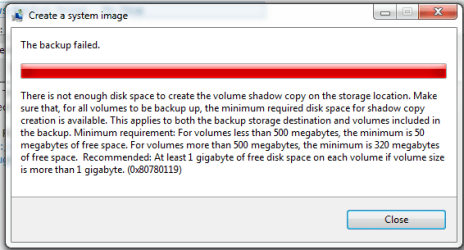
Windows Backup Image - No Dice

Well Thanks for all that but it doesn't appear to work.
I tried this for my sons computer and then mine neither of them work.
Capture 1.PNG
He has plenty of room and yet.
Capture2.PNG
Trying to resolve found this here:
Backup Problem - Not enough disc space?!!
So I guess still looking for a way to restore that can be scheduled.
And Yes the partition I am trying to backup is on a seperate drive from the one I am trying to back it up on. Thinking maybe it's a write priviledge of some kind but unable to resolve.
 

My Computer My Computer

At a glance

Windows 7 Profesional 64 BitAMD Athlon II X4 6206 Gigsgts 450
OS
Windows 7 Profesional 64 Bit
CPU
AMD Athlon II X4 620
Motherboard
GA-MA770-UD3
Memory
6 Gigs
Graphics Card(s)
gts 450
Sound Card
built in
Monitor(s) Displays
HP w2338h
Screen Resolution
1920 X 1080
Hard Drives
sata barracuda 1tb seagate X2 IDE Mode
PSU
huh
Case
generic
Cooling
box w/cpu
Internet Speed
LOL 3mbs
Try with Wbadmin from an elevated Command prompt. It may work. The command is:

wbadmin start backup -backuptarget:X: -include:Y:

Wher X is the volume to which you want to backup and Y is the volume that you want to backup.
 

My Computer My Computer

At a glance

Vista, Windows7, Mint Mate, Zorin, Windows 8from 1.6GHz Duo to i7
Computer Manufacturer/Model Number
HP, Dell, Gateway, Toshiba - 4 laptops and 2 desktops
OS
Vista, Windows7, Mint Mate, Zorin, Windows 8
CPU
from 1.6GHz Duo to i7
Monitor(s) Displays
2x HP w2207
Hard Drives
5x HDD, 7x SSD, 12x Externals
Keyboard
with trackball - no mices
Mouse
Trackball mice
Internet Speed
DSL 6000
Well Thanks for all that but it doesn't appear to work.
I tried this for my sons computer and then mine neither of them work.
View attachment 151586
He has plenty of room and yet.
View attachment 151587
Trying to resolve found this here:
Backup Problem - Not enough disc space?!!
So I guess still looking for a way to restore that can be scheduled.
And Yes the partition I am trying to backup is on a seperate drive from the one I am trying to back it up on. Thinking maybe it's a write priviledge of some kind but unable to resolve.
In the thread you refer to the 100MB system reserved partition is mentioned. If you have one and it does not have 50MB free you will get the error reported.

Windows Disk Management will show you the free space in the system reserved partition.
 

My Computer My Computer

At a glance

Windows 7x64 Home Premium SP1Intel i7 2600kG.Skill Ripjaws (DDR3-1600) 2x4GBNvidia GeForce GTS 450; Intel HD Graphics 300...
Computer type
PC/Desktop
Computer Manufacturer/Model Number
Own build
OS
Windows 7x64 Home Premium SP1
CPU
Intel i7 2600k
Motherboard
ASUS P8Z68 Deluxe
Memory
G.Skill Ripjaws (DDR3-1600) 2x4GB
Graphics Card(s)
Nvidia GeForce GTS 450; Intel HD Graphics 3000(GT2+)
Monitor(s) Displays
Dell Ultrasharp IPS panel U2311H, Samsung SyncMaster P2350
Screen Resolution
1920x1080
Hard Drives
Samsung 850 Pro SSD 256GB, Samsung SSD 840 120GB, Seagates 1TB Barracuda ST31000528AS x2
PSU
Seasonic M12II 520W
Case
Lian Li Lancool PC-K60
Cooling
Case: 1x120mm, 3x140mm CPU: Hyper 212+
Keyboard
Logitech MK520 (wireless)
Mouse
Logitech MK520
Internet Speed
6-7 Mbps
Antivirus
Norton Security Premium, Malwarebytes on 2 (MSE on 3rd PC)
Browser
FireFox
Other Info
Audio: Logitech Z523 2.1
Yeah, I read it before I put a link to it. That's not the problem.
 

My Computer My Computer

At a glance

Windows 7 Profesional 64 BitAMD Athlon II X4 6206 Gigsgts 450
OS
Windows 7 Profesional 64 Bit
CPU
AMD Athlon II X4 620
Motherboard
GA-MA770-UD3
Memory
6 Gigs
Graphics Card(s)
gts 450
Sound Card
built in
Monitor(s) Displays
HP w2338h
Screen Resolution
1920 X 1080
Hard Drives
sata barracuda 1tb seagate X2 IDE Mode
PSU
huh
Case
generic
Cooling
box w/cpu
Internet Speed
LOL 3mbs
My understanding is reader always parks at ouside of disk, so partitioning cannot gain seek speed. This is why we suggest placing OS in first partition.

With separate HD's, yes, you get the benefit of two working readers (e.g. OS and data).
 
Back
Top