Rolling back to XP

Takeshi Kovacs

New member
Local time
4:59 PM
Messages
17
Location
London
Rather stupidly I installed Windows 7 RC after a bottle of wine last night and never read any of the literature, so never created a partition or anything. :o

So now I have Win7 as my main OS, problem is it doesn't seem to like most of my hardware (mainly my netgear WG111v3 dongle) and I'd like to go back to WinXP 64 SP2 - however when I pop in the disc and boot up from it, I try and format the HDD and get the following:
Setup was unable to format the partition. The disk may be damaged.

Make sure the drive is switched on and properly connected to your computer.

You must select a different partition for Windows.


Now I know the HDD is fine, it isn't even two weeks old and it works perfectly well under Win7 and it worked well under 64xp. So how on earth do I format this partition and get back on XP64?

Thanks and apologies if this has been asked before, I am just really frustrated and annoyed at myself.

TK
 

My Computer

OS
XP64
Pop in the Windows 7 disk, delete all the partitions. Restart, put in XPx64 disk. Also did you have to install HDD drivers upon XP setup before? That may be your problem as well.
 

My Computer

Computer Manufacturer/Model Number
Custom Made
OS
Windows 7 Build 7600|16384- 64bit
CPU
AMD Phenom II X4 810 - 2.61ghz Deneb
Motherboard
Asus M4A79T Deluxe
Memory
4GB DDR3 Mushkin (1600 O.C. Rated)
Graphics Card(s)
ATI HD Radeon 4890 1GB
Sound Card
Realtek HD Onboard Audio
Monitor(s) Displays
AOC 912vwa-1
Screen Resolution
1440x900 (Max Monitor)
Hard Drives
10000RPM 150GB Western Digital Velociraptor
PSU
Corsair TSX750W
Case
Antec Nine Hundred
Cooling
Air Cooled
Keyboard
Logitech Elite
Mouse
Logitech MX518
Internet Speed
Comcast High-Speed (+Powerboost)
Really, it's that simple? If so sorry for wasting your time and thank you for making me look like a fool :D

Problem though is it will only boot up from the CD in windows?

Edit: No, I didn't have to install any HDD drivers. I stuck in the HDD and popped in my CD and installed it straight away, everything worked fine.


---
update
----

Yeah I just popped in the Win7 disc again and it totally ignores it, takes me through to Winodws and if I run it through windows it does not give me an option to remove any partitions. Obviously disk manager won't work as the partition I want to format is the one that Win7 sits on.

:(

Going to download Gparted and see if I can nuke it that way.
 

My Computer

OS
XP64
Gparted just tells me that I have an invalid partition table on my USB drive, ***** :mad:
 

My Computer

OS
XP64
thats kind of odd. i installed XP over 7 without a problem. maybe it was you installation disk that is at fault....

@Takeshi Kovacs - sorry, i dont have any experiance with installing off a usb. Im sure some who does, will be along, shortly.
 

My Computer

Computer Manufacturer/Model Number
eMachines W3502
OS
Windows 7 Ultimate x32
CPU
Intel Celeron D 3.2 Ghz 533 fsb (LGA 775)
Motherboard
Intel D101GGC
Memory
1 GB (2x512MB) PC-3200 DDR @ 200Mhz
Graphics Card(s)
Nvidia GeForce 9400GT- 1GB
Sound Card
Sound Blaster X-Fi Xtreame Gamer
Monitor(s) Displays
19" LCD HDtv
Screen Resolution
1360x768 @ 60Htz
Hard Drives
SeaGate Barracuda 750GB
SeaGate Barracuda 100GB
Toshiba CD/DVDW/ TS-H552D [DVD+R, DL]
PSU
stock (idk)
Case
The busted remains of the stock case
Cooling
Dust cooled, waitwut?
Keyboard
Stock. Missing a few keys.
Mouse
Logitech LX8 5-btn mouse (wireless)
Internet Speed
TWC 10Mb
Other Info
Keeps going, and going, and going.......
Hi, so do you have a "Windows Old" folder.? when you select My Computer, and then the drive that is running at the moment,?

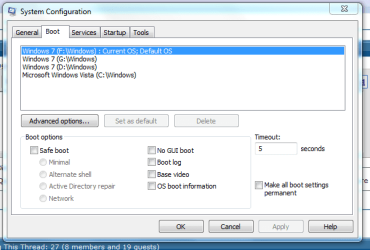
also what does it say in MSCONFIG under the boot section?
 

My Computer

Computer Manufacturer/Model Number
Self Build 64bit
OS
Vista Ult64, Win7600
CPU
Intel Core 2 Quad Q6600 @ 2400 MHz 64bit OS
Motherboard
Asus P5E3 Deluxe WiFi @p 64 bit OS
Memory
4096 MB DDR3-SDRAM
Graphics Card(s)
ATI Radeon HD 3870 Series x2 Crossfired
Sound Card
Realtek on board
Monitor(s) Displays
Samsung SyncMaster - 23 inches
Screen Resolution
1680x1050 pixels at 60 Hz in True Colors
Hard Drives
Hitachi (250 GB)/Samsung 750 GB. /Barracuda 160 GB.
My Book 1 TB external..
PSU
Cooler Master 1000w
Case
Cooler Master Cosmos 1000.
Cooling
Fans and fresh air,
Keyboard
Wireless
Mouse
Wireless
Internet Speed
Never fast enough
Other Info
I use a Magnum.
---
update
----

Yeah I just popped in the Win7 disc again and it totally ignores it, takes me through to Winodws and if I run it through windows it does not give me an option to remove any partitions. Obviously disk manager won't work as the partition I want to format is the one that Win7 sits on.

:(

Going to download Gparted and see if I can nuke it that way.

Time for a stupid question (I'm pretty good at those) ... In your BIOS, have you selected your DVD drive to be first in boot order?

Next stupid question ... Are you sure your DVD is bootable? As in, are you sure it's the one you used to install Win7 ?
 

My Computer

Computer Manufacturer/Model Number
Cobbled together :)
OS
Win7 Ultimate, x64
CPU
i7 920, currently NOT OC
Motherboard
Asrock X58 Deluxe
Memory
OCZ Platinum 12GB (6 x 2GB) 240-Pin DDR3 SDRAM DDR3 1600
Graphics Card(s)
nvidia geforce 7600 gt
Sound Card
integrated
Monitor(s) Displays
Samsung SyncMaster 204t (dual monitors)
Screen Resolution
1600 x 1200
Hard Drives
WDC WD2000JS-00MHB0 ATA
WDC WD5000AAKS-65YGA0 ATA
PSU
750w
Cooling
Air, 4 120mm
Windows 7 (H:\Windows) Current OS; Default OS

There is no Windows.old anywhere on my computer, but there is a Windows folder within my Windows folder that looks like my old XP...
 

My Computer

OS
XP64
Time for a stupid question (I'm pretty good at those) ... In your BIOS, have you selected your DVD drive to be first in boot order?

Next stupid question ... Are you sure your DVD is bootable? As in, are you sure it's the one you used to install Win7 ?

Yep to the first question and I am pretty sure the Win7 DVD is bootable, I just downloaded it off the MS website and burned it. I am never doing anything drunk again! :D
 

My Computer

OS
XP64
What about msconfig/boot.
Here is mine, what does it say in your one.

Capture1.PNG
 

My Computer

Computer Manufacturer/Model Number
Self Build 64bit
OS
Vista Ult64, Win7600
CPU
Intel Core 2 Quad Q6600 @ 2400 MHz 64bit OS
Motherboard
Asus P5E3 Deluxe WiFi @p 64 bit OS
Memory
4096 MB DDR3-SDRAM
Graphics Card(s)
ATI Radeon HD 3870 Series x2 Crossfired
Sound Card
Realtek on board
Monitor(s) Displays
Samsung SyncMaster - 23 inches
Screen Resolution
1680x1050 pixels at 60 Hz in True Colors
Hard Drives
Hitachi (250 GB)/Samsung 750 GB. /Barracuda 160 GB.
My Book 1 TB external..
PSU
Cooler Master 1000w
Case
Cooler Master Cosmos 1000.
Cooling
Fans and fresh air,
Keyboard
Wireless
Mouse
Wireless
Internet Speed
Never fast enough
Other Info
I use a Magnum.
Sorry, jfar

It says:

Windows 7 (H:\Windows) Current OS; Default OS


I would post a screen shot but I can't get it to going the net at the moment (and the router is too far for a cable) so I am stuck on this old brick of an acer laptop.
 

My Computer

OS
XP64
Gparted just tells me that I have an invalid partition table on my USB drive, ***** :mad:

So If I understand well you want to install the XP to an USB drive?
 

My Computer

Computer Manufacturer/Model Number
home made
OS
Windows 7 RTM x64
CPU
AMD X2 5000+
Motherboard
Asrock
Memory
4GB
Graphics Card(s)
Nvidia 9400GT
Sound Card
onboard 6Ch
Monitor(s) Displays
Medion 22" + HannSpree 22"
Screen Resolution
1680X1050 + 1920X1080
Hard Drives
Intel SSD 80GB
WD 1.5 TB
WD 1 TB
Samsung 1TB X 3
PSU
noname
Case
noname
Cooling
Zalman
Keyboard
DeLUX multimedia keyboard
Mouse
Microsoft
Internet Speed
25MB/s
This is what the DVD with Win7 on looks like, AFAICT it look like it should be bootable?

wlvfww.gif


So If I understand well you want to install the XP to an USB drive?

No, mate. I want to install Windos XP 64 SP2 on my computer as my main (and only) OS. :)
 

My Computer

OS
XP64
No, mate. I want to install Windos XP 64 SP2 on my computer as my main (and only) OS.
ok :)

If you can not delete or format that partition than try to make an other new partition somewhere and install the XP on that. Maybe it works. And maybe later you can format the partition of the Win7 from the XP. I hope it helps!
 

My Computer

Computer Manufacturer/Model Number
home made
OS
Windows 7 RTM x64
CPU
AMD X2 5000+
Motherboard
Asrock
Memory
4GB
Graphics Card(s)
Nvidia 9400GT
Sound Card
onboard 6Ch
Monitor(s) Displays
Medion 22" + HannSpree 22"
Screen Resolution
1680X1050 + 1920X1080
Hard Drives
Intel SSD 80GB
WD 1.5 TB
WD 1 TB
Samsung 1TB X 3
PSU
noname
Case
noname
Cooling
Zalman
Keyboard
DeLUX multimedia keyboard
Mouse
Microsoft
Internet Speed
25MB/s
Sorry, we need to know these things, in Control Panel /Administrative Tools /Computer Management /Disk Management, what does it say, or can you post a picture.
 

My Computer

Computer Manufacturer/Model Number
Self Build 64bit
OS
Vista Ult64, Win7600
CPU
Intel Core 2 Quad Q6600 @ 2400 MHz 64bit OS
Motherboard
Asus P5E3 Deluxe WiFi @p 64 bit OS
Memory
4096 MB DDR3-SDRAM
Graphics Card(s)
ATI Radeon HD 3870 Series x2 Crossfired
Sound Card
Realtek on board
Monitor(s) Displays
Samsung SyncMaster - 23 inches
Screen Resolution
1680x1050 pixels at 60 Hz in True Colors
Hard Drives
Hitachi (250 GB)/Samsung 750 GB. /Barracuda 160 GB.
My Book 1 TB external..
PSU
Cooler Master 1000w
Case
Cooler Master Cosmos 1000.
Cooling
Fans and fresh air,
Keyboard
Wireless
Mouse
Wireless
Internet Speed
Never fast enough
Other Info
I use a Magnum.
ok :)

If you can not delete or format that partition than try to make an other new partition somewhere and install the XP on that. Maybe it works. And maybe later you can format the partition of the Win7 from the XP. I hope it helps!

That is exactly what I was thinking :D

Long way to go about it but it should work! Thought I would post on the off chance that there might be a simple solution. I think I am going to wait until it is fully released and compatible with my hardware before I go buying the upgrade. I am impressed with it so far but I really need to get back into an OS that has lost most of it's teething trouble :)

Thanks again
 

My Computer

OS
XP64
You are welcome!
I ought to you to keep the Seven as a secondary system and try to get on with it! :)
We are always here if you will have problem with it! :)
 

My Computer

Computer Manufacturer/Model Number
home made
OS
Windows 7 RTM x64
CPU
AMD X2 5000+
Motherboard
Asrock
Memory
4GB
Graphics Card(s)
Nvidia 9400GT
Sound Card
onboard 6Ch
Monitor(s) Displays
Medion 22" + HannSpree 22"
Screen Resolution
1680X1050 + 1920X1080
Hard Drives
Intel SSD 80GB
WD 1.5 TB
WD 1 TB
Samsung 1TB X 3
PSU
noname
Case
noname
Cooling
Zalman
Keyboard
DeLUX multimedia keyboard
Mouse
Microsoft
Internet Speed
25MB/s
So are you saying, that you don't care if you loose all the stuff that you had on XP x64?

Because it looks like you have a lot of stuff there.
 

My Computer

Computer Manufacturer/Model Number
Self Build 64bit
OS
Vista Ult64, Win7600
CPU
Intel Core 2 Quad Q6600 @ 2400 MHz 64bit OS
Motherboard
Asus P5E3 Deluxe WiFi @p 64 bit OS
Memory
4096 MB DDR3-SDRAM
Graphics Card(s)
ATI Radeon HD 3870 Series x2 Crossfired
Sound Card
Realtek on board
Monitor(s) Displays
Samsung SyncMaster - 23 inches
Screen Resolution
1680x1050 pixels at 60 Hz in True Colors
Hard Drives
Hitachi (250 GB)/Samsung 750 GB. /Barracuda 160 GB.
My Book 1 TB external..
PSU
Cooler Master 1000w
Case
Cooler Master Cosmos 1000.
Cooling
Fans and fresh air,
Keyboard
Wireless
Mouse
Wireless
Internet Speed
Never fast enough
Other Info
I use a Magnum.
So are you saying, that you don't care if you loose all the stuff that you had on XP x64?

Nope :) Couldn't give a monkey's, I only built the computer last week so I haven't had time to fill it full of rubbish yet. So I am quite happy to format the primary partition if this is possible?
 

My Computer

OS
XP64
Back
Top