Dark side of COMODO...

manhunter2826: The only two free-for-personal-use firewalls I recommend are Online Armor and Outpost:


Having had personal experience with the CEO of Comodo, I want nothing to do with any of that company's products.
As always, thanks Corrine - exactly what I'm looking for:)
 

My Computer

OS
Windows XP - Now Windows 7 Home Premium (64-bit).
I have never knowing used a comodo product but I have a COMODO Certification Authority certificate in the Trusted Root store of my local computer. Can/should it be removed?
 

My Computer

Computer Manufacturer/Model Number
ultraplanet - model 23
OS
Windows 7
CPU
P4 3.0 HT
Motherboard
Intel DQ965GF
Memory
4 gigs of Crucial DDR2
Graphics Card(s)
nVidia GeForce 7800GT 256MB 256-bit w/ ACCELS1 Rev 2
Sound Card
on board
Monitor(s) Displays
HP 2509m
Screen Resolution
1920x1080
Hard Drives
2x 320gb Seagate Barracuda's - SATA 3Gbit/s - RAID-0 array
PSU
650 watt
Case
Antec
Cooling
Cool Master
Keyboard
Logitech diNovo Media Desktop
Mouse
see keyboard
Internet Speed
comcast cable
Other Info
7 Ultimate and 7 Pro twice each at home - Gigabit on the Network - Tomato on the Linksys - I freely share my wireless with my neighbors (8-10 additional devices)
I've had no problems with Comodo products.

I've been using the Firewall and Antivirus since the beta versions and really only experienced problems during those stages, which was to be expected since they were in beta.

IF anyone had problems with their software, well I'm sorry to hear that. They've came out with A LOT of new stuff since I was in the Antivirus and Firewall beta testing, in a short period of time, and it's no surprise people were having some serious issues since most of their products are still in development as we speak.

The current Firewall/Antivirus security suite is fantastic though. I've tried a lot of security programs and this release is with out a doubt the best I've ever used.. Most the bugs are gone, it's easier to use, it has a much better interface and more security and customization options. But I will agree the only down side to the software is it's ease of use, to get the full use out of it would require an experienced user of Comodo products or someone who understands Internet security well enough.

I'm not a fan boy or anything, but I've been using Comodo products since 2007 and I've had no major issues at all. Everyone has their personal tastes and preference, and I will go through the tedious security popups and etc from Comodo any day than have my system infected with lord knows how much junk there is on the interwebs today.

Rule of thumb, don't use software in development and beta stages on your primary computer. Most the things people are complaining about here regarding Comodo, have been addressed many times in the Comodo community.
 

My Computer

Computer Manufacturer/Model Number
Custom
OS
Windows 7 Professional 64 bit
CPU
AMD Phenom X4 925 @ 2.8ghz
Motherboard
Gigabyte GA-MA785GT-UD3H AM3
Memory
4GB DDR3 1600mhz A-DATA gaming series
Graphics Card(s)
Dual HIS Radeon HD 5770
Sound Card
Asus Xonar D1
Monitor(s) Displays
Samsung Syncmaster EX2220
Screen Resolution
1920x1080
Hard Drives
Dual Hitatchi 500GB Sata
PSU
Thermaltake Toughpower Grand 1200w A+ certified Gold.
Case
Thermaltake V3 Black
Cooling
Watercooler with Radiator on CPU, with 4 120mm case fans.
Keyboard
Thermaltake Challenger Pro
Mouse
Death Adder
Internet Speed
10mbps/1mbps
I briefly road tested the Comodo firewall on my computer but I didn't like it (it made programs (photoshopCS2 etc) not run anymore and I found it overly complex in areas.) It seems like I made a good choice in sticking with the built-in Window's Firewall.
 

My Computer

Computer Manufacturer/Model Number
HP DV6 1330sa
OS
Windows 7 Professional 64 Bit SP1
CPU
INTEL DUAL CORE 2.1Ghz
Motherboard
N/A
Memory
4GB DDR3
Graphics Card(s)
INTEL
Sound Card
LAPTOP
Monitor(s) Displays
2
Screen Resolution
3200x1080
Hard Drives
250GB
PSU
LAPTOP
Case
LAPTOP
Cooling
LAPTOP
Keyboard
SOLID YEAR 260U
Mouse
USB
Internet Speed
20 MB/S
I briefly road tested the Comodo firewall on my computer but I didn't like it (it made programs (photoshopCS2 etc) not run anymore and I found it overly complex in areas.) It seems like I made a good choice in sticking with the built-in Window's Firewall.

Yeah you have to define programs as safe so that Defense + won't block it, and so that it won't run in the Sandbox which partially limits access.

You need some type of firewall, don't have to use Comodo Firewall but I wouldn't recommend using Windows Firewall as your primary.
 

My Computer

Computer Manufacturer/Model Number
Custom
OS
Windows 7 Professional 64 bit
CPU
AMD Phenom X4 925 @ 2.8ghz
Motherboard
Gigabyte GA-MA785GT-UD3H AM3
Memory
4GB DDR3 1600mhz A-DATA gaming series
Graphics Card(s)
Dual HIS Radeon HD 5770
Sound Card
Asus Xonar D1
Monitor(s) Displays
Samsung Syncmaster EX2220
Screen Resolution
1920x1080
Hard Drives
Dual Hitatchi 500GB Sata
PSU
Thermaltake Toughpower Grand 1200w A+ certified Gold.
Case
Thermaltake V3 Black
Cooling
Watercooler with Radiator on CPU, with 4 120mm case fans.
Keyboard
Thermaltake Challenger Pro
Mouse
Death Adder
Internet Speed
10mbps/1mbps
W7 firewall set to public is plenty strong, especially if you are behind a router firewall already. No need for an overly complicated third party firewall.
 

My Computer

OS
Windows 7 Home Premium x64 SP1

My Computer

Computer Manufacturer/Model Number
Personal build
OS
Windows 7 Ultimate x64 (Retail)
CPU
Intel I7-860
Motherboard
Asus Maximus III Formula
Memory
G.Skill RipJaw DDR3-1333 16GB (4x4GB)
Graphics Card(s)
Nvidia GTS-250 1GB
Sound Card
SupremeFX X-Fi 7.1 HD sound system.
Monitor(s) Displays
VisionQuest VQL-22WSHD LCD Monitor
Screen Resolution
1680x1050
Hard Drives
1x Seagate ST3500418AS 500G SATA2 HDD
1x Western Digital Caviar SE16 500G SATA2 HDD
1x Western Digital Caviar SE16 750G SATA2 HDD
2x Western Digital Caviar Green 2TB SATA2 HDD, configured RAID1
PSU
OCZ EliteXtream OCZ1000EXS 1000W ATX12V 20/24 Pin Active PFC
Case
Antec 1200
Cooling
Swifteck H2O-220 Ultima XT Liquid Cooling w/ 320 Radiator
Keyboard
Logitech G11 Keyboard
Mouse
Logitech MX518 Optical Mouse
Internet Speed
Cable Modem
Other Info
Visiontek TV Wonder 650 Theater PCI-E TV Tuner Card
Logitech 9000 Pro Web Camera
Logitech Cordless RumblePad 2 game controller
LG 18x SuperMulti SATA2 DVD Writer
NmediaPC CR98 Multi Card reader
Nmedia Pro-LCD
Corsair Dominator Memory Fan
Coolermaster R4-L2R-20ac 120mm Case Fan x2
CIS 5.3 is easier to use than previous versions, and even this is being improved upon.
Btw, check out Matousec's ProActive Security Challenge

Than you "jebuchanan" for that link, I've lost it some time a go. Though, haven't found much of change except from Bitdefender's great jusmp in top 9. From extremely poor score of 2% to a very good 86%, wow that's some improvement here. Anyway, I've been using Comodo's Firewall for last 4 years & haven't got problem with any of it's pop-ups OR experienced any other issues. Just giving me best of security under the most vulnerable OS platform :zip: .
 

My Computer

Computer Manufacturer/Model Number
CHIP (Custom)
OS
Windows 7 Pro. 64 Bit + Back|Track 5 (Both Updated)
CPU
AMD FX 4100 (3.6GHz, 2 x 2MB L2, 8MB L3) Socket AM3
Motherboard
Biostar A880GZ (AM3+)
Memory
Kingmax DDR3 - 2 x 2GB (1333 MHz)
Graphics Card(s)
XFX ATi Radeon HD 5570 (1GB DDR3)
Sound Card
On Board (Realtec HD Codec)
Monitor(s) Displays
Samsung SyncMaster 2033sw (20") : DVI Connected
Screen Resolution
1600 x 900 (60Hz)
Hard Drives
Seagate 500GB SATA 2.0
PSU
UMAX 550W
Case
Basic White
Cooling
AMD Stock
Keyboard
Logitech
Mouse
Logitech Mouse
Internet Speed
BSNL DataOne 512KB/s
Other Info
Protected with.....
Bitdefender Internet Security 2012
SUPERAntiSpyware
Malwarebytes Anti Malware
OpenDNS
Hi guys, my first post. I want to come right out and say I am polite to a fault. But I am direct and I don't have a whole lot of time for invalid positions or malicious (whether by intent or by ignorance) 'advice' either.

As a result, my posting offends those who are guilty of the above. I neither apologise for their offence in advance, nor do I value 'offence' (as a concept) at all. It's a tool used by people who hold indefensible positions, who assert illogical claims; and the entire 'offence' construct should be eliminated from society (because there is nothing more offensive, than wrongdoers or those who are unwilling to justify or argue their positions with dignity...claiming to be 'offended', in their attempts to silence / censor dignified and polite arguments and questions and evidence.

Rule of thumb, don't use software in development and beta stages on your primary computer. Most the things people are complaining about here regarding Comodo, have been addressed many times in the Comodo community.

Here's another rule of thumb: Don't use software products created by a company which sells it's SSL certificate to malware distributors.

And claiming that wrongdoing has been discussed extensively within the community of wrongdoers and their customers...as a justification for discussing it no longer; is about as illogical a statement one can possibly make.

I'm about to show you why your argument is outrageous, in the next sentence I write.

Comodo has been caught selling its popular SSL certificate to malware distributors/scan websites.

Thank you, Creer - had I been aware of that, I would have saved myself a whole stack of trauma. The reason I was not aware of that, was partly due to the oh-so-prevalent attitude so evident in Matt's illogical, yet expressed as if they were otherwise, 'frustrations' above.

Mountains of trauma
. nb. Comodo did not trigger it, they merely added to it. I suspect (I have no proof beyond logical and justified suspicion), that they did so maliciously. Not that intent is worth a rat's carcass, to the victim - of course.

I paid for a service which made clearly false claims about the ability (*lack of*) possessed by their (non) geeks:

Comodo GeekBuddy said:
Imagine a world where you could have any PC problem – from a nasty virus to a temperamental printer – fixed remotely by a friendly expert, available 24/7 with a single mouse-click! Well imagine no more, because GeekBuddy is here.

The guy knew squat. The guy was rude. He was insulting. He wasted my time, refused to answer my polite, direct questions. He refused my dozen requests that he pass me on to someone who had the answers.
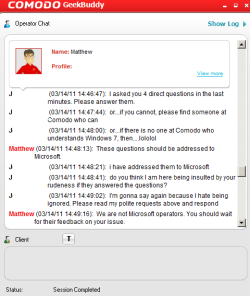
Comodo GeekBuddy.png

I repaid him in 1/10th kind. I insisted Comodo change their lying claim on the website so that other unknowing victims like myself would not be fraudulently trapped in the future. Of course, the lies remain advertised unchanged.

To be fair to Comodo when they don't really deserve it, I was able to cancel my payment for their (non) service. I was not reimbursed for my wasted time however. Nor for the carnage that followed, from my stupidity in not immediately eradicating every trace of their software from my systems.

Comodo sucks.

Dont mince words on us Dinesh ... tell us what you really think about Comodo??

If I were to tell you what I really think about Comodo, I would likely 'offend' some delicate sensibilities. So I am limited to understatement for the sake of decorum, and concur with Dinesh; Comodo SUCKS!

The cert. issue is not really valid, and most people who post about is do admit, at some point, that Comodo is faster deleting bogus sites than Verisign. The real issue there is the type of cert. and the way they are cuurently handled.

You are correct about the entire certificate chaos (which is basically a ridiculous joke) being the real issue.

You are incorrect in your outrageously incorrect assessment on the 'validity' of discussing an issue of a software manufacturer (who tricks people into giving them THAT level of access to their systems) being caught selling their certificates to malware distributors.

ESET ???:roflmao:

gamepro127: take a REALLY good look at Results and comments - www.matousec.com

ESET is #27 on that list ! (#9 from the BOTTOM...)

i have tested some firewalls, the results with ESET was so bad that i couldn´t believe it, so i decided to run the tests a second time, which gave the same results.

do NOT use ESET´s firewall if you want protection !

i use Comodo right now, because it has a very good protection, 100% score at Matousec,
and it also blocks all unwanted OUTGOING connections.
in fact, it was the only firewall of those tested that really blocked.

I agree with you on ESET. I just uninstalled them after...well, if you're interested you can take a look for yourself I guess. I do a hof rant at the end, stolen courtesy of Aaron Sorkin (aka god).

As for Comodo, I have no doubt they are capable of doing the job they are paid to do. The fact that, in some glaring instances, they seem to be unable to do so...is kind of the entire issue innit?
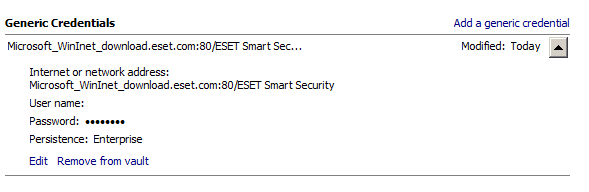
eset credentials wtf.PNG

ESET certificate.png

ESET certificate response 2.png

ESET certificate response 3.png


This industry is filthy corrupt.
And yes, of course the people who would be 'offended' by such a claim are those profiting from the corruption.

 

My Computer

Computer Manufacturer/Model Number
ACPI x64-based PC
OS
Windows 7 Ultimate 64-bit Version 6.1 Build 7601: Service Pack 1
CPU
Intel(R) Core i7 CPU 920 @ 2.67Ghz
Motherboard
Intel(R) ICH10 Family PCI Express
Memory
10GB RAM
Graphics Card(s)
ATI Radeon HD 5800 Series
Sound Card
High Definition Audio Controller
Monitor(s) Displays
LCD2490WUXi2
Screen Resolution
1920x1200
Hard Drives
ST9500325AS ATA Device 500GB
Internet Speed
TrueAsia 50Mbps/20 VDSL
W7 firewall set to public is plenty strong, especially if you are behind a router firewall already. No need for an overly complicated third party firewall.

Was reading through various things and came across this. If you are behind a router then a software firewall is completely superfluous, unless you want to use outgoing blocks. All it will do is slow down your machine.

Regards....Mike Connor
 

My Computer

OS
Several, including Windows 7 x64 Ultimate
I have CIS ver5.3 on two Win7 pc's (x32 and x64). While I admit that CIS is not an install and leave app, it is quite good once you have the right settings that will suit your taste and how you use your pc. I come to like it as much as I like OA Premium and Outpost Firewall Pro ver7. When I have trouble with either Online Armor or Outpost I always go back to CIS and apply the settings I have saved. My resource eating apps are Autocad 2009 Mechanical, Adobe CS3, Minitab14, SAS statistical software. No apparaent slowdown on them.

The SSL fiasco was a fault of how Comodo overlooked aspects because of marketing. And if a company always keep on focusing on marketing profit then problems will really arise. The practice of issuing certificates directly off the root should not be done but rather as mozilla suggested "use intermediate certs" and "different one for each RA account". I believe there was also an incident with VeriSign in 2001(well not in this caliber though but same proof of issuance of "bogus certificates").

Some interesting links about the SSL issue here:

HERE

HERE

HERE


Comodo firewall is very good especially with D+. I am speaking of the firewall only. Personally I don't like the AV either. Sure there are still others who offer firewall protection for free like ZoneAlarm/Privatefirewall/Rising..etc but hey, firewall is really good and in the league of OA and OP. You will not find that "league" on the Avira Premium Security Suite/ Avast IS firewall..(you can't simply terminate a connection there (also with Privatefirewall you'd have to use a 3rd party app like ProcessHacker)..

A first time user especially when coming off from say, Online Armor firewall will definitely be confused with CIS. Even in the rules creation. But as any "new" thing you have(not of the same brand say, mobile phone --say from a Nokia 3210 to a Sony Ericcson android phone) you have to let it grow on you to see wether it's a keeper by your standard or not.

This latest version of CIS has been improved. It's now lighter as compared to ver4. Used ver4 for a month on a test XP pc and went back to Online Armor Premium. Now it seems they are both light as Outpost Pro ver7. Some interesting discussions here about CS ver5.3

HERE


Just my two cents here.

damien
 

My Computer

Computer type
PC/Desktop
Computer Manufacturer/Model Number
Custom Build
OS
Win7 Ultimate 64bit
CPU
AMD A8 5600K APU
Motherboard
Gigabyte F2A75MD3H
Memory
16gb DDR3
Graphics Card(s)
Radeon 7560
Sound Card
onboard
Monitor(s) Displays
kingston lcd 23inch wide
Hard Drives
WD 500gb (2)
WD 1TB
Antivirus
EAM + Online Armor Premium -- desktop
W7 firewall set to public is plenty strong, especially if you are behind a router firewall already. No need for an overly complicated third party firewall.

Was reading through various things and came across this. If you are behind a router then a software firewall is completely superfluous, unless you want to use outgoing blocks. All it will do is slow down your machine.

Regards....Mike Connor

Sigh I've just spent the last 3 hours trying and failing to install software firewalls lol fml.

My router firewall is on. Should I be disabling the Win7 firewall then?


Activation context generation failed for "C:\Users\GOSCUT~1\AppData\Local\Temp\042811115900\CertCheck.dll". Dependent Assembly Microsoft.VC90.CRT,processorArchitecture="x86",publicKeyToken="1fc8b3b9a1e18e3b",type="win32",version="9.0.21022.8" could not be found. Please use sxstrace.exe for detailed diagnosis.

Sure thing, Microsoft.

Code:
C:\Windows\system32>sxstrace trace -logfile:sxstrace.etl
Tracing started. Trace will be saved to file sxstrace.etl.
Press Enter to stop tracing...

C:\Windows\system32>sxstrace parse -logfile:systrace.etl -outfile:sxstrace.txt
Parsing log file systrace.etl...
ProcessTrace failed. Error message is:
 

My Computer

Computer Manufacturer/Model Number
ACPI x64-based PC
OS
Windows 7 Ultimate 64-bit Version 6.1 Build 7601: Service Pack 1
CPU
Intel(R) Core i7 CPU 920 @ 2.67Ghz
Motherboard
Intel(R) ICH10 Family PCI Express
Memory
10GB RAM
Graphics Card(s)
ATI Radeon HD 5800 Series
Sound Card
High Definition Audio Controller
Monitor(s) Displays
LCD2490WUXi2
Screen Resolution
1920x1200
Hard Drives
ST9500325AS ATA Device 500GB
Internet Speed
TrueAsia 50Mbps/20 VDSL
W7 firewall set to public is plenty strong, especially if you are behind a router firewall already. No need for an overly complicated third party firewall.

Was reading through various things and came across this. If you are behind a router then a software firewall is completely superfluous, unless you want to use outgoing blocks. All it will do is slow down your machine.

Regards....Mike Connor

Sigh I've just spent the last 3 hours trying and failing to install software firewalls lol fml.

My router firewall is on. Should I be disabling the Win7 firewall then?


Activation context generation failed for "C:\Users\GOSCUT~1\AppData\Local\Temp\042811115900\CertCheck.dll". Dependent Assembly Microsoft.VC90.CRT,processorArchitecture="x86",publicKeyToken="1fc8b3b9a1e18e3b",type="win32",version="9.0.21022.8" could not be found. Please use sxstrace.exe for detailed diagnosis.
Sure thing, Microsoft.

Code:
C:\Windows\system32>sxstrace trace -logfile:sxstrace.etl
Tracing started. Trace will be saved to file sxstrace.etl.
Press Enter to stop tracing...

C:\Windows\system32>sxstrace parse -logfile:systrace.etl -outfile:sxstrace.txt
Parsing log file systrace.etl...
ProcessTrace failed. Error message is:

Yes, just disable it, it's completely pointless if you are behind a router. The router blocks all direct access. Software firewalls are superfluous in such a case, indeed they will slow down your machine as they still try to check everything.

If you want to check your ports are not open, go here and run the tests;

https://www.grc.com/x/ne.dll?bh0bkyd2

http://www.grc.com/x/ne.dll?rh1dkyd2

Don't worry if you "fail" the Ping test. It is not security relevant.

Regards....Mike Connor
 

My Computer

OS
Several, including Windows 7 x64 Ultimate
I once used Comodo but after some 'tests' I found that it was not worth being downloaded :)
 

My Computer

Computer type
PC/Desktop
Computer Manufacturer/Model Number
Custom Build
OS
Windows 10 Pro x64, Arch Linux
CPU
Intel Core 2 Quad Q8200 OC'd 3.08GHz
Motherboard
Asus Rampage formula LGA775
Memory
8GB DDR2 900Mhz
Graphics Card(s)
MSI GT730 2GB GDDR5 (Kepler)
Sound Card
Supreme FX2
Monitor(s) Displays
Samsung LS22F350 LED
Screen Resolution
1080P
Hard Drives
Kingston SSDNow UV400 120GB, 500GB Hitachi, 2TB Samsung, 500GB Seagate FreeAgent, 640GB Samsung, 160GB Toshiba (Arch)
PSU
AeroCool 500W Bronze
Cooling
Cooler Master V6 + 3X fans
Keyboard
Prolink keyboard
Mouse
Logitech M705
Internet Speed
1MiB/s
Browser
Chrome Beta
With specific regard to Comodo, although I have never used their firewall, I did extensive trials with a lot of their other software. Basically, and without going in to too much detail here, it seemed to work fine at first, but in a relatively short time problems arose with every single program. While I can not swear to it, I am pretty sure that this was the cause of some severe errors which necessitated reinstalling Window 7.

Since the machine I use for testing stuff like that has no more Comodo stuff on it, it runs perfectly.

Stuff which caused problems specifically;

Comodo System-Cleaner Tools - Disk Registry Cleaner Software | Comodo

( Pretty sure this damaged the registry although I did NOT actually use the "Registry cleaner".)

Comodo Programs Manager

This caused a lot of problems, and was definitely the cause of one major problem which necessitated a new install.

So, I stay away from Comodo stuff now.


At present I am testing this;

http://www.innovative-sol.com/uninstaller/

the free version first, and I am pretty pleased with it so far. Early days though, it has only been on the machine a couple of weeks.

Regards....Mike Connor
 

My Computer

OS
Several, including Windows 7 x64 Ultimate
an anagram of 'comodo' is 'doom co' :devil:
 

My Computer

Computer Manufacturer/Model Number
mickey megabyte 1234
OS
ultimate 64 sp1
CPU
i5 2500K [email protected]
Motherboard
MSI P67A-GD53
Memory
8 gigs GSkill Ripjaws 1600
Graphics Card(s)
amd hd6950
Sound Card
creative x-fi gamer
Monitor(s) Displays
samsung 24"
Screen Resolution
1920x1080
Hard Drives
ocz vertex 2e 60 gig, samsung f3 1tb, buffalo 2tb ext
PSU
antec 550
Case
antec three hundred
Cooling
i'm a cooling fan
Keyboard
saitek eclipse ii
Mouse
logitech g3
Internet Speed
about 4 Mbps
Other Info
i love win7
Update on Comodo here
 

My Computer

Computer type
PC/Desktop
Computer Manufacturer/Model Number
Custom Build
OS
Win7 Ultimate 64bit
CPU
AMD A8 5600K APU
Motherboard
Gigabyte F2A75MD3H
Memory
16gb DDR3
Graphics Card(s)
Radeon 7560
Sound Card
onboard
Monitor(s) Displays
kingston lcd 23inch wide
Hard Drives
WD 500gb (2)
WD 1TB
Antivirus
EAM + Online Armor Premium -- desktop
Hello everyone, i've tried and used COMODO Internet Security & Antivirus for more then a year now and i've experienced it it is NOT good i will never recommend it anymore to anyone, i've tried Comodo on my new and old computer, Desktop and Laptop but COMODO is just making the computer run slower and opens back doors for hackers and MORE

so WATCH OUT!! DO NOT USE COMODO ANYMORE.

Here are the softwares i could and would use and also tried them and they works fine.

ESET NOD32 and ESET Smart Secuirty ( Recommended for old and slow systems )
ZoneAlarm ( all versions ) ( a half recommend but still works fine )
Norton ( All versions ) Recommend Norton 360.
BitDefender ( works perfectly on my new computer RECOMMENDED ). ( Tried all versions and all of them works PERFECT )

And a important Note: If you are trying to install a program or so from a random person and if the Antivirus is telling you it's a virus ( DON'T DISABLE YOUR ANTIVIRUS PROGRAM! ) If you do so it can happen it will open backdoors and more in your computer and make it slow.

I did this once just to test it out on my old computer and everything really ****ed up, it got hacked, got Trojan worm, Trojan Spammer, Trojan downloader and alot more, it really slowed down my computer i wasn't even able to run a program or anything because all the viruses blocked everything and slowed down my old computer.

SO MAKE SURE BEFORE YOU DISABLE YOUR ANTIVIRUS SOFTWARE!
 

My Computer

Computer Manufacturer/Model Number
Gigabyte + Asus
OS
Windows Ultimate 64 bit ( Swedish )
CPU
AMD FX(tm)-4170 Quad-Core Processor 4.20 GHz
Motherboard
Gigabyte 990XA-UD3
Memory
16384 MB RAM
Graphics Card(s)
ASUS GTX560 TI 2GB
Sound Card
Gigabyte Motherboard
Monitor(s) Displays
LG Flatron / GETTING NEW ONE
PSU
700W
Case
ADVANCE
Cooling
Water Cooler
Back
Top