Solved Office 2010 Professional Plus won't install

Locketi

New member
Local time
6:44 AM
Messages
19
Hello,
I've just upgraded from vista to win7 ultimate and I've been encountering a number of problems...

I've been trying to reinstall programs and they are not working. Like some aren't extracting correctly or most are saying "files are corrupted, re-download". Does that mean they are not compatible with win7? because I've re-downloaded winrar almost 6 times with the same result...

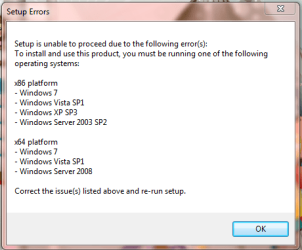
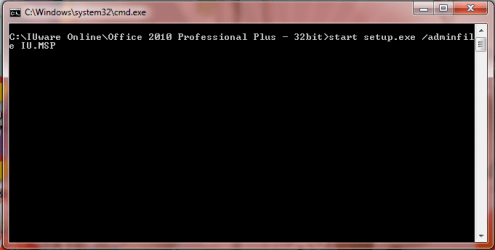
When I try and complete the setup for Office, it extracts and the cmd prompt thing pops up, then the error message saying I don't have a proper OS but my windows is Activated and genuine with Windows 7 Ultimate.
 

Attachments
  • cmd.PNG
    cmd.PNG
    14.7 KB · Views: 36
  • office.PNG
    office.PNG
    14.9 KB · Views: 28

My Computer My Computer

At a glance

Windows 7 Ultimate 32bitIntel Mobile Core 2 Duo T8100 @ 2.10GHz4GBNVIDIA GeForce 8400M GS
Computer Manufacturer/Model Number
XPS M1530
OS
Windows 7 Ultimate 32bit
CPU
Intel Mobile Core 2 Duo T8100 @ 2.10GHz
Motherboard
Dell Inc. 0D500F (Microprocessor)
Memory
4GB
Graphics Card(s)
NVIDIA GeForce 8400M GS
Sound Card
HD
Monitor(s) Displays
Generic PnP Monitor
Screen Resolution
1280x800@60Hz
Hard Drives
244GB Western Digital WDC WD2500BEVS-75UST0 ATA Device (SATA)
Keyboard
HID device
Mouse
HID compliant
Hello there, Locketi

Are you installing this Office from a DVD?

What other programs/apps are showing the same behavior?

I've had no problems with Office 2010, so far. I've installed it at least 200 times (exagerating)
 

My Computer My Computer

At a glance

Windows
Computer type
PC/Desktop
OS
Windows
Hello there, Locketi

Are you installing this Office from a DVD?

What other programs/apps are showing the same behavior?

I've had no problems with Office 2010, so far. I've installed it at least 200 times (exagerating)

I'm installing it from the internet. My university makes software available to us free of charge. I've downloaded the same thing before prior to updating to windows 7 from windows vista last night ....

Other things I've tried are winrar, gimp, and adobe reader (which is working now). It says the file contents are corrupted and i have to re-download.
 

My Computer My Computer

At a glance

Windows 7 Ultimate 32bitIntel Mobile Core 2 Duo T8100 @ 2.10GHz4GBNVIDIA GeForce 8400M GS
Computer Manufacturer/Model Number
XPS M1530
OS
Windows 7 Ultimate 32bit
CPU
Intel Mobile Core 2 Duo T8100 @ 2.10GHz
Motherboard
Dell Inc. 0D500F (Microprocessor)
Memory
4GB
Graphics Card(s)
NVIDIA GeForce 8400M GS
Sound Card
HD
Monitor(s) Displays
Generic PnP Monitor
Screen Resolution
1280x800@60Hz
Hard Drives
244GB Western Digital WDC WD2500BEVS-75UST0 ATA Device (SATA)
Keyboard
HID device
Mouse
HID compliant
Maybe the problem resides on your University's servers, because if everything is giving you download errors, have you tried with another PC? just to double check that isn't your PC the one with the issue.
 

My Computer My Computer

At a glance

Windows
Computer type
PC/Desktop
OS
Windows
Maybe the problem resides on your University's servers, because if everything is giving you download errors, have you tried with another PC? just to double check that isn't your PC the one with the issue.

I haven't ... but you know what? I tried re-installing winrar from a different site and it ended up working so maybe it's the download. Should I try and download from a CD instead?
 

My Computer My Computer

At a glance

Windows 7 Ultimate 32bitIntel Mobile Core 2 Duo T8100 @ 2.10GHz4GBNVIDIA GeForce 8400M GS
Computer Manufacturer/Model Number
XPS M1530
OS
Windows 7 Ultimate 32bit
CPU
Intel Mobile Core 2 Duo T8100 @ 2.10GHz
Motherboard
Dell Inc. 0D500F (Microprocessor)
Memory
4GB
Graphics Card(s)
NVIDIA GeForce 8400M GS
Sound Card
HD
Monitor(s) Displays
Generic PnP Monitor
Screen Resolution
1280x800@60Hz
Hard Drives
244GB Western Digital WDC WD2500BEVS-75UST0 ATA Device (SATA)
Keyboard
HID device
Mouse
HID compliant
Yes, try to install it from a DVD and use the serial that your University provides for the students (unless there's some kind of special installer, which i doubt)
 

My Computer My Computer

At a glance

Windows
Computer type
PC/Desktop
OS
Windows
Yes, try to install it from a DVD and use the serial that your University provides for the students (unless there's some kind of special installer, which i doubt)

Wow.. I finally got it to work. I started the setup process directly from the folder. Sorry for wasting your time and brain power, but thanks anyway! Phewwwww!
 

My Computer My Computer

At a glance

Windows 7 Ultimate 32bitIntel Mobile Core 2 Duo T8100 @ 2.10GHz4GBNVIDIA GeForce 8400M GS
Computer Manufacturer/Model Number
XPS M1530
OS
Windows 7 Ultimate 32bit
CPU
Intel Mobile Core 2 Duo T8100 @ 2.10GHz
Motherboard
Dell Inc. 0D500F (Microprocessor)
Memory
4GB
Graphics Card(s)
NVIDIA GeForce 8400M GS
Sound Card
HD
Monitor(s) Displays
Generic PnP Monitor
Screen Resolution
1280x800@60Hz
Hard Drives
244GB Western Digital WDC WD2500BEVS-75UST0 ATA Device (SATA)
Keyboard
HID device
Mouse
HID compliant
Yes, try to install it from a DVD and use the serial that your University provides for the students (unless there's some kind of special installer, which i doubt)

Wow.. I finally got it to work. I started the setup process directly from the folder. Sorry for wasting your time and brain power, but thanks anyway! Phewwwww!

Time in here, is not wasted.. so, don't worry about that, that's the spirit here, helping others with their problems.

Glad to read that you've installed everything now. This thread can be closed now. :)
 

My Computer My Computer

At a glance

Windows
Computer type
PC/Desktop
OS
Windows
Back
Top