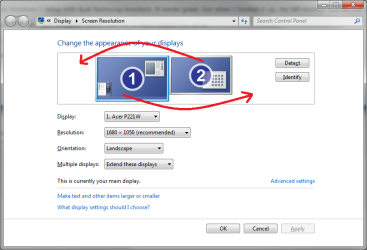
Dual Monitors - Swapped cables but screens stayed same

bobbyj

New member
Local time
11:31 AM
Messages
4
Hi,

I have Windows 7 setup with dual Samsung monitors. It works great, but when I booted it up, my left monitor was on the right site and the right was on the left.

No problem, so I just swapped cables, but the screens stayed the same.

How does Windows know that I changed monitors on connections and is there a way to clear this setting?

Thanks.
 

My Computer My Computer

At a glance

Windows 7 64 Premium
OS
Windows 7 64 Premium
The software......either Nvidia or AMD allows you to swap monitors.
Also, you can do it from Appearance and Personalization, Adjust screen resolution.
 

My Computer My Computer

At a glance

Windows 7 Home Premium 64 bitIntel Core i7-4790G.SKILL 8GB (2 x 4GB) DDR3 F3-10666CL9D-8GBNTAMD Radeon R7 250
Computer type
PC/Desktop
Computer Manufacturer/Model Number
Custom Build
OS
Windows 7 Home Premium 64 bit
CPU
Intel Core i7-4790
Motherboard
GA-Z87X-D3H
Memory
G.SKILL 8GB (2 x 4GB) DDR3 F3-10666CL9D-8GBNT
Graphics Card(s)
AMD Radeon R7 250
Sound Card
Realtek ALC892
Monitor(s) Displays
Samsung UN32EH5000, Dell 1703FPT
Screen Resolution
1920 x 1080, 1280 x 1024
Hard Drives
WD5003AZEX
WD10EZEX
Samsung HD103SJ
Samsung 128 GB 840 PRO
PSU
SeaSonic M12II SS-500GM
Case
Fractal Design Define R4
Cooling
Zalman CNPS9900ALED
Keyboard
Logitech K800
Mouse
Logitech M705
Internet Speed
16 Mbps
Antivirus
Avast
Browser
Firefox
Other Info
Bose Companion 2 Multimedia Speakers

My Computer My Computer

At a glance

Win 7 Ultimate x64FX-8350 @ 4.6 GHz so farADATA XPG V1 Series Black 8GB DDR3 1600Sapphire R9 270x Dual-X
Computer type
PC/Desktop
Computer Manufacturer/Model Number
Me
OS
Win 7 Ultimate x64
CPU
FX-8350 @ 4.6 GHz so far
Motherboard
Asus M5A97 EVO
Memory
ADATA XPG V1 Series Black 8GB DDR3 1600
Graphics Card(s)
Sapphire R9 270x Dual-X
Sound Card
Xonar DGX w/ Corsair Vengence 1300
Monitor(s) Displays
Acer S232HL Abid
Screen Resolution
1920x1080
Hard Drives
120 GB OCZ Vertex 3
500 GB Seagate 7200.12
PSU
Antec Earthwatts 650W Green
Case
Antec Three Hundred
Cooling
Cooler Master 212 EVO
Keyboard
Logitech G510
Mouse
Logitech G500s
Internet Speed
35000/3000
Thanks. I know I can change the settings in Windows, but I need to know how Windows remembers the initial position of the monitors and keeps it that way even if the connections are swapped.

There has to be an INF setting somewhere where the EDID of the monitor is stored.

I want to be able to reset it.
 

My Computer My Computer

At a glance

Windows 7 64 Premium
OS
Windows 7 64 Premium
Hello bobbyj, welcome to Sevenforums.

Stupid question: Have you tried to tick 'Set to main display'.
- Or atleast something like that.
 

My Computer My Computer

At a glance

Microsoft Windows 7 Ultimate: x64 (SP1)Intel® Core™ i5-2500K ProcessorKingston DDR3 HyperX 1600MHz 8GBASUS GTX 560 TI DirectCU II 900MHz
Computer Manufacturer/Model Number
Brewed
OS
Microsoft Windows 7 Ultimate: x64 (SP1)
CPU
Intel® Core™ i5-2500K Processor
Motherboard
ASUS P8Z68-V PRO
Memory
Kingston DDR3 HyperX 1600MHz 8GB
Graphics Card(s)
ASUS GTX 560 TI DirectCU II 900MHz
Sound Card
Realtek® ALC892 8-Channel High Definition Audio CODEC
Monitor(s) Displays
ACER LCD P246HBD 1920x1080 (24") - Dell 1280x800
Screen Resolution
ACER LCD P246HBD ~ [1920X1080] - DELL ~ [1280x800]
Hard Drives
500 GB WD Caviar SE116 7200rpm SATA2
PSU
Corsair 750W Power Supply
Case
Coolermaster CM Scout
Cooling
Zalman FS-C77 Fatal1ty CPU Cooler
Keyboard
Logitech G15
Mouse
Coolermaster Sentinel Advanced
Internet Speed
[↓ 10 MB/s DL] [↑ 1 MB/s UL]
Other Info
- ROCCAT™ Kave – Solid 5.1 Surround Sound Gaming Headset
- Not overclocking
Hello bobbyj, welcome to Sevenforums.

Stupid question: Have you tried to tick 'Set to main display'.
- Or atleast something like that.

Yes, I have tried that and it works.

I'm still trying to find out how and why Windows remembers the monitor position when it first powers up. The reason is I am using a dual headed DVI extender and it has the ability to request the EDID from the monitor.

I want to be able to "reset" the graphic card settings so it does not remember the initial monitor positions.
 

My Computer My Computer

At a glance

Windows 7 64 Premium
OS
Windows 7 64 Premium
uninstall the graphics drivers and reinstall them, that would be the easyist way to achieve what your after.

while editing a file can be done it's not something i would recommend as a good idea, as you may end up having to reinstall the drivers anyway.

the reason why windows remembers the position is pretty simple really, it logs things like resolution settings for cleartype/hue/saturation and so forth as these can be indepently adjusted for each monitor, as your task bar can be dragged around as well as widgets windows will always try to put things in the same place you left them.

if it didn't do that i'd get alot more phone calls from the more stupid side of society at work from screaming idiots crying over things being different every day.
 

My Computer My Computer

At a glance

....
Computer Manufacturer/Model Number
.
OS
.
CPU
.
Motherboard
.
Memory
.
Graphics Card(s)
.
Monitor(s) Displays
.
Screen Resolution
.
Hard Drives
.
PSU
.
Case
.
Cooling
.
Keyboard
.
Mouse
.
Internet Speed
.
Other Info
.
Thanks. I'll give that try. It makes sense now. I was hoping for something easier, but this should work.

Cheers,

Bobby
 

My Computer My Computer

At a glance

Windows 7 64 Premium
OS
Windows 7 64 Premium
Back
Top