
A weird connection issue.

1337

New member
Member
VIP
Local time
1:32 PM
Messages
167
Location
Singapore!
Hello again and sorry for the trouble as well.
So, I have been using this, Aztech broadband modem (Phone-line to modem then to PC) for a while now and I have decided to add another wireless router (Modem to router) along with it to make my connection wireless for my iDevices.

So, at first, everything was working nicely, connection was up and good but whenever I off my modem, router and computer then start it, my network always shows, 'Network 4' and does not have any internet connect but the wifi is still up and I can still access internet on my iPhone. Often, I can resolve this by: cmd - ipconfig /release, flushdns then renew. I will have internet back on my computer again but I find it kinda' irritating. Is there any way which I can stop this? Also, sometimes, doing the cmd wouldn't work and all I can do is to restart everything again.

Modem: Aztech DSL1000ERT
Router: Linksys WRT54G
PC spec is in my info.

Please help and sorry for the poor explaination. Thanks.
 

My Computer

Computer type
PC/Desktop
OS
Microsoft Windows 7 Ultimate (x64) Build 7601
CPU
Intel Core i5-3570K
Motherboard
MSI Z77A-G45
Memory
Corsair Vengeance 1600.9 (4GB x 3)
Graphics Card(s)
MSI GeForce GTX-560Ti Twin Frozr II (OC Edition)
Monitor(s) Displays
Dell U2312HM
Screen Resolution
1920 x 1080
Hard Drives
Intel 330 SSD - 120GB, WD Black HDD - 1TB & WD Green HDD - 500GB
PSU
Seasonic S12II (620W)
Case
Corsair Carbide 400R
Cooling
Cooler Master Hyper 612 PWM
Keyboard
Logitech Gaming Keyboard G110
Mouse
Razer DeathAdder 3.5G
Antivirus
Kaspersky Internet Security 2013
Browser
Chrome
Other Info
Mouse Pad: Razer Goliathus Speed Edition - Medium: 355mm x 254mm x 3mm
Gamepad: Logitech Wireless Gamepad F710
Speaker: SonicGear Evo 7 Pro
Headset: SteelSeries Siberia V2 USB
Webcam: Logitech Webcam C170
Hello,

Uninstall your Wi-Fi Adapter from Device Manager, right click on it and choose uninstall. Make sure to install the latest driver for it that you may download from the manufacturer's site.

Also, from Device Manager, right click the wireless adapter and click on Power Management Tab, disable any Power Mode options here.

Please let us know.
 

My Computer

Computer Manufacturer/Model Number
Lenovo Desktop/Samsung Laptop
OS
Win7 & Win8 64bit
CPU
Intel i5
Internet Speed
Charter-20 Mbps
Antivirus
Avast
Browser
FF, IE9 and Chrome
Thank you for the reply but sorry, I don't quite get it.

My connection for my computer is connected from my modem with a line and the wifi is connected through router connected through modem.
 

My Computer

Computer type
PC/Desktop
OS
Microsoft Windows 7 Ultimate (x64) Build 7601
CPU
Intel Core i5-3570K
Motherboard
MSI Z77A-G45
Memory
Corsair Vengeance 1600.9 (4GB x 3)
Graphics Card(s)
MSI GeForce GTX-560Ti Twin Frozr II (OC Edition)
Monitor(s) Displays
Dell U2312HM
Screen Resolution
1920 x 1080
Hard Drives
Intel 330 SSD - 120GB, WD Black HDD - 1TB & WD Green HDD - 500GB
PSU
Seasonic S12II (620W)
Case
Corsair Carbide 400R
Cooling
Cooler Master Hyper 612 PWM
Keyboard
Logitech Gaming Keyboard G110
Mouse
Razer DeathAdder 3.5G
Antivirus
Kaspersky Internet Security 2013
Browser
Chrome
Other Info
Mouse Pad: Razer Goliathus Speed Edition - Medium: 355mm x 254mm x 3mm
Gamepad: Logitech Wireless Gamepad F710
Speaker: SonicGear Evo 7 Pro
Headset: SteelSeries Siberia V2 USB
Webcam: Logitech Webcam C170
Sorry for the bump.
 

My Computer

Computer type
PC/Desktop
OS
Microsoft Windows 7 Ultimate (x64) Build 7601
CPU
Intel Core i5-3570K
Motherboard
MSI Z77A-G45
Memory
Corsair Vengeance 1600.9 (4GB x 3)
Graphics Card(s)
MSI GeForce GTX-560Ti Twin Frozr II (OC Edition)
Monitor(s) Displays
Dell U2312HM
Screen Resolution
1920 x 1080
Hard Drives
Intel 330 SSD - 120GB, WD Black HDD - 1TB & WD Green HDD - 500GB
PSU
Seasonic S12II (620W)
Case
Corsair Carbide 400R
Cooling
Cooler Master Hyper 612 PWM
Keyboard
Logitech Gaming Keyboard G110
Mouse
Razer DeathAdder 3.5G
Antivirus
Kaspersky Internet Security 2013
Browser
Chrome
Other Info
Mouse Pad: Razer Goliathus Speed Edition - Medium: 355mm x 254mm x 3mm
Gamepad: Logitech Wireless Gamepad F710
Speaker: SonicGear Evo 7 Pro
Headset: SteelSeries Siberia V2 USB
Webcam: Logitech Webcam C170
Can you upload a screenshot of your network connections? also your ipconfig/all results...

If you are able to access internet through your iphone, it should tell us the problem is with your pc setup.

if you only have one connection from your pc to router your should have one network conection i don't understand why the 'network 4' comes in.
 

My Computer

Computer Manufacturer/Model Number
CustomBuild001
OS
7 ultimate x64
CPU
Intel core i7 2600K
Motherboard
ASUS P8Z68-V PRO
Memory
Vengeance™ — 16GB Triple Channel DDR3 PC16000
Graphics Card(s)
GeForce GTX 560 Ti
Monitor(s) Displays
HannsG 22" widescreen (HDMI)
Screen Resolution
1680x1050
Hard Drives
Samsung 1TB x2(RAID1) Deskstar 160G, Buffalo ExHD 500GB
PSU
Corsair 850HX
Case
Antec Three Hundred Gaming Tower Case
Cooling
CPU Freezer 7 Pro Rev. 2...ANTEC 3phase cooling, 2 intake.
Keyboard
microsoft intellitype 6000 v3.0
Mouse
microsoft sidewinder
Internet Speed
50Mb
Other Info
64GB SSD in pipeline for Intel Smart Response Technology.
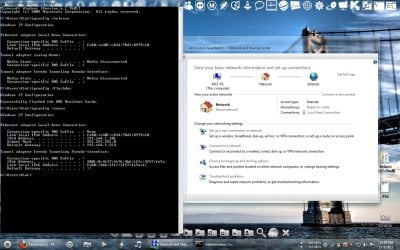
Hello, sir. Thank you for the reply. I have upload the following SS:
Wrong = The one with 'Network 4' with no internet and I have shown my ipconfig /all information.
Right = The right title 'Network' with internet after I have done ipconfig /lfush blah thing.

Please assist, thanks.
 

Attachments

  • Right.jpg
    Right.jpg
    165.4 KB · Views: 18
  • Wrong.jpg
    Wrong.jpg
    165.1 KB · Views: 13

My Computer

Computer type
PC/Desktop
OS
Microsoft Windows 7 Ultimate (x64) Build 7601
CPU
Intel Core i5-3570K
Motherboard
MSI Z77A-G45
Memory
Corsair Vengeance 1600.9 (4GB x 3)
Graphics Card(s)
MSI GeForce GTX-560Ti Twin Frozr II (OC Edition)
Monitor(s) Displays
Dell U2312HM
Screen Resolution
1920 x 1080
Hard Drives
Intel 330 SSD - 120GB, WD Black HDD - 1TB & WD Green HDD - 500GB
PSU
Seasonic S12II (620W)
Case
Corsair Carbide 400R
Cooling
Cooler Master Hyper 612 PWM
Keyboard
Logitech Gaming Keyboard G110
Mouse
Razer DeathAdder 3.5G
Antivirus
Kaspersky Internet Security 2013
Browser
Chrome
Other Info
Mouse Pad: Razer Goliathus Speed Edition - Medium: 355mm x 254mm x 3mm
Gamepad: Logitech Wireless Gamepad F710
Speaker: SonicGear Evo 7 Pro
Headset: SteelSeries Siberia V2 USB
Webcam: Logitech Webcam C170
Sorry for the late reply, i was very busy.
May I ask which part you don't understand?
Have you tried uninstalling the problematic network adapter from Device Manager?
Thank you for the reply but sorry, I don't quite get it.

My connection for my computer is connected from my modem with a line and the wifi is connected through router connected through modem.
 

My Computer

Computer Manufacturer/Model Number
Lenovo Desktop/Samsung Laptop
OS
Win7 & Win8 64bit
CPU
Intel i5
Internet Speed
Charter-20 Mbps
Antivirus
Avast
Browser
FF, IE9 and Chrome
Do not uninstall your adaptor that is not the problem. Go into your Aztec modem and setup a "static ip" for your Linksys wireless router and in the setup for the Linksys make sure that it is trying to connect to the same ip that you setup in the Aztec.
 

My Computer

OS
win7
Sorry for the late reply, i was very busy.
May I ask which part you don't understand?
Have you tried uninstalling the problematic network adapter from Device Manager?
Thank you for the reply but sorry, I don't quite get it.

My connection for my computer is connected from my modem with a line and the wifi is connected through router connected through modem.

Thank you again. I haven't try un-install my network driver but I'll get it done soon and see how it goes.
I'm sorry if I'm mistaken but previously when I'm using just the modem without the wireless router as add-on, I have no problem.


Do not uninstall your adaptor that is not the problem. Go into your Aztec modem and setup a "static ip" for your Linksys wireless router and in the setup for the Linksys make sure that it is trying to connect to the same ip that you setup in the Aztec.

Thank you too, sir. I am really confused with static IP so, I'm sending an email to Aztech people to help me on this one but when I refer to their manual, does static IP means static route? Sorry.
 

My Computer

Computer type
PC/Desktop
OS
Microsoft Windows 7 Ultimate (x64) Build 7601
CPU
Intel Core i5-3570K
Motherboard
MSI Z77A-G45
Memory
Corsair Vengeance 1600.9 (4GB x 3)
Graphics Card(s)
MSI GeForce GTX-560Ti Twin Frozr II (OC Edition)
Monitor(s) Displays
Dell U2312HM
Screen Resolution
1920 x 1080
Hard Drives
Intel 330 SSD - 120GB, WD Black HDD - 1TB & WD Green HDD - 500GB
PSU
Seasonic S12II (620W)
Case
Corsair Carbide 400R
Cooling
Cooler Master Hyper 612 PWM
Keyboard
Logitech Gaming Keyboard G110
Mouse
Razer DeathAdder 3.5G
Antivirus
Kaspersky Internet Security 2013
Browser
Chrome
Other Info
Mouse Pad: Razer Goliathus Speed Edition - Medium: 355mm x 254mm x 3mm
Gamepad: Logitech Wireless Gamepad F710
Speaker: SonicGear Evo 7 Pro
Headset: SteelSeries Siberia V2 USB
Webcam: Logitech Webcam C170
thanks for uploading a screenshot of your network centre settings...can you upload a screenshot of all your network connections?

Have you recently tried to create a new network conection?

Is your ISP cable or a telco? why do you require a modem if you have broadband with a suitable gateway router?
 

My Computer

Computer Manufacturer/Model Number
CustomBuild001
OS
7 ultimate x64
CPU
Intel core i7 2600K
Motherboard
ASUS P8Z68-V PRO
Memory
Vengeance™ — 16GB Triple Channel DDR3 PC16000
Graphics Card(s)
GeForce GTX 560 Ti
Monitor(s) Displays
HannsG 22" widescreen (HDMI)
Screen Resolution
1680x1050
Hard Drives
Samsung 1TB x2(RAID1) Deskstar 160G, Buffalo ExHD 500GB
PSU
Corsair 850HX
Case
Antec Three Hundred Gaming Tower Case
Cooling
CPU Freezer 7 Pro Rev. 2...ANTEC 3phase cooling, 2 intake.
Keyboard
microsoft intellitype 6000 v3.0
Mouse
microsoft sidewinder
Internet Speed
50Mb
Other Info
64GB SSD in pipeline for Intel Smart Response Technology.
Yes, static route is the same as static ip. At the moment I think you are probably using DHCP which means that the modem may be conflicting with the router which is looking after handing out ip addresses. The following thread from a different forum deals with a similar problem you are experiencing:- How to hook up Singnet Aztech DSL 1000ER Router modem into Wireless router - www.hardwarezone.com.sg.
More info on getting into WAN bridge mode have a look here:- http://forums.whirlpool.net.au/forum-replies.cfm?t=933517
 

My Computer

OS
win7
Back
Top