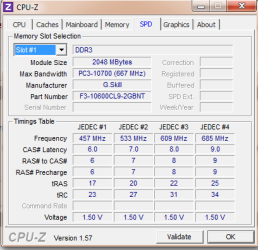
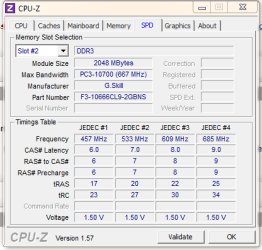
Half of memory is not usable - Please help me understand where it is

I agree with stormy that this is not OS issue.

Additionally, the heatsink I used is a monster of a heatsink, shouldn't have listened to a friends recommendation on that.
I have always used Intel and smaller Arctic Cooler heatsink fans with 0 problems. Since I don't overclock, I never buy monster heatsinks and tend to stay away from MSI/Gigabyte/Asus motherboards because their BIOS is blotted with OCing features. I have used ECS boards with very good success - granted they have less features in BIOS but what little it does - does well and quite stable of a motherboard in my opinion. You don't really need that monster heatsink unless you plan to OC (mainly for games).

Just for fun, have you tried loosening off the heatsink yet?
Try that.

And try running the RAM on single channel mode? Another thing that beats me is according to OP, MemTest86+ is able to see and test all 4 GB of RAM. :huh: My suspicion goes towards your CPU (being improperly seated or damaged or whatever) and then to your motherboard.

Some of those things are definitely possible, but it is more likely to be incorrect RAM. We got about two cases a week regarding this problem, and all due to technicians using RAM they thought would work, but didn't. Windows can see it, the board can obviously see it, various tests will show it and test it, but Windows can't use it.

Of course, there are major problems trying to troubleshoot such problems per posts. It could be a number of things, some of which could be quite easily eliminated, but there is no way of knowing what exactly the person concerned is actually doing. Also, not everybody has a collection of suitable RAM lying around.

Will be interesting to hear how the problem is eventually cured. Hopefully the OP will let us know.

Regards....Mike Connor
 

My Computer My Computer

At a glance

Several, including Windows 7 x64 Ultimate
OS
Several, including Windows 7 x64 Ultimate
Most likely this isn't it, But sometimes if you have a integrated chipset (Graphics) on your mobo, It will allocate a certain amount for that chip, Just saying its a possibility... Hope i helped :D If that is it just remover the driver for the graphics, even if all of it isnt there it will free like 100mb if not used..
 

My Computer My Computer

At a glance

Windows 7 Ultimate x64AMD Phenom xII 620 @2.8Ghz6004Mb DDR3Integrated HD 4250 1.3Gb of VRam
Computer Manufacturer/Model Number
Hp Dv6 (Laptop)
OS
Windows 7 Ultimate x64
CPU
AMD Phenom xII 620 @2.8Ghz
Motherboard
HP
Memory
6004Mb DDR3
Graphics Card(s)
Integrated HD 4250 1.3Gb of VRam
Sound Card
N/A Integrated
Monitor(s) Displays
Generic PnP Monitor
Hard Drives
500Gb Western Digital HDD
PSU
N/A
Case
N/A
Cooling
Stock Fans
Most likely this isn't it, But sometimes if you have a integrated chipset (Graphics) on your mobo, It will allocate a certain amount for that chip, Just saying its a possibility... Hope i helped
biggrin.gif

No you didn't help. Simply if you take the courtesy to look at OP's computer specs, the motherboard listed has no integrated graphic chip.
 

My Computer My Computer

At a glance

Ubuntu 10.10 64 bit/Window 7 VMCore 2 Duo 2.2 Ghz4 GB Kingston ValueRAM (DDR2 800)nVidia 240 GT
Computer Manufacturer/Model Number
Custom
OS
Ubuntu 10.10 64 bit/Window 7 VM
CPU
Core 2 Duo 2.2 Ghz
Motherboard
ECS g31 mATX
Memory
4 GB Kingston ValueRAM (DDR2 800)
Graphics Card(s)
nVidia 240 GT
Sound Card
Onboard
Monitor(s) Displays
19" Dell LCD
Hard Drives
500 GB Seagate Drive x 2
PSU
Antec 430 Watt
Case
Coolermaster
Keyboard
Microsoft Ergonomic Keyboard 4000
Mouse
Laser Mouse (Logitech)
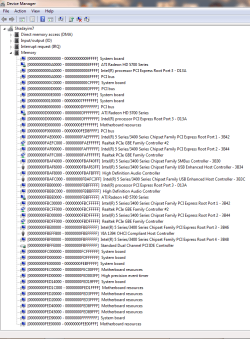
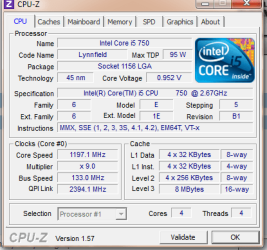
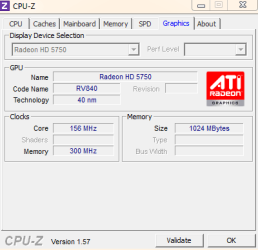
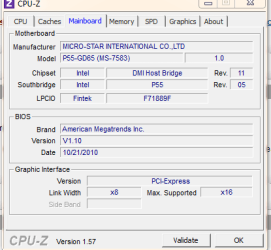
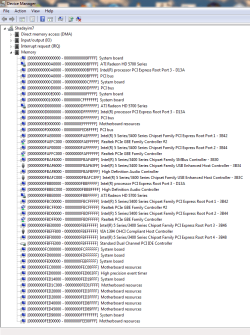
Quick update - I replaced my heatsink with the default Intel one, bought new RAM (I now have 6x 2GB sticks (the mobo can only take 4 sticks, but this was for testing)). I rebooted, and I still got only 2GB useable, 2GB reserved. Attached please find the memory dump - again, I am very bad at reading hex and do not understand what I am seeing, though it looks like the graphics card may be hogging a large amount. The screenshots are from when I have 4GB installed, and when i Have 8GB installed. Always, exactly half my RAM is not usable.
 

Attachments

  • 8gb memory.PNG
    8gb memory.PNG
    30.1 KB · Views: 15
  • 2gb memory mappings.PNG
    2gb memory mappings.PNG
    29.7 KB · Views: 10
  • cpu.PNG
    cpu.PNG
    17.2 KB · Views: 16
  • graphics.PNG
    graphics.PNG
    8.2 KB · Views: 13
  • mobo.PNG
    mobo.PNG
    9.5 KB · Views: 13
  • mem1.PNG
    mem1.PNG
    11.4 KB · Views: 15
  • mem2.PNG
    mem2.PNG
    10.9 KB · Views: 13

My Computer My Computer

At a glance

Windows 7 x64 ProfessionalIntel Core i5 7502x2GB Gskill Ripjaw SeriesATI Radeon HD 5750
OS
Windows 7 x64 Professional
CPU
Intel Core i5 750
Motherboard
MSI P55 GD65
Memory
2x2GB Gskill Ripjaw Series
Graphics Card(s)
ATI Radeon HD 5750
To OP, it isn't worth waisting your money on RAM and heatsink. We have already determined those are not the cause of this issue. I would suggest you return the extra RAM you bought right away and also stop waisting money on heatsinks.

It seems like your video card, and we determined that by looking at your I/O maps. Test with a different card (preferably an nvidia one). If that doesn't resolve your problem, then your motherboard may be faulty. Try that and let us know.

Tomorrow I might have some time, so I will do the math for you for once more.
 

My Computer My Computer

At a glance

Ubuntu 10.10 64 bit/Window 7 VMCore 2 Duo 2.2 Ghz4 GB Kingston ValueRAM (DDR2 800)nVidia 240 GT
Computer Manufacturer/Model Number
Custom
OS
Ubuntu 10.10 64 bit/Window 7 VM
CPU
Core 2 Duo 2.2 Ghz
Motherboard
ECS g31 mATX
Memory
4 GB Kingston ValueRAM (DDR2 800)
Graphics Card(s)
nVidia 240 GT
Sound Card
Onboard
Monitor(s) Displays
19" Dell LCD
Hard Drives
500 GB Seagate Drive x 2
PSU
Antec 430 Watt
Case
Coolermaster
Keyboard
Microsoft Ergonomic Keyboard 4000
Mouse
Laser Mouse (Logitech)
To OP, it isn't worth waisting your money on RAM and heatsink. We have already determined those are not the cause of this issue. I would suggest you return the extra RAM you bought right away and also stop waisting money on heatsinks.

It seems like your video card, and we determined that by looking at your I/O maps. Test with a different card (preferably an nvidia one). If that doesn't resolve your problem, then your motherboard may be faulty. Try that and let us know.

Tomorrow I might have some time, so I will do the math for you for once more.

The heatsink was a spare - I did not spend money on it. I will try to see if I can get ahold of anothr graphics card to test. Do you think it worthwhile to RMA the cpu as well? I read cases where people were talking about bent pins being the cause - is that a motherboard or CPU issue.
 

My Computer My Computer

At a glance

Windows 7 x64 ProfessionalIntel Core i5 7502x2GB Gskill Ripjaw SeriesATI Radeon HD 5750
OS
Windows 7 x64 Professional
CPU
Intel Core i5 750
Motherboard
MSI P55 GD65
Memory
2x2GB Gskill Ripjaw Series
Graphics Card(s)
ATI Radeon HD 5750
any updates to this? Did you try new video card?

Do you think it worthwhile to RMA the cpu as well?
It is only worth while once we know for sure what the source of the problem is.
 

My Computer My Computer

At a glance

Ubuntu 10.10 64 bit/Window 7 VMCore 2 Duo 2.2 Ghz4 GB Kingston ValueRAM (DDR2 800)nVidia 240 GT
Computer Manufacturer/Model Number
Custom
OS
Ubuntu 10.10 64 bit/Window 7 VM
CPU
Core 2 Duo 2.2 Ghz
Motherboard
ECS g31 mATX
Memory
4 GB Kingston ValueRAM (DDR2 800)
Graphics Card(s)
nVidia 240 GT
Sound Card
Onboard
Monitor(s) Displays
19" Dell LCD
Hard Drives
500 GB Seagate Drive x 2
PSU
Antec 430 Watt
Case
Coolermaster
Keyboard
Microsoft Ergonomic Keyboard 4000
Mouse
Laser Mouse (Logitech)
Hi
I have the same problem
windows takes 50% of ram
My computer is dell t7400 with dual xeon cpu and dual quadro 5600 in SLI
It used to work under vista 64 and used all 16 gigs
and under 7 pro it used 16.

but for some time now i have noticed that it shows usable 8 of installed 16

http://dl.dropbox.com/u/6738215/screen1.png
 

My Computer My Computer

At a glance

wnidows 7 pro x64
OS
wnidows 7 pro x64
memory use in windows 7

Hey there to all,

OK, so I am new to this form but here is my two cents, I have the same memory, (RIPJAW) and am running windows 7 home premium. I was running 16Gb and all was well, I went to 32Gb and then it said that there were 32 Gb installed but that only 16Gb were usable, what I was able to get from Microsoft is that windows 7 home premium will only "use" 16Gb if you put in more it will recognize it but will only use 16Gb. Microsoft also said the Windows 7 Pro will use up to whatever you put in it, so I gave 16Gb to my son and kept 16Gb for me, I do photo imaging and rendering, he is a gamer and 16 is plenty for us both. If it not using quite all then that's usually coming from having "on board" graphics and the system "steals" some for "virtual memory" to be used for graphics.

Hope that helps matey.
 

My Computer My Computer

At a glance

Windows 7 home premium 64 bitAMD FX 6 core16Gb of G. Skill raptorATI 7700 series with enhanced audio.
Computer type
PC/Desktop
Computer Manufacturer/Model Number
Custom build
OS
Windows 7 home premium 64 bit
CPU
AMD FX 6 core
Motherboard
Gigabit
Memory
16Gb of G. Skill raptor
Graphics Card(s)
ATI 7700 series with enhanced audio.
Sound Card
Gigabit 5.1 surround
Monitor(s) Displays
ACER 24 inch
Screen Resolution
1920 X 1080
Hard Drives
180 Gb Intel SSD drive which contains the OS, and graphics card drivers/controls, and a Toshiba 1Gb "platter" drive.
Cooling
3 fans
Keyboard
AZZA
Mouse
AJAZZ Green Hornet
Internet Speed
34Mbs DSL
Antivirus
Avast
Browser
Firefox
Other Info
Why is the rum always gone? .......Duh!
Back
Top