No page file should be faster?

steelbom

Banned
Local time
3:17 PM
Messages
50
hey, I've removed my paging file, just wondering if it should run faster or not?

I've set it to none, I have 18GB RAM so I don't think I need it for anything..

Should I keep it or not, I've not noticed anything much different.

Kind Regards
 

My Computer My Computer

Computer Manufacturer/Model Number
MacPro3,1
OS
Snow Leopard (10.6.1)
CPU
Dual Quad Core X5472 @ 3.0GHz, 1.6GHz FSB, 12MB L2 Cache
Memory
18GB DDR2 800MHz
Graphics Card(s)
NVidia GeForce GTX 285 1GB DDR3
Sound Card
Intel High Definition Audio (Built In)
Monitor(s) Displays
23" Apple Cinema HD Display
Screen Resolution
1920x1200
Hard Drives
1x 320GB, 1x 1TB, 1x TB EXT, and soon X25-M G2 320GB, and Intel X25-M G2 160GB
Keyboard
Apple Keyboard
Mouse
Apple Mighty Mouse
Internet Speed
High Speed Cable
Other Info
Running Parallels 4.0 w/ Windows XP Pro 32-BIT, Windows Vista Ultimate 32-BIT, and linked to Windows 7 64-BIT on Boot Camp.

SuperDrive: PIONEER DVD-RW DVR-112D
With that much RAM disabling it should not really affect you, unless you use a lot of RAM Hungry programs.
 

My Computer My Computer

Computer Manufacturer/Model Number
Custom | Whitebox
OS
Windows 7 Ultimate, OS X 10.7, Ubuntu 11.04
CPU
Intel E6750 @ 3.80GHz
Motherboard
Gigabyte GA-EP45-UD3L (Revision 1.1)
Memory
2x2GB & 2x1GB (6GB) OCZ Reaper 1066MHz @ 1080MHz
Graphics Card(s)
EVGA nVidia GTX 260 896mb (216 Core) FTW Edition
Sound Card
Realtek ALC888
Monitor(s) Displays
21" VIZIO TV
Screen Resolution
1680x1050 @ 60Hz
Hard Drives
Western Digital WD6401AALS - 640GB
Hitachi HDP725016GLA380 - 160GB
PSU
Corsair 750W
Case
NZXT Nemesis Elite
Cooling
Thermaltake SpinQ
Keyboard
Logitech Wireless S520
Mouse
Logitech Wireless S520 - Microsoft Wireless Arc Mouse
Internet Speed
Download: 20mbps, Upload: 3mbps
Disable it, entirely.

- No fragmentation
- No drive thrashing
- No pointless swapping

The pagefile is a throwback to the stoneage, it's not needed. I ran XP Pro with 2GB for almost 5 years without one and never had problems. With 7, I run x64 on 8GB and no pagefile. Zero problems and it's much faster.
 

My Computer My Computer

Computer type
PC/Desktop
Computer Manufacturer/Model Number
Custom Build/Mod
OS
Windows 7 Home Premium x64
CPU
Intel QX9650 Extreme 4.0 GHz
Motherboard
ASUS Rampage Extreme Rev2
Memory
8GB (4x2) Corsair Dominator DDR3
Graphics Card(s)
2x Radeon R390X [8GB]
Sound Card
SupremeFX X-Fi
Monitor(s) Displays
Dell 2408WFP 26" Panel
Screen Resolution
1920x1200
Hard Drives
4x WD 2TB (8TB+ Total)
2x Crucial SSD 128GB (RAID-0)
1x LG Blu-ray read/write
1x Phillips LightScribe DVD read/write
PSU
Corsair HX1000
Case
CoolerMaster - Cosmos S
Cooling
Custom Liquid - 320mm rad w/ 3x 80mm fans, CPU/NB/SB Blocks
Keyboard
Logitech Illuminater Pro
Mouse
Logitech
Internet Speed
Fractional T1 - 125Mbps
Antivirus
ESET Security Suite / Microsoft Security Essentials
Browser
Cyberfox Intel x64
Other Info
OC'd to 5.0GHz @ 44c under full load
I've set it to none,

I've not noticed anything much different.

and perhaps you never will. Personally, I keep a pagefile for compatibility reasons. It's on a RAID0 array and I never did notice any speed increase or lesser hard drive usage with it disabled. In fact, my hard drive activity in Windows XP is still dormant for the most part (but I cannot say the same about Vista or Windows 7...they both thrash the heck out my drives because of all this useless defragging and indexing...)

That said, disabling the pagefile probably won't hurt anything either...unless some programs decide to require it. It doesn't really make much difference either way.
 

My Computer My Computer

Computer Manufacturer/Model Number
Too many to list.
OS
XP, Seven, 2008R2
CPU
AMD, Intel, VIA
Motherboard
Various
Memory
Corsair, Kingston, etc.
Graphics Card(s)
ATI, NVIDIA
Monitor(s) Displays
Samsung
Hard Drives
Maxtor, Western Digital
Keyboard
qwerty
Internet Speed
22 Mb/s @ home, 1 Gb/s @ server
Other Info
All of my systems still run fastest on XP 32-bit for the most part. Win7 is fun to play with, but I still prefer XP for raw speed, security, and functionality.
I don't think you will gain anything by disabling it. If you have enough memory then the page file is simply never used, so no performance hit. That is, unless you are incredibly cramped on disk space.
 

My Computer My Computer

OS
Windows 7
to disable "paging executive" would probably help more than disabling the pagefile.

disable both and you'll probably get the best performance. But like I said, it's pretty much unnoticeable.
 

My Computer My Computer

Computer Manufacturer/Model Number
Too many to list.
OS
XP, Seven, 2008R2
CPU
AMD, Intel, VIA
Motherboard
Various
Memory
Corsair, Kingston, etc.
Graphics Card(s)
ATI, NVIDIA
Monitor(s) Displays
Samsung
Hard Drives
Maxtor, Western Digital
Keyboard
qwerty
Internet Speed
22 Mb/s @ home, 1 Gb/s @ server
Other Info
All of my systems still run fastest on XP 32-bit for the most part. Win7 is fun to play with, but I still prefer XP for raw speed, security, and functionality.
hey, I've removed my paging file, just wondering if it should run faster or not?

I've set it to none, I have 18GB RAM so I don't think I need it for anything..

Should I keep it or not, I've not noticed anything much different.

Kind Regards
.
It would be interesting to see some careful tests done on systems with and without page files, varying amounts of ram and memory loads, etc. I think synthetic benchmarks are necessary to measure the differences. In theory I don't see why having a page file would slow the system as long as there is sufficient ram available. The OS only starts seriously leaning on the page file when the memory load is high. With 18 gb you probably never load the system enough for it to make a difference one way or the other.
 

My Computer My Computer

Computer type
PC/Desktop
OS
Windows 7 x64
CPU
Intel Core2 Extreme Q6850 3.00GHz
Motherboard
EVGA 132-CK-NF79
Memory
8 GB
Graphics Card(s)
Radeon R7 260X
Sound Card
Xonar DS
Hard Drives
Hitachi Deskstar 1 tb
As others have mentioned, you'd want to keep it around for compatibility reasons. There are apps like some versions of Adobe's Photoshop that will complain if it's not around. Also, other applications of dubious quality will have serious issues without it.

I doubt there is much performance difference with the service and paging file disabled. If you're not using it, it's not being access, and the service is only taking up memory, not processing cycles.
 

My Computer My Computer

Computer Manufacturer/Model Number
custom build
OS
Windows 7 Ultimate 64-bit RTM
CPU
Intel Core i7 920 (D0), overclocked @ 3.6GHz (4.2GHz stable)
Motherboard
EVGA X58 A1
Memory
6GB of OCZ DDR3-1600 triple channel @ 7-7-7-20
Graphics Card(s)
EVGA GTX 295 Co-Op
Sound Card
Auzentech X Meridian 7.1
Monitor(s) Displays
(3x) Samsung 943BX, (1x) Samsung 2333HD, (1x) BenQ FP202W
Screen Resolution
3840x1024 + 1920x1080 + 1680x1050
Hard Drives
(4x) OCZ Vertex 30GB SATA2 SSDs on RAID 0 for 120GB total
(2x) Western Digital Black 1TB SATA2 on RAID 0
(1x) Lite-on DVD Burner and Blu-Ray player
PSU
PC Power & Cooling Super-quiet Silencer 910
Case
(modified) Tagan Black Pearl full tower, WCR edition
Cooling
Scythe Mugen2 CPU cooler, (5x) Scythe SFF21F, Zalaman cntrl.
Keyboard
Logitech G19
Mouse
Logitech G9x
Internet Speed
Comcast Cable, 22Mbps down and 5Mbps up
Other Info
Logitech Z-5500 Digital speaker system
If you have enough memory that you're not using the PageFile, then feel free to disable it. But it would be wise to not delude yourself into thinking that it makes a difference in performance. After all, you're disabling something your system wasn't using in the first place.

If that sounds confusing: All you're accomplishing is telling your computer to not write information to disc, which it was never writing to disk anyhow. Not writing before.. Not writing now... No Difference.


Personally, I don't disable mine. But instead specify a limit (512MB, in my case) on the chance that some program may want to use it. Makes feck~all difference in day to day performance. But it may save a little disc space. Keep in mind that many/most 32 bit programs can still only use 2GB of address/memory space at a time, may attempt to use the Page should that limit be approached, and may become unhappy if it can't do that.
 
Last edited:

My Computer My Computer

Computer Manufacturer/Model Number
Home Built
OS
Windows 7 (x64)
CPU
Intel Core i7 960 @ 3.8GHz (3.2GHz stock)
Motherboard
EVGA E758 X-58
Memory
6GB OCZ DDR3 1600
Graphics Card(s)
Powercolor AX5870 (ATI 5870 w/improved cooling)
Sound Card
Omega Claro+
Monitor(s) Displays
1. Acer P243W (24") 2. Samsung T260 HD HDMI HDTV/Monitor
Screen Resolution
1920 x 1200 x 2
Hard Drives
(1) 128GB Kingston SNVP325-S2 SSD for OS/Games
(2) 500GB WD Caviar Black - Storage
PSU
Corsair CMPSU-850HX
Case
Lian Li PC-K60WB
Cooling
Thermalright Venemous-X
Keyboard
Microsoft Natural keyboard 4000
Mouse
Microsoft Sidewinder
Internet Speed
Cable
Other Info
165 bclk, 23 Multi
After all, you're disabling something your system wasn't using in the first place.

If that sounds confusing: All you're accomplishing is telling your computer to not write information to disc, which it was never writing to disk anyhow. Not writing before.. Not writing now... No Difference.

It's recommended to leave it enabled for certain applications. If you don't use applications that complain when it's disabled, no problem is disabling it.

Jeff Atwood from Coding Horror said:
So, if you have a lot of RAM, you don't need a pagefile, right? Not necessarily. When certain applications start, they allocate a huge amount of memory (hundreds of megabytes typically set aside in virtual memory) even though they might not use it. If no pagefile (i.e., virtual memory) is present, a memory-hogging application can quickly use a large chunk of RAM. Even worse, just a few such programs can bring a machine loaded with memory to a halt. Some applications (e.g., Adobe Photoshop) will display warnings on startup if no pagefile is present.

My advice, therefore, is not to disable the pagefile, because Windows will move pages from RAM to the pagefile only when necessary. Furthermore, you gain no performance improvement by turning off the pagefile.
 

My Computer My Computer

Computer Manufacturer/Model Number
custom build
OS
Windows 7 Ultimate 64-bit RTM
CPU
Intel Core i7 920 (D0), overclocked @ 3.6GHz (4.2GHz stable)
Motherboard
EVGA X58 A1
Memory
6GB of OCZ DDR3-1600 triple channel @ 7-7-7-20
Graphics Card(s)
EVGA GTX 295 Co-Op
Sound Card
Auzentech X Meridian 7.1
Monitor(s) Displays
(3x) Samsung 943BX, (1x) Samsung 2333HD, (1x) BenQ FP202W
Screen Resolution
3840x1024 + 1920x1080 + 1680x1050
Hard Drives
(4x) OCZ Vertex 30GB SATA2 SSDs on RAID 0 for 120GB total
(2x) Western Digital Black 1TB SATA2 on RAID 0
(1x) Lite-on DVD Burner and Blu-Ray player
PSU
PC Power & Cooling Super-quiet Silencer 910
Case
(modified) Tagan Black Pearl full tower, WCR edition
Cooling
Scythe Mugen2 CPU cooler, (5x) Scythe SFF21F, Zalaman cntrl.
Keyboard
Logitech G19
Mouse
Logitech G9x
Internet Speed
Comcast Cable, 22Mbps down and 5Mbps up
Other Info
Logitech Z-5500 Digital speaker system
In the words of Mark Russinovich, no real benefit from disabling it.

Some feel having no paging file results in better performance, but in general, having a paging file means Windows can write pages on the modified list (which represent pages that aren’t being accessed actively but have not been saved to disk) out to the paging file, thus making that memory available for more useful purposes (processes or file cache). So while there may be some workloads that perform better with no paging file, in general having one will mean more usable memory being available to the system (never mind that Windows won’t be able to write kernel crash dumps without a paging file sized large enough to hold them).

Mark's Blog : Pushing the Limits of Windows: Virtual Memory
 

My Computer My Computer

Computer Manufacturer/Model Number
Home Built
OS
Windows 7 x64
CPU
Intel Core 2 Quad Q6700 @ 3.2 GHz
Motherboard
Gigabyte GA-965P-DQ6
Memory
4 Gig
Graphics Card(s)
ATI Radeon HD 4870
Sound Card
Creative X-Fi XtremeMusic
Monitor(s) Displays
Samsung SyncMaster 226BW
Screen Resolution
1680 x 1050
PSU
Antec TruePower TP-550
Case
Antec P180
Cooling
Zalman CNPS9700, 3 Antec TriCool 120mm
Keyboard
Logitech G15
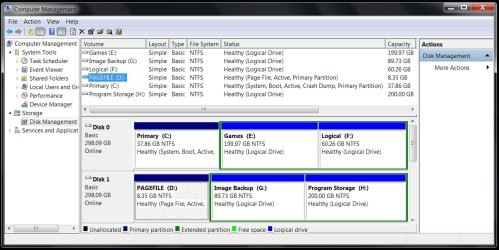
Disabling pagefile created a HUGE drop in gaming perf.

I tried disabling pagefile on my system a immediately saw a HUGE drop in systems & gaming performance! :shock:
I did a number of tests to confirm this!
This was using 7232 64bit with 4gigs of ram too.

So for me & my system's setup I use 8gbs of page file on the front partition of my second drive away from the OS disk & get Great performance this way! :p
 

Attachments

  • Disk partition layout.jpg
    Disk partition layout.jpg
    114.5 KB · Views: 605

My Computer My Computer

Computer Manufacturer/Model Number
ABS Tech Ultimate X9
OS
Windows® 7 Ultimate x64 SP1
CPU
Intel Core 2 Duo E8400 (E0) @ 4.0GHz
Motherboard
ASUS P5Q Pro Turbo / 1780 FSB
Memory
G.SKILL-F2-8500CL5D-4GBPK (2x2Gbs) (5-5-5-15) @ 1067Mhz
Graphics Card(s)
EVGA GTX 470 SC (845/1690/2000) 160Gbs
Sound Card
VIA HD Audio / Boston Acoustics
Monitor(s) Displays
Acer X222W HD 22" LCD 2500:1 / 5ms
Screen Resolution
1680x1050
Hard Drives
Seagate Barracuda SATAII 2 x 320GB
Seagate Barracuda SATAII 1Tb
Intel® Rapid Storage Technology v10.1.0.1008
AHCI-NCQ Enabled
PSU
Silent Pro GOLD 80 PLUS 800w /95% efficiency / SLI-Crossfire
Case
ABS Stealth Black-Custom
Cooling
CoolerMaster V6GT 6 Heatpipe 200w CPU Cooler
Keyboard
Logitech G15 Gaming Keyboard (Old Style Blue!)
Mouse
Logitech MX518 Gaming Mouse
Internet Speed
1Mbs-up/ 6Mbs-down
This topic has been beaten to death time and time again in numerous forums over the years...

Virtual memory will ALWAYS be a part of Windows no matter what. There's absolutely nothing to gain by disabling it. Many apps and games will insist on having a pagefile, let alone Windows. If you have lots of RAM, but are unwilling to sacrifice several gigs of disk space for the pagefile, allocate a minimum of 512mb and forget about it. The pagefile shouldn't be any larger than 4096mb. Anything over this amount is just a waste, IMO.
 

My Computer My Computer

OS
XPSP3, Se7en RTM
CPU
AMD Athlon XP 2600+ @ 2.30GHz
Motherboard
GA-7N400S-L; nForce2 Ultra400R
Memory
Corsair VS 1x1024MB400 + 2x512MB400 DDR
Graphics Card(s)
nVIDIA GeForce 6600 AGP8X 128-bit, 256mb
Sound Card
Onboard nVIDIA MCP2-S dolby digital; Realtek ALC655
Screen Resolution
1024x768
Hard Drives
2x80GB ATA-100, 1x200GB ATA-100
PSU
Generic 450W (12V~18A)
Cooling
CPU stock cooling, 3 case fans
Keyboard
Standard
Mouse
PS/2 optical mouse
Internet Speed
2048/512
Well, Windows 7 allocated 36GB for my page file, so I think I'll set a max of 4GB lol

Kind Regards
 

My Computer My Computer

Computer Manufacturer/Model Number
MacPro3,1
OS
Snow Leopard (10.6.1)
CPU
Dual Quad Core X5472 @ 3.0GHz, 1.6GHz FSB, 12MB L2 Cache
Memory
18GB DDR2 800MHz
Graphics Card(s)
NVidia GeForce GTX 285 1GB DDR3
Sound Card
Intel High Definition Audio (Built In)
Monitor(s) Displays
23" Apple Cinema HD Display
Screen Resolution
1920x1200
Hard Drives
1x 320GB, 1x 1TB, 1x TB EXT, and soon X25-M G2 320GB, and Intel X25-M G2 160GB
Keyboard
Apple Keyboard
Mouse
Apple Mighty Mouse
Internet Speed
High Speed Cable
Other Info
Running Parallels 4.0 w/ Windows XP Pro 32-BIT, Windows Vista Ultimate 32-BIT, and linked to Windows 7 64-BIT on Boot Camp.

SuperDrive: PIONEER DVD-RW DVR-112D
you will need your "paging file" enabled if you need to debug any crashes such as computer stops unexpectedly because of a Stop error "blue screen," system crash, or bug check :geek:
 

My Computer My Computer

Computer Manufacturer/Model Number
built my own
OS
win7 ultimate / virtual box
CPU
Intel Core i7 3770K,1155, Ivy Bridge
Motherboard
MSI Z77A-G43
Memory
GSkill Ripjaws Z Series 1600 CL 9.0 16GB
Graphics Card(s)
KFA2 GeForce GTX 670 EX OC 2048MB GDDR5 PCI-E gfx card
Sound Card
onboard Nvidia HDMI audio
Monitor(s) Displays
ASUS VK222H 22" widescreen LCD monitor
Screen Resolution
1680x1050
Hard Drives
Kingston 128gb SSD
OCZ Vertex 90gb SSD
500GB WDCaviar 16mb 5000KS
320GB WDCaviar 16mb 3200AAKS sata 2
1TB Samsung 16mb HD103SJ sata 2
PSU
Corsair HX 750W ATX2.2 Modular
Cooling
Antec 25 Kuhler H2O 620
Keyboard
logitech
Mouse
logitech MX518
Internet Speed
7mb adsl
Yeah, but that would never happen to me :D
 

My Computer My Computer

Computer Manufacturer/Model Number
MacPro3,1
OS
Snow Leopard (10.6.1)
CPU
Dual Quad Core X5472 @ 3.0GHz, 1.6GHz FSB, 12MB L2 Cache
Memory
18GB DDR2 800MHz
Graphics Card(s)
NVidia GeForce GTX 285 1GB DDR3
Sound Card
Intel High Definition Audio (Built In)
Monitor(s) Displays
23" Apple Cinema HD Display
Screen Resolution
1920x1200
Hard Drives
1x 320GB, 1x 1TB, 1x TB EXT, and soon X25-M G2 320GB, and Intel X25-M G2 160GB
Keyboard
Apple Keyboard
Mouse
Apple Mighty Mouse
Internet Speed
High Speed Cable
Other Info
Running Parallels 4.0 w/ Windows XP Pro 32-BIT, Windows Vista Ultimate 32-BIT, and linked to Windows 7 64-BIT on Boot Camp.

SuperDrive: PIONEER DVD-RW DVR-112D
Well, Windows 7 allocated 36GB for my page file, so I think I'll set a max of 4GB lol

Kind Regards
.
That's remarkable. How did you determine that 36 gigs was allocated just to the page file? Did that happen using the "Automatically manage page file for all drives" setting? LOL is right :D
 

My Computer My Computer

Computer type
PC/Desktop
OS
Windows 7 x64
CPU
Intel Core2 Extreme Q6850 3.00GHz
Motherboard
EVGA 132-CK-NF79
Memory
8 GB
Graphics Card(s)
Radeon R7 260X
Sound Card
Xonar DS
Hard Drives
Hitachi Deskstar 1 tb
I just want to bump Frostbite's post quoting Technet Guru, MS Engineer, and MS Front-end for the public face of their architecture - Mark Russinovich.
The blog post is: Pushing the Limits of Windows: Virtual Memory and the Sub Heading is How Big Should I Make the Paging File?
Some feel having no paging file results in better performance, but in general, having a paging file means Windows can write pages on the modified list (which represent pages that aren’t being accessed actively but have not been saved to disk) out to the paging file, thus making that memory available for more useful purposes (processes or file cache). So while there may be some workloads that perform better with no paging file, in general having one will mean more usable memory being available to the system (never mind that Windows won’t be able to write kernel crash dumps without a paging file sized large enough to hold them).
In the Comments one of the Engineers involved in setting pagefile size for Vista further explains:
Configuring a system with lots of RAM to run without pagefile may have either negative or positive perf impact depending on what the system is doing. The general recommendation in this case is to create a reasonably sized pagefile (for example, 4 GB) and increase it if the Paging file\% Usage counter gets close to 100%.
and
By the way, there are actually 2 separate reasons why pagefiles are necessary.
The first reason is to allow dirty pages that are never (or very rarely) referenced to be moved to disk, freeing up more RAM for other purposes.
The other reason is to enable better use of *virtual* memory, given that physical memory is allocated on demand. Remember that when a process calls VirtualAlloc(MEM_COMMIT) there are no physical pages allocated at this time. Physical pages are only allocated when the app accesses virtual pages for the first time. This is good because it makes committing pages a relatively cheap operation, so apps can commit memory in bigger chunks, without having to worry about each page they may or may not use.
Now, even though committing memory does not allocate physical pages, it still guarantees to the application that reading from/writing to the committed pages will never fail (or deadlock). It might be slow if other physical pages have to be moved to disk in order to make room, but it will eventually succeed.
 

My Computer My Computer

Computer Manufacturer/Model Number
AMD Athlon 64 3200+, Lenovo G560 i3
OS
Windows 7 Ultimate, Ubuntu
Motherboard
Gigabyte K8T8000
Memory
DDR 2Gb (!)
Graphics Card(s)
6600GT
Monitor(s) Displays
MultiMonitor (2) LCD
Hard Drives
Old Seagate 75
Big Western Digital
Samsung 500Gb pulled out of an external drive and installed
Ext: Maxtor (Firewire), 1Gb Lacie (Samsung)
Mouse
Logitech MX620 Cordless
Thats a lie and you definitly need pagefile
(prety much sure windows 7 was made to work with it),
once tried set manualy 1gb min and max on pagefile for months just for test.
(using 2nd HDD (D) OS HDD (C) i got 8gb ram)

Then i did set managed by system (he sets max exactly the amount of ram i have 8gb)
works far better that way and theres absolutly no fragments caused by pagefile eitheir...
8gb on a 500gb hard drive is nothing for me.
 

My Computer My Computer

Computer Manufacturer/Model Number
Acer Aspire 7750G
OS
Windows 7 Home Premium 64 bit
CPU
Intel® Core™ i5-2430M Processor (3M Cache, 2.40 GHz)
Memory
8gb DDR3
Graphics Card(s)
Switchable Cards/ Intel HD 3000/ Radeon HD 6650M 2gb vram
Sound Card
Realtek
Monitor(s) Displays
Acer 17.3
Screen Resolution
1600x900
Hard Drives
Western Digital 500gb
Good day Otase. You are posting on a very old thread.
I do agree with you. One should use page filing. But that doesn't mean the people that disagree are telling a lie.
 

My Computer My Computer

Computer type
PC/Desktop
Computer Manufacturer/Model Number
Home made Desktop
OS
Windows 10 Pro. 64/ version 1709 Windows 7 Pro/64
CPU
Intel i7-6800K @ 4.3
Motherboard
ASUS X-99 Deluxe II
Memory
Corsair Platinum 16 gig @2400
Graphics Card(s)
EVGA GTX 1070 OC
Monitor(s) Displays
Asus 27" LED LCD/VE278Q
Screen Resolution
1920-1080 or 1280-720 HDMI
Hard Drives
INTEL SSD 730-240 Gb Sata 3.0/
PSU
EVGA Platium 1200W
Case
Phanteks Luxe Tempered Glass 8 fans/ one radiator
Cooling
XSPC/ Water Cooled CPU
Keyboard
Das 4 Professional
Mouse
Logitech M705/MX Anywhere 2-S
Internet Speed
100 mbits
Antivirus
Microsoft Security Essentials/ Malwarebytes Premium 3.0/ SAS
Browser
I.E. 11 default/Firefox/ ISP Time Warner Cable/Spectrum
Other Info
LG BluRay Burner/
Sound system-KLipsch-THX/
Icy Dock ssd Hot Swap bays.
Back
Top